MultiDrive – free backup, clone & wipe disk utility from Atola Technology

All times are UTC - 5 hours [ DST ]


Switch to mobile style


Post new topic Reply to topic  [ 7 posts ] 
Author Message
 Post subject: Samsung HD400LD. Lost Partitions/Capacity.
PostPosted: October 15th, 2010, 19:40 
Offline

Joined: October 15th, 2010, 18:57
Posts: 3
Location: Poland
Hi all,

I have a problem with my samsung drive. After Pc reboot HDD starts "ticking".
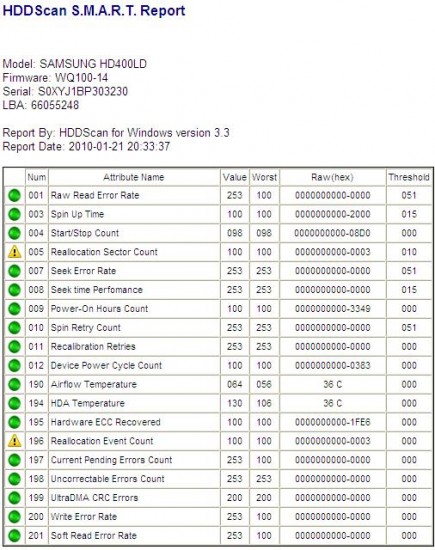
I scan it with HDD scan and now i have just 31GB(previous 400GB).
Attachment:
hddscan.JPG
hddscan.JPG [ 84.41 KiB | Viewed 5959 times ]

Tried to restore capacity with HADAT2 - done, but after repower no change.
MHDD - first read with rhap, then nhpa command - same effect.
Disk restore capcity, also nothing.

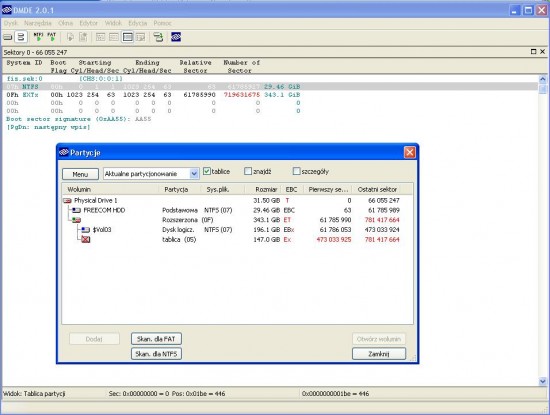
With DMDE software i was able to see lost partitions but they seems to be "mixed".
Attachment:
dmde1.JPG
dmde1.JPG [ 93.24 KiB | Viewed 5959 times ]

So I copy boot sector from primary ntfs partition (31.GB - 63th sector) and open it with hex editor.
Look for boot sector copy hex adress and change it into dec, copy it, then compare both in HxD - no diffrences, looks ok.

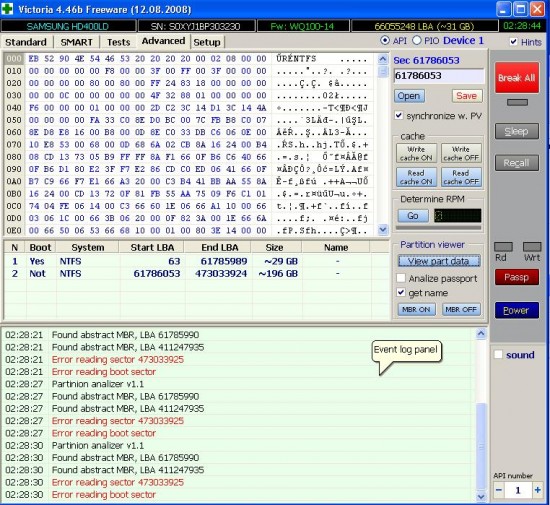
I tride to do same thing with second partition. I can open only boot sector. After hex->dec change i've got boot copy sector adress but it is located on "missing" 360GB part of HDD. No chance to scan it because every time I try I got "MFT/MFTmirr not found"... MFT read and restore is a bit "magic" for me now.help :?:

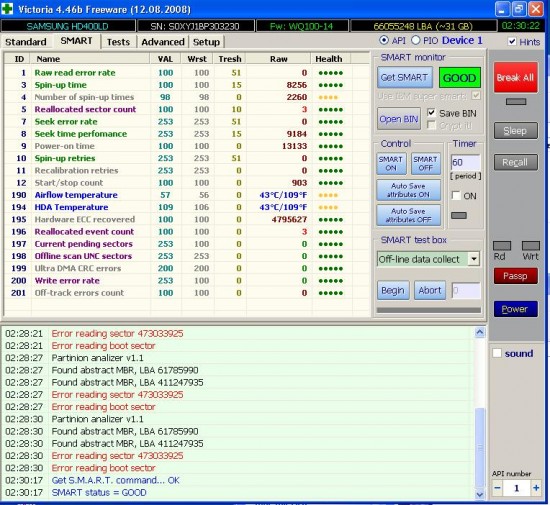
Below few screen shots: DMDE, VIctoria,Hddscan.
Attachment:
victoria.jpg
victoria.jpg [ 161.4 KiB | Viewed 5959 times ]

Attachment:
victoria2.jpg
victoria2.jpg [ 139.15 KiB | Viewed 5959 times ]


Thanks for any info.


Top
 Profile  
 
 Post subject: Re: Samsung HD400LD. Lost Partitions/Capacity.
PostPosted: October 15th, 2010, 19:52 
Offline

Joined: October 23rd, 2006, 8:56
Posts: 1336
Well your drive is certainly failing. If you can not see the full capacity in Victoria, MHDD or HDAT2, then attempting to work with the MFT is point less. Your drive has bad sectors and has started to relocate them. The best thing to do is to image copy the drive, however if you can not get access to all of the LBA's, then that is currently not an option. I would say most likely you have some firmware issues and further more they are probably caused by a weak head. Putting additional stress on the drive would not be a wise decision. You will need to send the drive to a data recovery shop, or at least get access to some tool to check the firmware.
If you can get the capacity restored then quickly image the drive and send it in for RMA replacement.


Top
 Profile  
 
 Post subject: Re: Samsung HD400LD. Lost Partitions/Capacity.
PostPosted: October 15th, 2010, 20:21 
Offline

Joined: October 15th, 2010, 18:57
Posts: 3
Location: Poland
Good thing is that I was able to copy all importatnt files form 31GB partition using DMDE (it takes some time).
Annoying is that i still can see files on missing drive but no chance to copy them even when they have full hex... :(


Top
 Profile  
 
 Post subject: Re: Samsung HD400LD. Lost Partitions/Capacity.
PostPosted: October 16th, 2010, 8:13 
Offline

Joined: March 7th, 2009, 12:43
Posts: 1091
Location: Angel Data Recovery
Use Samsung HUTIL for correct size :
http://www.samsung.com/global/business/ ... HUTIL.html


Image
Quote:
Set Max Address

- This screen shows how to use SET MAX ADDRESS. Default value of TARGET LBA or TARGET SIZE represents the current drive size. If you want to resize drive capacity, select TARGET LBA or TARGET SIZE and type the proper LBA or MB number that you want to change. After adjusting drive capacity, perform PROCESS by pressing Enter Key.

-Regarding MODE, you are presented to select either NON-VOLATILE, changed capacity is effective regardless of power off/on, or VOLATILE, changed capacity is effective as long as power on (i.e. after power off/on, drive capacity will be retrieved to original one).

-If you want to recover to the original size of drive, perform RECOVER NATIVE SIZE by pressing Enter Key. DISPLAY CURRENT STATUS represents the current size of drive.

-If you set 32GB Clip due to capacity limitation of system, remove the 32GB clip to adjust the LBA or SIZE.

-After performing SET MAX ADDRESS user’s previous data will be corrupted. Therefore it takes into great consideration to back-up the data in advance. Samsung has no responsibility of lost data.


_________________
Angel Data Recovery


Top
 Profile  
 
 Post subject: Re: Samsung HD400LD. Lost Partitions/Capacity.
PostPosted: October 16th, 2010, 12:07 
Offline

Joined: October 23rd, 2006, 8:56
Posts: 1336
DR-Kiev wrote:
Use Samsung HUTIL for correct size :
http://www.samsung.com/global/business/ ... HUTIL.html


If I remember correctly HDAT2 and MHDD use the same SET MAX ADDRESS command as HUTIL (Standard documented ATA Commands), therefore results should be the same.


Top
 Profile  
 
 Post subject: Re: Samsung HD400LD. Lost Partitions/Capacity.
PostPosted: October 16th, 2010, 16:45 
Offline

Joined: October 15th, 2010, 18:57
Posts: 3
Location: Poland
I've got reply form polish HDD forum.

"Logical data is ok, dont try to destroy it.
check your jumper settings(!) and try to restore capacity with HUTIL or Samsung ES-tool."

So i'll and give more info tomorrow.


Top
 Profile  
 
 Post subject: Re: Samsung HD400LD. Lost Partitions/Capacity.
PostPosted: October 18th, 2010, 3:09 
Offline
User avatar

Joined: September 8th, 2009, 18:21
Posts: 16960
Location: Australia
There is a capacity limitation jumper that limits the size to 32GB.

See page 4 of the following document:
http://www.produktinfo.conrad.com/daten ... 200RPM.pdf

_________________
A backup a day keeps DR away.


Top
 Profile  
 
Display posts from previous:  Sort by  
Post new topic Reply to topic  [ 7 posts ] 

All times are UTC - 5 hours [ DST ]


Who is online

Users browsing this forum: No registered users and 169 guests


You cannot post new topics in this forum
You cannot reply to topics in this forum
You cannot edit your posts in this forum
You cannot delete your posts in this forum
You cannot post attachments in this forum

Search for:
Jump to:  
Powered by phpBB © 2000, 2002, 2005, 2007 phpBB Group