MultiDrive – free backup, clone & wipe disk utility from Atola Technology

All times are UTC - 5 hours [ DST ]


Switch to mobile style


Post new topic Reply to topic  [ 22 posts ]  Go to page 1, 2  Next
Author Message
 Post subject: Recovery problems with HFS+ RAID 0 - resulting data garbled
PostPosted: September 7th, 2011, 9:23 
Offline

Joined: September 7th, 2011, 5:21
Posts: 10
Location: Poland
This is my first post here, so hello everyone.

I am trying to recover files from RAID0 that was running in Mac - Leopard OS - as a storage partition. One of two disks has been accidentally "erased" in Disk Utility application. But the process was so quick I'm sure data couldn't be actually erased. At least not all data, as I can see file system sector, files signatures etc. while viewing partition in disk editor. Of course disk is not recognized as part of a Stripe anymore.

The system:
2x 1TB, HFS+ filesystem
Each disk contains 3 partitions:
  1) 200 MB - EFI FAT32 partition
  2) 931.19 GB - data HFS+ partition
  3) 128 MB - Booter HFS+ partition

Now, I am trying to recover files by creating a virtual RAID in R-Studio, so I add both partitions and set them in correct order (I can find a sector on each disk that says RAID Partition 1 and 2 respectively). I then set parameters to what_I_think_should_be_correct and scan resulting partition (application recognizes new partition and detects correct file system). After scanning first 2-3 GB of data I preview files to find out that data is garbled. Next I change stripe size and re-scan partition, but it looks like none of them is correct, as I see pictures garbled each time. I attach two files to give you the idea.

Please advise.


Attachments:
143.jpg
143.jpg [ 45.48 KiB | Viewed 13993 times ]
142.jpg
142.jpg [ 60.49 KiB | Viewed 13993 times ]
Top
 Profile  
 
 Post subject: Re: Recovery problems with HFS+ RAID 0 - resulting data garb
PostPosted: September 7th, 2011, 9:37 
Offline

Joined: November 6th, 2006, 6:58
Posts: 1752
Hi,

Are you sure it's a RAID0 system?


Top
 Profile  
 
 Post subject: Re: Recovery problems with HFS+ RAID 0 - resulting data garb
PostPosted: September 7th, 2011, 10:12 
Offline

Joined: September 7th, 2011, 5:21
Posts: 10
Location: Poland
dmarques,
Thanks for your reply.
Actually, I was told it's a RAID0 system. However, I can see a description in Sector #2 - RAID Partition 1 / RAID Partition 2 (see below), what most likely indicates RAID0 system - but please correct me if I'm wrong.

Code:
Sector 2

        400:  28 73 2A C1 1F F8 D2 11 - BA 4B 00 A0 C9 3E C9 3B  (s*Á.řŇ.şK. É>É;
        410:  4E D6 0C D0 73 88 EB 43 - 85 77 8E 17 22 34 B9 AE  NÖ.Đs.ëC…wŽ."4ą®
        420:  28 00 00 00 00 00 00 00 - 27 40 06 00 00 00 00 00  (.......'@......
        430:  00 00 00 00 00 00 00 00 - 45 00 46 00 49 00 20 00  ........E.F.I. .
        440:  53 00 79 00 73 00 74 00 - 65 00 6D 00 20 00 50 00  S.y.s.t.e.m. .P.
        450:  61 00 72 00 74 00 69 00 - 74 00 69 00 6F 00 6E 00  a.r.t.i.t.i.o.n.
        460:  00 00 00 00 00 00 00 00 - 00 00 00 00 00 00 00 00  ................
        470:  00 00 00 00 00 00 00 00 - 00 00 00 00 00 00 00 00  ................
        480:  44 49 41 52 00 00 AA 11 - AA 11 00 30 65 43 EC AC  DIAR..Ş.Ş..0eCě¬
        490:  6C 07 BE B3 35 23 F1 4E - BD 05 BE 3F 6C 62 64 16  l.ľł5#ńN..ľ?lbd.
        4A0:  28 40 06 00 00 00 00 00 - 87 6D 6C 74 00 00 00 00  (@......‡mlt....
        4B0:  00 00 00 00 00 00 00 00 - 52 00 61 00 69 00 64 00  ........R.a.i.d.
        4C0:  20 00 50 00 61 00 72 00 - 74 00 69 00 74 00 69 00   .P.a.r.t.i.t.i.
        4D0:  6F 00 6E 00 20 00 31 00 - 00 00 00 00 00 00 00 00  o.n. .1.........
        4E0:  00 00 00 00 00 00 00 00 - 00 00 00 00 00 00 00 00  ................
        4F0:  00 00 00 00 00 00 00 00 - 00 00 00 00 00 00 00 00  ................
        500:  74 6F 6F 42 00 00 AA 11 - AA 11 00 30 65 43 EC AC  tooB..Ş.Ş..0eCě¬
        510:  10 26 A6 EC 70 7C 74 4C - 97 75 BB AC FC 36 0D DB  .&¦ěp|tL—u»¬ü6.Ű
        520:  88 6D 6C 74 00 00 00 00 - 87 6D 70 74 00 00 00 00  .mlt....‡mpt....
        530:  00 00 00 00 00 00 00 00 - 42 00 6F 00 6F 00 74 00  ........B.o.o.t.
        540:  65 00 72 00 20 00 30 00 - 78 00 36 00 35 00 30 00  e.r. .0.x.6.5.0.
        550:  35 00 34 00 30 00 66 00 - 36 00 00 00 00 00 00 00  5.4.0.f.6.......
        560:  00 00 00 00 00 00 00 00 - 00 00 00 00 00 00 00 00  ................
        570:  00 00 00 00 00 00 00 00 - 00 00 00 00 00 00 00 00  ................
        580:  00 00 00 00 00 00 00 00 - 00 00 00 00 00 00 00 00  ................
        590:  00 00 00 00 00 00 00 00 - 00 00 00 00 00 00 00 00  ................
        5A0:  00 00 00 00 00 00 00 00 - 00 00 00 00 00 00 00 00  ................
        5B0:  00 00 00 00 00 00 00 00 - 00 00 00 00 00 00 00 00  ................
        5C0:  00 00 00 00 00 00 00 00 - 00 00 00 00 00 00 00 00  ................
        5D0:  00 00 00 00 00 00 00 00 - 00 00 00 00 00 00 00 00  ................
        5E0:  00 00 00 00 00 00 00 00 - 00 00 00 00 00 00 00 00  ................
        5F0:  00 00 00 00 00 00 00 00 - 00 00 00 00 00 00 00 00  ................

Code:
Sector 2

        400:  28 73 2A C1 1F F8 D2 11 - BA 4B 00 A0 C9 3E C9 3B  (s*Á.řŇ.şK. É>É;
        410:  EB E4 FD 04 9F 31 F2 4A - 98 19 DD A3 B5 24 C6 0B  ëäý.ź1ňJ..ÝŁµ$Ć.
        420:  28 00 00 00 00 00 00 00 - 27 40 06 00 00 00 00 00  (.......'@......
        430:  00 00 00 00 00 00 00 00 - 45 00 46 00 49 00 20 00  ........E.F.I. .
        440:  53 00 79 00 73 00 74 00 - 65 00 6D 00 20 00 50 00  S.y.s.t.e.m. .P.
        450:  61 00 72 00 74 00 69 00 - 74 00 69 00 6F 00 6E 00  a.r.t.i.t.i.o.n.
        460:  00 00 00 00 00 00 00 00 - 00 00 00 00 00 00 00 00  ................
        470:  00 00 00 00 00 00 00 00 - 00 00 00 00 00 00 00 00  ................
        480:  44 49 41 52 00 00 AA 11 - AA 11 00 30 65 43 EC AC  DIAR..Ş.Ş..0eCě¬
        490:  EB 23 0D 74 EC 51 91 40 - BC 18 A8 77 68 5D BC 5A  ë#.těQ‘@Ľ.¨wh]ĽZ
        4A0:  28 40 06 00 00 00 00 00 - 87 6D 6C 74 00 00 00 00  (@......‡mlt....
        4B0:  00 00 00 00 00 00 00 00 - 52 00 61 00 69 00 64 00  ........R.a.i.d.
        4C0:  20 00 50 00 61 00 72 00 - 74 00 69 00 74 00 69 00   .P.a.r.t.i.t.i.
        4D0:  6F 00 6E 00 20 00 32 00 - 00 00 00 00 00 00 00 00  o.n. .2.........
        4E0:  00 00 00 00 00 00 00 00 - 00 00 00 00 00 00 00 00  ................
        4F0:  00 00 00 00 00 00 00 00 - 00 00 00 00 00 00 00 00  ................
        500:  74 6F 6F 42 00 00 AA 11 - AA 11 00 30 65 43 EC AC  tooB..Ş.Ş..0eCě¬
        510:  6E DD 0F AD 88 69 22 41 - B0 7E C8 D0 96 B7 60 E5  nÝ...i"A°~ČĐ–·`ĺ
        520:  88 6D 6C 74 00 00 00 00 - 87 6D 70 74 00 00 00 00  .mlt....‡mpt....
        530:  00 00 00 00 00 00 00 00 - 42 00 6F 00 6F 00 74 00  ........B.o.o.t.
        540:  65 00 72 00 20 00 30 00 - 78 00 36 00 35 00 30 00  e.r. .0.x.6.5.0.
        550:  35 00 34 00 30 00 66 00 - 36 00 00 00 00 00 00 00  5.4.0.f.6.......
        560:  00 00 00 00 00 00 00 00 - 00 00 00 00 00 00 00 00  ................
        570:  00 00 00 00 00 00 00 00 - 00 00 00 00 00 00 00 00  ................
        580:  00 00 00 00 00 00 00 00 - 00 00 00 00 00 00 00 00  ................
        590:  00 00 00 00 00 00 00 00 - 00 00 00 00 00 00 00 00  ................
        5A0:  00 00 00 00 00 00 00 00 - 00 00 00 00 00 00 00 00  ................
        5B0:  00 00 00 00 00 00 00 00 - 00 00 00 00 00 00 00 00  ................
        5C0:  00 00 00 00 00 00 00 00 - 00 00 00 00 00 00 00 00  ................
        5D0:  00 00 00 00 00 00 00 00 - 00 00 00 00 00 00 00 00  ................
        5E0:  00 00 00 00 00 00 00 00 - 00 00 00 00 00 00 00 00  ................
        5F0:  00 00 00 00 00 00 00 00 - 00 00 00 00 00 00 00 00  ................


And also it doesn't look like any data is mirrored, as I've checked and compared disk-to-disk some sectors and they look different. It just doesn't look data is mirrored.

Still, if you have any ideas or requests to check further I am wiling to hear them and dig deeper.


Top
 Profile  
 
 Post subject: Re: Recovery problems with HFS+ RAID 0 - resulting data garb
PostPosted: September 7th, 2011, 10:37 
Offline

Joined: November 9th, 2006, 15:15
Posts: 2984
In R-studio when you build it at what sector in virtual RAID you see 'H+' signature?


Top
 Profile  
 
 Post subject: Re: Recovery problems with HFS+ RAID 0 - resulting data garb
PostPosted: September 7th, 2011, 10:46 
Offline

Joined: September 7th, 2011, 5:21
Posts: 10
Location: Poland
It's in sector #2 of partition 1.

Code:
Sector 2 (Parent: Raid Partition 1 Sector: 2)

         400:  48 2B 00 04 80 00 21 00 - 48 46 53 4A 00 00 3A 35  H+....!.HFSJ..:5

I said partition, because I added partitions (not whole disks) to virtual RAID.


Edit: If you meant sector of the disk please see below.

Code:
Sector 819242 (Parent: SeagateST31000528ASCC38 Sector: 409642)

    19005400:  48 2B 00 04 80 00 21 00 - 48 46 53 4A 00 00 3A 35  H+....!.HFSJ..:5


Top
 Profile  
 
 Post subject: Re: Recovery problems with HFS+ RAID 0 - resulting data garb
PostPosted: September 7th, 2011, 11:19 
Offline

Joined: July 7th, 2010, 4:45
Posts: 924
Location: UK
grzecisz wrote:
dmarques,
And also it doesn't look like any data is mirrored, as I've checked and compared disk-to-disk some sectors and they look different. It just doesn't look data is mirrored.


You mention raid0 & then mention mirrored? Raid0 is Striped.

From the pics, the last pic bottom row shows in 2 halfs? are your sure the order is correct?
You could try raid reconstructor to see if that works out the raid order, stripe size etc.

Loki


Top
 Profile  
 
 Post subject: Re: Recovery problems with HFS+ RAID 0 - resulting data garb
PostPosted: September 7th, 2011, 12:07 
Offline

Joined: March 7th, 2009, 12:43
Posts: 1091
Location: Angel Data Recovery
Quote:
I then set parameters to what_I_think_should_be_correct and scan resulting partition (application recognizes new partition and detects correct file system)


Which offsets have you set ?

_________________
Angel Data Recovery


Top
 Profile  
 
 Post subject: Re: Recovery problems with HFS+ RAID 0 - resulting data garb
PostPosted: September 7th, 2011, 12:23 
Offline

Joined: November 6th, 2006, 6:58
Posts: 1752
I asked also, because you could be rebuilding a RAID0 while could be a JBOD.


Top
 Profile  
 
 Post subject: Re: Recovery problems with HFS+ RAID 0 - resulting data garb
PostPosted: September 7th, 2011, 12:56 
Offline

Joined: September 7th, 2011, 5:21
Posts: 10
Location: Poland
loki,
I said that because dmarques suggested it could be RAID other then 0. So I thought he is suggesting RAID1 and that's why I said I don't see mirrored data.
Raid reconstructor is not able to determine parameters (message: result is not significant; entropy: 0,00).

DR-Kiev,
First I didn't set any offset (offset 0 on both drives). Then I found out there is a difference where file system header and data starts on disks:

Code:
Drive #1
HFSJ header is @ Sector 2 (of partition)= Sector 409642 (of disk)
Data starts @ Sector 1470936

Drive #2
HFSJ header is @ Sector 59986 (of partition) = Sector 469626 (of disk)
Data starts @ Sector 721368

so it looks like there is an offset of 59984 sectors (hfsj header difference) ??... But when I set this offset for drive #2 it doesn't seem to help.


Top
 Profile  
 
 Post subject: Re: Recovery problems with HFS+ RAID 0 - resulting data garb
PostPosted: September 7th, 2011, 16:22 
Offline

Joined: February 19th, 2011, 11:05
Posts: 358
Location: Toronto
grzecisz wrote:
This is my first post here, so hello everyone.

I am trying to recover files from RAID0 that was running in Mac - Leopard OS - as a storage partition. One of two disks has been accidentally "erased" in Disk Utility application. But the process was so quick I'm sure data couldn't be actually erased. At least not all data, as I can see file system sector, files signatures etc. while viewing partition in disk editor. Of course disk is not recognized as part of a Stripe anymore.

The system:
2x 1TB, HFS+ filesystem
Each disk contains 3 partitions:
  1) 200 MB - EFI FAT32 partition
  2) 931.19 GB - data HFS+ partition
  3) 128 MB - Booter HFS+ partition


I don't understand the disk configuration of the original RAID. Maybe, the RAID itself has 3 partitions, not each disk?

grzecisz wrote:
Now, I am trying to recover files by creating a virtual RAID in R-Studio, so I add both partitions

Maybe, you need to create a RAID from the HARD DISKS rather than the PARTITIONS?
A screenshot of the R-Studio Main panel with the Drives and RAID configuration panels would be helpful.

_________________
R-Studio Data Recovery Software


Top
 Profile  
 
 Post subject: Re: Recovery problems with HFS+ RAID 0 - resulting data garb
PostPosted: September 7th, 2011, 17:47 
Offline

Joined: September 7th, 2011, 5:21
Posts: 10
Location: Poland
Alt,
I think that Mac OS creates its own partitions layout while constructing RAID. Please look at attached screens.

files:
raid-drives - drives available to R-Studio, we care only about two: [10] SeagateST31000528ASCC38 & [11] SeagateST31000528ASCC38 (the rest are my PC drives).

raid-partitions-sets - virtual RAID created with partitions, you can notice RS detects Direct Volume with correct File System (HFS+) and also correct size of both - RAID and Volume (1.82 TB).

raid-drives-sets - virtual RAID created with hard disks, RS detects all 3 partitions and correct size for the whole RAID (1.82 TB), but detects only 931 GB for RAID partition (although in Parents tab on the right you can see I added both drives - why is RS not detecting full RAID size?).


Also, I just found something really interesting in the last 8 sectors of both RAID partitions - there is an Apple RAID Header!

Header starts in last 8 Sectors of each RAID partition - that is sector 1952853336 (disk Sector: 1953262976).
Code:
Disk #1 / RAID partition

AppleRAIDHeader.A3450C56-704E-49A9-9ABA-281FF57017E3............................
30B48E50-0BA5-434A-9607-F9895EC9D8A0...............................čĚZ..
<dict>
<key>AppleRAID-CanAddSpares</key><false/>
<key>AppleRAID-SetName</key><string>A1</string>
<key>AppleRAID-SequenceNumber</key><integer size="32">0x1</integer>
<key>AppleRAID-CanAddMembers</key><true/>
<key>AppleRAID-HeaderVersion</key><integer size="32">0x20000</integer>
<key>AppleRAID-ContentHint</key><string>Apple_HFS</string>
<key>AppleRAID-LevelName</key><string>Concat</string>
<key>AppleRAID-RemovalAllowed</key><string>Last</string>
<key>AppleRAID-MemberUUID</key><string ID="9">30B48E50-0BA5-434A-9607-F9895EC9D8A0</string>
<key>AppleRAID-Members</key><array><string IDREF="9"/><string>40EA93C8-215D-4096-817F-247F8955BCBB</string></array>
<key>AppleRAID-SizesCanVary</key><true/>
<key>AppleRAID-MemberType</key><string>AppleRAID-Members</string>
<key>AppleRAID-SetUUID</key><string>A3450C56-704E-49A9-9ABA-281FF57017E3</string>
<key>AppleRAID-AutoRebuild</key><false/>
<key>AppleRAID-MemberIndex</key><integer size="32">0x0</integer>
<key>AppleRAID-Spares</key><array></array>
<key>AppleRAID-SetTimeout</key><integer size="32">0x1e</integer>
<key>AppleRAID-ChunkCount</key><integer size="64">0x1d198b5</integer>
<key>AppleRAID-ChunkSize</key><integer size="64">0x8000</integer>
</dict>

Disk #2 / RAID partition

AppleRAIDHeader.A3450C56-704E-49A9-9ABA-281FF57017E3............................
40EA93C8-215D-4096-817F-247F8955BCBB...............................čĚZ..
<dict>
<key>AppleRAID-CanAddSpares</key><false/>
<key>AppleRAID-SetName</key><string>A1</string>
<key>AppleRAID-SequenceNumber</key><integer ID="3" size="32">0x1</integer>
<key>AppleRAID-CanAddMembers</key><true/>
<key>AppleRAID-HeaderVersion</key><integer size="32">0x20000</integer>
<key>AppleRAID-ContentHint</key><string>Apple_HFS</string>
<key>AppleRAID-LevelName</key><string>Concat</string>
<key>AppleRAID-RemovalAllowed</key><string>Last</string>
<key>AppleRAID-MemberUUID</key><string ID="9">40EA93C8-215D-4096-817F-247F8955BCBB</string>
<key>AppleRAID-Members</key><array><string>30B48E50-0BA5-434A-9607-F9895EC9D8A0</string><string IDREF="9"/></array>
<key>AppleRAID-SizesCanVary</key><true/>
<key>AppleRAID-MemberType</key><string>AppleRAID-Members</string>
<key>AppleRAID-SetUUID</key><string>A3450C56-704E-49A9-9ABA-281FF57017E3</string>
<key>AppleRAID-AutoRebuild</key><false/>
<key>AppleRAID-MemberIndex</key><integer IDREF="3"/>
<key>AppleRAID-Spares</key><array></array>
<key>AppleRAID-SetTimeout</key><integer size="32">0x1e</integer>
<key>AppleRAID-ChunkCount</key><integer size="64">0x1d198b5</integer>
<key>AppleRAID-ChunkSize</key><integer size="64">0x8000</integer>
</dict>


Attachments:
raid-drives.png
raid-drives.png [ 41.37 KiB | Viewed 13894 times ]
raid-partitions-sets.png
raid-partitions-sets.png [ 88.22 KiB | Viewed 13894 times ]
raid-drives-sets.png
raid-drives-sets.png [ 103.84 KiB | Viewed 13894 times ]
Top
 Profile  
 
 Post subject: Re: Recovery problems with HFS+ RAID 0 - resulting data garb
PostPosted: September 7th, 2011, 20:53 
Offline

Joined: August 12th, 2008, 13:11
Posts: 3235
Location: USA
According to the header, stripe size should be 64 sectors / 32k

Using the partitions instead of the drives is correct, this is a software RAID

_________________
You don't have to backup all of your files, just the ones you want to keep.


Top
 Profile  
 
 Post subject: Re: Recovery problems with HFS+ RAID 0 - resulting data garb
PostPosted: September 8th, 2011, 2:41 
Offline

Joined: September 7th, 2011, 5:21
Posts: 10
Location: Poland
drc,
Thanks, also for confirmation of using partitions to build virtual RAID.

Also, I was able to determine RAID type, it is also in the Header - <key>AppleRAID-LevelName</key><string>Concat</string> - I found a description of the Header:
Quote:
struct AppleRAIDHeader {
char raidSignature[16]; // 0x0000 - kAppleRAIDSignature
UInt32 raidHeaderSize; // 0x0010 - Defaults to kAppleRAIDHeaderSize
UInt32 raidHeaderVersion; // 0x0014 - kAppleRAIDHeaderV1_0_0
UInt32 raidHeaderSequence; // 0x0018 - 0 slice is bad, >0 slice could be good
UInt32 raidLevel; // 0x001C - one of kAppleRAIDStripe, kAppleRAIDMirror or kAppleRAIDConcat
UInt32 raidUUID[4]; // 0x0020 - 128 bit univeral unique identifier
char raidSetName[32]; // 0x0030 - Null Terminated 31 Character UTF8 String
UInt32 raidSliceCount; // 0x0050 - Number of slices in set
UInt32 raidSliceNumber; // 0x0054 - 0 <= raidSliceNumber < raidSliceCount
UInt32 raidChunkSize; // 0x0058 - Usually 32 KB
UInt32 raidChunkCount; // 0x005C - Number of full chunks in set
UInt32 reserved1[104]; // 0x0060 - reservered init to zero, but preserve on update
char raidOFPaths[0]; // 0x0200 - Allow kAppleRAIDMaxOFPath for each slice

So the type is concat, that is not RAID0 as I was informed.
Quote:
"stripe" - Striped Volume (RAID 0)
"mirror" - Mirrored Volume (RAID 1)
"concat" - Concatenated Volume (Spanning)

I have SPAN type of array. Anyone have suggestions how to recover files from that?


Top
 Profile  
 
 Post subject: Re: Recovery problems with HFS+ RAID 0 - resulting data garb
PostPosted: September 8th, 2011, 3:02 
Offline

Joined: November 6th, 2006, 6:58
Posts: 1752
So, finally it's JBOD :)

You can set up a volume for that within r-studio instead of a raid.


Top
 Profile  
 
 Post subject: Re: Recovery problems with HFS+ RAID 0 - resulting data garb
PostPosted: September 8th, 2011, 3:43 
Offline

Joined: September 7th, 2011, 5:21
Posts: 10
Location: Poland
Yes, it looks like you were right! :)

I'm scanning Virtual Volume Set as we speak.


Top
 Profile  
 
 Post subject: Re: Recovery problems with HFS+ RAID 0 - resulting data garb
PostPosted: September 8th, 2011, 7:07 
Offline

Joined: November 6th, 2006, 6:58
Posts: 1752
So let's wait for the results, but probably you'll get the data.


Top
 Profile  
 
 Post subject: Re: Recovery problems with HFS+ RAID 0 - resulting data garb
PostPosted: September 8th, 2011, 12:23 
Offline

Joined: September 7th, 2011, 5:21
Posts: 10
Location: Poland
It took some time to scan the whole 1.82 TB partition...

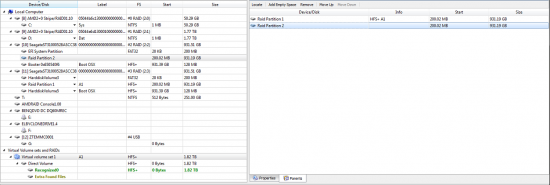
As you can see on the screenshot below there are two objects under Virtual volume set 1 \ Direct Volume: Recognized0 and Extra Found Files. According to R-Studio documentation: Recognized0 is a logical partition with boot records and file entries found; and Extra Found Files only contains files that were found using "scan for known file types" option (which I was using).
Attachment:
raid-span.png
raid-span.png [ 117.02 KiB | Viewed 13797 times ]


Under Recognized0 object it shows total 19.86 TB of data found. There also is a folder called Extra Found Files marked as deleted and all its subfolders are marked as deleted as well. All files inside this folder seems to have valid file names but are unreadable and do not have valid file headers.
Attachment:

raid-span-recognized.png
raid-span-recognized.png [ 36.81 KiB | Viewed 13797 times ]


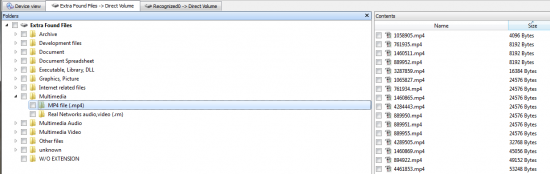
Under Extra Found Files object it shows total 33.35 TB of data found!! Files inside have generic (1.jpg, 2.jpg etc) names. Some of them are good, but most of them looks garbled... but at least lots of them have valid file headers.
Attachment:
raid-span-extrafound.png
raid-span-extrafound.png [ 58.98 KiB | Viewed 13797 times ]


So... the results - scan found a lot of data, it found more data than the size of span partition (which I think is pretty normal for recovery applications). I was able to find some good files but it looks like most of the files are still garbled. :(

Considering there is more total data found than the size of partition it's pretty obvious most of data will be unreadable... But how can I sort through bad files and recover good files only?

Guys, please give me some advice because I'm running out of ideas... :? Damn HFS+ !!! :evil:


Top
 Profile  
 
 Post subject: Re: Recovery problems with HFS+ RAID 0 - resulting data garb
PostPosted: September 8th, 2011, 12:28 
Offline

Joined: November 6th, 2006, 6:58
Posts: 1752
I think now it's time to take that into a pro, as it's running out your options without hex analysis.

It can be that there's some extra sectors at the end for example.

All of the Extra Files Found folder will contain good file headers, because that is exactly the point of that area.


Top
 Profile  
 
 Post subject: Re: Recovery problems with HFS+ RAID 0 - resulting data garb
PostPosted: September 9th, 2011, 1:44 
Offline

Joined: September 7th, 2011, 5:21
Posts: 10
Location: Poland
I really hate it when I can't get something I seem to have at my fingertips...

I defined my own file types before to find those specific ones (not detected by RS by default) and I can see it finds the header, but there is no ending pattern... I think most of data is fragmented on those drives.

How can someone, even a pro, find and put together files out of raw fragmented data bytes?... It's becoming hopeless...


Top
 Profile  
 
 Post subject: Re: Recovery problems with HFS+ RAID 0 - resulting data garb
PostPosted: September 9th, 2011, 6:54 
Offline

Joined: December 27th, 2006, 10:15
Posts: 1852
Location: Belgium
Thats why they call us a pro :D

_________________
Murphy was an optimist

Datarecovery in Belgium, Holland, France and Germany
Datarecoverytools http://www.drtools.eu


Top
 Profile  
 
Display posts from previous:  Sort by  
Post new topic Reply to topic  [ 22 posts ]  Go to page 1, 2  Next

All times are UTC - 5 hours [ DST ]


Who is online

Users browsing this forum: No registered users and 112 guests


You cannot post new topics in this forum
You cannot reply to topics in this forum
You cannot edit your posts in this forum
You cannot delete your posts in this forum
You cannot post attachments in this forum

Search for:
Jump to:  
Powered by phpBB © 2000, 2002, 2005, 2007 phpBB Group
