MultiDrive – free backup, clone & wipe disk utility from Atola Technology

All times are UTC - 5 hours [ DST ]


Switch to mobile style


Post new topic Reply to topic  [ 11 posts ] 
Author Message
 Post subject: Maxtor 6L160M0 TR=3Mb/s AT=20ms Passes all tests!
PostPosted: September 28th, 2013, 7:04 
Offline

Joined: September 28th, 2013, 6:33
Posts: 6
Location: Southern France
I believe theoretically I should be seeing 150Mb/second transfer and 9m/s Access Time

After setting acoustic performance to max:
HD Tune: Maxtor 6L160M0 Benchmark

Transfer Rate Minimum : 2.5 MB/sec
Transfer Rate Maximum : 3.2 MB/sec
Transfer Rate Average : 3.1 MB/sec
Access Time : 19.4 ms
Burst Rate : 3.1 MB/sec
CPU Usage : 50.2%

Seatools DOS:
Short - Pass
Long - Pass (guess 20 minutes)

Seatools WinXP:
Short generic - Pass
Long generic - Pass (14 hours)

Note: I do not know if the DOS and WinXP tests are the same.
If they are, then the fault must lie with windows.

I tried HD Sentinel DOS, but it also just provides a pass.
What would be useful would be a DOS utility that provides Transfer rates.

HD Sentinel for windows gives the HD
98% performance rating (I don't understand why @ 3Mb/s)
100% health rating.

I'd really appreciate some help with this problem.
Could it be windows?
Is there a DOS utility that can provide performance data (I'm downloading UBCD526 - looks great, but I don't think it has what I'm looking for, though I've not tried it yet).

Thanks for any help!

Below is the HDS readout:
Hard Disk Summary
Hard Disk Number,0
Interface,S-ATA
Hard Disk Model ID,Maxtor 6L160M0
Firmware Revision,BANC1G10
Hard Disk Serial Number,L309Q0DH L309Q0DH
Total Size,152586 MB
Power State,Active

Logical Drive(s)
Logical Drive,C: []
Logical Drive,J: [PROGRAMS_]
Logical Drive,K: [DATA_]
Logical Drive,L: [AVG_]
Logical Drive,M: [SWAP_]
Logical Drive,N: [Net_TEMP_]

ATA Information
Hard Disk Cylinders,310020
Hard Disk Heads,16
Hard Disk Sectors,63
ATA Revision,ATA/ATAPI-7 T13 1532D version 0
Total Sectors,312500000
Bytes Per Sector,512
Buffer Size,8192 KB
Multiple Sectors,16
Error Correction Bytes,4
Unformatted Capacity,152588 MB
Maximum PIO Mode,4
Maximum Multiword DMA Mode,2
Maximum UDMA Mode,150 MB/s (6)
Active UDMA Mode,150 MB/s (5)
Minimum multiword DMA Transfer Time,120 ns
Recommended Multiword DMA Transfer Time,120 ns
Minimum PIO Transfer Time Without IORDY,120 ns
Minimum PIO Transfer Time With IORDY,120 ns
ATA Control Byte,Valid
ATA Checksum Value,Valid

Acoustic Management Configuration,Adjust
Acoustic Management,Supported
Acoustic Management,Enabled
Current Acoustic Level,Max performance and volume (FEh)
Recommended Acoustic Level,Balanced performance and volume

(C0h)

ATA Features
Read Ahead Buffer,"Supported, Enabled"
DMA,Supported
Ultra DMA,Supported
S.M.A.R.T.,Supported
Power Management,Supported
Write Cache,Supported
Host Protected Area,Supported
Advanced Power Management,"Supported, Disabled"
Extended Power Management,Not supported
Power Up In Standby,Not supported
48-bit LBA Addressing,Supported
Device Configuration Overlay,Supported
IORDY Support,Supported
Read/Write DMA Queue,Not supported
NOP Command,Supported
Trusted Computing,Not supported
64-bit World Wide ID,Not supported
Streaming,Supported
Media Card Pass Through,Not supported
General Purpose Logging,Supported
Error Logging,Supported
CFA Feature Set,Not supported
CFast Device,Not supported
Long Physical Sectors (1),Not supported
Long Logical Sectors,Not supported
Write-Read-Verify,Not supported
NV Cache Feature,Not supported
NV Cache Power Mode,Not supported
NV Cache Size,Not supported
Free-fall Control,Not supported
Free-fall Control Sensitivity,Not supported

SSD Features
Data Set Management,Not supported
TRIM Command,Not supported
Deterministic Read After TRIM,Not supported

S.M.A.R.T. Details
Off-line Data Collection Status,Never Started
Self Test Execution Status,Successfully Completed
Total Time To Complete Off-line Data Collection,1202 seconds
Execute Off-line Immediate,Supported
Abort/restart Off-line By Host,Not supported
Off-line Read Scanning,Supported
Short Self-test,Supported
Extended Self-test,Supported
Conveyance Self-test,Not supported
Selective Self-Test,Supported
Save Data Before/After Power Saving Mode,Supported
Enable/Disable Attribute Autosave,Supported
Error Logging Capability,Supported
Short Self-test Estimated Time,2 minutes
Extended Self-test Estimated Time,60 minutes
Last Short Self-test Result,Never Started
Last Short Self-test Date,Never Started
Last Extended Self-test Result,Never Started
Last Extended Self-test Date,Never Started

Security Mode
Security Mode,Supported
Security Erase,Not supported
Security Erase Time,Not supported
Security Enhanced Erase Feature,Not supported
Security Enhanced Erase Time,Not supported
Security Enabled,No
Security Locked,No
Security Frozen,Yes
Security Counter Expired,No
Security Level,High

Serial ATA Features
S-ATA Compliance,Yes
S-ATA I Signaling Speed (1.5 Gps),Supported
S-ATA II Signaling Speed (3 Gps),Not supported
S-ATA Gen3 Signaling Speed (6 Gps),Not supported
Receipt Of Power Management Requests From Host,Supported
PHY Event Counters,Not supported
Non-Zero Buffer Offsets In DMA Setup FIS,Not supported
DMA Setup Auto-Activate Optimization,Not supported
Device Initiating Interface Power Management,Not supported
In-Order Data Delivery,Not supported
Asynchronous Notification,Not supported
Software Settings Preservation,"Supported, Enabled"
Native Command Queuing (NCQ),Supported
Queue Length,32

Disk Information
Disk Family,DiamondMax 10
Form Factor,"3.5"" "
Capacity,"160 GB (160 x 1,000,000,000 bytes)"
Number Of Disks,?
Number Of Heads,?
Rotational Speed,7200 RPM
Rotation Time,8.33 ms
Average Rotational Latency,4.17 ms
Disk Interface,Serial-ATA/150
Buffer-Host Max. Rate,150 MB/seconds
Buffer Size,8192 KB
Drive Ready Time (typical),? seconds
Average Seek Time,9.0 ms
Track To Track Seek Time,? ms
Full Stroke Seek Time,? ms
Width,101.6 mm (4.0 inch)
Depth,147.0 mm (5.8 inch)
Height,26.1 mm (1.0 inch)
Weight,630 grams (1.4 pounds)
Acoustic (Idle),3.5 Bel
Acoustic (Min performance and volume),2.7 Bel
Acoustic (Max performance and volume),2.7 Bel
Required power for spinup,"1,520 mA"
Power required (seek),12.2 W
Power required (idle),7.3 W
Power required (standby),0.9 W
Manufacturer,Seagate Corporation
Manufacturer Website, Seagate - Storing the world


Top
 Profile  
 
 Post subject: Re: Maxtor 6L160M0 TR=3Mb/s AT=20ms Passes all tests!
PostPosted: September 28th, 2013, 17:40 
Offline
User avatar

Joined: September 8th, 2009, 18:21
Posts: 16955
Location: Australia
Your drive is behaving as if it is stuck in PIO mode. Windows XP will downgrade the interface from DMA mode to PIO mode if there are an excessive number of CRC errors.

There are some solutions and workarounds here:
http://winhlp.com/node/10

The following article explains how to edit your registry so that 6 consecutive CRC errors rather than 6 cumulative CRC errors are required to trigger a switch to PIO mode:

IDE ATA and ATAPI disks use PIO mode after multiple time-out or CRC errors occur:
http://support.microsoft.com/kb/817472

It involves adding a "ResetErrorCountersOnSuccess" entry.

_________________
A backup a day keeps DR away.


Top
 Profile  
 
 Post subject: Re: Maxtor 6L160M0 TR=3Mb/s AT=20ms Passes all tests!
PostPosted: September 28th, 2013, 18:19 
Offline

Joined: September 28th, 2013, 6:33
Posts: 6
Location: Southern France
Thanks so much for that response.

It's almost like as if it doesn't matter whether this is the right area to look at.... it just shows that there are problems like this. 8)

Note also, the PC in question is a Dell dimension 5100.
Node/10 talks about this being a dell problem.

BTW..... I've just loaded kubuntu, and there is always DOS.
Are there any progs available that can provide data rates outside of a windows environment?

Hopefully this is a PIO issue.
I'm on it.... so this weekend may see it solved :wink:
Thanks again :)


Top
 Profile  
 
 Post subject: Re: Maxtor 6L160M0 TR=3Mb/s AT=20ms Passes all tests!
PostPosted: September 28th, 2013, 18:28 
Offline
User avatar

Joined: September 8th, 2009, 18:21
Posts: 16955
Location: Australia
You could use MHDD to perform a full surface scan of your drive. It provides a full report which includes an average transfer rate figure. It should tell you if the drive has any "slow" sectors.

_________________
A backup a day keeps DR away.


Top
 Profile  
 
 Post subject: Re: Maxtor 6L160M0 TR=3Mb/s AT=20ms Passes all tests!
PostPosted: September 28th, 2013, 21:36 
Offline

Joined: September 28th, 2013, 6:33
Posts: 6
Location: Southern France
Thanks again fzabkar,
That looks like what I'm looking for :D

I've just burned mhdd32ver4.6iso to a cd.

I am now enjoying reading the documentation - the warnings are good.
i guess if you "give them a good sharp shock, then they won't do it again" :wink:

It's very 'engineering based' - a breath of fresh air; as I can see that there has been a serious attempt at explaining the methodology.
However..... having made a good peruse of the docs (and the faq thread) it's not clear which command is going to be relevant to my needs.

From:
http://hddguru.com/software/2005.10.02- ... portedhard

I can't discern the command I need to make, to establish the working "average data transfer rate".

Having run numerous diagnostic packages; all seem to indicate that the disk is in full health.
Given that...
... a non-windows data transfer rate is most required, to confirm that the problem resides within windows.
Probably confirming that this is a PIO problem.

therefore; can the command be confirmed, to establish the data transfer rate, when I boot the PC from the burned CD?

:)


Top
 Profile  
 
 Post subject: Re: Maxtor 6L160M0 TR=3Mb/s AT=20ms Passes all tests!
PostPosted: September 28th, 2013, 23:25 
Offline
User avatar

Joined: September 8th, 2009, 18:21
Posts: 16955
Location: Australia
Here is the documentation:
http://real-world-systems.com/docs/MHDD_en_manual.html

Here is a screenshot from a recent thread:
download/file.php?id=7143&mode=view

The AVG (average) transfer rate in kilobytes per second is displayed at the top right corner of the screen.

BTW, sometimes you can see the DMA or PIO status in Device Manager.

_________________
A backup a day keeps DR away.


Top
 Profile  
 
 Post subject: Re: Maxtor 6L160M0 TR=3Mb/s AT=20ms Passes all tests!
PostPosted: September 29th, 2013, 10:30 
Offline

Joined: September 28th, 2013, 6:33
Posts: 6
Location: Southern France
Thank you very much for the link to that manual, and the image file.
Anybody downloading mhdd must surely need that manual.

Here's the results:

********
mhdd 4.6: Maxtor 6L160M0

Average access time: 18.71ms
avg: 55250kb/s
act: 36244kb/s
<3ms: 1064595
<10ms: 158583
<50ms: 2229
<150ms: 59
<500ms: 21
>500ms: 4
zero error notes
Approximately 12 warnings.
time spent: 00:47:07
*******

Notes:
Warnings mostly different on second scan

Transfer Rate
started approx: 68000kb/s
Finished approx: 32000kb/s

Initial tracks were mostly <3ms but with quite a few slow <150/500ms
Then the track display cleared to <3ms until increasing numbers of slower sectors, as the scan proceeded.
At around 66% the display showed 5 sets of <10ms tram lines, each 3 sectors apart - not random at all, until clearing to checker-board pattern.

I guess, as the scan moves into the disk, the rotational speed is dropping, therefore slowing transfer rates.
I wonder what was happening with the 'tram line' display - perhaps relating to the disk manufacturing process?

What do the warnings mean?
(I was thinking of a prog I worked on for a while - 'the diskette workshop'.
At the time the thinking was that weak sectors could be strengthened by regular read/writes)

I note that the transfer rate of around 50Mb/s is around a third of the claimed specs, and access time is around double that of the specs.

Is this typical?
OR is the drive actually performing quite badly?

Either way, the speed is clearly better than 10 times the speed shown in windows, so it is increasingly looking like a PIO issue.

.... A bit of reading is required :wink:


Top
 Profile  
 
 Post subject: Re: Maxtor 6L160M0 TR=3Mb/s AT=20ms Passes all tests!
PostPosted: September 29th, 2013, 20:50 
Offline
User avatar

Joined: September 8th, 2009, 18:21
Posts: 16955
Location: Australia
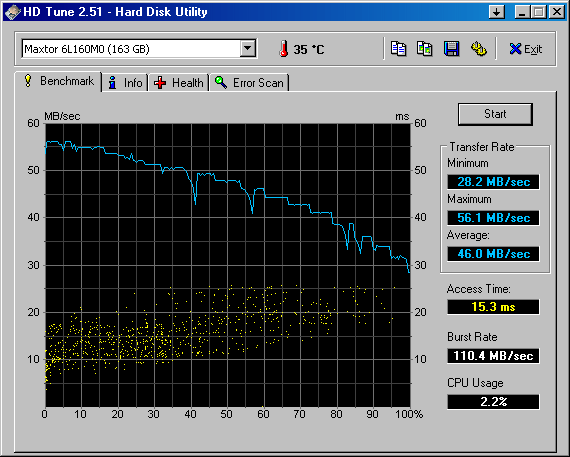
The transfer rate of 150MB/s is the SATA link speed. It is reflected in the "burst rate", ie the transfer rate to and from the drive's cache RAM.

The drive's sustained transfer rate is much less, and reflects the data rate between the RAM and platters.

See this HD Tune read benchmark:
http://www.hdtune.com/results/Maxtor_6L160M0(2).gif

The transfer rate at the outermost zones is about twice the speed at the innermost zone because there are about twice as many bits per track.

Here is a slightly slower version of your model:
http://www.hdtune.com/results/Maxtor_6L160M0.gif

I suspect that the difference is in the number of heads, ie the faster drive may have 3 heads while the slower may have 4.

Another thing to examine would be the drive's SMART report. Look for reallocated, pending, or uncorrectable sectors. Also check the error rates, including read, write, and UDMA CRC errors. I realise that HD Sentinel reports 100% health, but a closer look at the raw values may be advisable.

_________________
A backup a day keeps DR away.


Top
 Profile  
 
 Post subject: Re: Maxtor 6L160M0 TR=3Mb/s AT=20ms Passes all tests!
PostPosted: September 30th, 2013, 16:17 
Offline

Joined: September 28th, 2013, 6:33
Posts: 6
Location: Southern France
Have a look at my HD Tune graphs (post DMA reset dealt with in another post :) ):

Certainly not as neat as the the two you posted; and note the scatter-gun effect.
To be honest, I'm not sure what we can discern from that (analysis help needed).
They are clearly not well 'banded' as per the two 'benchmark' graphs previously posted.

The PC was inactive vis a vis running applications.
02 test was carried out directly after 01 in order to establish how consistent the tests are:

Attachment:
Maxtor_6L160M0_zero_activity_01.gif
Maxtor_6L160M0_zero_activity_01.gif [ 55.58 KiB | Viewed 9779 times ]

Attachment:
Maxtor_6L160M0_zero_activity_02.gif
Maxtor_6L160M0_zero_activity_02.gif [ 56.48 KiB | Viewed 9779 times ]


Here we can see the S.M.A.R.T. output:

Attachment:
Maxtor_6L160M0_smart_data.gif
Maxtor_6L160M0_smart_data.gif [ 64.69 KiB | Viewed 9779 times ]

*******

Overall, the drive 'graphically' doesn't match the benchmark graphs, yet HD Sentinel is very happy with both performance and health (effectively 100% for both!!!).

I note your concern over this disparity, and am also 'a bit at a loss'.
The graph is merely a 'format representation' ideal for 'at a glance' human comprehension.... yet the actual results surely must be easily quantifiable for a 'percentage based assessment'.

Looking at my first post, it is clear that HD Sentinel has the spec for the drive (150Mb/s and 9ms).
Yet the results above do not, in any way, match the specs, neither in MHDD direct access, nor via WinXP O/S.

Even accepting your premise, that "the spec rate is based upon 'burst' ", the drive is still down by 30% (approx 100Mb/s vs 150Mb/s spec and double the access).

............. I do recognise commercial imperatives.
It may be that there is a wide tolerance applied to drive performance (just thinking aloud).....
... For HD S to give such a glowing bill of health (that flies in the face of the stats in front of us) makes me think that 'the drive is within acceptable performance tolerance'.

IE.
In engineering terms: is it a spindle @ 10mm -10 thou.... and a hole @ 10mm +10 thou.....resulting in 20 thou of slop, yet still within design tolerance?

Perhaps the SMART data can help.
:)


Top
 Profile  
 
 Post subject: Re: Maxtor 6L160M0 TR=3Mb/s AT=20ms Passes all tests!
PostPosted: September 30th, 2013, 20:57 
Offline
User avatar

Joined: September 8th, 2009, 18:21
Posts: 16955
Location: Australia
Your SMART data look OK to me. In fact I compared them with the following sets which I found with a Google search:

http://www.ihdd.ru/forum/uploaded_image ... to01_1.jpg
http://www.elektroda.pl/rtvforum/topic1757692.html
https://www.ddo.com/forums/showthread.p ... ae89c67cc2
http://torufoorum.net/files.php?pid=17105&aid=2807
http://www.trainsim.com/vbts/showthread ... are-issues
http://www.progtown.com/topic364173-and ... grade.html

The 150MB/s transfer rate is equivalent to the 1.5Gbps spec for the SATA link rate. You seem to be having difficulty comprehending this figure.

The DiamondMax 10 datasheet refers to this speed as the "External Data Transfer Rate":
http://www.seagate.com/staticfiles/maxt ... _sheet.pdf

The DiamondMax 10 Product Manual refers to the speed "to/from interface" but does not specify a sustained data rate (aka "Internal Data Transfer Rate"):
http://www.datasheets.pl/hard_drives/DI ... L_SATA.pdf

Perhaps the following analogy may help.

Imagine that you were transporting goods from a warehouse to a nearby supermarket. The transportation speed between the warehouse loading dock and supermarket unloading dock might be 1 tonne per minute, say. This reflects the speed of the truck on the road between the two locations and would be analogous to the SATA link rate. Now consider the effective transportation speed if you were to include the loading time at the warehouse. This figure might be 1 tonne per hour, and would be analogous to the transfer rate between the drive's platters and the drive's cache.

As for you concerns regarding the scatter in the access time graph, it does look bothersome. I would normally be concerned, but I can't see any relationship between this scatter and your other results, so I can't suggest a reason for it. AIUI, the access time is given by the following relationship:

access time = seek time + rotational latency.

That is, the total access time is the time required to seek to the target track plus the time required for the target sector to pass under the head. In the case of a 7200RPM HDD, the latter time can vary from 0 to 8.33ms (8.33ms = one full revolution). Therefore, in the case of an ideal drive, one would expect to see a tight band of data points approximately 8ms wide.

AFAICS, if the drive were experiencing read problems, then one would expect to see an additional band of data points corresponding to read retries, and this band would be separated from the first band by 8ms, ie the time for an additional revolution. That said, I don't know what to make of your data, but it does appear to be suggesting that numerous retries are happening. The UDMA CRC Error Count is 0, so this would appear to eliminate the SATA cable as a potential culprit.

_________________
A backup a day keeps DR away.


Top
 Profile  
 
 Post subject: Re: Maxtor 6L160M0 TR=3Mb/s AT=20ms Passes all tests!
PostPosted: October 8th, 2013, 17:19 
Offline

Joined: September 28th, 2013, 6:33
Posts: 6
Location: Southern France
The drive has been running now for a good few days.
There can be no doubt that a major cause of the 'slow transfer rate' was PIO issue, where the problem is described thus (http://winhlp.com/node/10):
"A typical symptom of PIO mode is slow data transfer, accompanied by high processor load"

The above link deals with this scenario AND provides the solution script (which works):
http://winhlp.com/tools/resetdma.vbs

Thanks to fzabkar for identifying this cause at the outset :good:

As regards what caused the problem:
Reading that help doc, I note that there have been historical problems with both old cables and Dell bios's - but on checking the bios, the link speed is rated at 1.5Gb/s, and it is a SATA drive and: "The UDMA CRC Error Count is 0, so this would appear to eliminate the SATA cable as a potential culprit".

That may leave (as a cause), a buggy bios, or six DMA transfer timeouts having occurred.

RE: The Access Time Graph
I am wondering whether the scattered band of results is an indicator of cause, or merely coincidence.

It is always interesting when an established member posts "I can't suggest a reason for it" and "I don't know what to make of your data".

Normally, such admissions would trigger an avalanche of 'suggestions' and 'reasoning'.
However, in this case, nobody else chimed in.

So is the drive running correctly?

I don't think so.
It doesn't sound right.

Back in IBM PC days we'd be listening for a perfect 'I am your automatic lover (automatic lover)' ringing out from the hard drive.
Nowadays, we're listening for somebody drumming their nails on a metal sheet, to tell us something is not quite right.

A severely fragmented hard disk.... not in this case.

Other than memory, I don't now have a reference (for the sound), as it is a PC from 2005; but it does seem to me that there is too much clicking.

We could just leave it at that - the PC has certainly become usable after the fix.

But still..... there's always going to be that nagging question, as to why the Access Time band (what band?) is all over the shop.

Does anybody have any ideas, before we put this one to bed in the 'unsolved' filing cabinet?

:)


Top
 Profile  
 
Display posts from previous:  Sort by  
Post new topic Reply to topic  [ 11 posts ] 

All times are UTC - 5 hours [ DST ]


Who is online

Users browsing this forum: Google [Bot] and 40 guests


You cannot post new topics in this forum
You cannot reply to topics in this forum
You cannot edit your posts in this forum
You cannot delete your posts in this forum
You cannot post attachments in this forum

Search for:
Jump to:  
Powered by phpBB © 2000, 2002, 2005, 2007 phpBB Group