MultiDrive – free backup, clone & wipe disk utility from Atola Technology

All times are UTC - 5 hours [ DST ]


Switch to mobile style


Post new topic Reply to topic  [ 20 posts ] 
Author Message
 Post subject: Seagate SSHD ST1000LM014
PostPosted: April 25th, 2015, 0:40 
Offline

Joined: April 25th, 2015, 0:01
Posts: 7
Location: AUNSW
I have a Dell Precision M6800, it comes with two HDD, the 2nd is a Seagate 1TB SSHD. This laptop had some display issues and Dell eventually gave me a same replacement. Received the laptop four days ago and copied the entire 2nd HDD (partition E: and F:) to the new 2nd HDD in the replacement, using acronis. Then I deleted the partitions on the old 1TB HDD and repartitioned/quick formatted it to a single partition. At that point, I forgot to take a backup.

New 1TB SSHD

P/N: 1EJ164-038
FW: DEMA
DOM 02/2015

old 1TB SSHD
P/N: 1EJ164-036
FW: DEM7
DOM 04/2014

Everything was fine until couple hours ago when I was trying to unzip a file in E: and it just freezes. After a few attempts, I went to a different folder in E: and found nothing wrong except for not able to unzip that particular one. After a reboot, E: and F: just disappeared, BIOS could not see it there either. I then put the old 1TB HDD in the the 2nd HDD bay and BIOS & windows both recognised it, empty drive though. The last attempt was to put the faulty disk back and BIOS detected it and windows did not. Bootable acronis struggled to load due to an error loading dev1 something( sorry, I forgot to note down the exact message). Windows 8.1 was in this cycle which it detects E: then unmounts it and repeats. Each lasted a few seconds, clicking on E: in explorer when it was briefly detected would just freeze up explorer. In fact, windows could not even display the volume of E:.

It is found that the motor still spins and there is no clicking noise, HD indicator was flicking like mad. When I put it in a portable USD adapte, it was a bit intense in the first five seconds as if it was trying to fire up but couldn't.

Dell is more than happy to send me a new HD, but I want to recover the data as it contains a work-related library and other study material which hadn't been backed up since late last year. A friend of mine who specializes in electronics can swap the 8-pin FW/ROM chip (both start with 25Q80B) for me, is that going to work given these two HDD have different firmwares? PCBs have identical model number (100705349 REV D), however some modules were different brand.

What do you think the best course of action is now? I would like to get your opinions first before heading to a data recovery company as it can be really costly.

Thanks.
Attachment:
File comment: Faulty HDD PCB
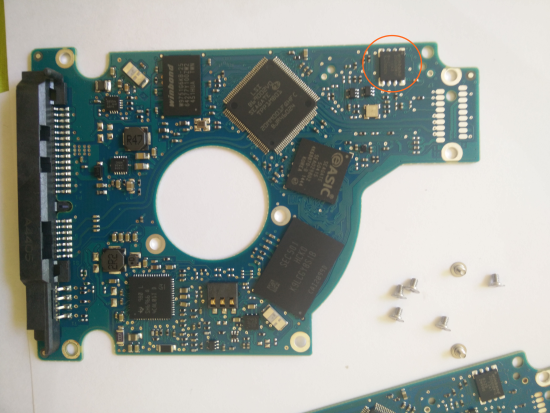
faulty.png
faulty.png [ 10.31 MiB | Viewed 17431 times ]

Attachment:
File comment: Old 1TB SSHD
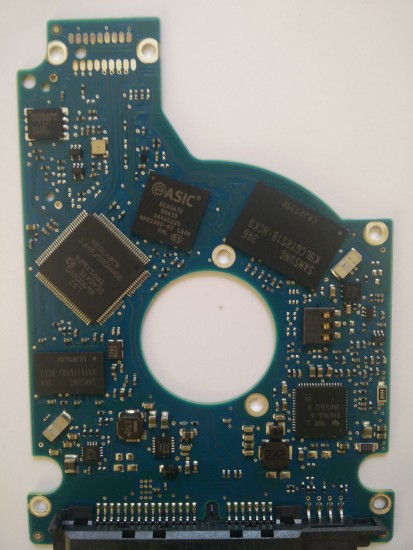
old 1TB SSHD.jpg
old 1TB SSHD.jpg [ 3.04 MiB | Viewed 17431 times ]


Top
 Profile  
 
 Post subject: Re: Seagate SSHD ST1000LM014
PostPosted: April 25th, 2015, 2:07 
Offline
User avatar

Joined: September 8th, 2009, 18:21
Posts: 16960
Location: Australia
It doesn't sound like a PCB fault, so IMHO it would best to try to recover your data from your quick formatted drive. Partition F: would most likely be completely recoverable with freeware. Partition E: would be more difficult, but still doable.

I would use a disc editor such as DMDE (freeware). If you see your F: volume in DMDE's Partitions window, then double-click it and expand the Root. Do you see your original file/folder tree?

_________________
A backup a day keeps DR away.


Top
 Profile  
 
 Post subject: Re: Seagate SSHD ST1000LM014
PostPosted: April 25th, 2015, 2:18 
Offline

Joined: April 25th, 2015, 0:01
Posts: 7
Location: AUNSW
fzabkar wrote:
It doesn't sound like a PCB fault, so IMHO it would best to try to recover your data from your quick formatted drive. Partition F: would most likely be completely recoverable with freeware. Partition E: would be more difficult, but still doable.

I would use a disc editor such as DMDE (freeware). If you see your F: volume in DMDE's Partitions window, then double-click it and expand the Root. Do you see your original file/folder tree?


Thanks for your quick reply. I downloaded a software named Yodot recovery software, it's currently scanning that formatted disk (it was also re-partitioned). It's been 1 hr 20mins, 52% so far. Will update soon.

I'll also try DMDE once this is completed. The question is if both of these are out of luck, is it worthwhile swapping the ROM chip at all? Can that completely damage the data on the faulty disk?


Top
 Profile  
 
 Post subject: Re: Seagate SSHD ST1000LM014
PostPosted: April 25th, 2015, 2:22 
Offline

Joined: April 25th, 2015, 0:01
Posts: 7
Location: AUNSW
fzabkar wrote:
It doesn't sound like a PCB fault, so IMHO it would best to try to recover your data from your quick formatted drive. Partition F: would most likely be completely recoverable with freeware. Partition E: would be more difficult, but still doable.

I would use a disc editor such as DMDE (freeware). If you see your F: volume in DMDE's Partitions window, then double-click it and expand the Root. Do you see your original file/folder tree?


Thanks for your quick reply. I downloaded a software named Yodot recovery software, it's currently scanning that formatted disk (it was also re-partitioned). It's been 1 hr 20mins, 52% so far. Will update soon.

I'll also try DMDE once this is completed. The question is if both of these are out of luck, is it worthwhile swapping the ROM chip at all? Can that completely damage the data on the faulty disk?


Top
 Profile  
 
 Post subject: Re: Seagate SSHD ST1000LM014
PostPosted: April 25th, 2015, 12:33 
Offline

Joined: April 25th, 2015, 0:01
Posts: 7
Location: AUNSW
fzabkar wrote:
It doesn't sound like a PCB fault, so IMHO it would best to try to recover your data from your quick formatted drive. Partition F: would most likely be completely recoverable with freeware. Partition E: would be more difficult, but still doable.

I would use a disc editor such as DMDE (freeware). If you see your F: volume in DMDE's Partitions window, then double-click it and expand the Root. Do you see your original file/folder tree?


Thanks for the advice, DMDE could see both partitions on the old disk and as you suggested, I could recover most files in F: but not nothing on E: . (F: had the option to insert whereas E had replace)


Can you please elaborate on how to recover E: in this case ?

There's some data on the new disk F:(faulty one) that was important and hasn't been backed up yet, would still like to try swapping rom on the PCB after recovering the data from E: if possible.


Attachments:
File comment: F:
F.png
F.png [ 22.63 KiB | Viewed 17359 times ]
File comment: E
Snap1.png
Snap1.png [ 23.28 KiB | Viewed 17359 times ]
Top
 Profile  
 
 Post subject: Re: Seagate SSHD ST1000LM014
PostPosted: April 25th, 2015, 17:37 
Offline
User avatar

Joined: September 8th, 2009, 18:21
Posts: 16960
Location: Australia
I strongly recommend that you work on a sector-by-sector clone (at least of drive E:, physical sectors 0-1441521663), but you can undo the repartitioning error by r-clicking the $Noname01 Primary partition and selecting Remove the Partition.

Then r-click each of the $Noname02 and $Noname03 partitions and select Insert the Partition (Undelete). You may need to select Drive -> Apply Changes and reboot for the OS to reexamine the file systems. Drive F: should then be accessible as before, but drive E: will probably show up as RAW.

You could also restore the original boot sector for E: by r-clicking it and selecting Restore Boot Sector from the Copy. The file system will still be corrupt (the MFT will have been initialised), but an NTFS Search Within the Partition should find the old NTFS components. You can pause the search, save the search log, and resume at a later time. This allows you to examine any file/folder trees that DMDE finds without having to wait for the entire drive to be scanned.

Alternatively, you could mount the F: drive with Partition Find and Mount in readonly mode, and then copy and paste your files to another drive, just as you would in Windows Explorer. You wouldn't need to repair your partitions in order to do this.

http://findandmount.com/

_________________
A backup a day keeps DR away.


Top
 Profile  
 
 Post subject: Re: Seagate SSHD ST1000LM014
PostPosted: April 26th, 2015, 1:07 
Offline

Joined: April 25th, 2015, 0:01
Posts: 7
Location: AUNSW
fzabkar wrote:
I strongly recommend that you work on a sector-by-sector clone (at least of drive E:, physical sectors 0-1441521663), but you can undo the repartitioning error by r-clicking the $Noname01 Primary partition and selecting Remove the Partition.

Then r-click each of the $Noname02 and $Noname03 partitions and select Insert the Partition (Undelete). You may need to select Drive -> Apply Changes and reboot for the OS to reexamine the file systems. Drive F: should then be accessible as before, but drive E: will probably show up as RAW.


Exactly, F: came back but E: showed up as RAW

fzabkar wrote:
You could also restore the original boot sector for E: by r-clicking it and selecting Restore Boot Sector from the Copy. The file system will still be corrupt (the MFT will have been initialised), but an NTFS Search Within the Partition should find the old NTFS components. You can pause the search, save the search log, and resume at a later time. This allows you to examine any file/folder trees that DMDE finds without having to wait for the entire drive to be scanned.


Just started NTFS Search Within the Partition (E:), 7% so far. Hopefully I can still recover those data


http://findandmount.com/


Top
 Profile  
 
 Post subject: Re: Seagate SSHD ST1000LM014
PostPosted: April 26th, 2015, 2:48 
Offline

Joined: November 29th, 2006, 10:08
Posts: 7864
Location: UK
easy wrote:
fzabkar wrote:
It doesn't sound like a PCB fault, so IMHO it would best to try to recover your data from your quick formatted drive. Partition F: would most likely be completely recoverable with freeware. Partition E: would be more difficult, but still doable.

I would use a disc editor such as DMDE (freeware). If you see your F: volume in DMDE's Partitions window, then double-click it and expand the Root. Do you see your original file/folder tree?


Thanks for your quick reply. I downloaded a software named Yodot recovery software, it's currently scanning that formatted disk (it was also re-partitioned). It's been 1 hr 20mins, 52% so far. Will update soon.

I'll also try DMDE once this is completed. The question is if both of these are out of luck, is it worthwhile swapping the ROM chip at all? Can that completely damage the data on the faulty disk?


It's nothing at all to do with the PCB, don't waste your time :?

_________________
PC Image Data Recovery
http://www.pcimage.co.uk

New!! HDD-PCB.COM for all your PCB and donor HDD requirements!


Top
 Profile  
 
 Post subject: Re: Seagate SSHD ST1000LM014
PostPosted: April 26th, 2015, 10:47 
Offline

Joined: April 25th, 2015, 0:01
Posts: 7
Location: AUNSW
pcimage wrote:
easy wrote:
fzabkar wrote:
It doesn't sound like a PCB fault, so IMHO it would best to try to recover your data from your quick formatted drive. Partition F: would most likely be completely recoverable with freeware. Partition E: would be more difficult, but still doable.

I would use a disc editor such as DMDE (freeware). If you see your F: volume in DMDE's Partitions window, then double-click it and expand the Root. Do you see your original file/folder tree?


Thanks for your quick reply. I downloaded a software named Yodot recovery software, it's currently scanning that formatted disk (it was also re-partitioned). It's been 1 hr 20mins, 52% so far. Will update soon.

I'll also try DMDE once this is completed. The question is if both of these are out of luck, is it worthwhile swapping the ROM chip at all? Can that completely damage the data on the faulty disk?


It's nothing at all to do with the PCB, don't waste your time :?


What do you think it could be that made the new HDD stop working all of a sudden based on what I described?


Top
 Profile  
 
 Post subject: Re: Seagate SSHD ST1000LM014
PostPosted: April 26th, 2015, 19:47 
Offline
User avatar

Joined: December 4th, 2012, 1:35
Posts: 3903
Location: Adelaide, Australia
easy wrote:
What do you think it could be that made the new HDD stop working all of a sudden based on what I described


I have seen a high percentage of drive fails after a user has done a very large transfer of files/disk activity is high in a short amount of time.
I don't know if it is just co-incidence, or what, but I have seen it.

I myself have seen it. A friend was transferring their collection of movies from a full 500GB o a new 1TB. They bought a new disk, and copied the lot in 1 go... quite a long transfer. the copy actually stopped a few times for whatever reason, they recounted. the new disk failed in the first day of them trying to use it. I looked at it and couldn't do any logical fixes, there was headbanging going on. They bought a new one and did the same, and this too failed before all the files were even copied. I ended up doing the transfer in 30GB chunks over a day and night.

I am very hesitant to do large transfers, aside from imaging a drive.

Sometimes disks just die, and the reason is never truly attributed. best and quickest policy - have a good backup system so it doesn't matter if and when a disk fails. I know, I know, 20/20 hindsight.. and it isn't easy..


Top
 Profile  
 
 Post subject: Re: Seagate SSHD ST1000LM014
PostPosted: April 27th, 2015, 14:26 
Offline

Joined: July 2nd, 2011, 14:16
Posts: 463
Location: England
overheating probably and it damages something when its constantly on the busy.


Top
 Profile  
 
 Post subject: Re: Seagate SSHD ST1000LM014
PostPosted: April 27th, 2015, 15:29 
Offline
User avatar

Joined: April 3rd, 2011, 0:19
Posts: 2003
Location: Providence, RI
Are you working from the original, or did you image the drive first????

You should never in a million years be running all these scans on the original drive. Likely it has bad sectors, which coincidentally can cause all the issues you describe, and may cause the drive to catastrophically fail. Which means you lose all the data if you didn't clone it first.

You should really use ddrescue on a drive like that, then run all your data recovery utilities on the clone.

I'm actually quite surprised that none of these other data recovery "pros" thought to mention that.

_________________
Data Medics - Hard Drive, SSD, and RAID Data Recovery Service Company


Top
 Profile  
 
 Post subject: Re: Seagate SSHD ST1000LM014
PostPosted: April 27th, 2015, 15:33 
Offline
User avatar

Joined: April 3rd, 2011, 0:19
Posts: 2003
Location: Providence, RI
Wait, I just realized that Frank did mention that. You just didn't listen.

_________________
Data Medics - Hard Drive, SSD, and RAID Data Recovery Service Company


Top
 Profile  
 
 Post subject: Re: Seagate SSHD ST1000LM014
PostPosted: May 1st, 2015, 22:44 
Offline

Joined: April 25th, 2015, 0:01
Posts: 7
Location: AUNSW
data-medics wrote:
Are you working from the original, or did you image the drive first????

You should never in a million years be running all these scans on the original drive. Likely it has bad sectors, which coincidentally can cause all the issues you describe, and may cause the drive to catastrophically fail. Which means you lose all the data if you didn't clone it first.

You should really use ddrescue on a drive like that, then run all your data recovery utilities on the clone.

I'm actually quite surprised that none of these other data recovery "pros" thought to mention that.


I did take a sector-by-sector copy of the original (formatted) drive first as Frank suggested. Eventually recovered most data from it including E:. On the other hand, BIOS can see the faulty drive but windows mounts and unmounts it periodically (~5 seconds). As you said I suspect it could be bad sectors. I'm going to return it as is.

Thanks for all your helps.


Top
 Profile  
 
 Post subject: Re: Seagate SSHD ST1000LM014
PostPosted: January 28th, 2016, 17:08 
Offline

Joined: January 28th, 2016, 17:04
Posts: 2
Location: miami
I have a similar issue with the exact same hd.
except mine, it does not spin at all so i think its the PCB.

i ordered one but it wasn't the same PCB rev code so when i replaced it i noticed that it did spin up, but my mac thought it was an uninitialized drive. I'm ordering another PCB with exact same PCB#, REV CODE , SN, PN and Manufactured location. I'm hoping with the right PCB the hd will actually not only spin up but it will also read correctly.
although i did read you sometimes have to move over a "bios" on the hd? is this true? if so is there a chip hat i need to move over for this hard drive? even though its the same PCB number , rev, sn,pn etc?
thanks in advance!


Top
 Profile  
 
 Post subject: Re: Seagate SSHD ST1000LM014
PostPosted: January 28th, 2016, 17:22 
Offline

Joined: November 29th, 2006, 10:08
Posts: 7864
Location: UK
There's a LOT more to these Seagate SSHD drives than swapping the boards.

Yes, there is a ROM chip which contains unique info including adaptive data and even the drives serial number.

But that's only part of the issue with these, with the SSD of the part of the drive to contend with.

Don't waste your money on buying more PCB's, they won't work.

If you need the data then you DO need to professional assistance. And the right company too, a lot don't know how to handle these beasts.

_________________
PC Image Data Recovery
http://www.pcimage.co.uk

New!! HDD-PCB.COM for all your PCB and donor HDD requirements!


Top
 Profile  
 
 Post subject: Re: Seagate SSHD ST1000LM014
PostPosted: January 29th, 2016, 0:54 
Offline

Joined: January 28th, 2016, 17:04
Posts: 2
Location: miami
then what would it cost to recover the 1tb data on the drive? really its only about 300gb from the 1tb i need.


Top
 Profile  
 
 Post subject: Re: Seagate SSHD ST1000LM014
PostPosted: March 2nd, 2016, 9:21 
Offline

Joined: March 2nd, 2016, 9:16
Posts: 3
Location: Poland
oldschoola,
any progress with the same PCB?


Top
 Profile  
 
 Post subject: Re: Seagate SSHD ST1000LM014
PostPosted: March 2nd, 2016, 9:55 
Offline
User avatar

Joined: September 8th, 2009, 18:21
Posts: 16960
Location: Australia
http://forum.acelaboratory.com/viewtopic.php?t=8760

_________________
A backup a day keeps DR away.


Top
 Profile  
 
 Post subject: Re: Seagate SSHD ST1000LM014
PostPosted: March 3rd, 2016, 4:46 
Offline

Joined: April 16th, 2008, 4:50
Posts: 264
Quote:
http://forum.acelaboratory.com/viewtopic.php?t=8760


The above solution does not seem to work on this drive
Has anyone tested it ?


Top
 Profile  
 
Display posts from previous:  Sort by  
Post new topic Reply to topic  [ 20 posts ] 

All times are UTC - 5 hours [ DST ]


Who is online

Users browsing this forum: Google [Bot] and 83 guests


You cannot post new topics in this forum
You cannot reply to topics in this forum
You cannot edit your posts in this forum
You cannot delete your posts in this forum
You cannot post attachments in this forum

Search for:
Jump to:  
Powered by phpBB © 2000, 2002, 2005, 2007 phpBB Group



