Seagate 7200.11 hard drive burned out
July 24th, 2009, 17:25
Hi,
I have a Seagate 7200.11 st31000333as hard drive that l've managed to fry through a surge. It still smells burned, and freezes the pc when l add it. There are some family photos and videos on it that l want.
Before going the route of buying the exact same model, firmware etc on ebay (none listed with right firmware at present), l thought l'd try to remove the tvs and copy the data, throwing the drive away after. I've read on this board that this often works, and if the logic board is stuffed anyway, l figure l have nothing to lose. Problem is l'm not sure what to remove. Can someone tell me where the tvs is on the logic board? I've attached an image.
Thanks in advance,
Peter
I have a Seagate 7200.11 st31000333as hard drive that l've managed to fry through a surge. It still smells burned, and freezes the pc when l add it. There are some family photos and videos on it that l want.
Before going the route of buying the exact same model, firmware etc on ebay (none listed with right firmware at present), l thought l'd try to remove the tvs and copy the data, throwing the drive away after. I've read on this board that this often works, and if the logic board is stuffed anyway, l figure l have nothing to lose. Problem is l'm not sure what to remove. Can someone tell me where the tvs is on the logic board? I've attached an image.
Thanks in advance,
Peter
- Attachments
-
Re: Seagate 7200.11 hard drive burned out
July 24th, 2009, 17:31
Check the voltage suppressors (next to the power socket), if you know what you're doing. You can try google images to see what they look like 
Re: Seagate 7200.11 hard drive burned out
July 24th, 2009, 23:20
Search TVS in this forum! Good Luck!!!
If you can't get it fix, contact a recovery pro in your country. There is a reliable one here on the forum.
If you can't get it fix, contact a recovery pro in your country. There is a reliable one here on the forum.
Re: Seagate 7200.11 hard drive burned out
July 27th, 2009, 18:29
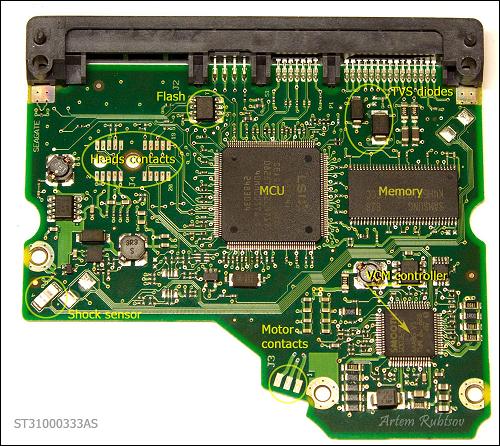
Transient Voltage Suppression diode or TVS diode.
It protects PCB from power surges from external power supply. When TVS diode detects power surge it fries itself and creates short circuit between power connector and ground. There are two TVS diodes on this PCB for 5V and 12V protection.
Credit: http://en.rlab.ru/doc/
Re: Seagate 7200.11 hard drive burned out
July 28th, 2009, 0:58
Ha, that was convenient. Say thanks to Doomer.
Powered by phpBB © phpBB Group.