Component ID on a Segate ST3300631A Logic PCB
September 8th, 2009, 11:15
Hi guys,
Wondering if anyone can help. I am looking for information of a chip on the above logic board. I am trying to locate one but I am having difficulties sourcing one. The drive unit came from a external USB drive which stopped working so I removed the drive to take a look. The cause of the failure is that a chip has blown on it (the motor controller?). In the attached picture it is the one located to the lower left of the barcode sticker, the small square one on its own with 2 connections one of the left and one of the right. (Top left of the largest Chip, under the row of Resistors at the top)
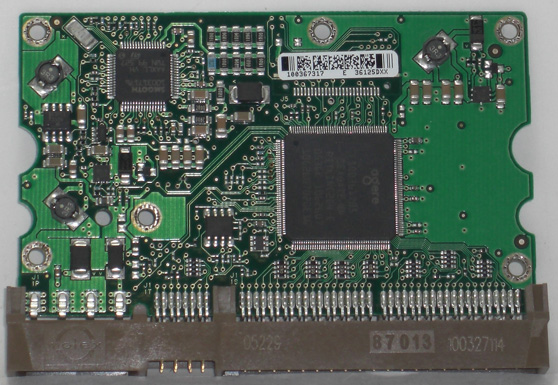
Frustratingly I cannot find any information/schematic etc of this board so I can ID the chip and try to source the chip. I have tried contacting Seagate directly but I might as well bang my head against the wall with the responses I got from them which was basically if it is not in warranty we do not want to know (Great Tech support, I mean whats the point in wasting money paying these people when you could have automated reply?)
If anyone has one of these drives I would greatly appriciate if you could let me know what the information on the chip is so I can try and order one fix my drive that way :) All I need is it to work for half hour longer so I can extract the data as this was my back up drive with data going back 10 years! (Photos etc) which are currently not stored else where as that other drive failed as well...
Thank you for your time
(ps please excuse the rant, I hope you can understand my frustration!)
Wondering if anyone can help. I am looking for information of a chip on the above logic board. I am trying to locate one but I am having difficulties sourcing one. The drive unit came from a external USB drive which stopped working so I removed the drive to take a look. The cause of the failure is that a chip has blown on it (the motor controller?). In the attached picture it is the one located to the lower left of the barcode sticker, the small square one on its own with 2 connections one of the left and one of the right. (Top left of the largest Chip, under the row of Resistors at the top)
Frustratingly I cannot find any information/schematic etc of this board so I can ID the chip and try to source the chip. I have tried contacting Seagate directly but I might as well bang my head against the wall with the responses I got from them which was basically if it is not in warranty we do not want to know (Great Tech support, I mean whats the point in wasting money paying these people when you could have automated reply?)
If anyone has one of these drives I would greatly appriciate if you could let me know what the information on the chip is so I can try and order one fix my drive that way :) All I need is it to work for half hour longer so I can extract the data as this was my back up drive with data going back 10 years! (Photos etc) which are currently not stored else where as that other drive failed as well...
Thank you for your time
(ps please excuse the rant, I hope you can understand my frustration!)
Re: Component ID on a Segate ST3300631A Logic PCB
September 8th, 2009, 13:41
From looking about they are not the TVS (there bottom left of the pix???) am I right in saying that this is the motor control chip? There is no way of bypassing this or a substitute component?
Re: Component ID on a Segate ST3300631A Logic PCB
September 8th, 2009, 15:01
Closer inspection and abit of guess work as the component is badly damaged, some of the information looks very similar to the chip in the lower left, the 2 running vertically in the above pix. It is the one on the far left which is a ST E BUX C607...
If I removed the one that has failed as according to the below thread, would I (theoretically)be able to start the drive? or do I have to do other stuff?
seagate-320gb-st3320820a-pcb-swap-t12189.html
Thanks
If I removed the one that has failed as according to the below thread, would I (theoretically)be able to start the drive? or do I have to do other stuff?
seagate-320gb-st3320820a-pcb-swap-t12189.html
Thanks
Re: Component ID on a Segate ST3300631A Logic PCB
September 8th, 2009, 18:33
The "SMOOTH" chip controls the spin motor and the voice coil.
Re: Component ID on a Segate ST3300631A Logic PCB
September 8th, 2009, 18:35
It could be a BUXC537 or KVP5BA.
Re: Component ID on a Segate ST3300631A Logic PCB
September 9th, 2009, 1:02
I can't see the part number on the SMOOTH combo motor controller chip, but if it is similar to the L7250 ST Microelectronics device, then its datasheet or application notes may have an application circuit that matches your PCB's layout.
Here is one datasheet:
http://wandrew.regruppa.ru/PCInfo/TechDoc/L7250(Smooth).pdf
See the application circuits on pages 43 and 44.
Here is one datasheet:
http://wandrew.regruppa.ru/PCInfo/TechDoc/L7250(Smooth).pdf
See the application circuits on pages 43 and 44.
Re: Component ID on a Segate ST3300631A Logic PCB
September 9th, 2009, 2:57
The BU? marking code appears to be used by ST Microelectronics in
their SMBJ series 600W Transil (TVS) range.
See page 2 of the datasheet:
http://www.st.com/stonline/products/lit ... s/5616.pdf
The BUX marking isn't listed, but it would appear that the "U"
designates a unidirectional device. However, if this were the case, then one would expect to see a polarity stripe.
The "C" appears to be the manufacturing location, followed by a
numeric YWW date code.
their SMBJ series 600W Transil (TVS) range.
See page 2 of the datasheet:
http://www.st.com/stonline/products/lit ... s/5616.pdf
The BUX marking isn't listed, but it would appear that the "U"
designates a unidirectional device. However, if this were the case, then one would expect to see a polarity stripe.
The "C" appears to be the manufacturing location, followed by a
numeric YWW date code.
Re: Component ID on a Segate ST3300631A Logic PCB
September 9th, 2009, 4:11
Thanks for your help guys, just a couple more questons.
I found a very large Magnifying glass and had a couple of people look at this. It does seem to be the same component as the one in the lower part. I've uploaded a highlighted pix now that I'm on a PC and not my N97.
The failed component has the Red square around it, the one that is identical is in blue. Now from what I understand is that he one in blue (and the smaller one next to it) are TVS components to smooth the incoming power. Now looking at pictures of the seagate logic boards (the only ones I have found are on larger drives) there is not one of these extra TVS components.
So I have 2 questions:
1 - If I remove the failed one and tried to power it up would it power do you think?
2 - If I removed the failed one and swapped in place the other TVS in blue, would it boot then?
I need it to run for no more than a hour if that!
Thanks again
I found a very large Magnifying glass and had a couple of people look at this. It does seem to be the same component as the one in the lower part. I've uploaded a highlighted pix now that I'm on a PC and not my N97.
The failed component has the Red square around it, the one that is identical is in blue. Now from what I understand is that he one in blue (and the smaller one next to it) are TVS components to smooth the incoming power. Now looking at pictures of the seagate logic boards (the only ones I have found are on larger drives) there is not one of these extra TVS components.
- Segate ST3300631A Logic PCB.jpg (39.17 KiB) Viewed 12366 times
So I have 2 questions:
1 - If I remove the failed one and tried to power it up would it power do you think?
2 - If I removed the failed one and swapped in place the other TVS in blue, would it boot then?
I need it to run for no more than a hour if that!
Thanks again
Re: Component ID on a Segate ST3300631A Logic PCB
September 9th, 2009, 5:07
IF, There are no faults elsewhere (inside HDA) and
IF, Your power supply voltage is correct (NB)
you could just remove the faulty "chip" and leave the other two in place.
Should work, BUT
this is not how I would solve this problem
But, you asked the question and I gave you an answer.
You do anything AT YOUR OWN RISK !!
IF, Your power supply voltage is correct (NB)
you could just remove the faulty "chip" and leave the other two in place.
Should work, BUT
this is not how I would solve this problem
But, you asked the question and I gave you an answer.
You do anything AT YOUR OWN RISK !!
Re: Component ID on a Segate ST3300631A Logic PCB
September 9th, 2009, 5:49
Thanks
I understand that if there is any other faults it won't work The drive came from a USB caddy made by Seagate which I think is faulty. I am going to put it in my main PC running off a solid supply.
How would you repair this drive derp? This is going to be my first attempt at a HDD and I would like to learn!
I'm having a lot of trouble sourcing the board or a replacement drive which people are trying to charge over $350USD for(!!!!!!!), RS components and even the ST website do not contain listings of this component, Google gives me nothing either.
I do understand that anything I do is at my own risk, but would like to limit the risk with as much knowledge of what I attempt before I attempt! lol
Thanks for your help derp
I understand that if there is any other faults it won't work
The drive came from a USB caddy made by Seagate which I think is faulty. I am going to put it in my main PC running off a solid supply.How would you repair this drive derp? This is going to be my first attempt at a HDD and I would like to learn!
I'm having a lot of trouble sourcing the board or a replacement drive which people are trying to charge over $350USD for(!!!!!!!), RS components and even the ST website do not contain listings of this component, Google gives me nothing either.
I do understand that anything I do is at my own risk, but would like to limit the risk with as much knowledge of what I attempt before I attempt! lol
Thanks for your help derp
Re: Component ID on a Segate ST3300631A Logic PCB
September 9th, 2009, 6:50
Ah  I think you got enough info for now.
I hope this is not a customer's drive
I think you got enough info for now.I hope this is not a customer's drive
Re: Component ID on a Segate ST3300631A Logic PCB
September 9th, 2009, 7:14
Thanks derp... I've clipped it off but won't be able to try it until I get home at 10 tonight 
Nah this is my own personal back/long term storage drive, with stuff going back years which I have no other copies of (photos etc) so would love to get access just for 1 more hour so I can do a clone.
I'll post back here later
Thanks again
Nah this is my own personal back/long term storage drive, with stuff going back years which I have no other copies of (photos etc) so would love to get access just for 1 more hour so I can do a clone.
I'll post back here later
Thanks again
Re: Component ID on a Segate ST3300631A Logic PCB
September 9th, 2009, 7:38
why don't you take it to someone who knows what they are doing. It wont be expensive providing you dont mess it up.
Re: Component ID on a Segate ST3300631A Logic PCB
September 11th, 2009, 7:43
Hi,
Just want to say a massive thanks to derp and fzabkar for all there help. Clipped the offending component off and put it inside my PC, booted up fine and was able to rescue all the data! So thanks again in guiding me to a solution.
HDD Spaz, thank you for your unhelpful comment. I am well aware that I could have taken/sent it to a specialist who would have charged me more than I can afford to at the moment when the solution was very simple to do, and from the comments I was writing hopefully I came across as someone who was competent at attempting these things (I would hope so as I fix GPS, Radar and Satellite on boats so I really hope so), it was just that I have not attempted this before so wanted to gather as much knowledge as I could before I did as where is the fun in sending it to someone else when you know yourself you can probably fix it. So if I did follow your suggestion I would have wasted my money and time in doing so, luckly other people on here was helpful enough to point me in the right direction
So again thanks derp and fzabkar, I owe you a beer!
Just want to say a massive thanks to derp and fzabkar for all there help. Clipped the offending component off and put it inside my PC, booted up fine and was able to rescue all the data! So thanks again in guiding me to a solution.
HDD Spaz, thank you for your unhelpful comment. I am well aware that I could have taken/sent it to a specialist who would have charged me more than I can afford to at the moment when the solution was very simple to do, and from the comments I was writing hopefully I came across as someone who was competent at attempting these things (I would hope so as I fix GPS, Radar and Satellite on boats so I really hope so), it was just that I have not attempted this before so wanted to gather as much knowledge as I could before I did as where is the fun in sending it to someone else when you know yourself you can probably fix it. So if I did follow your suggestion I would have wasted my money and time in doing so, luckly other people on here was helpful enough to point me in the right direction
So again thanks derp and fzabkar, I owe you a beer!
Powered by phpBB © phpBB Group.