External NTFS HDD suddenly appears as FAT 32 folder - help
December 27th, 2009, 7:26
Hi everybody,
I have a strange problem with my external hard disks. All of a sudden they dont appear as hard drives anymore, but as folders named pendrive, with a fat32 file system.
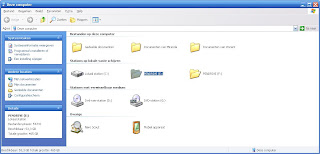
This goes for both my external hdds, a medion drive n go and a freecom 500gb hdd. I know for sure both are NTFS, because I used them to store dvd movies. If I try to store a dvd now, it says files cant exceed 4gb.
I am using XP professional on a toshiba laptop.
If I try to open the folder by double clicking, the following error is displayed:
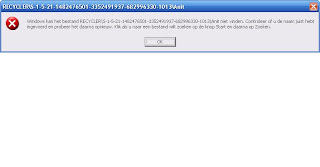
Translated, it says it cannot find file RECYCLER\S.....\Anit.
I can open the folder by right clicking and selecting explore. All my data is still there, and still available.
If I plug either hdd in my work laptop (Lenovo T61), I get the same problem, except that I can double click the folder icon to explore the drive.
When I check the properties, it is still (correctly) called freecom hdd, eventhough it is shown as pendrive in my computer.
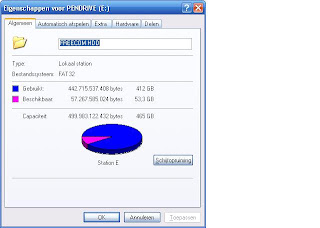
I have looked around a bit and attempted to fix the problem myself.
I tried converting fat32 to ntfs by using command CONVERT E: /FS:NTFS but without result.
I also tried test-disk win, but this did not fix it either.
I checked the volume for errors but this did not help either...
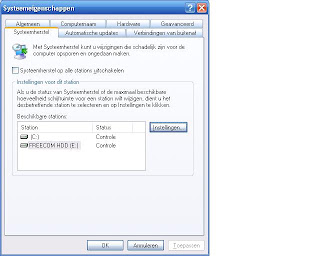
If I check system recovery settings, the hdd is displayed correctly - as a drive and with the correct name.
I am sorry it became such a long post, I am not quite sure what info is relevant so I tried to include as many details as possible. If someone could help me this would be great !
Thanks for reading!
Miranda aka Randje
I have a strange problem with my external hard disks. All of a sudden they dont appear as hard drives anymore, but as folders named pendrive, with a fat32 file system.
This goes for both my external hdds, a medion drive n go and a freecom 500gb hdd. I know for sure both are NTFS, because I used them to store dvd movies. If I try to store a dvd now, it says files cant exceed 4gb.
I am using XP professional on a toshiba laptop.
If I try to open the folder by double clicking, the following error is displayed:
Translated, it says it cannot find file RECYCLER\S.....\Anit.
I can open the folder by right clicking and selecting explore. All my data is still there, and still available.
If I plug either hdd in my work laptop (Lenovo T61), I get the same problem, except that I can double click the folder icon to explore the drive.
When I check the properties, it is still (correctly) called freecom hdd, eventhough it is shown as pendrive in my computer.
I have looked around a bit and attempted to fix the problem myself.
I tried converting fat32 to ntfs by using command CONVERT E: /FS:NTFS but without result.
I also tried test-disk win, but this did not fix it either.
I checked the volume for errors but this did not help either...
If I check system recovery settings, the hdd is displayed correctly - as a drive and with the correct name.
I am sorry it became such a long post, I am not quite sure what info is relevant so I tried to include as many details as possible. If someone could help me this would be great !
Thanks for reading!
Miranda aka Randje
Re: External NTFS HDD suddenly appears as FAT 32 folder - help
December 28th, 2009, 1:42
Here are the full-sized versions of your images:
http://2.bp.blogspot.com/_mQvo_YtP3OI/S ... 5bz1PLm3U/
http://1.bp.blogspot.com/_mQvo_YtP3OI/S ... 4akgrq7Rg/
http://4.bp.blogspot.com/_mQvo_YtP3OI/S ... 2GKZGSQJw/
http://2.bp.blogspot.com/_mQvo_YtP3OI/S ... kViUlIsg0/
You could use Microsoft's UVCView to examine your USB devices:
http://www.users.on.net/~fzabkar/USB_ID ... ew.x86.exe
You could also use Microsoft's Sector Inspector utility to capture the "MBR, Partition Table(s) and Volume Boot Records for every disk connected to your computer":
http://www.users.on.net/~fzabkar/SecInspect.zip
Extract the above archive to the one folder and execute the SIrun.bat file. The procedure will generate a report file named SIout.txt which you can then upload to a file sharing service so that we can examine it.
More information here:
http://mirror.href.com/thestarman/asm/m ... tm#SecInsp
http://2.bp.blogspot.com/_mQvo_YtP3OI/S ... 5bz1PLm3U/
http://1.bp.blogspot.com/_mQvo_YtP3OI/S ... 4akgrq7Rg/
http://4.bp.blogspot.com/_mQvo_YtP3OI/S ... 2GKZGSQJw/
http://2.bp.blogspot.com/_mQvo_YtP3OI/S ... kViUlIsg0/
You could use Microsoft's UVCView to examine your USB devices:
http://www.users.on.net/~fzabkar/USB_ID ... ew.x86.exe
You could also use Microsoft's Sector Inspector utility to capture the "MBR, Partition Table(s) and Volume Boot Records for every disk connected to your computer":
http://www.users.on.net/~fzabkar/SecInspect.zip
Extract the above archive to the one folder and execute the SIrun.bat file. The procedure will generate a report file named SIout.txt which you can then upload to a file sharing service so that we can examine it.
More information here:
http://mirror.href.com/thestarman/asm/m ... tm#SecInsp
Re: External NTFS HDD suddenly appears as FAT 32 folder - help
December 28th, 2009, 16:18
Hi fzabkar
Thanks for your reply!
I have used the tools you described to create the log files - http://drop.io/HDDissues.
For both the Freecom HDD and the Medion HDD I have created logs using UVCview and SecInspect. I hope you can do anything with it, to me it´s abacadabra..
Miranda
Thanks for your reply!
I have used the tools you described to create the log files - http://drop.io/HDDissues.
For both the Freecom HDD and the Medion HDD I have created logs using UVCview and SecInspect. I hope you can do anything with it, to me it´s abacadabra..
Miranda
Re: External NTFS HDD suddenly appears as FAT 32 folder - help
December 30th, 2009, 4:55
I have taken the liberty of reposting your data on my own web space to make it easier for others to access:
http://www.users.on.net/~fzabkar/Randje/
I hope you don't mind.
Anyway, both your external devices identify themselves to UVCView as "Mass Storage USB Device Interface Class", which means they should be assigned drive letters by Windows. I don't understand why they show up as Pendrives, though.
Sector Inspector finds three drives.
PHYSICALDRIVE0 is your boot drive. It has a 79.8 GB NTFS partition (type 07) and a small 263MB type 88 partition. The following URLs suggest that it may be a HP QuickPlay partition or "Linux plaintext partition table":
http://www.ozzu.com/mswindows-forum/won ... 73477.html
http://www.win.tue.nl/~aeb/partitions/p ... pes-1.html
Both the MBR and NTFS boot sector appear to contain original MS code (English).
PHYSICALDRIVE1 is your Drive-n-go. It contains a single 500GB "WIN95 OSR2 FAT32, LBA-mapped" partition, type 0C, with no MBR code, and an MSWIN4.1 FAT32 boot sector, also without code.
PHYSICALDRIVE2 is your Freecom HDD. It contains a single 500GB partition as above, type 0C, but with MS MBR code (English). The boot sector is an MSWIN4.1 FAT32, with German boot code.
So it appears to me that your are mistaken. Both external drives do indeed have FAT32 file systems.
http://www.users.on.net/~fzabkar/Randje/
I hope you don't mind.
Anyway, both your external devices identify themselves to UVCView as "Mass Storage USB Device Interface Class", which means they should be assigned drive letters by Windows. I don't understand why they show up as Pendrives, though.
Sector Inspector finds three drives.
PHYSICALDRIVE0 is your boot drive. It has a 79.8 GB NTFS partition (type 07) and a small 263MB type 88 partition. The following URLs suggest that it may be a HP QuickPlay partition or "Linux plaintext partition table":
http://www.ozzu.com/mswindows-forum/won ... 73477.html
http://www.win.tue.nl/~aeb/partitions/p ... pes-1.html
Both the MBR and NTFS boot sector appear to contain original MS code (English).
PHYSICALDRIVE1 is your Drive-n-go. It contains a single 500GB "WIN95 OSR2 FAT32, LBA-mapped" partition, type 0C, with no MBR code, and an MSWIN4.1 FAT32 boot sector, also without code.
PHYSICALDRIVE2 is your Freecom HDD. It contains a single 500GB partition as above, type 0C, but with MS MBR code (English). The boot sector is an MSWIN4.1 FAT32, with German boot code.
So it appears to me that your are mistaken. Both external drives do indeed have FAT32 file systems.
Powered by phpBB © phpBB Group.