2 Western Digital with no Power
June 4th, 2010, 13:25
Hi,
recently I lost two of my HDD's
sadly about the situation, I will try to get them repaired.
So, the first one is a WD2000JD - 00GBB0 (200GB)
The chip plate nr is: 2060-001215-003 REV A
The second on is a WD10EADS-00P8B0 (1TB)
Chip plate nr: 2060-701640-001 REV A
I read in a other topic that with a 5 Volt damage there could be damaged more :-/ I hope it's not my case.
When I buy a new chip plate, how many Numbers of the HDD and the chip Serial have to be the same?
Like WWN, DCM, LBA
Thanks for helping me!
recently I lost two of my HDD's
sadly about the situation, I will try to get them repaired.
So, the first one is a WD2000JD - 00GBB0 (200GB)
The chip plate nr is: 2060-001215-003 REV A
The second on is a WD10EADS-00P8B0 (1TB)
Chip plate nr: 2060-701640-001 REV A
I read in a other topic that with a 5 Volt damage there could be damaged more :-/ I hope it's not my case.
When I buy a new chip plate, how many Numbers of the HDD and the chip Serial have to be the same?
Like WWN, DCM, LBA
Thanks for helping me!
- Attachments
-
- Closer to the burned chip
-
- The WD10EADS
-
- Closer to the burned chip
-
- That's the WD2000
Re: 2 Western Digital with no Power
June 4th, 2010, 13:48
Just go by the PCB sticker and stamp at the back. Post in this forum in the buying parts section with the full model of both ur drives and PCB sticker info from the back.
Also a question on a picture of ur 1TB PCB i see that u are missing ur U12 ( eeprom ) Did u already take it out ?
Also a question on a picture of ur 1TB PCB i see that u are missing ur U12 ( eeprom ) Did u already take it out ?
Re: 2 Western Digital with no Power
June 4th, 2010, 14:07
Hey, thank you for the reply
No, I didn't take the eeprom off. I just took the PCB from the drive.
No, I didn't take the eeprom off. I just took the PCB from the drive.
Re: 2 Western Digital with no Power
June 4th, 2010, 14:43
well , i dont really know why, but the picture of ur 1TB WD is missing eeprom... Its strange unless that WD model can store adaptives at eeprom OR embeded. If its embeded u going to need help from a pro.
Re: 2 Western Digital with no Power
June 4th, 2010, 14:45
Alexii wrote:Just go by the PCB sticker and stamp at the back. Post in this forum in the buying parts section with the full model of both ur drives and PCB sticker info from the back.
Also a question on a picture of ur 1TB PCB i see that u are missing ur U12 ( eeprom ) Did u already take it out ?
This 1Tb doesn't have an external ROM, it's embedded in the MCU. The pads for the ROM are there in case you need to put an external ROM there to fix up a buggered/misprogrammed internal ROM which is preventing the PCB starting.
Re: 2 Western Digital with no Power
June 4th, 2010, 14:52
Here we go. I was dealing with a 1.5 Terra same model today and it had eeprom , so i asumed 1tb will have it as well. I stand corrected. Ty pcimage.
Re: 2 Western Digital with no Power
June 4th, 2010, 15:12
Hi,
 Alexii - look at the picture ...
Mikippp
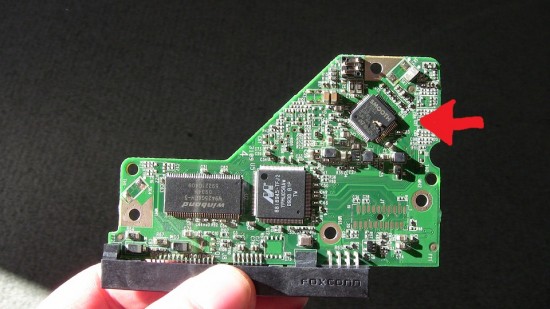
Alexii - look at the picture ...Mikippp
Re: 2 Western Digital with no Power
June 4th, 2010, 15:32
Do I need the eeprom to repair the HDD?
Re: 2 Western Digital with no Power
June 4th, 2010, 16:27
The ROM in this HDD is stored in the Marvell CPU 88i8945-TFJ2
(if is an external ROM - is a different processor 88i9045-TFJ2)
ROM can be:
-readed from the original processor...
-the processor can be transferred from patient PCB to donor PCB...
-Base part of ROM can be readed from SA (if original CPU is damaged), unfortunately (probably) modules 102-107 are NOT_INIT in this HDD...
Mikippp
(if is an external ROM - is a different processor 88i9045-TFJ2)
ROM can be:
-readed from the original processor...
-the processor can be transferred from patient PCB to donor PCB...
-Base part of ROM can be readed from SA (if original CPU is damaged), unfortunately (probably) modules 102-107 are NOT_INIT in this HDD...
Mikippp
Re: 2 Western Digital with no Power
June 4th, 2010, 16:44
Patient ROM must be uploaded to donor PCB ...
You are not able to do it yourself !!!
Mikippp
You are not able to do it yourself !!!
Mikippp
Re: 2 Western Digital with no Power
June 7th, 2010, 3:15
You can get an idea if the MCU or other chips are damaged by measuring the load resistance at each of the onboard regulators.
For the WD10EADS board, measure the resistances between ground and each side of the inductors (L1, L2, L3) below the SMOOTH chip. Also test diodes D2 and D1.
You can also check the outputs of the regulator (TLE4417, IRU1239SC) for the WD2000 by referring to the datasheet of a compatible (?) IC.
STMicroelectronics ST3L01K7R IC REG TRIPLE 2.6/3.3/8V 7SPAK:
http://www.st.com/stonline/books/pdf/docs/8618.pdf
http://catalog.digikey.com/scripts/part ... -4313-1-ND
You may not be able to repair anything, but the above tests will help you assess the damage.
For the WD10EADS board, measure the resistances between ground and each side of the inductors (L1, L2, L3) below the SMOOTH chip. Also test diodes D2 and D1.
You can also check the outputs of the regulator (TLE4417, IRU1239SC) for the WD2000 by referring to the datasheet of a compatible (?) IC.
STMicroelectronics ST3L01K7R IC REG TRIPLE 2.6/3.3/8V 7SPAK:
http://www.st.com/stonline/books/pdf/docs/8618.pdf
http://catalog.digikey.com/scripts/part ... -4313-1-ND
You may not be able to repair anything, but the above tests will help you assess the damage.
Re: 2 Western Digital with no Power
June 7th, 2010, 9:21
Mikippp wrote:Hi,
Mikippp
I looked at the picture. Its showing a dead smooth. So ?
Re: 2 Western Digital with no Power
March 10th, 2011, 23:48
fzabkar wrote:You can get an idea if the MCU or other chips are damaged by measuring the load resistance at each of the onboard regulators.
Doesn't work all the time
Damaged VCM controller can hold CPU reset signal and that will prevent SoC from starting
Re: 2 Western Digital with no Power
March 11th, 2011, 1:14
The photo that shows damage to the larger Marvell chip suggests catastrophic (i.e. widespread) damage, and my guess is the preamp is probably dead in that one.
Professional assistance is required for both of these.
Professional assistance is required for both of these.
Re: 2 Western Digital with no Power
March 11th, 2011, 1:28
Doomer wrote:fzabkar wrote:You can get an idea if the MCU or other chips are damaged by measuring the load resistance at each of the onboard regulators.
Doesn't work all the time
Damaged VCM controller can hold CPU reset signal and that will prevent SoC from starting
If you've read my other posts on the subject, you will realise that I'm very well aware of that.
Moreover, if you reread what I wrote, I suggested testing the loads of the regulators for shorts. A short would indicate that the associated chips may be damaged. For example, a short on Vcore would point to an MCU failure, while a short on Vio could be due to a failed MCU, SDRAM, or flash memory.
Re: 2 Western Digital with no Power
March 11th, 2011, 2:10
Checking regulators etc is totally useless in 99.99 percent of case as end users can't easily have the parts and don't have soldering equipment (and won't buy it just to save porn and warez) so all this waste of forum space is useless too. Users are limited to buy pcbs and eventually have fw transferred , otherwise they are screwed. In this forum beside me there are people that repair pcbs and can reprogram up to mcus, but are few - it's a choice.
Linking datasheets etc to average joe with a still smoking pcb is like taking a diabetic in a candy shop, and it won't get a single bit out of drive.
Now you get why I prefer to have the drives without pcb if I have the feeling the customer has touched it...
Linking datasheets etc to average joe with a still smoking pcb is like taking a diabetic in a candy shop, and it won't get a single bit out of drive.
Now you get why I prefer to have the drives without pcb if I have the feeling the customer has touched it...
Re: 2 Western Digital with no Power
March 11th, 2011, 10:03
fzabkar wrote:Moreover, if you reread what I wrote, I suggested testing the loads of the regulators for shorts.
It's either my English or yours
Probably mine but I didn't find the word "short" in your original post
Measuring resistance could show you some numbers and you can calc amount of consuming power knowing voltage of regulator
Simplified formula P=U^2/R
Since you said "load resistance" I guessed you suggested to measure it while power is on and it is not a constant value because of semiconductors
That's what I thought
Re: 2 Western Digital with no Power
March 11th, 2011, 12:26
It is difficult to make measurements from pictures, Doomer...
Re: 2 Western Digital with no Power
March 11th, 2011, 13:06
Not for Doomer. He is not like regular mortals.

Re: 2 Western Digital with no Power
March 11th, 2011, 15:44
Doomer wrote:It's either my English or yours
Since you said "load resistance" I guessed you suggested to measure it while power is on and it is not a constant value because of semiconductors
That's what I thought
It's your English.
I wrote that "you can get an idea if the MCU or other chips are damaged by measuring the load resistance at each of the onboard regulators".
I'm addressing DIY-ers. Dynamic resistances are the last thing I would expect them to be able to measure. In any case, when using a multimeter, resistance is measured in the absence of power. Every junior tech knows that. :roll:
See "Resistance Measurements" on page 6 of the following manual:
Cen-Tech 90899 7 Function Digital Multimeter User Manual:
http://manuals.harborfreight.com/manual ... /90899.pdf
BTW, correcting your errors is getting to be tedious.
Powered by phpBB © phpBB Group.