WD 2000 SATA format
September 27th, 2010, 11:23
Hello!
I have an older hard-drive at home (WD 2000 SATA), so I'm thinking of puting it in my PC so that I'll have two HDD's and so that I can have another pagefile.sys on my second HDD and use it for more virtual RAM. Do you think that's a good idea since I can't afford to buy new "real" RAM? And what kind of problems can I face in doing this, will I have to reinstall Windows XP (hope not)? There's also a possibility of a nasty virus being on that old HDD, maybe even in it's boot sector, I'm not sure, so how do I prevent it's spreading to my healthy HDD that I already have installed. I've downloaded your Low Level HDD Format utility, so that I'll format it as soon as I put it in my PC box. I'm just afraid of the virus, so please help me.
Thank you!
I have an older hard-drive at home (WD 2000 SATA), so I'm thinking of puting it in my PC so that I'll have two HDD's and so that I can have another pagefile.sys on my second HDD and use it for more virtual RAM. Do you think that's a good idea since I can't afford to buy new "real" RAM? And what kind of problems can I face in doing this, will I have to reinstall Windows XP (hope not)? There's also a possibility of a nasty virus being on that old HDD, maybe even in it's boot sector, I'm not sure, so how do I prevent it's spreading to my healthy HDD that I already have installed. I've downloaded your Low Level HDD Format utility, so that I'll format it as soon as I put it in my PC box. I'm just afraid of the virus, so please help me.
Thank you!
Re: WD 2000 SATA format
September 28th, 2010, 5:05
Ptaak:
Connect the 2000 to the secondary controller and disconnect your boot drive.
Then power up and run MHDD, select the drive, then type ERASE. Problem solved and virus (and all data) erased, and drive is refreshed. Then hit F4, select REMAP ON, and hit F4 again to certify the drive.
What type of RAM do you need? --> If <-- its not overly expensive to ship 3rd class mail from USA to Slovenia, I --> might <-- donate some.
Best swap approach for speed is to make a FAT32 partition, say 1 GB, right at the beginning of the disk, and then make your data partition or partitions for the rest of the disk. Then set a permanent 1 gig swap file on the 1 gig partition. And don't have both drives on the same cable. (Never mind, on SATA there can be only one drive on a cable... pay that no mind.)
http://www.hdtune.com/results/Western_D ... 2000JS.gif
See how the speed falls off towards the middle and end of the disk? The beginning of the disk is always fastest. Look up CAV and CLV (constant angular velocity and constant linear velocity) to explain why.
Hiren or self booting MHDD CD or USB stick is easiest.
Connect the 2000 to the secondary controller and disconnect your boot drive.
Then power up and run MHDD, select the drive, then type ERASE. Problem solved and virus (and all data) erased, and drive is refreshed. Then hit F4, select REMAP ON, and hit F4 again to certify the drive.
What type of RAM do you need? --> If <-- its not overly expensive to ship 3rd class mail from USA to Slovenia, I --> might <-- donate some.
Best swap approach for speed is to make a FAT32 partition, say 1 GB, right at the beginning of the disk, and then make your data partition or partitions for the rest of the disk. Then set a permanent 1 gig swap file on the 1 gig partition. And don't have both drives on the same cable. (Never mind, on SATA there can be only one drive on a cable... pay that no mind.)
http://www.hdtune.com/results/Western_D ... 2000JS.gif
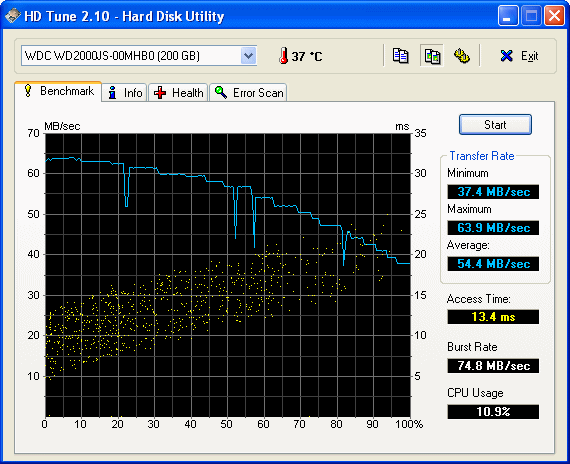
See how the speed falls off towards the middle and end of the disk? The beginning of the disk is always fastest. Look up CAV and CLV (constant angular velocity and constant linear velocity) to explain why.
Hiren or self booting MHDD CD or USB stick is easiest.
Last edited by Feklar on September 28th, 2010, 5:09, edited 1 time in total.
Re: WD 2000 SATA format
September 28th, 2010, 5:08
After low level format there will be no viruses. There will be no any other data as well.
Re: WD 2000 SATA format
September 28th, 2010, 11:25
Pagefile is like ram- but the way its managed makes the performance worse if you increase the pagefiles more than 3 times the actual ram you actually have. Its a good idea to put it on another drive to readuce
I/O but its not likely that you will gain any performance..
Unless you are running DDR3 which i doubt.. you can get cheap ram on your favorite action sites.
Best performance is achieved with pagefile turned OFF! but you must have sufficient RAM and consider what applications/games you use and on which OS.
Besides that - i din not actually understand what you meant..
I/O but its not likely that you will gain any performance..
Unless you are running DDR3 which i doubt.. you can get cheap ram on your favorite action sites.
Best performance is achieved with pagefile turned OFF! but you must have sufficient RAM and consider what applications/games you use and on which OS.
Besides that - i din not actually understand what you meant..
Re: WD 2000 SATA format
September 28th, 2010, 12:16
*action - auction 
Re: WD 2000 SATA format
September 28th, 2010, 15:48
Thank you all for your help! Before I start asking more questions, please tell me how much will I gain with adding another HDD and moving the pagefile.sys from C:\ to the new HDD (in terms of virtual memory, not in terms of new HDD free space). Thank you!
Re: WD 2000 SATA format
September 28th, 2010, 16:22
Re: WD 2000 SATA format
September 28th, 2010, 19:33
I will, thank you!
PS: As gain I mean what will I gain in terms of lower latency when recording music (for example).
PS: As gain I mean what will I gain in terms of lower latency when recording music (for example).
Re: WD 2000 SATA format
September 28th, 2010, 19:43
I still don't understand what you are talking about? DO you want to say that in Slovak maybe?(im not being ironic/racist/sarcastic - i can speak it)
Do you want me to donate you some ram? 512DDR?? 512DDR2?? The pagefile wont do shit for you. Its all crap on other sites saying it will increase your performance blah blah blah... Did you read what i posted higher up??
Just face it- or get a new pc on 18month finance for crying out loud.
Pagefile and latency in recording music. Its like what does a cookie have to steering wheel?
CCLEANER - Disable and remove all starup ITEMS- so maybe you 256mb system will load a bit faster. Disable Antivirus
MALWARE ANTI MALWARE- Remove all crap from watching too much porn on your adsl 512mbit
Make sure your UDMA drivers are functioning correctly-- then i guarantee your pc will faster.
Oh and if you are still running XP- i can sell you Windows 7 Pro for 50Euro just to help you out.. and ill throw in ram for free. + p&p
Do you want me to donate you some ram? 512DDR?? 512DDR2?? The pagefile wont do shit for you. Its all crap on other sites saying it will increase your performance blah blah blah... Did you read what i posted higher up??
Just face it- or get a new pc on 18month finance for crying out loud.
Pagefile and latency in recording music. Its like what does a cookie have to steering wheel?
CCLEANER - Disable and remove all starup ITEMS- so maybe you 256mb system will load a bit faster. Disable Antivirus
MALWARE ANTI MALWARE- Remove all crap from watching too much porn on your adsl 512mbit
Make sure your UDMA drivers are functioning correctly-- then i guarantee your pc will faster.
Oh and if you are still running XP- i can sell you Windows 7 Pro for 50Euro just to help you out.. and ill throw in ram for free. + p&p
Re: WD 2000 SATA format
September 28th, 2010, 21:03
Bellzemos wrote:I will, thank you!
PS: As gain I mean what will I gain in terms of lower latency when recording music (for example).
Best for audio recording is ASIO or ASIO4ALL: http://www.google.com/url?sa=t&source=w ... Rw&cad=rja
Best recording to disk speed with any hard drive is to partition the first third or even fourth of the drive as the recording partition, and load the OS from a partition in the rest of the space.
Hirens has Acronis Disk Director, great for partitioning. Beware that resizing and moving a partition is possible, but is sometimes fatal, so clone the drive first before trying it.
And what ppumkin said about removing hog startup and taskbar programs...
Re: WD 2000 SATA format
September 29th, 2010, 9:35
I know about ASIO, I'm just wondering if it makes any sense to put in a second HDD just for the sake of moving swap file to it...
Re: WD 2000 SATA format
September 29th, 2010, 11:02
Budete potrebovať viac pamäte v počítači. Nový pevný disk tobie nepomôže. Môžete mať problém so softvérom tiež.
Re: WD 2000 SATA format
September 29th, 2010, 11:33
Bellzemos wrote:I know about ASIO, I'm just wondering if it makes any sense to put in a second HDD just for the sake of moving swap file to it...
It would make a large difference in recording. In video recording, it can mean whether you drop frames or not. The extra seeking involved in the swap file activity takes the heads away from the recording area long enough to drop frames. The better solution is to use the second drive as the recording space.
Speed test both drives. Whichever is the slower drive, if its not the boot drive, clone the boot drive onto it and use the clone as the boot drive, and use the faster drive to record to.
Sometimes it is best just to backup all your data, then nuke the drive, repartition a swap and a boot partition, and do a clean reinstall of Windows and your programs and data.
And the more RAM, the better.
Re: WD 2000 SATA format
September 29th, 2010, 11:46
On live video recording to hard drive with loss of frames would mean that constant write speed is under 5mb/s - If its not under 5mb/s then its because the processor cant handle the current encoder algorythm and drops frames to compensate for smoothness. Ram can help with this.. but not much. Usually its best to use hardware encoding support such as mpeg4 on msot tv cards.
If encoding video from file to file - you should have 0% frame dropping but the time will be longer to encode on slower systems.
This is also very dependand on the codec you use and the tolerance you set.
Recording live audio should work normally on a 386 with 8mb ram!!!! With NO FRAME LOSS!
Burning to a CD Audio stream (from MP3 128kb/s)(opther source codecs can severly damage audio recording to CD on this type of machine) with no jitter is possible on windows 98SE with a Celeron and 256MB Ram with DMA5.
What Version of windows are you using.. i asked this already.
And how much ram have you got-- and like Feklar said. Run a disk speed test. If its constant rate is 5mb/s you are running in PIO mode.. pff
And i am talking about any program you use! Nero, Asio, CoolEdit, AviSynch, DVDRipper, CloneCD,etc - No software can make your cd rom burn faster or your slow hard drive run faster..
If encoding video from file to file - you should have 0% frame dropping but the time will be longer to encode on slower systems.
This is also very dependand on the codec you use and the tolerance you set.
Recording live audio should work normally on a 386 with 8mb ram!!!! With NO FRAME LOSS!
Burning to a CD Audio stream (from MP3 128kb/s)(opther source codecs can severly damage audio recording to CD on this type of machine) with no jitter is possible on windows 98SE with a Celeron and 256MB Ram with DMA5.
What Version of windows are you using.. i asked this already.
And how much ram have you got-- and like Feklar said. Run a disk speed test. If its constant rate is 5mb/s you are running in PIO mode.. pff
And i am talking about any program you use! Nero, Asio, CoolEdit, AviSynch, DVDRipper, CloneCD,etc - No software can make your cd rom burn faster or your slow hard drive run faster..
Powered by phpBB © phpBB Group.