Some problem with Seagate 7200.12
March 30th, 2011, 1:12
Hi guys,
I"m litter speak Enhlish, sorry.
I see many cases with no solutions. Can someone help me teamviewer ? please (Yahoo chat: khoiphucdulieu)
I have a Seagate Barracuda HDD not detected bios:
Family: 7200.12
Model: ST3250318AS
Size: 250Gbytes
Firmware: CC37
Product of China
When I looked in the BIOS model, saw that my Seagate HDD was recognized as 0MB and 0LBA!!
I have tried with dku5 and PC 3000 : but failed (
(
AND I"M TRIED COMMAND :
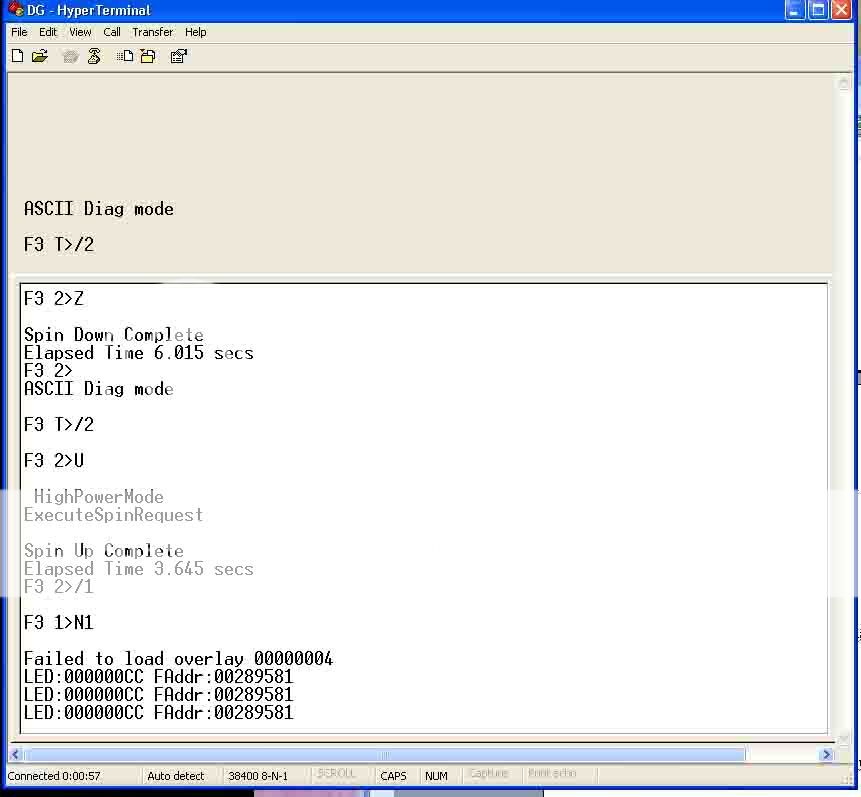
I tried but not
COMMAND: V4, V1
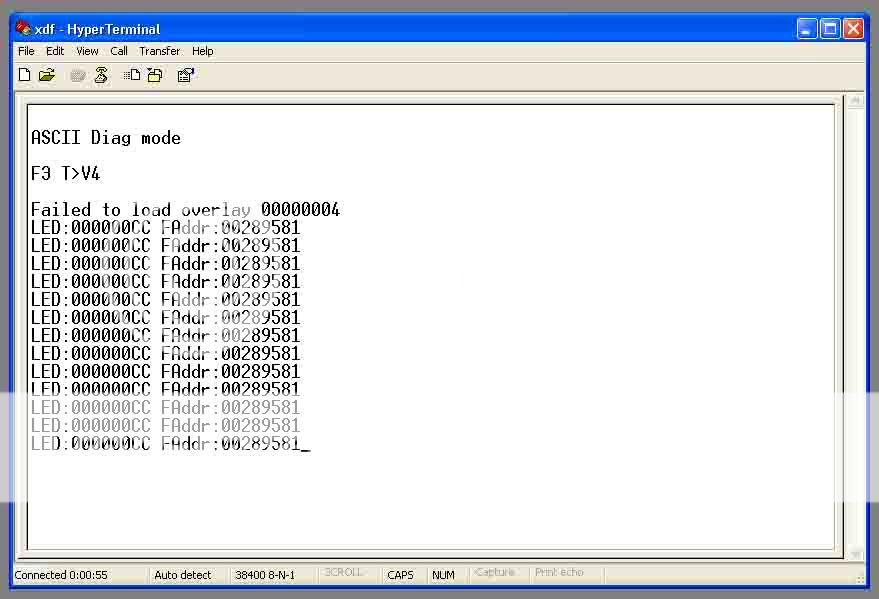
I"m litter speak Enhlish, sorry.
I see many cases with no solutions. Can someone help me teamviewer ? please (Yahoo chat: khoiphucdulieu)
I have a Seagate Barracuda HDD not detected bios:
Family: 7200.12
Model: ST3250318AS
Size: 250Gbytes
Firmware: CC37
Product of China
When I looked in the BIOS model, saw that my Seagate HDD was recognized as 0MB and 0LBA!!
I have tried with dku5 and PC 3000 : but failed
(AND I"M TRIED COMMAND :
I tried but not
COMMAND: V4, V1
Re: Some problem with Seagate 7200.12
March 31st, 2011, 22:06
Can someone help me ?
Re: Some problem with Seagate 7200.12
April 1st, 2011, 10:03
Disconnect the PCB from the hdd, connect PCB only to terminal, Power ON
wait for Prompt, then try Ctrl-Z (stop motor) wait after it stops for min. 2-3 min.
then connect PCB back and be careful while doing so.
then, Ctrl-U ( level 2 /2)
then /1 U and wait for another 2-3 min after it does so then clear smart as you tried again
and post results back here
good luck
wait for Prompt, then try Ctrl-Z (stop motor) wait after it stops for min. 2-3 min.
then connect PCB back and be careful while doing so.
then, Ctrl-U ( level 2 /2)
then /1 U and wait for another 2-3 min after it does so then clear smart as you tried again
and post results back here
good luck
Re: Some problem with Seagate 7200.12
April 1st, 2011, 13:03
Normally with PC-3000 the ES2 manual will go through this one nicely for you. It will show you what needs to be done plus in the scripting of the UDMA there is a nice scrip to handle this one. What version of PC-3000 do you have and use? Is it PCI or UDMA version on this one? If it is older model then no it does not have the script for you and you will need to do a different step on this one. Try to download the Seagate ES2 manual from your download box
Re: Some problem with Seagate 7200.12
April 1st, 2011, 13:15
DId the both of you see "FAILED TO LOAD OVERLAY 00000004" ?
Re: Some problem with Seagate 7200.12
May 19th, 2011, 17:31
Hi to all the forum!
What about 7200.12 that at power on + Ctrl-Z show this
please note that is stays bricked at line
(P) SATA Reset
and doesn't show the prompt again.
I tried the sequence for the SIM error, it has been hard to get the prompt, but finally I've been able to issue both the commands and both succeeded, but after power cycling the drive, it went again into
Thank you for any tip, hint, answer or help
Cor
(to PM me click here)
--------
What about 7200.12 that at power on + Ctrl-Z show this
- Code:
F3 T>
RAW OFF

(P) SATA Reset
please note that is stays bricked at line
(P) SATA Reset
and doesn't show the prompt again.
I tried the sequence for the SIM error, it has been hard to get the prompt, but finally I've been able to issue both the commands and both succeeded, but after power cycling the drive, it went again into
- Code:
F3 T>
RAW OFF

(P) SATA Reset
Thank you for any tip, hint, answer or help
Cor
(to PM me click here)
--------
Re: Some problem with Seagate 7200.12
May 25th, 2011, 2:18
Corsari wrote:Hi to all the forum!
What about 7200.12 that at power on + Ctrl-Z show this
- Code:
F3 T>
RAW OFF

(P) SATA Reset
please note that is stays bricked at line
(P) SATA Reset
and doesn't show the prompt again.
I tried the sequence for the SIM error, it has been hard to get the prompt, but finally I've been able to issue both the commands and both succeeded, but after power cycling the drive, it went again into
- Code:
F3 T>
RAW OFF

(P) SATA Reset
Thank you for any tip, hint, answer or help
Cor
(to PM me click here)
--------
are u able to get the terminal after this?
Re: Some problem with Seagate 7200.12
June 6th, 2011, 8:07
einstein9 wrote:...
are u able to get the terminal after this?
No it is hanged.
I've found one trick to get it but this won't help, 'cause as said above, the commands are successful, but the disk is still bricked.
Sorry for the delay in this answer
Cor
Powered by phpBB © phpBB Group.