Samsung HD204UI 2TB suspicious
August 12th, 2011, 9:38
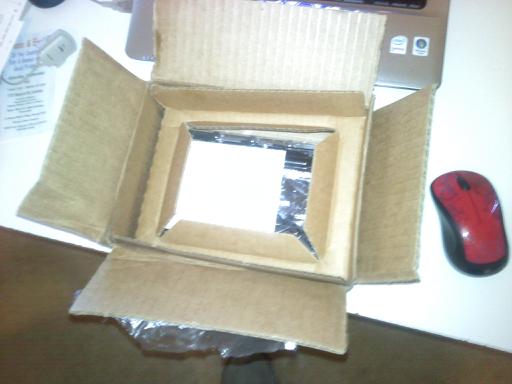
I ordered the Samsung HD204UI 2TB last week. It arrived in a clamshell cardboard box with no padding. I was immediately concerned when I opened it up because I've never seen a HD shipped like that before. No bubble wrap, no foam, just a drive sandwiched between cardboard!
I knew that I probably needed to update the firmware, so I downloaded the A37 update and applied it. I did a cold boot then immediately ran the ESTOOL that Samsung provides for diagnostics. It passed all of the preliminary tests, but during the full surface scan I got an error AJ36 Bad Sectors. It recommended running the erase, low level format. I was skeptical, but ran it anyway. The low level format was successful, I ran the diagnostic again and got AJ41 Ram Verify Test sector error. Somewhat discouraged, I figured I would give the drive a cold boot. After the cold boot, the drive passed the diagnostic and recommended the full surface scan again. It ran and said successful, on the tail end of the log I saw this:
Expected Pattern,
12 34 12 00 50 00 00 34 12 34 etc....
Actual Pattern
00 00 00 01 66 00 00 00 A0 55 etc....
There were 3 such pairs of errors but the tail end of the log said the drive was good. This is a brand new drive, no data on it yet, so I'm looking for some recommendations. I have not yet formatted it in Windows 7 32bit.
I did another cold boot this morning and started a 3rd surface scan. Even if that one comes back clean, I'm not sure I want to trust this drive.
1) Call SuperBiiz, demand a replacement with them paying shipping back because they shipped it poorly. I have a feeling if I did an RMA to Samsung using the SuperBiiz packaging that it would be rejected for insufficient packing.
2) They say they don't pay for return shipping, so if they deny that, I might just return the drive for a refund.
3) Format the drive and try some Windows Diagnostics
4) RMA to Samsung
Another complicating factor is I bought the drive with a coupon code for $10 off ($65 total). The drive is out of stock, $75 when it comes back in stock, but I wouldn't trust their shipping back if it was the same method. It has gone on sale for $69 on Newegg a few times recently, but I have heard horror stories about Newegg shipping hard drives, so figured I would give SuperBiiz a try.
I knew that I probably needed to update the firmware, so I downloaded the A37 update and applied it. I did a cold boot then immediately ran the ESTOOL that Samsung provides for diagnostics. It passed all of the preliminary tests, but during the full surface scan I got an error AJ36 Bad Sectors. It recommended running the erase, low level format. I was skeptical, but ran it anyway. The low level format was successful, I ran the diagnostic again and got AJ41 Ram Verify Test sector error. Somewhat discouraged, I figured I would give the drive a cold boot. After the cold boot, the drive passed the diagnostic and recommended the full surface scan again. It ran and said successful, on the tail end of the log I saw this:
Expected Pattern,
12 34 12 00 50 00 00 34 12 34 etc....
Actual Pattern
00 00 00 01 66 00 00 00 A0 55 etc....
There were 3 such pairs of errors but the tail end of the log said the drive was good. This is a brand new drive, no data on it yet, so I'm looking for some recommendations. I have not yet formatted it in Windows 7 32bit.
I did another cold boot this morning and started a 3rd surface scan. Even if that one comes back clean, I'm not sure I want to trust this drive.
1) Call SuperBiiz, demand a replacement with them paying shipping back because they shipped it poorly. I have a feeling if I did an RMA to Samsung using the SuperBiiz packaging that it would be rejected for insufficient packing.
2) They say they don't pay for return shipping, so if they deny that, I might just return the drive for a refund.
3) Format the drive and try some Windows Diagnostics
4) RMA to Samsung
Another complicating factor is I bought the drive with a coupon code for $10 off ($65 total). The drive is out of stock, $75 when it comes back in stock, but I wouldn't trust their shipping back if it was the same method. It has gone on sale for $69 on Newegg a few times recently, but I have heard horror stories about Newegg shipping hard drives, so figured I would give SuperBiiz a try.
Re: Samsung HD204UI 2TB suspicious
August 12th, 2011, 20:45
Called the RMA department and they said many other people called in with the same complaint. I sent in some pics of the box and they sent me a return label 
Powered by phpBB © phpBB Group.