Western DigitalWD20EARS-00MVWB0 Clic ... PCB Swap solution ?
December 30th, 2011, 17:40
Hello Everyone,
I have a new problem with a Western digital drive WD20EARS. while I was trying to restore my laptop
with this drive mounted on a Icy-Box Dock, I made something stupid by trying to move my laptop and the dock with
the drive turn over on the table (the drive was still in the dock)...
So When I tried to plug the dock back on my laptop nothing happen, the drive try to start again it spin for 3 secondes
but after start to clic for 5 times then stop, clic 5 times more stop then clic 2 times more and stop spinning.
Everytime I try to power on the drive it clic like that and stop at the end. Windows 7 doesn't do anymore the sound
when a USB or esata drive is plugged.
First I was resigned for me it was for sure a head failure (clic of death).
Nevertheless today I noticed that I have in spare another WD drive with similar informations.
I did a quick PCB swap and I was really surprise cause the drive start and spin without stopping, and Windows 7 does
the sound we have when a USB or esata drive is plugged. Unfortunately I was not able to see the drive in windows but it
is probably due to the fact that I haven't swap the U12 ROM.
here are the information of the WD drive in failure
WWN:50014EE2B0559629
MDL: WD20EARS-00MVWB0
DATE: 17 MAR 2011
DCM: HARNHTJCAB
DCX5M08V5WW6
LBA:3907029168
on the PCB
REV A
2060-771698-002
sticker : 2061-771698-802 AA XC BEB9 8U08 G 0003360 1363
and the other one in Spare working properly
WWN:50014EE25AFF3669
MDL: WD20EARS-00MVWB0
DATE: 16 MAR 2011
DCM: HHNNHTJMHB
DCX5M07V52W3
LBA:3907029168
on the PCB
REV A
2060-771698-002
sticker : 2061-771698-802 AA XC BEB9 0AAH F 0003360 1363
Do you have an idea if a PCB swap (with rom swap) can help me to solve the problem or it can be something else
(preamp chip into the HDD) ? Does my Space PCB match ?
I haven't noticed any problem on the PCB card no component burned ... (I have attached 2 pics maybe it will help)
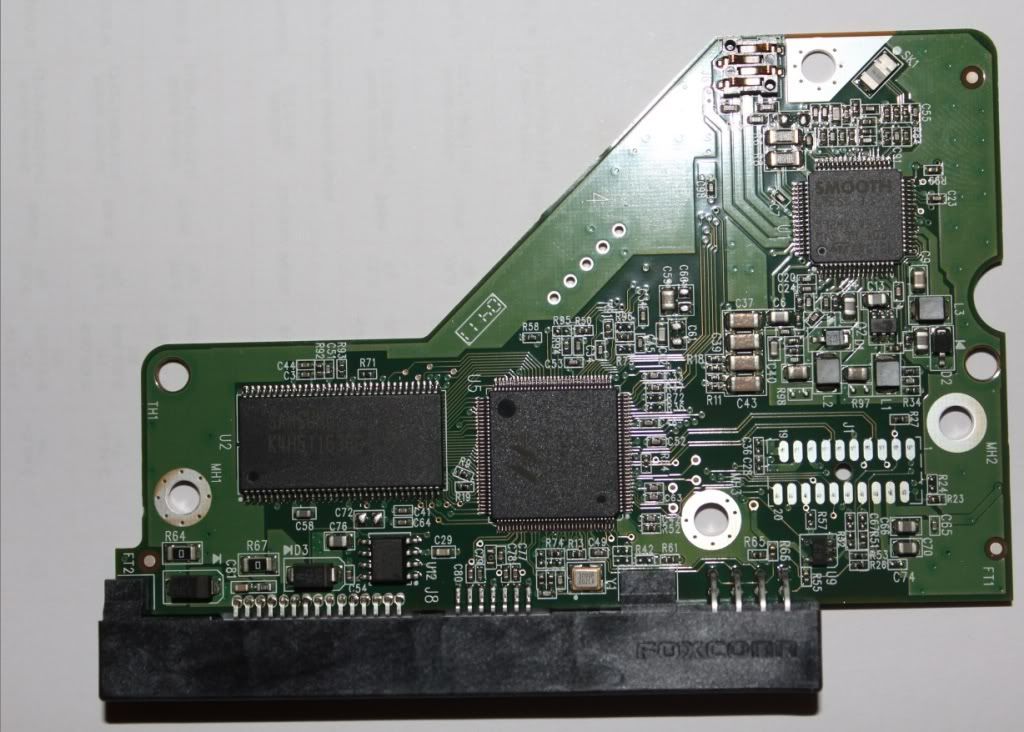
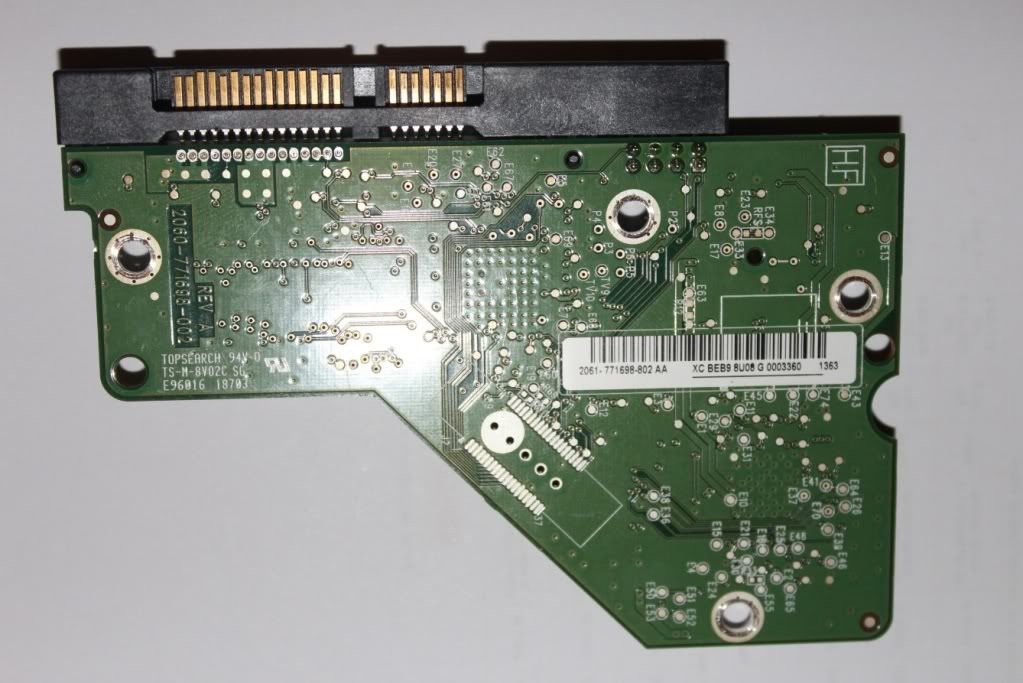
Thank you for your answer
Diz
I have a new problem with a Western digital drive WD20EARS. while I was trying to restore my laptop
with this drive mounted on a Icy-Box Dock, I made something stupid by trying to move my laptop and the dock with
the drive turn over on the table (the drive was still in the dock)...
So When I tried to plug the dock back on my laptop nothing happen, the drive try to start again it spin for 3 secondes
but after start to clic for 5 times then stop, clic 5 times more stop then clic 2 times more and stop spinning.
Everytime I try to power on the drive it clic like that and stop at the end. Windows 7 doesn't do anymore the sound
when a USB or esata drive is plugged.
First I was resigned for me it was for sure a head failure (clic of death).
Nevertheless today I noticed that I have in spare another WD drive with similar informations.
I did a quick PCB swap and I was really surprise cause the drive start and spin without stopping, and Windows 7 does
the sound we have when a USB or esata drive is plugged. Unfortunately I was not able to see the drive in windows but it
is probably due to the fact that I haven't swap the U12 ROM.
here are the information of the WD drive in failure
WWN:50014EE2B0559629
MDL: WD20EARS-00MVWB0
DATE: 17 MAR 2011
DCM: HARNHTJCAB
DCX5M08V5WW6
LBA:3907029168
on the PCB
REV A
2060-771698-002
sticker : 2061-771698-802 AA XC BEB9 8U08 G 0003360 1363
and the other one in Spare working properly
WWN:50014EE25AFF3669
MDL: WD20EARS-00MVWB0
DATE: 16 MAR 2011
DCM: HHNNHTJMHB
DCX5M07V52W3
LBA:3907029168
on the PCB
REV A
2060-771698-002
sticker : 2061-771698-802 AA XC BEB9 0AAH F 0003360 1363
Do you have an idea if a PCB swap (with rom swap) can help me to solve the problem or it can be something else
(preamp chip into the HDD) ? Does my Space PCB match ?
I haven't noticed any problem on the PCB card no component burned ... (I have attached 2 pics maybe it will help)
Thank you for your answer
Diz
Re: Western DigitalWD20EARS-00MVWB0 Clic ... PCB Swap soluti
December 31st, 2011, 8:26
in addition here is an audio sample of the clics http://www.megaupload.com/?d=6JO97FB5
Re: Western DigitalWD20EARS-00MVWB0 Clic ... PCB Swap soluti
December 31st, 2011, 11:38
Hello it is me again  , excuse me for the multi posting I was not able to edit my previous post.
One more interesting thing, I tried another test.
With
HDD1+PCB1 (Working properly)
HDD2+PCB2 (try to start but finishes by clicking and stopping)
I did
HDD1+PCB2 => result : (try to start but finishes by clicking and stopping exactly as HDD2+PCB2)
HDD2+PCB1 => result : start and spin, windows do the sound when a new HDD (usb or esata) is plugged but the drive is not recognized by windows (I haven't swap the U12 ROM yet for info)
Do you think it could be a pcb-head-mimic-problem as northwind mentionned in a previous thread ? I don't know what it means but it looks for me similar
here is his post
western-digital-wd2500js-t21039.html?hilit=western%20digital%20pcb%20swap#p141028
Thanks in advance for your comments and sorry one more time for the multi post
, excuse me for the multi posting I was not able to edit my previous post.One more interesting thing, I tried another test.
With
HDD1+PCB1 (Working properly)
HDD2+PCB2 (try to start but finishes by clicking and stopping)
I did
HDD1+PCB2 => result : (try to start but finishes by clicking and stopping exactly as HDD2+PCB2)
HDD2+PCB1 => result : start and spin, windows do the sound when a new HDD (usb or esata) is plugged but the drive is not recognized by windows (I haven't swap the U12 ROM yet for info)
Do you think it could be a pcb-head-mimic-problem as northwind mentionned in a previous thread ? I don't know what it means but it looks for me similar
here is his post
western-digital-wd2500js-t21039.html?hilit=western%20digital%20pcb%20swap#p141028
Thanks in advance for your comments and sorry one more time for the multi post
Re: Western DigitalWD20EARS-00MVWB0 Clic ... PCB Swap soluti
January 1st, 2012, 8:52
What is the Marvell chip number on your pcb? I think these pcbs don't have such problem, but i'm not too sure and my memory is weak at this moment.
Re: Western DigitalWD20EARS-00MVWB0 Clic ... PCB Swap soluti
January 1st, 2012, 9:27
here is info on the marvel (U5)
88i9146-TFJ2
P4H7590B-1
1101 B2P
TW
and on U2
SAMSUNG 107
K4H511638G-LCCC
H5116 CZA099GCU
88i9146-TFJ2
P4H7590B-1
1101 B2P
TW
and on U2
SAMSUNG 107
K4H511638G-LCCC
H5116 CZA099GCU
Re: Western DigitalWD20EARS-00MVWB0 Clic ... PCB Swap soluti
January 1st, 2012, 9:36
You have a mechanical problem -- not a PCB problem.
When a substitute PCB is used, the drive is unable to complete the Power On Self Test (POST). The test is designed to spin down the drive when bad heads are detected. So basically you have defeated the safety mechanism with the board swap.
This is not a do-it-yourself problem; any more time that you run the drive may mean less data can be recovered.
When a substitute PCB is used, the drive is unable to complete the Power On Self Test (POST). The test is designed to spin down the drive when bad heads are detected. So basically you have defeated the safety mechanism with the board swap.
This is not a do-it-yourself problem; any more time that you run the drive may mean less data can be recovered.
Re: Western DigitalWD20EARS-00MVWB0 Clic ... PCB Swap soluti
January 1st, 2012, 10:46
Ok thanks for your answer.
Nevertheless I do not understand why when I swap the PCB of the faulty drive on the working drive (HDD1+PCB2 previous test) the drive have the same behavior as the
faulty PCB with the faulty HDD (HDD2+PCB2) the drive clic and stop, I did a test with a third WD drive of a friend (that I have clone before) and the drive was not also able to spin it clic and stop.
If the PCB of the faulty drive was OK should the board swap also defeated the safety mechanism and let the drive spin cause none of both drives used for the test have mecanical problem, heads are ok ?
Thanks
Diz
Nevertheless I do not understand why when I swap the PCB of the faulty drive on the working drive (HDD1+PCB2 previous test) the drive have the same behavior as the
faulty PCB with the faulty HDD (HDD2+PCB2) the drive clic and stop, I did a test with a third WD drive of a friend (that I have clone before) and the drive was not also able to spin it clic and stop.
If the PCB of the faulty drive was OK should the board swap also defeated the safety mechanism and let the drive spin cause none of both drives used for the test have mecanical problem, heads are ok ?
Thanks
Diz
Re: Western DigitalWD20EARS-00MVWB0 Clic ... PCB Swap soluti
January 1st, 2012, 11:07
dizmo wrote:Nevertheless I do not understand why when I swap the PCB of the faulty drive on the working drive (HDD1+PCB2 previous test) the drive have the same behavior as the
faulty PCB with the faulty HDD (HDD2+PCB2) the drive clic and stop,
Because you should first know how WDs work - it should have saved time and disappointment. In any case the problem is internal and there's very little to do without know how AND special equipment - according to the symptoms - sorry.
Re: Western DigitalWD20EARS-00MVWB0 Clic ... PCB Swap soluti
January 1st, 2012, 12:04
dizmo wrote:If the PCB of the faulty drive was OK should the board swap also defeated the safety mechanism and let the drive spin cause none of both drives used for the test have mecanical problem, heads are ok ?
Remember, the difference in the two drives is that the first one likely has bad heads, and you want the drive NOT to spin in that case. When you put the PCB from the faulty drive onto the 2nd drive, the heads are not bad, so the safety feature isn't called upon. The PCBs are specially tuned for each drive, so they are not cross-compatible. That's why the 2nd drive won't work with the 1st PCB.
Re: Western DigitalWD20EARS-00MVWB0 Clic ... PCB Swap soluti
January 1st, 2012, 16:36
Thanks for the thread btw dizmo. I've been following this thread because my problem is very similar. I think the big question here is why did it work here, as dismo mentions, or what is different?
western-digital-wd2500js-t21039.html?hilit=western%20digital%20pcb%20swap#p141028
western-digital-wd2500js-t21039.html?hilit=western%20digital%20pcb%20swap#p141028
Re: Western DigitalWD20EARS-00MVWB0 Clic ... PCB Swap soluti
January 1st, 2012, 17:04
In the unlikely case that you have a "mimic" problem, then transferring U12 to a donor board should fix it. If you don't want to go through the hassle of soldering work, then here is a software tool that should do the job:
call-forum-administrator-t21565-20.html
Personally I think you will be wasting your time and money, but you could always try reselling the tool.
call-forum-administrator-t21565-20.html
Personally I think you will be wasting your time and money, but you could always try reselling the tool.
Re: Western DigitalWD20EARS-00MVWB0 Clic ... PCB Swap soluti
January 1st, 2012, 18:43
fzabkar wrote:Personally I think you will be wasting your time and money, but you could always try reselling the tool.
You WILL be wasting your time.
Re: Western DigitalWD20EARS-00MVWB0 Clic ... PCB Swap soluti
January 2nd, 2012, 6:27
jono-ats wrote:fzabkar wrote:Personally I think you will be wasting your time and money, but you could always try reselling the tool.
You WILL be wasting your time.
Agreed. Not a mimic case or something that is diy.
Re: Western DigitalWD20EARS-00MVWB0 Clic ... PCB Swap soluti
January 7th, 2012, 8:25
I have noticed that after the PCB swap and the drive was able to spin without any click, but despite it was not recognized by windows it was in Bios.
With an Acronis usb boot stick (It was really long for the drive to be recongized but after an error message saying bad sector ...) I was finally able to see the drive and all the files on it. For information I haven't move the NVRAM only swap the boards but it worked it really surprise me because I have for an hitachi drive and a nvram swap was needed. In that case the pcb were very close (17 march and 16 march with similar info on the pcb stickers)
I have recovered all the files except 3 small files without interest (total = 980 Go) so ... finally I haven't waste my time the more painfull was to backup the drive by creating acronis tib files (I have created multiple separate backup files for security) and restore them on another drive.
Since my files have been recovered I will try to fix the drive with hiren boot cd tools to see if it is possible but I will not waste to much time the goal now is to do a secure erase of the drive, swap back with the wrong pcb and send it to western digital (warranty is still valid).
One more time thanks, I feel today really reassured and happy to have recovered my files
Diz
With an Acronis usb boot stick (It was really long for the drive to be recongized but after an error message saying bad sector ...) I was finally able to see the drive and all the files on it. For information I haven't move the NVRAM only swap the boards but it worked it really surprise me because I have for an hitachi drive and a nvram swap was needed. In that case the pcb were very close (17 march and 16 march with similar info on the pcb stickers)
I have recovered all the files except 3 small files without interest (total = 980 Go) so ... finally I haven't waste my time
the more painfull was to backup the drive by creating acronis tib files (I have created multiple separate backup files for security) and restore them on another drive.Since my files have been recovered I will try to fix the drive with hiren boot cd tools to see if it is possible but I will not waste to much time the goal now is to do a secure erase of the drive, swap back with the wrong pcb and send it to western digital (warranty is still valid).
One more time thanks, I feel today really reassured and happy to have recovered my files
Diz
Re: Western DigitalWD20EARS-00MVWB0 Clic ... PCB Swap soluti
January 7th, 2012, 18:22
I would be very interested to see if the original board still has the same symptom.
Congratulations, BTW.
Congratulations, BTW.
Re: Western DigitalWD20EARS-00MVWB0 Clic ... PCB Swap soluti
January 7th, 2012, 18:31
Congratulations! Looks like I called that one wrong. I need to tune up my powers of "remote" diagnostics!
You lucked out in that the firmware versions were identical, and the adaptives were close enough to do the trick.
Can you buy a lottery ticket in France?
You lucked out in that the firmware versions were identical, and the adaptives were close enough to do the trick.
Can you buy a lottery ticket in France?
Re: Western DigitalWD20EARS-00MVWB0 Clic ... PCB Swap soluti
January 27th, 2012, 20:58
regarding your question
I have swapped back the original board to test and it has still the same symptom so probably the board has also something ... So now I use the donor pcb to try to erase the drive but is is complicate.
So after having saved all the files on another drive I have try to erase the drive securely with Acronis but the process was not complete and stop with a bad sector error... I have try to see check with partition magic which has detected some error and ask to correct the drive. Unfortunately I don't know what partition magic did but now I can't see the file (via acronis) anymore everything has disappear... so it doesn't matter but I can't find a way to securely erase the drive.
The drive is detected under windows but everytime it is plugged it required to be formated and when I try to create a NTFS partition it failed when doing the format...

I have done smart tests (worrying)
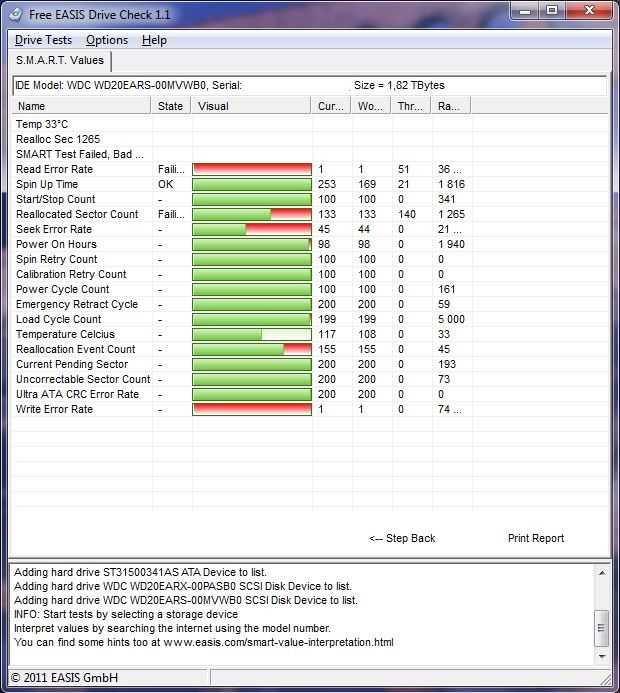
and with HDDLLF.4.25
Current date and time: 28/01/2012 01:48:52
HDD Low Level Format Tool 4.25; http://hddguru.com
SMART data for [5] WDC WD20EARS-00MVWB0 150. [2000,39 GB]
Attribute Current Worst Raw Note
----------------------------------------------------------------------------------------
1 01 Read error rate 1 1 36691
3 03 Spin up time 253 169 1816
4 04 Number of spin-up times 100 100 341
5 05 Reallocated sectors count 133 133 1265
7 07 Seek error rate 45 44 21411
9 09 Power-on time 98 98 1940
10 0A Spin-up retries 100 100 0
11 0B Calibration retries 100 100 0
12 0C Power Cycles 100 100 161
192 C0 Power-off retract count 200 200 59
193 C1 Load/unload cycle count 199 199 5000
194 C2 HDA Temperature 116 108 34 (34 degrees)
196 C4 Reallocate event count 155 155 45
197 C5 Current pending sectors 200 200 193
198 C6 Offline scan UNC sectors 200 200 73
199 C7 Ultra ATA CRC Error Rate 200 200 0
200 C8 Write error rate at preamp 1 1 74535
I have tried a Low Level format (quick wipe) also with HDDLLF.4.25 but it stop with error before the end
I don't know if I will be able to do a secure erase so a question if I send the drive to western digital (it is still under warranty) is there any
confidential policy, do they destroy the data on the drive ? Is there a way to do a secure erase and skip bad sectors
Thanks for your comments
fzabkar wrote:I would be very interested to see if the original board still has the same symptom.
Congratulations, BTW.
I have swapped back the original board to test and it has still the same symptom so probably the board has also something ... So now I use the donor pcb to try to erase the drive but is is complicate.
So after having saved all the files on another drive I have try to erase the drive securely with Acronis but the process was not complete and stop with a bad sector error... I have try to see check with partition magic which has detected some error and ask to correct the drive. Unfortunately I don't know what partition magic did but now I can't see the file (via acronis) anymore everything has disappear... so it doesn't matter but I can't find a way to securely erase the drive.
The drive is detected under windows but everytime it is plugged it required to be formated and when I try to create a NTFS partition it failed when doing the format...
I have done smart tests (worrying)
and with HDDLLF.4.25
Current date and time: 28/01/2012 01:48:52
HDD Low Level Format Tool 4.25; http://hddguru.com
SMART data for [5] WDC WD20EARS-00MVWB0 150. [2000,39 GB]
Attribute Current Worst Raw Note
----------------------------------------------------------------------------------------
1 01 Read error rate 1 1 36691
3 03 Spin up time 253 169 1816
4 04 Number of spin-up times 100 100 341
5 05 Reallocated sectors count 133 133 1265
7 07 Seek error rate 45 44 21411
9 09 Power-on time 98 98 1940
10 0A Spin-up retries 100 100 0
11 0B Calibration retries 100 100 0
12 0C Power Cycles 100 100 161
192 C0 Power-off retract count 200 200 59
193 C1 Load/unload cycle count 199 199 5000
194 C2 HDA Temperature 116 108 34 (34 degrees)
196 C4 Reallocate event count 155 155 45
197 C5 Current pending sectors 200 200 193
198 C6 Offline scan UNC sectors 200 200 73
199 C7 Ultra ATA CRC Error Rate 200 200 0
200 C8 Write error rate at preamp 1 1 74535
I have tried a Low Level format (quick wipe) also with HDDLLF.4.25 but it stop with error before the end
I don't know if I will be able to do a secure erase so a question if I send the drive to western digital (it is still under warranty) is there any
confidential policy, do they destroy the data on the drive ? Is there a way to do a secure erase and skip bad sectors
Thanks for your comments
Re: Western DigitalWD20EARS-00MVWB0 Clic ... PCB Swap soluti
January 28th, 2012, 1:50
I would think that your SMART mess is to be expected of a drive running with non-native adaptives. I could be wrong, though.
Re: Western DigitalWD20EARS-00MVWB0 Clic ... PCB Swap soluti
May 12th, 2012, 15:43
dizmo wrote:I have noticed that after the PCB swap and the drive was able to spin without any click, but despite it was not recognized by windows it was in Bios.
With an Acronis usb boot stick (It was really long for the drive to be recongized but after an error message saying bad sector ...) I was finally able to see the drive and all the files on it. For information I haven't move the NVRAM only swap the boards but it worked it really surprise me because I have for an hitachi drive and a nvram swap was needed. In that case the pcb were very close (17 march and 16 march with similar info on the pcb stickers)
I have recovered all the files except 3 small files without interest (total = 980 Go) so ... finally I haven't waste my time
Since my files have been recovered I will try to fix the drive with hiren boot cd tools to see if it is possible but I will not waste to much time the goal now is to do a secure erase of the drive, swap back with the wrong pcb and send it to western digital (warranty is still valid).
One more time thanks, I feel today really reassured and happy to have recovered my files
Diz
Hello dizmo, i have the same kind of problem with my Western Digital WD20EARS harddrive. It is not being recognized, and i want to try swapping the pcb with a new one.
I have created a topic(at http://forum.hddguru.com/not-recognized-harddrive-t22923.html) with detailed description of my problem, could you please take a look at my first post? Do you think i could recover my data(in the situation i described) by replacing the pcb?
My post:
Hi all,
My external harddrive(ntfs, 2 TB, Western digital elements, WD20EARS) became corrupt after a not successful copying of files action in Linux-Backtrack operating system. During the copy action, the Linux OS hybernated automatically to the standby situation, which caused for the freezing of the copy action. After the freezing i tried to cancel the copy action, which failed, and crashed. I could not stop the crash, so i removed the usb cable of the harddrive. And after this the harddrive was not recognized anymore by several computers where i have tried to read it. I tried everything and nothing solved the problem.
After this i have opened the original casing of the external harddrive, and removed the internal sata harddrive. I have tried the read this internal sata harddrive with several computers, but did not succeed, getting error messages from bios like "Master Harddisk Error", meaning it didnt recognize it.
Then, i tried to read the sata harddrive with a docking station and another new usb casing. This time the computers did recognize it, but in disk management "Harddrive not initialized" error and reported that the harddrive is 0kb. Both with casing, dockingstation and internal sata, the harddrive makes a ticking sound, trying to read the harddrive for a long time, but failing each time. I have tried to read it with the Gparted Linux OS. Gparted was busy for hours to read the harddrive(in the docking station or casing), but failed finally with some I/O error popup.
When i went to a computer shop they said the harddrive was recognized as 2 TB(so not 0 KB) but it was impossible to reach the folders/files. They told me the problem could maybe be solved, when replacing the circuitboard. They also told that maybe the cache could have been damaged.
I can say that i have never dropped the harddrive or did not damage the hardware components of the harddrive, the problem did happen only because of a software error. So how can i solve this problem and save some of the files on the harddrive? Will replacing the circuit board solve the problem? I have heard of people with similar problems(with Seagate harddrives), who had solved it by updating the firmware of the harddrive(firmware only available at the office of Seagate support centre). I see you cannot download the firmware of Western Digital publically from their website, so should i call Western Digital support to ask for this firmware update? Will this fix the problem? Another thing i have not tried is a sata to usb adapter(not the same as usb dockingstation or casing). Will this make any difference?
Besides these options, what else can i try to successfully read my corrupt harddrive?
Re: Western DigitalWD20EARS-00MVWB0 Clic ... PCB Swap soluti
January 2nd, 2016, 10:10
Hi there!
2 years ago a WD20EARS-00MVWB0 died at boot of system and i left it in shelf till now.
Now i was looking on internet after a identical PCB and i found one but:
Mine hdd is: WD20EARS-00MVWB0 2060-771698-002 REV P2 2061-771698-802 07P
And on internet i found this: WD20EARS-00MVWB0 2060-771698-002 REV P1
So, the difference is that mine is ver. P2 and the donor is ver. P1
If i will swap Bios chip from mine to donor, will be ok, or need to be identical till the last letter?
Thank you so much!
dizmo, what you put on usb with acronis? I am really interested, if you can help me, thanks!
2 years ago a WD20EARS-00MVWB0 died at boot of system and i left it in shelf till now.
Now i was looking on internet after a identical PCB and i found one but:
Mine hdd is: WD20EARS-00MVWB0 2060-771698-002 REV P2 2061-771698-802 07P
And on internet i found this: WD20EARS-00MVWB0 2060-771698-002 REV P1
So, the difference is that mine is ver. P2 and the donor is ver. P1
If i will swap Bios chip from mine to donor, will be ok, or need to be identical till the last letter?
Thank you so much!
dizmo, what you put on usb with acronis? I am really interested, if you can help me, thanks!
Powered by phpBB © phpBB Group.