Damaged micro usb (soldered) on WD Elements 1TB.
March 10th, 2012, 0:13
Hi guys,
I have a problem with my WD Elements 1TB.
The product number is WDBABV0010BBK-00.
The SATA is WD10TMVV.
I have found some images online.
This is how it looks,
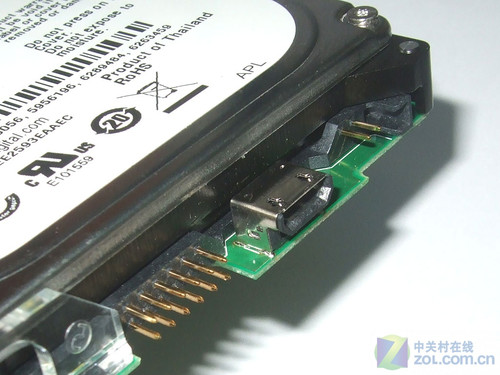

My problem
The micro usb that is soldered on to the PCB is damaged.
The external drive is working all good and okay until one day I realize I could not plug in my cable to the micro usb port.
The micro usb is damaged.
Solutions
1) Get professionals to do a data recovery but that is too expensive. And there is a good link here showing you how you could by pass it the micro usb and wired the PCB.
http://www.datarecoverytools.co.uk/2010 ... tor-suite/
2) Get a new micro usb and replace it. I will go with this. Do let me know if this is not feasible.
- - -
However before I start anything, I need to know what micro usb to buy.
I did a bit of research and if I am not mistaken, I think I need Micro-B.
Here is an image, http://en.wikipedia.org/wiki/File:Types-usb_new.svg
I have a house mate who is a PhD in electrical engineering. He could do all the soldering for me.
But is there anything I need to tell him so he could be aware of when he is swapping out the damaged micro usb?
Where would be the best place to get electronic parts? I did some research again, it seems mouser.com is the best?
Cheers,
Venn.
I have a problem with my WD Elements 1TB.
The product number is WDBABV0010BBK-00.
The SATA is WD10TMVV.
I have found some images online.
This is how it looks,
My problem
The micro usb that is soldered on to the PCB is damaged.
The external drive is working all good and okay until one day I realize I could not plug in my cable to the micro usb port.
The micro usb is damaged.
Solutions
1) Get professionals to do a data recovery but that is too expensive. And there is a good link here showing you how you could by pass it the micro usb and wired the PCB.
http://www.datarecoverytools.co.uk/2010 ... tor-suite/
2) Get a new micro usb and replace it. I will go with this. Do let me know if this is not feasible.
- - -
However before I start anything, I need to know what micro usb to buy.
I did a bit of research and if I am not mistaken, I think I need Micro-B.
Here is an image, http://en.wikipedia.org/wiki/File:Types-usb_new.svg

I have a house mate who is a PhD in electrical engineering. He could do all the soldering for me.
But is there anything I need to tell him so he could be aware of when he is swapping out the damaged micro usb?
Where would be the best place to get electronic parts? I did some research again, it seems mouser.com is the best?
Cheers,
Venn.
Re: Damaged micro usb (soldered) on WD Elements 1TB.
March 11th, 2012, 23:50
Sorry to bump this thread but I will need some experts to look into this.
Just a refresher, on this model, you can't make it as an internal, you can't change the enclosure.
There are only 3 options for me,
1) Change the PCB (thanked god WD Elements doesn't have data encryption).
2) Change the micro usb.
3) Bypass the usb and wired the PCB.
Obviously, option 2 will be the easiest.
- - -
My questions will be:
1) Do I need to separate the hard drive from the PCB before I do the soldering?
2) Is that a micro-b usb?
3) The micro usb on WD is slightly different. What is that black color, 2 holes thingy underneath that micro usb? It is not the usual micro usb on the market.

Just a refresher, on this model, you can't make it as an internal, you can't change the enclosure.
There are only 3 options for me,
1) Change the PCB (thanked god WD Elements doesn't have data encryption).
2) Change the micro usb.
3) Bypass the usb and wired the PCB.
Obviously, option 2 will be the easiest.
- - -
My questions will be:
1) Do I need to separate the hard drive from the PCB before I do the soldering?
2) Is that a micro-b usb?
3) The micro usb on WD is slightly different. What is that black color, 2 holes thingy underneath that micro usb? It is not the usual micro usb on the market.
Re: Damaged micro usb (soldered) on WD Elements 1TB.
March 12th, 2012, 23:03
Hey guys,
Good news!
My housemate has managed to get the data off from the drive by soldering fine gauge electrical wires to the individual prongs in the micro usb. Those has to be some mad skills given the fact that micro usb is the smallest among all.
The next thing I will do is to fix the external drive.
I will need to see if my housemate has an idea for that.
Will update.
Good news!
My housemate has managed to get the data off from the drive by soldering fine gauge electrical wires to the individual prongs in the micro usb. Those has to be some mad skills given the fact that micro usb is the smallest among all.
The next thing I will do is to fix the external drive.
I will need to see if my housemate has an idea for that.
Will update.
Re: Damaged micro usb (soldered) on WD Elements 1TB.
March 13th, 2012, 19:24
It may be more expedient to buy a third party external enclosure, in which case I would look for one with a more robust connector. USB 3.0 would give you a transfer rate that approaches the drive's specs, whereas USB 2.0 would limit you to a maximum of about 30MB/s.
You may also like to consider an enclosure with eSATA and firewire interfaces, plus a cooling fan and an aluminium body.
You may also like to consider an enclosure with eSATA and firewire interfaces, plus a cooling fan and an aluminium body.
Powered by phpBB © phpBB Group.