WD10EARS not detected
July 3rd, 2012, 19:39
Hello, i have this hdd which isn't detect in bios anymore.
S/N: WCAV58255743
MDL: WD10EARS-00Y5B1
WWN: 50014EE2AEB76037
DATE: 04 FEB 2010
DCM: 5014Y8W55
LBA: 1953525168
Product of Thailand
The drive motor spins, i hear also a bzzzz noise for 1 second but nothing more.
In BIOS is detected as "nothing"... i mean in bios seems to be detected as with any characters, and it hangs there, after few second motor spins down.
To make boot the system i have to disconnect this faulty drive.
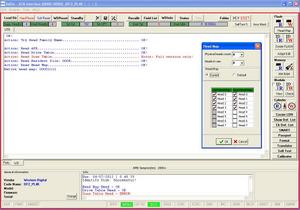
I used sediv to do some check, but i don't have full version:

As you can see, in sediv is detected only the vendor, but no "Code Name", no "Model", no "firmware", no "serial" and "0 user LBA".
I did another test with sediv, and something has changed:
Now the code name is detected as DF2_PL4K



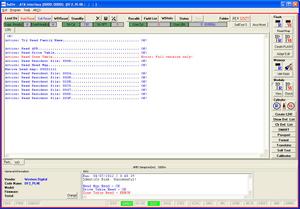


If i connect the drive with SATA/USB adapter, windows also can't detect it, but HDD Regenerator can but show it as a 2047 GB capacity
 +
+
Is this a firmware problem, or what?
Please help me if you know how to repair it, thanks.
S/N: WCAV58255743
MDL: WD10EARS-00Y5B1
WWN: 50014EE2AEB76037
DATE: 04 FEB 2010
DCM: 5014Y8W55
LBA: 1953525168
Product of Thailand
The drive motor spins, i hear also a bzzzz noise for 1 second but nothing more.
In BIOS is detected as "nothing"... i mean in bios seems to be detected as with any characters, and it hangs there, after few second motor spins down.
To make boot the system i have to disconnect this faulty drive.
I used sediv to do some check, but i don't have full version:

As you can see, in sediv is detected only the vendor, but no "Code Name", no "Model", no "firmware", no "serial" and "0 user LBA".
I did another test with sediv, and something has changed:
Now the code name is detected as DF2_PL4K


If i connect the drive with SATA/USB adapter, windows also can't detect it, but HDD Regenerator can but show it as a 2047 GB capacity
 +
+Is this a firmware problem, or what?
Please help me if you know how to repair it, thanks.
Re: WD10EARS not detected
July 3rd, 2012, 22:18
Stay away from HDD regenerator.
Could be PCB or heads/motor issue. Have to rule out the PCB.
What's the history on the drive? Why did it fail based on the owner's usage description?
Could be PCB or heads/motor issue. Have to rule out the PCB.
What's the history on the drive? Why did it fail based on the owner's usage description?
Re: WD10EARS not detected
July 4th, 2012, 2:04
If the motor spins down, then it's almost certainly a head related issue.
Stop playing with it,
Stop playing with it,
Re: WD10EARS not detected
July 4th, 2012, 4:20
Agreed.
Re: WD10EARS not detected
July 4th, 2012, 5:40
ok, i stop playing with it.
If you watch this pic in bottom, can you tell me for sure if are heads problem or not?
Could it be a firmware issue?
Also, if one head is broken, can i remap it with sediv and clone only the part which is readable with good heads?
P.S.
When i clic the button "SMART" or "Flash Read" in Sediv the computer hangs and i must reset.
I don't hear any clic or nocking head sound in this drive.
If you watch this pic in bottom, can you tell me for sure if are heads problem or not?
Could it be a firmware issue?
Also, if one head is broken, can i remap it with sediv and clone only the part which is readable with good heads?
P.S.
When i clic the button "SMART" or "Flash Read" in Sediv the computer hangs and i must reset.
I don't hear any clic or nocking head sound in this drive.
Re: WD10EARS not detected
July 4th, 2012, 18:21
Does the drive spin at all once powered on? Listen closely and feel for vibration.
You said in your first post that you can only hear one buzz after it spins. Need to make sure in establishing that it spins.
Did this drive come out of an external? If not sure look up the SN on the WD warranty page. It will show if it did.
You did not answer my question about the history of the drive, if any.
You said in your first post that you can only hear one buzz after it spins. Need to make sure in establishing that it spins.
Did this drive come out of an external? If not sure look up the SN on the WD warranty page. It will show if it did.
You did not answer my question about the history of the drive, if any.
Re: WD10EARS not detected
July 4th, 2012, 18:34
yes it spins good and does the Bzzz noise for 1 second.
After about 15 seconds the motor stops.
I don't know tthe story of this hdd because is not mine, but i will ask to my friend
After about 15 seconds the motor stops.
I don't know tthe story of this hdd because is not mine, but i will ask to my friend
Last edited by michael chiklis on July 4th, 2012, 18:37, edited 1 time in total.
Re: WD10EARS not detected
July 4th, 2012, 18:37
Ok, not a PCB issue. Head(s) issue so far.
Re: WD10EARS not detected
July 4th, 2012, 18:47
labtech wrote:Ok, not a PCB issue. Head(s) issue so far.
It is possible to check heads with sediv or other free tools on this WD?
Re: WD10EARS not detected
July 4th, 2012, 21:55
Not familar with sediv, but if the drive does not initialize, then not much can be done. Need more advanced tools and part(s) to make progress on this.
Re: WD10EARS not detected
July 15th, 2012, 12:16
Could it bee just a resetted model name issue?
If so, can i fix this?

If so, can i fix this?

Re: WD10EARS not detected
July 15th, 2012, 13:55
I did onother test with MHDD.
I attached the HDD to VIA VT6421A Serial RAID Controller
http://www.via.com.tw/en/products/perip ... d/vt6421a/
MHDD detects the drive as:
S/N: [NOTHING] wth nothing i mean it shows only black screen like it is empty or SPACE
FW: [NOTHING] wth nothing i mean it shows only black screen like it is empty or SPACE
SIZE: 0
LBA: 0
If i try any test it gives me error which says "can't do test on this drive because it has 0 LBA".
Do you still thing it is a head problem or it can be a FW issue?
I attached the HDD to VIA VT6421A Serial RAID Controller
http://www.via.com.tw/en/products/perip ... d/vt6421a/
MHDD detects the drive as:
S/N: [NOTHING] wth nothing i mean it shows only black screen like it is empty or SPACE
FW: [NOTHING] wth nothing i mean it shows only black screen like it is empty or SPACE
SIZE: 0
LBA: 0
If i try any test it gives me error which says "can't do test on this drive because it has 0 LBA".
Do you still thing it is a head problem or it can be a FW issue?
Re: WD10EARS not detected
July 15th, 2012, 14:41
Still a heads problem, 99% certainly
Re: WD10EARS not detected
July 15th, 2012, 14:52
When drive BUZZ heads are the problem on this one. The BUZZ means that heads are not reading, or stuck to platter, or another issue. To check heads in a free software it not possible nobody gives this option in a free software. Some of what you are describing sounds almost like HDD was dropped. It is hard to say from what you have indicated here in this post. But if you keep messing around on this one and if for some unknown reason heads are stuck to platter you can damage this one more.
Reason you can not test the HDD is becasue it can not read the SA on this and load the drive correctly for testing in MHDD. All your free software will do this to you and give you the same errors on this one. If you keep on trying to force a test it can do more damage to the drive. In the case of BUZZ and motor spin down this is normal to protect the HDD and not damage it further. The heads are not moving.
On the other hand if you heard clicking noise this is yet another issue. If the HDD did a seek and you heard 3 clicking noise on this and spin down and repeated it 3 times then stopped spinning all together this is yet another issue. But BUZZ is a head issue and you can not test this one without the proper tools to open it and the environment to open it in. Sorry. You might want to give this back to the person who gave it to you. Nothing you can do on this one.
Reason you can not test the HDD is becasue it can not read the SA on this and load the drive correctly for testing in MHDD. All your free software will do this to you and give you the same errors on this one. If you keep on trying to force a test it can do more damage to the drive. In the case of BUZZ and motor spin down this is normal to protect the HDD and not damage it further. The heads are not moving.
On the other hand if you heard clicking noise this is yet another issue. If the HDD did a seek and you heard 3 clicking noise on this and spin down and repeated it 3 times then stopped spinning all together this is yet another issue. But BUZZ is a head issue and you can not test this one without the proper tools to open it and the environment to open it in. Sorry. You might want to give this back to the person who gave it to you. Nothing you can do on this one.
Powered by phpBB © phpBB Group.