Western Digital Black WD1002FAEX Health bad
July 22nd, 2014, 11:32
Hi,
Yesterday I was using Defraggler from piriform to do a defrag, and I suddenly got a Disk Health: bad, and checked SMART, and all was 0, all SMART attributes was with error and bad, temperature was 0º (of course incorrect) a new disk with about 1 year and half, then I canceled the defrag and only have done a chkdsk (just chkdsk) on restart, then it took too much time, but at this time when I opened Defraggler, and I checked the Disk Health: good, also all SMART attributes was right.
It was a bug?
I think so because I was running Norton 360 Scheduled malware search and Defraggler simultaneously.
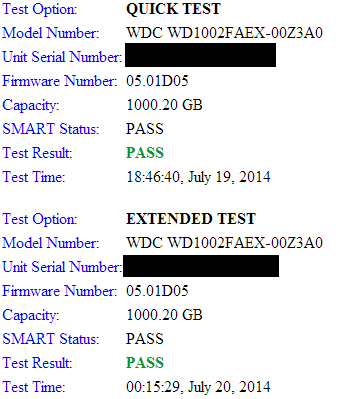
Then I put the WD diagnostic tool running, and done a quick test and extended test and I got all tests OK and passed.
Well, I let you 7 screenshots and please analyze this and say me if all is ok, and if all SMART attributes are there and OK or is someone attribute missing, or I should take it to warranty.
Defraggler:
http://gyazo.com/78937a5bc2f33ecc6ffb120cf58918ac.png
http://gyazo.com/2d5edfd7ecd060ebb389ecc533787733.png
Speccy:
http://gyazo.com/8c53fc81cf0dde9248f3fe822b2b68ff.png
http://gyazo.com/58ac447cdba7f2a045d24cccf1cfaf6e.png
WD Diagnost tool:
http://gyazo.com/97808d7c7dd9581129a089eefbcd2426.png
HD Sentinel:
http://gyazo.com/66148ffd5a76e07f5fb2dee84bf4e42c.png
http://gyazo.com/6c751bf0385fbe4a987be3e50e4a776a.png
Well and about this...?
HDD Regenerator
http://i.gyazo.com/847ab807e031964301dab1168619f9a0.png
http://i.gyazo.com/639388eae7b919357151d805ad3ac3d7.png
HD Sentinel says all is ok
http://gyazo.com/66148ffd5a76e07f5fb2dee84bf4e42c.png
http://gyazo.com/6c751bf0385fbe4a987be3e50e4a776a.png
It looks me strange.
Thank you.
Yesterday I was using Defraggler from piriform to do a defrag, and I suddenly got a Disk Health: bad, and checked SMART, and all was 0, all SMART attributes was with error and bad, temperature was 0º (of course incorrect) a new disk with about 1 year and half, then I canceled the defrag and only have done a chkdsk (just chkdsk) on restart, then it took too much time, but at this time when I opened Defraggler, and I checked the Disk Health: good, also all SMART attributes was right.
It was a bug?
I think so because I was running Norton 360 Scheduled malware search and Defraggler simultaneously.
Then I put the WD diagnostic tool running, and done a quick test and extended test and I got all tests OK and passed.
Well, I let you 7 screenshots and please analyze this and say me if all is ok, and if all SMART attributes are there and OK or is someone attribute missing, or I should take it to warranty.
Defraggler:
http://gyazo.com/78937a5bc2f33ecc6ffb120cf58918ac.png
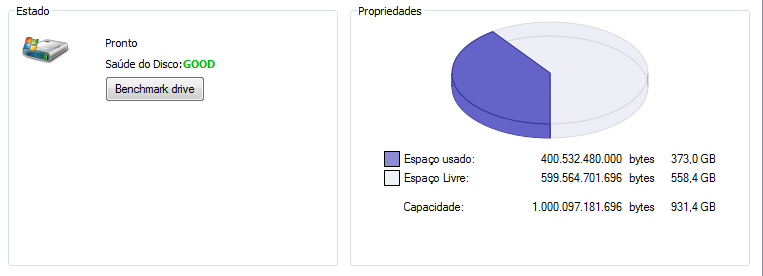
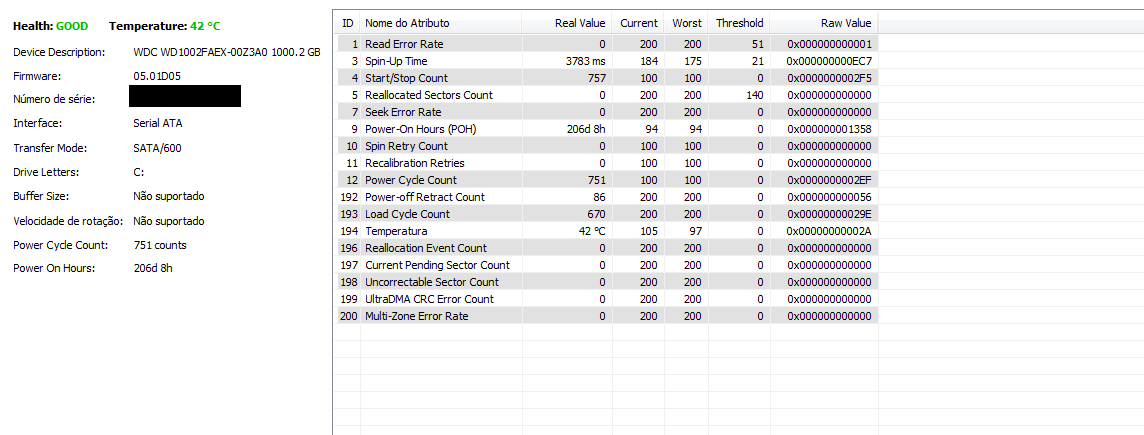
http://gyazo.com/2d5edfd7ecd060ebb389ecc533787733.png
Speccy:
http://gyazo.com/8c53fc81cf0dde9248f3fe822b2b68ff.png
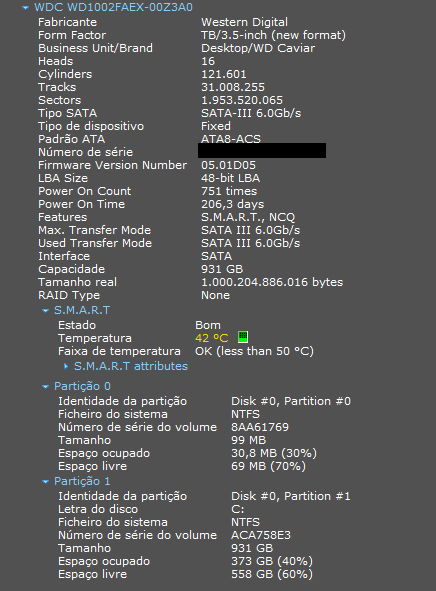
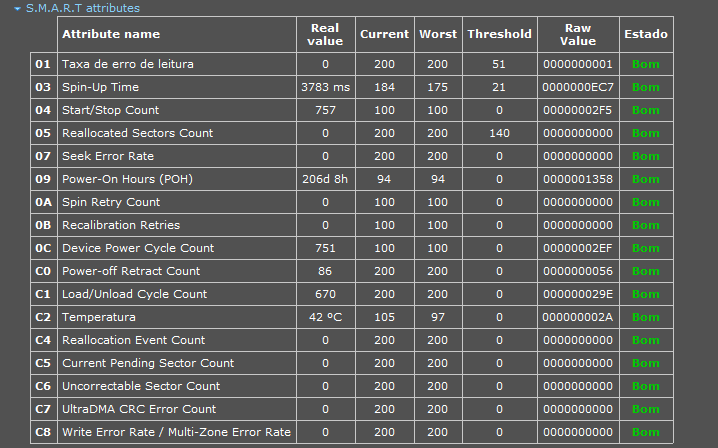
http://gyazo.com/58ac447cdba7f2a045d24cccf1cfaf6e.png
WD Diagnost tool:
http://gyazo.com/97808d7c7dd9581129a089eefbcd2426.png
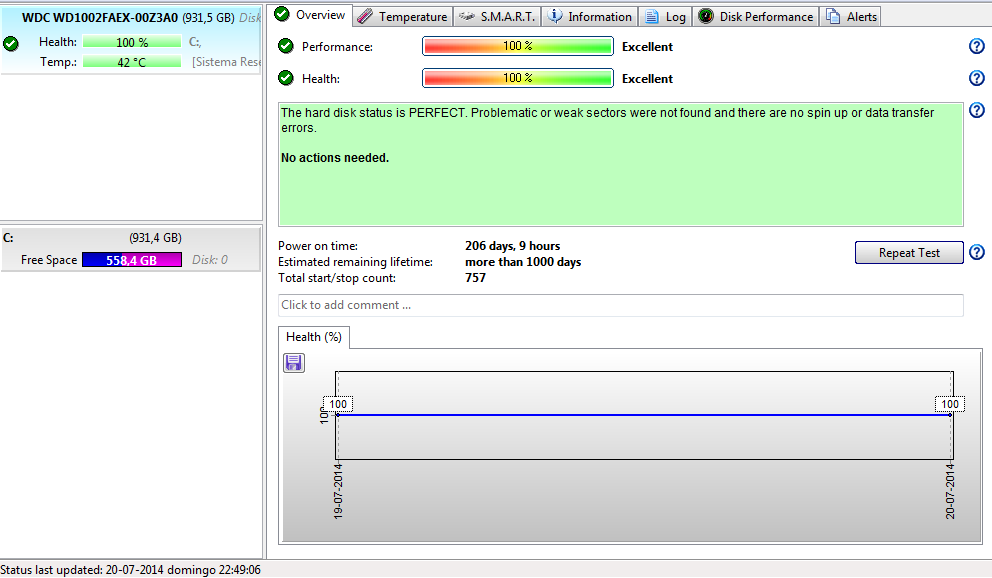
HD Sentinel:
http://gyazo.com/66148ffd5a76e07f5fb2dee84bf4e42c.png
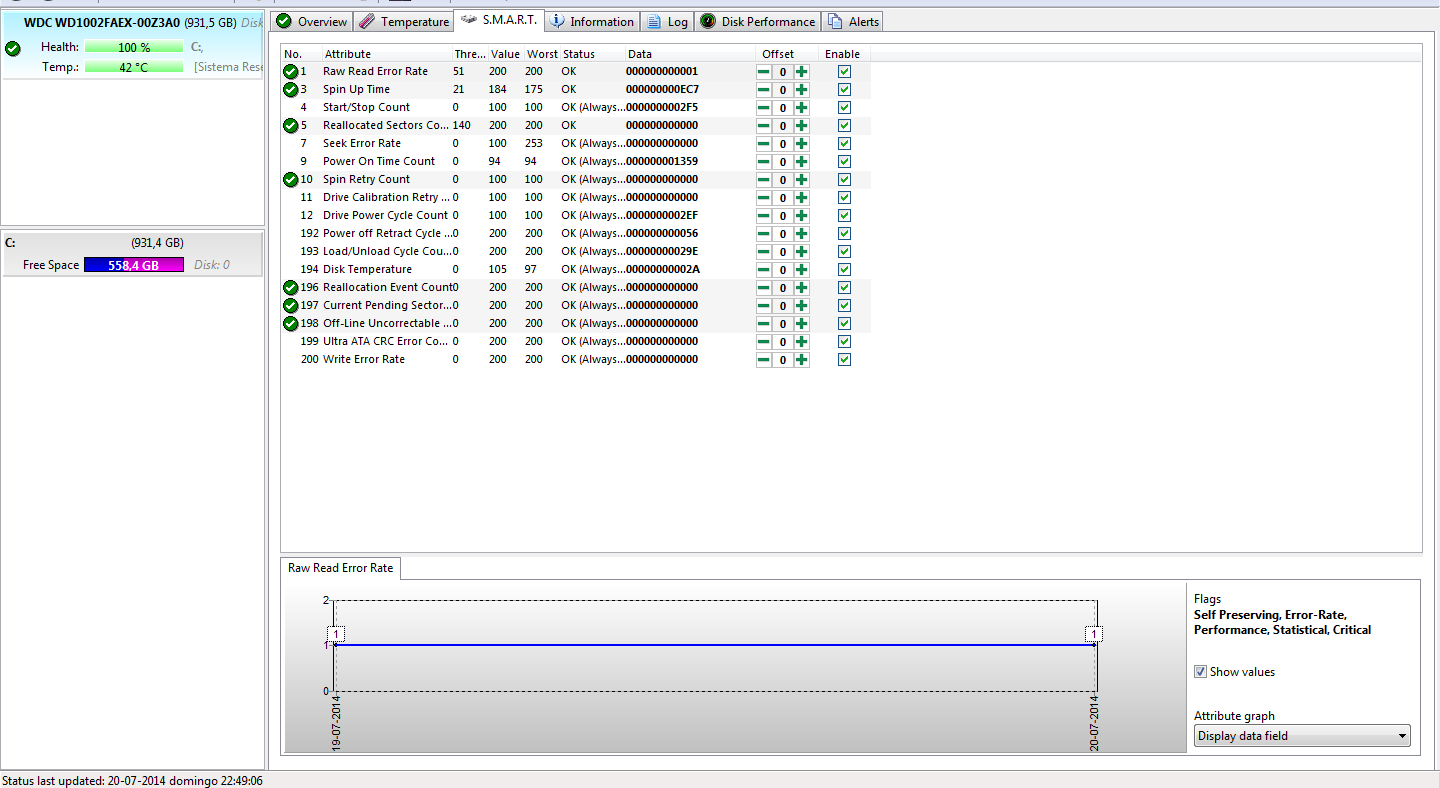
http://gyazo.com/6c751bf0385fbe4a987be3e50e4a776a.png
Well and about this...?
HDD Regenerator
http://i.gyazo.com/847ab807e031964301dab1168619f9a0.png
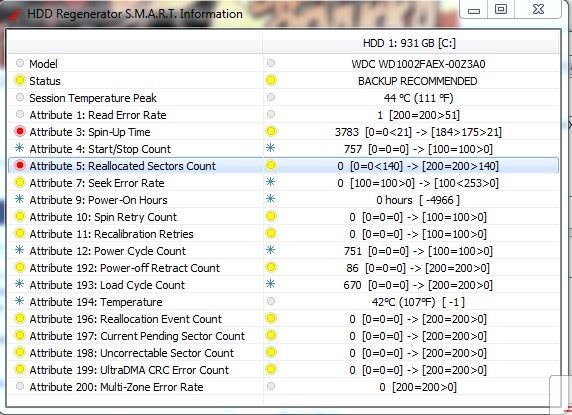
http://i.gyazo.com/639388eae7b919357151d805ad3ac3d7.png

HD Sentinel says all is ok
http://gyazo.com/66148ffd5a76e07f5fb2dee84bf4e42c.png
http://gyazo.com/6c751bf0385fbe4a987be3e50e4a776a.png
It looks me strange.
Thank you.
Re: Western Digital Black WD1002FAEX Health bad
July 22nd, 2014, 16:00
Thanks for accepted my topic.
Hope can help me.
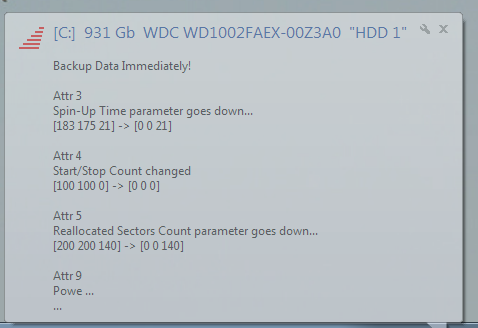
Let you one more photo from HDD Regenerator:
http://i.gyazo.com/12126ffff3e6c6257467073fbe635702.png
Hope can help me.
Let you one more photo from HDD Regenerator:
http://i.gyazo.com/12126ffff3e6c6257467073fbe635702.png
Re: Western Digital Black WD1002FAEX Health bad
July 22nd, 2014, 16:49
Problem is that some sectors are damaged but they have been reallocated (140 reallocated sectors).
Your drive is going to die, backup your data on a new one as soon as possible
Your drive is going to die, backup your data on a new one as soon as possible
Re: Western Digital Black WD1002FAEX Health bad
July 22nd, 2014, 16:55
So why tests are ok, and all passed?
Re: Western Digital Black WD1002FAEX Health bad
July 22nd, 2014, 17:01
Before an attribute is being reported as bad must reach a certain threshold.
"reallocated sectors" hasn't still reached the "bad" threshold for this reason is still indicated as good, but you can see that is going bad.
"reallocated sectors" hasn't still reached the "bad" threshold for this reason is still indicated as good, but you can see that is going bad.
Re: Western Digital Black WD1002FAEX Health bad
July 22nd, 2014, 17:03
Can you show me where you saw about 140?
Re: Western Digital Black WD1002FAEX Health bad
July 22nd, 2014, 17:06
"140" is the normalised threshold. The raw count is 0. AFAICT, the SMART report shows no evidence of any problem.michael chiklis wrote:Problem is that some sectors are damaged but they have been reallocated (140 reallocated sectors).
BTW, I would avoid HDD Regenerator (and SpinRite).
See viewtopic.php?f=1&t=28780
Re: Western Digital Black WD1002FAEX Health bad
July 22nd, 2014, 17:07
fzabkar wrote:"140" is the normalised threshold. The raw count is 0. AFAICT, the SMART report shows no evidence of any problem.michael chiklis wrote:Problem is that some sectors are damaged but they have been reallocated (140 reallocated sectors).
BTW, I would avoid HDD Regenerator (and SpinRite).
See viewtopic.php?f=1&t=28780
So everything is fine with my WD Black FAEX?
Re: Western Digital Black WD1002FAEX Health bad
July 22nd, 2014, 17:08
Re: Western Digital Black WD1002FAEX Health bad
July 22nd, 2014, 17:10
fzabkar wrote:"140" is the normalised threshold. The raw count is 0. AFAICT, the SMART report shows no evidence of any problem.michael chiklis wrote:Problem is that some sectors are damaged but they have been reallocated (140 reallocated sectors).
BTW, I would avoid HDD Regenerator (and SpinRite).
See viewtopic.php?f=1&t=28780
fzabkar right, i was wrong. Sorry
140 is the theshold.
Avoid hdd regenerator, it's not good.
Last edited by michael chiklis on July 22nd, 2014, 17:11, edited 1 time in total.
Re: Western Digital Black WD1002FAEX Health bad
July 22nd, 2014, 17:11
michael chiklis wrote:fzabkar wrote:"140" is the normalised threshold. The raw count is 0. AFAICT, the SMART report shows no evidence of any problem.michael chiklis wrote:Problem is that some sectors are damaged but they have been reallocated (140 reallocated sectors).
BTW, I would avoid HDD Regenerator (and SpinRite).
See viewtopic.php?f=1&t=28780
He's right, i was wrong. Sorry
140 is the theshold
Baah, you put me worried without reason ahahah, I've checked in other PC and it's same.
So my HD is fine?
Re: Western Digital Black WD1002FAEX Health bad
July 22nd, 2014, 17:13
cgentil wrote:Can you show me where you saw about 140?
HD Sentinel http://i.gyazo.com/6c751bf0385fbe4a987be3e50e4a776a.png no: 5 threshold 140
Speccy http://i.gyazo.com/58ac447cdba7f2a045d24cccf1cfaf6e.png no: 5 threshold 140
Defraggler http://i.gyazo.com/2d5edfd7ecd060ebb389ecc533787733.png 5 threshold 140
Loki
Wow everyone posted at the same time

Last edited by loki on July 22nd, 2014, 17:14, edited 1 time in total.
Re: Western Digital Black WD1002FAEX Health bad
July 22nd, 2014, 17:13
SMART doesn't always detect problems such as weak heads or marginal sectors. For example, if a bad sector can be read after 10 retries, say, then it may not be logged.
A better test would be to scan the drive with MHDD under DOS. MHDD will show you if there are any "slow" sectors, ie those that require several retries.
http://hddguru.com/software/2005.10.02-MHDD/
A better test would be to scan the drive with MHDD under DOS. MHDD will show you if there are any "slow" sectors, ie those that require several retries.
http://hddguru.com/software/2005.10.02-MHDD/
Re: Western Digital Black WD1002FAEX Health bad
July 22nd, 2014, 17:16
fzabkar wrote:SMART doesn't always detect problems such as weak heads or marginal sectors. For example, if a bad sector can be read after 10 retries, say, then it may not be logged.
A better test would be to scan the drive with MHDD under DOS. MHDD will show you if there are any "slow" sectors, ie those that require several retries.
http://hddguru.com/software/2005.10.02-MHDD/
I ran lot of tests, and all says me is ok, now I'm doing a test with HDTune, it's still performing test but all is good...
Re: Western Digital Black WD1002FAEX Health bad
July 22nd, 2014, 17:18
The trouble with Windows based surface scans and performance tests is that there may be background tasks which compete for the CPU's attention and thus interfere with the test. A DOS based test is better for this reason.
Re: Western Digital Black WD1002FAEX Health bad
July 22nd, 2014, 17:20
fzabkar wrote:The trouble with Windows based surface scans and performance tests is that there may be background tasks which compete for the CPU's attention and thus interfere with the test. A DOS based test is better for this reason.
But in general view all is ok or not?
Re: Western Digital Black WD1002FAEX Health bad
July 22nd, 2014, 17:29
Here are some sample screenshots from MHDD:
http://www.ihdd.ru/forum/uploaded_image ... hdd1_1.jpg
http://www.techmaniacs.net/files/tank_mhdd/mhdd_3.jpg
You can see the access times at the top RHS. They vary from "<3ms" (good) to ">500ms" (bad). This sort of data is difficult, if not impossible, to obtain in a multitasking environment, at least not reliably.
Sometimes you can see large dips in HD Tune's benchmark graphs, or large scatter in the access time data points. These are often indicative of read retries.
http://www.ihdd.ru/forum/uploaded_image ... hdd1_1.jpg

http://www.techmaniacs.net/files/tank_mhdd/mhdd_3.jpg

You can see the access times at the top RHS. They vary from "<3ms" (good) to ">500ms" (bad). This sort of data is difficult, if not impossible, to obtain in a multitasking environment, at least not reliably.
Sometimes you can see large dips in HD Tune's benchmark graphs, or large scatter in the access time data points. These are often indicative of read retries.
Re: Western Digital Black WD1002FAEX Health bad
July 24th, 2014, 5:02
Hi cgentil your HDD looks fine, but is strange that for a while reports bad logs.
if your data is important I recommend you to make a backup. in case there is a problem you will be safe
if your data is important I recommend you to make a backup. in case there is a problem you will be safe
Powered by phpBB © phpBB Group.