Another case of Truecrypt problems.
December 17th, 2014, 6:42
Hello to you all.
I've received this drive with the description : No data acces. Its from a DELL latitude laptop(quite old)
After connecting the drive ive notice this in Winhex
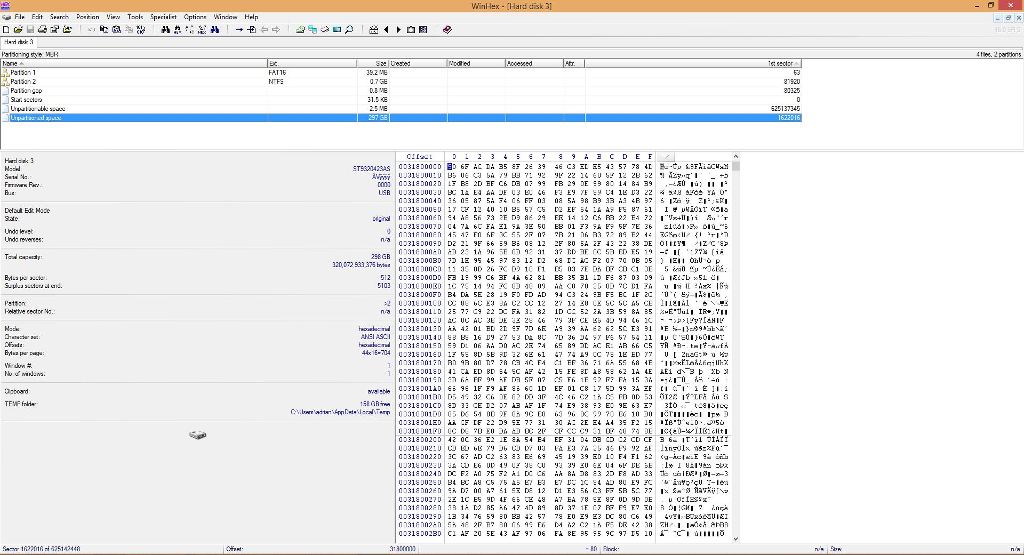
As we can see its an encryption case, whit truecrypt. Now the problem is i am not able to mount the drive.
I've cloned the disk and i am working with the image so that i keep safe user data in case off errors. The cloning went well, no errors.
I've tried to mount the drive whit almost any option that truecrypt has.
Waiting for your suggestions or questions.
Thank you all
I've received this drive with the description : No data acces. Its from a DELL latitude laptop(quite old)
After connecting the drive ive notice this in Winhex
As we can see its an encryption case, whit truecrypt. Now the problem is i am not able to mount the drive.
I've cloned the disk and i am working with the image so that i keep safe user data in case off errors. The cloning went well, no errors.
I've tried to mount the drive whit almost any option that truecrypt has.
Waiting for your suggestions or questions.
Thank you all
Re: Another case of Truecrypt problems.
December 17th, 2014, 17:36
can you post sector 0 please
Puedes enseñarnos el sector 0 porfavor
Puedes enseñarnos el sector 0 porfavor
Re: Another case of Truecrypt problems.
December 17th, 2014, 19:05
I just did one of these a couple weeks ago (If it is TrueCrypt we're talking about, which Sector 0 will reveal). You need to image to a physical drive, install the TrueCrypt software on the computer, and get the password from the customer. Then you can mount the volume on the computer from inside the TrueCrypt software. I think you have to use the "Mount Without Pre-Boot Authentication..." option since it's from a different computer.
Took me a few minutes to figure it out, but it worked like a charm.
Unless your customer doesn't have the password, then you're in trouble.
Took me a few minutes to figure it out, but it worked like a charm.
Unless your customer doesn't have the password, then you're in trouble.
Re: Another case of Truecrypt problems.
December 17th, 2014, 21:34
If customer doesn't remember the password there are still ways to mount TrueCrypt volume to access data.
You can use forensics tools, example "Elcomsoft Forensic Disk Decryptor".
Decrypts information stored in three most popular crypto containers
Mounts encrypted BitLocker, PGP and TrueCrypt volumes
Supports removable media encrypted with BitLocker To Go
Supports both encrypted containers and full disk encryption
Acquires protection keys from RAM dumps, hibernation files
Extracts all the keys from a memory dump at once if there is more than one crypto container in the system
Fast acquisition (limited only by disk read speeds)
Zero-footprint operation leaves no traces and requires no modifications to encrypted volume contents
Recovers and stores original encryption keys
Supports all 32-bit and 64-bit versions of Windows
You can use forensics tools, example "Elcomsoft Forensic Disk Decryptor".
Decrypts information stored in three most popular crypto containers
Mounts encrypted BitLocker, PGP and TrueCrypt volumes
Supports removable media encrypted with BitLocker To Go
Supports both encrypted containers and full disk encryption
Acquires protection keys from RAM dumps, hibernation files
Extracts all the keys from a memory dump at once if there is more than one crypto container in the system
Fast acquisition (limited only by disk read speeds)
Zero-footprint operation leaves no traces and requires no modifications to encrypted volume contents
Recovers and stores original encryption keys
Supports all 32-bit and 64-bit versions of Windows
Re: Another case of Truecrypt problems.
December 18th, 2014, 5:18
hdd_sand wrote:can you post sector 0 please
Puedes enseñarnos el sector 0 porfavor

Hola!
Aqui esta el sector 0.
Gracias por tu interes.
Re: Another case of Truecrypt problems.
December 18th, 2014, 5:27
data-medics wrote:I just did one of these a couple weeks ago (If it is TrueCrypt we're talking about, which Sector 0 will reveal). You need to image to a physical drive, install the TrueCrypt software on the computer, and get the password from the customer. Then you can mount the volume on the computer from inside the TrueCrypt software. I think you have to use the "Mount Without Pre-Boot Authentication..." option since it's from a different computer.
Took me a few minutes to figure it out, but it worked like a charm.
Unless your customer doesn't have the password, then you're in trouble.
Hello!
I have already imaged the drive and tried to mount the volume(with password supplied by customer) in different ways with no success.
Re: Another case of Truecrypt problems.
December 18th, 2014, 6:23
When y try to mount the drive i get the next message: Invalid password or not a truecrypt volume
Re: Another case of Truecrypt problems.
December 18th, 2014, 6:32

This is the way ive tried to mount the drive
Re: Another case of Truecrypt problems.
December 18th, 2014, 7:27
How do you know that's actually a Truecrypt volume? Also, have you got the right user password? AFAIK, there's no way of knowing if a volume is indeed an encrypted Truecrypt volume or something else (detection of "just" encryption is possible nonetheless), since there are no headers whatsoever. As per the documentation, the Truecrypt program believes it has correcly mounted a volume if using the provided key it finds the decrypted string "TRUE" at some location near the beginning of the volume.
Re: Another case of Truecrypt problems.
December 18th, 2014, 7:57
deftrue wrote:How do you know that's actually a Truecrypt volume? Also, have you got the right user password? AFAIK, there's no way of knowing if a volume is indeed an encrypted Truecrypt volume or something else (detection of "just" encryption is possible nonetheless), since there are no headers whatsoever. As per the documentation, the Truecrypt program believes it has correcly mounted a volume if using the provided key it finds the decrypted string "TRUE" at some location near the beginning of the volume.
Honestly i know because the customer said it is truecrypt, and ive based my research on that. Regarding the password ive just asked the commercial department to confirm it again.
Re: Another case of Truecrypt problems.
December 18th, 2014, 8:23
Hi. I think I would attempt to decrypt the whole drive/partition. First try in Truecrypt but it probably won't work. So then you could mount the clone drive in a pc and boot from a Truecrypt rescue disk. Select decrypt and see if that works. If it starts to decrypt then leave it until it finishes. It could take up to a couple of days to complete! By the way did the customer create the Truecrypt rescue iso? It would be very useful if they did.
Re: Another case of Truecrypt problems.
December 18th, 2014, 12:32
The partition table has been overwritten by testdisk (http://www.cgsecurity.org/wiki/Menu_MBRCode) so that why you can't recover, is not truecrypt bootstrap present on sector 0. You may want to get a working drive install truecrypt and then modify sector 0 on your image with the correct bootstrap for tuecrypt.
Re: Another case of Truecrypt problems.
December 18th, 2014, 12:51
hdd_sand wrote:The partition table has been overwritten by testdisk (http://www.cgsecurity.org/wiki/Menu_MBRCode) so that why you can't recover, is not truecrypt bootstrap present on sector 0. You may want to get a working drive install truecrypt and then modify sector 0 on your image with the correct bootstrap for tuecrypt.
- Attachments
-
Re: Another case of Truecrypt problems.
December 18th, 2014, 13:55
hdd_sand wrote:hdd_sand wrote:The partition table has been overwritten by testdisk (http://www.cgsecurity.org/wiki/Menu_MBRCode) so that why you can't recover, is not truecrypt bootstrap present on sector 0. You may want to get a working drive install truecrypt and then modify sector 0 on your image with the correct bootstrap for tuecrypt.
Thank you very much. Ill do that and get back with the result .
Re: Another case of Truecrypt problems.
December 18th, 2014, 14:01
Probably what happened is the system failed to boot so one of the bright techies in the backroom decided to overwrite the mbr with testdisc. I have seen quite a few like this and usually end up decrpting the drive/volume to get the data back.
You should read the Truecrypt manual on how to restore the Truecrypt boot loader from a rescue disk. If you can't get the volume to boot as a Truecrypt volume you should still be able to decrypt it providing you have the correct password. Que tengas suerte!
You should read the Truecrypt manual on how to restore the Truecrypt boot loader from a rescue disk. If you can't get the volume to boot as a Truecrypt volume you should still be able to decrypt it providing you have the correct password. Que tengas suerte!
Re: Another case of Truecrypt problems.
December 19th, 2014, 4:30
hdd_sand wrote:hdd_sand wrote:The partition table has been overwritten by testdisk (http://www.cgsecurity.org/wiki/Menu_MBRCode) so that why you can't recover, is not truecrypt bootstrap present on sector 0. You may want to get a working drive install truecrypt and then modify sector 0 on your image with the correct bootstrap for tuecrypt.
Thank you for your answer .
Re: Another case of Truecrypt problems.
December 19th, 2014, 4:31
dick wrote:Probably what happened is the system failed to boot so one of the bright techies in the backroom decided to overwrite the mbr with testdisc. I have seen quite a few like this and usually end up decrpting the drive/volume to get the data back.
You should read the Truecrypt manual on how to restore the Truecrypt boot loader from a rescue disk. If you can't get the volume to boot as a Truecrypt volume you should still be able to decrypt it providing you have the correct password. Que tengas suerte!
Today i will do it and get back to you with results. Gracias.
Re: Another case of Truecrypt problems.
December 19th, 2014, 7:04
I agree, as stated by others, that boot sector does not contain TrueCrypt.
Your only hope of recovery will be to use a TrueCrypt rescue disc to restore the bootloader. It forces you to create the rescue disc when originally encrypting the drive.
If the rescue disc has been lost then the data is unrecoverable.
Your only hope of recovery will be to use a TrueCrypt rescue disc to restore the bootloader. It forces you to create the rescue disc when originally encrypting the drive.
If the rescue disc has been lost then the data is unrecoverable.
Re: Another case of Truecrypt problems.
December 24th, 2014, 8:32
The customer just notified me that he has the rescue disk...... what a relief.
Hopefully i can restore data.
Thank you all
Hopefully i can restore data.
Thank you all
Powered by phpBB © phpBB Group.