Western Digital My passport 2TB ext hdd PCB problem
November 14th, 2020, 21:22
Hello,
accidently seems broke usb connector on my ext hdd WD 2TB WD20SDZW, its like this hdd,
https://www.fivestardatarecovery.com/wp ... 24x768.jpg
later realized that some part about usb connector like damaged, and hdd not anymore detected to PC, only sometimes when hold that brokent part around usb connector, cause of that decicde purchase replacement PCB, like this,
PCB Controller Board 2060-800067-001 WD20SDZW , cause this part number is written on original PCB of my ext hdd, and ordered it here,
https://www.aliexpress.com/item/4000774669787.html
Seller told me that enough to detach top left located on photo "bios ic" 8pin from original PCB (one with damages usb connector) and to attach it to new donor PCB, and then i'll can access again to my 2tb data. So, i did it, swaped 8pin "bios ic" from orig PCB to donor's PCB, and then connected hdd to PC, now light flash, i hear like hdd "works" , i mean like ago it worked, no any strange sounds, etc. , as hdd didn't drop anywhere, nothing other damaged, except USB connector, but still not visible hdd partitions to PC after swaping this bios ic suggested by seller. And at top right corner on PC i see something like 25xx not remember which letters, think like name of 8pin IC, and seems PC see it only by 8pin IC, not whole hdd, and at Disk managment of Wind 10 i see hdd status like 1.8TB "not initialized" and offer to choose GPT, when coose GPT, it says still not initalized, bla bla. That's probably cause OS still can't access hdd datas.
I read that for some WD ext hdds, not enough only to replace this 8pin IC, but need replace too "main IC" from old-orig PC to donor, as at some models in main IC fw which unlock hdd and make possible to access data? Please if someone can confirm this about this concrete modele mentione above?
And at this link is written that this model locked at main IC,
https://www.dolphindatalab.com/product/ ... 60-800067/
"These drives have main chip lock and users cannot read and write ROM, cannot read and write SA.
So users must unlock the main chip and then users can work with the firmware."
where they suggest to buy SATA PCB which is ok for using this HDD model, and then by it to unlock hdd, suppose they have idea SATA PCB 2060-800065 + PC3000 sw , MRT or something like that?
Please if anyone more experienced and skilled, or anyone had case with this model, what to do, is ok maybe to move main IC from original PCB to donor's PCB, as i already moved 8pin IC to donor's PCB, but still can't access my data!
accidently seems broke usb connector on my ext hdd WD 2TB WD20SDZW, its like this hdd,
https://www.fivestardatarecovery.com/wp ... 24x768.jpg
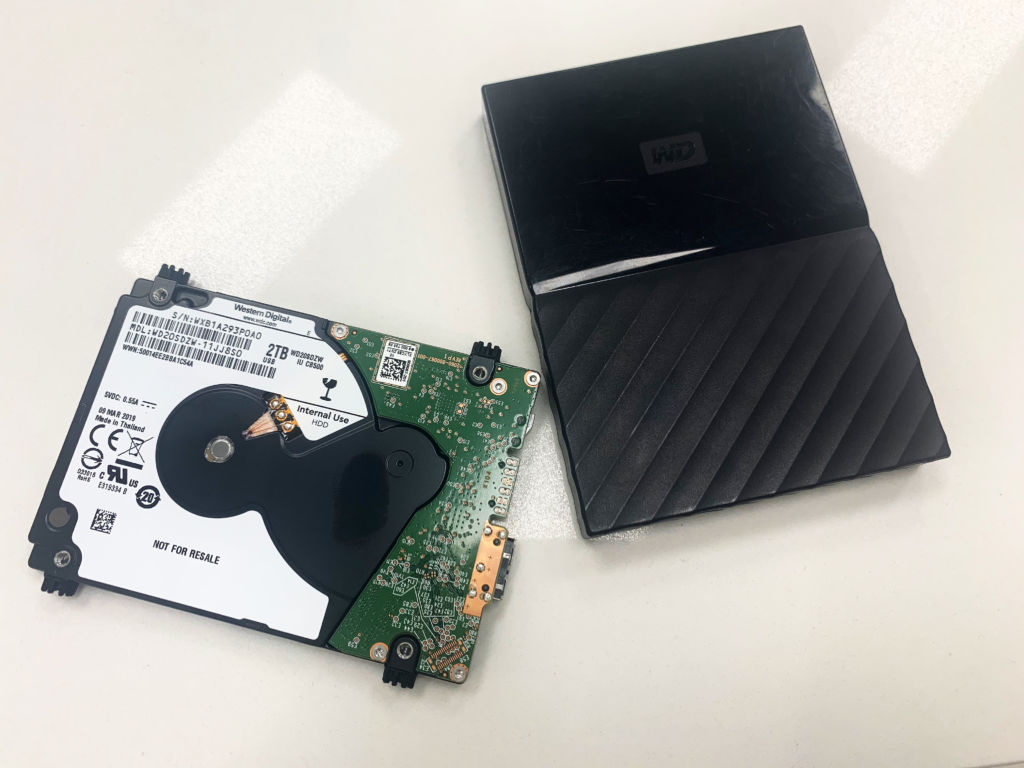
later realized that some part about usb connector like damaged, and hdd not anymore detected to PC, only sometimes when hold that brokent part around usb connector, cause of that decicde purchase replacement PCB, like this,
PCB Controller Board 2060-800067-001 WD20SDZW , cause this part number is written on original PCB of my ext hdd, and ordered it here,
https://www.aliexpress.com/item/4000774669787.html
Seller told me that enough to detach top left located on photo "bios ic" 8pin from original PCB (one with damages usb connector) and to attach it to new donor PCB, and then i'll can access again to my 2tb data. So, i did it, swaped 8pin "bios ic" from orig PCB to donor's PCB, and then connected hdd to PC, now light flash, i hear like hdd "works" , i mean like ago it worked, no any strange sounds, etc. , as hdd didn't drop anywhere, nothing other damaged, except USB connector, but still not visible hdd partitions to PC after swaping this bios ic suggested by seller. And at top right corner on PC i see something like 25xx not remember which letters, think like name of 8pin IC, and seems PC see it only by 8pin IC, not whole hdd, and at Disk managment of Wind 10 i see hdd status like 1.8TB "not initialized" and offer to choose GPT, when coose GPT, it says still not initalized, bla bla. That's probably cause OS still can't access hdd datas.
I read that for some WD ext hdds, not enough only to replace this 8pin IC, but need replace too "main IC" from old-orig PC to donor, as at some models in main IC fw which unlock hdd and make possible to access data? Please if someone can confirm this about this concrete modele mentione above?
And at this link is written that this model locked at main IC,
https://www.dolphindatalab.com/product/ ... 60-800067/
"These drives have main chip lock and users cannot read and write ROM, cannot read and write SA.
So users must unlock the main chip and then users can work with the firmware."
where they suggest to buy SATA PCB which is ok for using this HDD model, and then by it to unlock hdd, suppose they have idea SATA PCB 2060-800065 + PC3000 sw , MRT or something like that?
Please if anyone more experienced and skilled, or anyone had case with this model, what to do, is ok maybe to move main IC from original PCB to donor's PCB, as i already moved 8pin IC to donor's PCB, but still can't access my data!
Re: Western Digital My passport 2TB ext hdd PCB problem
November 15th, 2020, 9:17
usernamemy wrote: later realized that some part about usb connector like damaged, and hdd not anymore detected to PC, only sometimes when hold that brokent part around usb connector
If it worked when you held/wiggled the usb connector it was the usb connector / connection to the pcb likely to be faulty. Look at the connector VERY closely - ideally a hires photo or microscope, check for broken solder joints or ripped tracks and pads on the pcb where the usb connector is, and give them a poke to see if they move. Any which do give them a reflow. I wouldn't be messing about trying to make a working donor pcb.
Re: Western Digital My passport 2TB ext hdd PCB problem
November 15th, 2020, 9:59
Unfortunately not only pads-point on PCB where usb connector that are broken solder joints, my friend experienced electrician service checked it, and it's broken part of PCB a little bit far of usb connector in area of usb connector, then he disconnected usb 3.0 connector, and wired 10x wires in trying we get communication old-orig PCB to PC, but when connect only yellow exclamation mark, and hdd not recognized, seems wires not in right order or whatever... So changing USB connector in this case will not help, as that part of PCB around usb connector is little bit broken and then no communication when connect usb 3.0 cable, when i say "worked", it just light up for few seconds, but still no recognized hdd, as probably that broken part of PCB around usb 3.0 connector not allow full communication data+ data- etc.
That's why i have no other choice then to try, replacing bio IC and if necessary main ic - Marvell from old to new donor PCB, but need info by someone experienced who knows more about this PCB, is hdd locked only in bios ic or in main IC - Marvell?
Possible options maybe are, USB to SATA adapter, as some WD PCBs has pinouts for this type usb to sata connection, and then to try communicated, and option as i found googling is using some Sata PCB which is compatible with this USB PCB 2060-800067, even such PCB is rare and cost about 140-180$ ... I just try find way access my important data on hdd, with less danger way to avoid damage something and loose them forever ...
...
Hope someone will confirm about locking hdd is in bios ic only, or in main ic - Marvell too...
Tnx anyway!
That's why i have no other choice then to try, replacing bio IC and if necessary main ic - Marvell from old to new donor PCB, but need info by someone experienced who knows more about this PCB, is hdd locked only in bios ic or in main IC - Marvell?
Possible options maybe are, USB to SATA adapter, as some WD PCBs has pinouts for this type usb to sata connection, and then to try communicated, and option as i found googling is using some Sata PCB which is compatible with this USB PCB 2060-800067, even such PCB is rare and cost about 140-180$ ... I just try find way access my important data on hdd, with less danger way to avoid damage something and loose them forever
...Hope someone will confirm about locking hdd is in bios ic only, or in main ic - Marvell too...
Tnx anyway!
Re: Western Digital My passport 2TB ext hdd PCB problem
November 15th, 2020, 12:12
Yes, don't go messing around with the BIOS 8pin CHIP. Put it back where it was, all you need to do is fix the USB connector. this was a easy fix task that looks like might turn into a nightmare. I wish you asked here first before soldering any stuff.
Powered by phpBB © phpBB Group.