Internal GPT SATA HDDs became MBR, partially unallocated
March 5th, 2021, 9:19
Good day,
TL;DR All my internal GPT SATA HDDs suddenly became MBR, with unallocated spaces (see attachment) probalby following drivers changes. What method/tool give me the best chance to recover the data?
I have 3 internal SATA HDDs (games, programs, data), 1 NVMe PCIE 3.0 4x drive (bootable system drive dual booting Windows 7 and 10), 1 NVMe PCIE 2.0 4x drive unallocated.
Under Windows 10 I installed StoreMI (an AMD caching software) to use the NVMe PCIE 2.0 4x drive as a cache for one of my HDDs.
The NVMe cache drive (a Samsung 970 Evo) was not selectable as a cache under StoreMI so I contacted the AMD support who advised me to uninstall the proprietary Samsung driver, which I did through the device manager (after creating a restore point). Then I rebooted...
And then all of my 3 internal SATA HDDs (which were GPT, 8Tb single partition drives) had become MBR, with one partition (with no more drive letter) and two unallocated spaces of the exact same sizes for each drive ! (cf. attachment).
Most likely the StoreMI drivers did not play well with the removing of the Samsung EVO drivers.
Anyway, my data is safe (I make backups), my NVMe system disk is intact (and backed up). I am very confident that apart from whatever happened that changed the partitioning of my 3 internal SATA HDDs nothing else was written on them since they are only sollicited when I launch specific applications / access specific data. So I want to attempt a recovery of those HDDs (otherwise I would have a large number of games, many of them painstakingly modded which make them hard to recreate and of programs to reinstall).
I have a spare 8Tb HDD so my plan is to (one internal SATA HDD at a time): Make a low level backup of an entire internal SATA HDD to the spare HDD (I don't want to risk making recovery more difficult due to writes to the internal HDDs) , then using recovery tools on that 'cloned' HDD.
My questions are:
-What tool/method would you recommend for the backup? In particular would HDD RAW Copy Tool fit my purpose? if not what would: Sector level backup softwares, block level backup softwares, others? The method has to catch all the data irrelevant of whether it is in a partition or in the now unallocated spaces.
-Is it possible to at the same time catch those files and back them up to a GPT disk or will the process necessarily recreate the MBR, partition and unallocated spaces?
-What tool/method would you recommend for the recovery? In particular would the Partition Find and Mount Tool be useful? I have done a fair amount of searching and made a list of candidate tools/methods: converting to GPT and rebuilding the partition, or using partition recovery softwares... But I'd like advice from people experienced on these matters.
NB: I believe that reinstalling the Samsung and StoreMI drivers or using my restoration point is not going to solve the issue (booting under Win shows the 3 internal SATA HDDs in the exact same state so they got actually modified somehow and it is probably not related to the state of the OS and drivers)
NB: I want to avoid file recovery software because in my experience they are only able to recovery a small diversity of specific file formats (image files, video files, pdf etc) and not at all suited to the files formats used by games and programs.
NB: In the worse case scenario if I have to go the reinstallations path, I would like to find a way to see what was the directories/subdirectories structure and files names on the drives so I could use that as a guide to reinsall everthing as close as possible ti what it was.
Thank you in advance!
TL;DR All my internal GPT SATA HDDs suddenly became MBR, with unallocated spaces (see attachment) probalby following drivers changes. What method/tool give me the best chance to recover the data?
I have 3 internal SATA HDDs (games, programs, data), 1 NVMe PCIE 3.0 4x drive (bootable system drive dual booting Windows 7 and 10), 1 NVMe PCIE 2.0 4x drive unallocated.
Under Windows 10 I installed StoreMI (an AMD caching software) to use the NVMe PCIE 2.0 4x drive as a cache for one of my HDDs.
The NVMe cache drive (a Samsung 970 Evo) was not selectable as a cache under StoreMI so I contacted the AMD support who advised me to uninstall the proprietary Samsung driver, which I did through the device manager (after creating a restore point). Then I rebooted...
And then all of my 3 internal SATA HDDs (which were GPT, 8Tb single partition drives) had become MBR, with one partition (with no more drive letter) and two unallocated spaces of the exact same sizes for each drive ! (cf. attachment).
Most likely the StoreMI drivers did not play well with the removing of the Samsung EVO drivers.
Anyway, my data is safe (I make backups), my NVMe system disk is intact (and backed up). I am very confident that apart from whatever happened that changed the partitioning of my 3 internal SATA HDDs nothing else was written on them since they are only sollicited when I launch specific applications / access specific data. So I want to attempt a recovery of those HDDs (otherwise I would have a large number of games, many of them painstakingly modded which make them hard to recreate and of programs to reinstall).
I have a spare 8Tb HDD so my plan is to (one internal SATA HDD at a time): Make a low level backup of an entire internal SATA HDD to the spare HDD (I don't want to risk making recovery more difficult due to writes to the internal HDDs) , then using recovery tools on that 'cloned' HDD.
My questions are:
-What tool/method would you recommend for the backup? In particular would HDD RAW Copy Tool fit my purpose? if not what would: Sector level backup softwares, block level backup softwares, others? The method has to catch all the data irrelevant of whether it is in a partition or in the now unallocated spaces.
-Is it possible to at the same time catch those files and back them up to a GPT disk or will the process necessarily recreate the MBR, partition and unallocated spaces?
-What tool/method would you recommend for the recovery? In particular would the Partition Find and Mount Tool be useful? I have done a fair amount of searching and made a list of candidate tools/methods: converting to GPT and rebuilding the partition, or using partition recovery softwares... But I'd like advice from people experienced on these matters.
NB: I believe that reinstalling the Samsung and StoreMI drivers or using my restoration point is not going to solve the issue (booting under Win shows the 3 internal SATA HDDs in the exact same state so they got actually modified somehow and it is probably not related to the state of the OS and drivers)
NB: I want to avoid file recovery software because in my experience they are only able to recovery a small diversity of specific file formats (image files, video files, pdf etc) and not at all suited to the files formats used by games and programs.
NB: In the worse case scenario if I have to go the reinstallations path, I would like to find a way to see what was the directories/subdirectories structure and files names on the drives so I could use that as a guide to reinsall everthing as close as possible ti what it was.
Thank you in advance!
- Attachments
-
- All the internal SATA drives got similarily messed up
Re: Internal GPT SATA HDDs became MBR, partially unallocated
March 5th, 2021, 16:21
It may be possible to recover your data with a few clicks using DMDE:
https://dmde.com/
Can you show us DMDE's Partitions window? No need for a full scan, we just need to see something like this:
http://www.users.on.net/~fzabkar/DMDE/DMDE_Elements-8TB_Partitions.jpg
https://dmde.com/
Can you show us DMDE's Partitions window? No need for a full scan, we just need to see something like this:
http://www.users.on.net/~fzabkar/DMDE/DMDE_Elements-8TB_Partitions.jpg

Re: Internal GPT SATA HDDs became MBR, partially unallocated
March 5th, 2021, 17:15
Good day,
And thank you very much for your time and efforts in helping me with this.
I took screenshots as requested, possibly more than necessary as I am not sure which information is relevant to you. I am posting 3 replies with screenshots (1 for each disk). For each disk I did not take screenshots of the layers that showed the hexadecimal contents on the drive, only the layers that seemed to show synthetic information.
Attached are the screenshots for Disk 0.
And thank you very much for your time and efforts in helping me with this.
I took screenshots as requested, possibly more than necessary as I am not sure which information is relevant to you. I am posting 3 replies with screenshots (1 for each disk). For each disk I did not take screenshots of the layers that showed the hexadecimal contents on the drive, only the layers that seemed to show synthetic information.
Attached are the screenshots for Disk 0.
- Attachments
-
- Layer 3
-
- Layer 2
-
- Layer 1
Re: Internal GPT SATA HDDs became MBR, partially unallocated
March 5th, 2021, 17:18
Attached are the screenshots for Disk 1.
- Attachments
-
- Layer 7
-
- Layer 4
-
- Layer 3
-
- Layer 2
-
- Layer 1
Re: Internal GPT SATA HDDs became MBR, partially unallocated
March 5th, 2021, 17:19
Attached are the screenshots for Disk 2.
- Attachments
-
- Layer 4
-
- Layer 2
-
- Layer 1
Re: Internal GPT SATA HDDs became MBR, partially unallocated
March 7th, 2021, 6:45
(This is another attempt at answering to Fzabkar. I did answer almost immediatly with the requested screenshots but a day and a half later I am not sure whether my answer is still being moderated or if if it somehow failed to post altogether.)
Good day, and thank uou for your time and efforts in helping me.
I am attaching screenshots from DMDE (possibly more than are necessary since I am not sure what information is useful to you). For each disk I took a screenshot of every element in the partition panel that seemed to be associated with synthetic information, but skipped those that only showed the data on the drive in hexadecimal.
Here are the attachment for drive 0.
Good day, and thank uou for your time and efforts in helping me.
I am attaching screenshots from DMDE (possibly more than are necessary since I am not sure what information is useful to you). For each disk I took a screenshot of every element in the partition panel that seemed to be associated with synthetic information, but skipped those that only showed the data on the drive in hexadecimal.
Here are the attachment for drive 0.
- Attachments
-
- Layer 3
-
- Layer 2
-
- Layer 1
Re: Internal GPT SATA HDDs became MBR, partially unallocated
March 7th, 2021, 6:49
(This is another attempt at answering to Fzabkar. I did answer almost immediatly with the requested screenshots but a day and a half later I am not sure whether my answer is still being moderated or if if it somehow failed to post altogether.)
Good day, and thank uou for your time and efforts in helping me.
I am attaching screenshots from DMDE (possibly more than are necessary since I am not sure what information is useful to you). For each disk I took a screenshot of every element in the partition panel that seemed to be associated with synthetic information, but skipped those that only showed the data on the drive in hexadecimal.
Here are the attachment for drive 0.
Good day, and thank uou for your time and efforts in helping me.
I am attaching screenshots from DMDE (possibly more than are necessary since I am not sure what information is useful to you). For each disk I took a screenshot of every element in the partition panel that seemed to be associated with synthetic information, but skipped those that only showed the data on the drive in hexadecimal.
Here are the attachment for drive 0.
- Attachments
-
- Layer 3
-
- Layer 2
-
- Layer 1
Re: Internal GPT SATA HDDs became MBR, partially unallocated
March 9th, 2021, 15:26
The GPT Protective MBR in sector 0 has been replaced with a standard MBR. Its size is 1.4MB because that is the capacity that an 8TB drive reports when it is facing a 32-bit LBA limit (8TB - 6TiB = 1.4TB).
The solution would be to r-click each LinSwap partition and select "Remove the Partition".
R-click the MBR and select "Toggle MBR/Boot signature on/off".
Then r-click the same line and select "Reset GPT + MBR signatures (GPT On)"
Apply changes and reboot.
These changes only affect sector 0. They do not touch your data.
The solution would be to r-click each LinSwap partition and select "Remove the Partition".
R-click the MBR and select "Toggle MBR/Boot signature on/off".
Then r-click the same line and select "Reset GPT + MBR signatures (GPT On)"
Apply changes and reboot.
These changes only affect sector 0. They do not touch your data.
Re: Internal GPT SATA HDDs became MBR, partially unallocated
March 9th, 2021, 16:51
Good day,
Thank you for tour answer. These are extremely good news. Also my apologizes for the redundant posts above, I got a bit confused not seeing my answers displayed.
I would appreciate further guidance as I am afraid to make a mistake.
I started applying your recommendations on Disk1 (sometimes indicated as Disk 0 in the new attachment because I have temporarily un-plugged one of the HDDs).
Step 1: I right-clicked on the LinSwap partition and selected "Remove the Partition"
Step 2: I am blocked at this stage because the only line that showed the mention 'MBR' has now disappeared so I do not know to which item I should apply "Toggle MBR/Boot signature on/off" and "Reset GPT + MBR signatures (GPT On)"?
Also: The line indicating a 2 Tb NTFS (last line of the screenshot) should remain untouched and will disappear after the reboot?
cf. attachment
Thank you in advance
Thank you for tour answer. These are extremely good news. Also my apologizes for the redundant posts above, I got a bit confused not seeing my answers displayed.
I would appreciate further guidance as I am afraid to make a mistake.
I started applying your recommendations on Disk1 (sometimes indicated as Disk 0 in the new attachment because I have temporarily un-plugged one of the HDDs).
Step 1: I right-clicked on the LinSwap partition and selected "Remove the Partition"
Step 2: I am blocked at this stage because the only line that showed the mention 'MBR' has now disappeared so I do not know to which item I should apply "Toggle MBR/Boot signature on/off" and "Reset GPT + MBR signatures (GPT On)"?
Also: The line indicating a 2 Tb NTFS (last line of the screenshot) should remain untouched and will disappear after the reboot?
cf. attachment
Thank you in advance
- Attachments
-
- After LinSwap deletion
-
- Before LinSwap deletion
Re: Internal GPT SATA HDDs became MBR, partially unallocated
March 9th, 2021, 17:08
R-click the top line and turn GPT On.
Re: Internal GPT SATA HDDs became MBR, partially unallocated
March 9th, 2021, 17:42
The option only says 'off' is that normal? (cf attachment)
I also attach the preview that I get after accepting the GPT dialog box. Should I accept the changes? The preview still indicates that there remains a volume of 2 TB it seems.
After I understood what to do with this disk I should be able to do the other ones myself.
Thank you.
I also attach the preview that I get after accepting the GPT dialog box. Should I accept the changes? The preview still indicates that there remains a volume of 2 TB it seems.
After I understood what to do with this disk I should be able to do the other ones myself.
Thank you.
- Attachments
-
- preview before applying the changes
-
- Turn GPT 'off'?
Re: Internal GPT SATA HDDs became MBR, partially unallocated
March 9th, 2021, 18:13
It appears that DMDE is not reinstating the protective MBR in LBA 0. You can do this manually by selecting Edit -> Edit Mode, Mode -> Hex/Text and then typing the appropriate numbers into the partition table.
See https://thestarman.pcministry.com/asm/mbr/GPT.htm
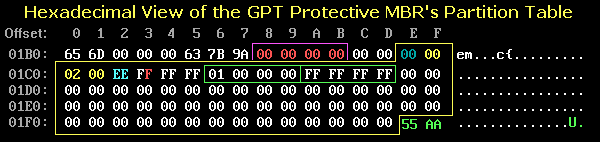
Copy the numbers in the last 4 lines, from 01c0 to 01ff, including "55 AA".
By turning GPT Off, you have deleted the "EFI PART" text from the header of LBA 1. You now need to repair offsets 200 to 207.
Once you have applied these changes, you should be able to access the data.
See https://thestarman.pcministry.com/asm/mbr/GPT.htm
Copy the numbers in the last 4 lines, from 01c0 to 01ff, including "55 AA".
By turning GPT Off, you have deleted the "EFI PART" text from the header of LBA 1. You now need to repair offsets 200 to 207.
Once you have applied these changes, you should be able to access the data.
Re: Internal GPT SATA HDDs became MBR, partially unallocated
March 9th, 2021, 18:30
Quote:
"By turning GPT Off, you have deleted the "EFI PART" text from the header of LBA 1."
Let me just clarify: I have not done anything yet. I only previewed the manipulations that you had recommended and then discarded all changes without applying anything.
Anyways, when you say "You now need to repair offsets 200 to 207." is that covered by your instructions about copying the values from 01c0 to 01ff, or does that involve yet another step?
Thank you
"By turning GPT Off, you have deleted the "EFI PART" text from the header of LBA 1."
Let me just clarify: I have not done anything yet. I only previewed the manipulations that you had recommended and then discarded all changes without applying anything.
Anyways, when you say "You now need to repair offsets 200 to 207." is that covered by your instructions about copying the values from 01c0 to 01ff, or does that involve yet another step?
Thank you
Re: Internal GPT SATA HDDs became MBR, partially unallocated
March 9th, 2021, 18:43
If the "EFI PART" signature is still present, then nothing needs to be repaired at offsets 200 - 207.
You only need to make changes to LBA 0.
You only need to make changes to LBA 0.
Re: Internal GPT SATA HDDs became MBR, partially unallocated
March 9th, 2021, 19:35
When I click 'Apply changes' I get 'Write must be allowed in device parameters' (cf. attachment).
How do I do that?
Thank you
How do I do that?
Thank you
- Attachments
-
- Write must be allowed
Re: Internal GPT SATA HDDs became MBR, partially unallocated
March 9th, 2021, 22:16
Sorry, the new version has added an extra safety check:
- Disk -> Device I/O Parameters -> Interface -> Allow Write
Disk -> Apply Changes
Re: Internal GPT SATA HDDs became MBR, partially unallocated
March 10th, 2021, 9:48
This post is great, thank you fzabkar for sharing.
Re: Internal GPT SATA HDDs became MBR, partially unallocated
March 10th, 2021, 9:55
Good day,
It is indeed very instructive and a great help.
Having applied the method to all of my 3 internal HDDs that had turned GPT, I am happy to report a complete success!
Many thanks to fzabkar and all those who contribute to this forum.
Cheers
(This thread can be closed or marked as 'Solved")
It is indeed very instructive and a great help.
Having applied the method to all of my 3 internal HDDs that had turned GPT, I am happy to report a complete success!
Many thanks to fzabkar and all those who contribute to this forum.
Cheers
(This thread can be closed or marked as 'Solved")
Powered by phpBB © phpBB Group.