ST6000NM0034 DKS2F-H6R0SS 7FA6
November 22nd, 2023, 0:07
Is there any consensus how to make these drives work?
I got a few of these formatted to 520, I was able to reformat to 512, but an attempt to write a partition table ends with
Flashing E005 did not work either.
Good news is ONE of these drives actually allowed me to create a GPT partition table and copy some files. Bad news is I have no clue if this is something I did when I was reformatting them or simply luck and some scsi mode pages difference between drives (sginfo command shows some differences).
Not sure how many people here are still interested in these drives, but I need some guidance how to a) figure out the difference and b) figure out how to enable or transfer this difference in other drives.
I got a few of these formatted to 520, I was able to reformat to 512, but an attempt to write a partition table ends with
- Code:
FAILED Result: hostbyte=DID_OK driverbyte=DRIVER_OK cmd_age=0s
Sense Key : Aborted Command [current] [descriptor]
<<vendor>>ASC=0x81 ASCQ=0x0
CDB: Write(16) 8a 00 00 00 00 02 ba a0 f4 88 00 00 00 28 00 00
Flashing E005 did not work either.
Good news is ONE of these drives actually allowed me to create a GPT partition table and copy some files. Bad news is I have no clue if this is something I did when I was reformatting them or simply luck and some scsi mode pages difference between drives (sginfo command shows some differences).
Not sure how many people here are still interested in these drives, but I need some guidance how to a) figure out the difference and b) figure out how to enable or transfer this difference in other drives.
Re: ST6000NM0034 DKS2F-H6R0SS 7FA6
November 24th, 2023, 6:59
DK models have a special write lock, until this is fixed you can't reformat/change sector size.
Besides that it's possible that the disk is a HGST. I know, it says ST...etc.
The only solution is to flash generic firmware, but I don't know how to do this.
Besides that it's possible that the disk is a HGST. I know, it says ST...etc.
The only solution is to flash generic firmware, but I don't know how to do this.
Re: ST6000NM0034 DKS2F-H6R0SS 7FA6
November 27th, 2023, 15:31
mr44er wrote:DK models have a special write lock, until this is fixed you can't reformat/change sector size.
Besides that it's possible that the disk is a HGST. I know, it says ST...etc.
The only solution is to flash generic firmware, but I don't know how to do this.
Well, I don't know what I do wrong (or right) but I got another drive to work: format to 512-byte, write GPT partition table and fill to the brim with data.
As a side note:
There is a 4-pin connector next to SATA and there is some info about serial (I guess rs232 or ttl level) transmission available (e.g. https://atola.com/products/insight/manual/serial-port-connection.html) - has anybody tried a simple terminal communication?
Re: ST6000NM0034 DKS2F-H6R0SS 7FA6
November 27th, 2023, 16:06
Just to satisfy my curiosity, could you tell us the part number of the PCB? Hitachi PCB P/Ns begin with 0A or 0B, Seagate's begin with "1".
Re: ST6000NM0034 DKS2F-H6R0SS 7FA6
November 27th, 2023, 19:52
fzabkar wrote:Just to satisfy my curiosity, could you tell us the part number of the PCB? Hitachi PCB P/Ns begin with 0A or 0B, Seagate's begin with "1".
There are few numbers on PCB, one of them says 100764671 REV B - is this the one you are looking for?
FYI I just formatted the third one to 512-byte, written GPT partition table and started populating with the data.
Now here is an interesting part: I was formatting them in pairs (two drives at the same time). Out of EACH pair one drive allowed me to write normally, while the other one threw an error. I believe it is pure coincidence but I will try again.
BTW this is the second attempt to format to 512-byte, after the first attempt I have reformatted all the drives back to 520-byte.
Re: ST6000NM0034 DKS2F-H6R0SS 7FA6
November 28th, 2023, 11:32
It's a Seagate PCB. It looks like it has unpopulated locations that are reserved for a flash controller and NAND flash.
https://www.harddiskpcb.com/images/seagate/100764671_2.jpg
https://www.harddiskpcb.com/images/seagate/100764671_2.jpg
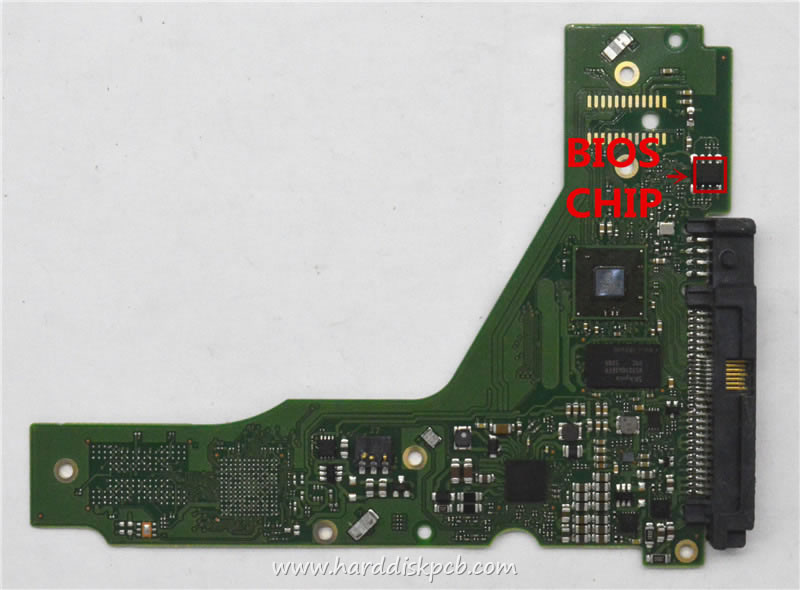
Re: ST6000NM0034 DKS2F-H6R0SS 7FA6
November 29th, 2023, 17:24
fzabkar wrote:It's a Seagate PCB. It looks like it has unpopulated locations that are reserved for a flash controller and NAND flash.
Correct.
BTW I just completed formatting to 512 bytes another drive and again I was able to partition it w/o write error. I will continue formatting EACH drive SEPARATELY as I have this weird theory that if you attempt to format more than one drive at the time and partition them ONLY first drive will work. If there is anybody with these drives to test this, please feel free. I have no clue how this could work (writing partition table to one drive broadcasts some message to other drives???), but it looks like a pattern. I will reformat all 512-byte drives that I cannot partition back to 520 bytes and try again.
Case closed until I get write error with my current approach.
Re: ST6000NM0034 DKS2F-H6R0SS 7FA6
December 4th, 2023, 22:11
stefan wrote:Case closed until I get write error with my current approach.
Well, I am afraid I have to reopen this case. I was able to make half of the drives work while the other half throws write errors.
What are my options to make the other half work? Can I read firmware from the working drive and write it to the non-working one?
Re: ST6000NM0034 DKS2F-H6R0SS 7FA6
December 4th, 2023, 23:16
What differences have you found?
Re: ST6000NM0034 DKS2F-H6R0SS 7FA6
December 6th, 2023, 14:47
fzabkar wrote:What differences have you found?
- Code:
[0:0:0:0]    disk    SEAGATE  DKS2F-H6R0SS     7FA6  /dev/sdc   /dev/sg2
[0:0:1:0]    disk    SEAGATE  DKS2F-H6R0SS     7FA6  /dev/sdd   /dev/sg3
[0:0:2:0]    disk    SEAGATE  DKS2F-H6R0SS     7FA6  /dev/sdg   /dev/sg6
[0:0:3:0]    disk    SEAGATE  DKS2F-H6R0SS     7FA6  /dev/sdh   /dev/sg7
[5:0:0:0]    disk    ATA      Samsung SSD 870  3B6Q  /dev/sda   /dev/sg0
[6:0:0:0]    disk    ATA      Samsung SSD 870  3B6Q  /dev/sdb   /dev/sg1
[15:0:0:0]   disk    SEAGATE  DKS2F-H6R0SS     7FA6  /dev/sde   /dev/sg4
[15:0:1:0]   disk    SEAGATE  DKS2F-H6R0SS     7FA6  /dev/sdf   /dev/sg5
[15:0:2:0]   disk    SEAGATE  DKS2F-H6R0SS     7FA6  /dev/sdi   /dev/sg8
[15:0:3:0]   disk    SEAGATE  DKS2F-H6R0SS     7FA6  /dev/sdj   /dev/sg9
See attached. First 4 drives highlighted green (sg2-sg5) are the ones that work (allowed writing GPT and data), last 4 highlighted red (sg6-sg9) are the ones that throw write error. Out of 4 non-working ones 3 have Write Cache Enabled (I can disable it with smartctl but it is a volatile change: as soon as drive is pulled out, it goes back to enabled). So I believe most of the diffs are related to this option enabled. Each working - non-working pair uses separate sff cable between the backplane and HBA and I have 2 HBAs to eliminate any connectivity questions.
HOWEVER, there is one difference that matches the working - non-working pattern: Mode Page 0x38, line 0x14. I need to see if I can change it and if it helps.
BTW the thing that I find unusual is every drive has a different number of cylinders. Not sure if this is normal.
- Attachments
-
Re: ST6000NM0034 DKS2F-H6R0SS 7FA6
December 6th, 2023, 15:08
Different numbers of cylinders are probably a consequence of Variable Bits Per Inch and Variable Tracks Per Inch, so that's normal.
https://hddscan.com/doc/HDD_Tracks_and_Zones.html
I can't find any reference to mode page 38h in Seagate's SCSI reference manual:
https://www.seagate.com/files/staticfiles/support/docs/manual/Interface%20manuals/100293068L.pdf
Is that mode page writeable???
https://hddscan.com/doc/HDD_Tracks_and_Zones.html
I can't find any reference to mode page 38h in Seagate's SCSI reference manual:
https://www.seagate.com/files/staticfiles/support/docs/manual/Interface%20manuals/100293068L.pdf
Is that mode page writeable???
Re: ST6000NM0034 DKS2F-H6R0SS 7FA6
December 6th, 2023, 17:08
fzabkar wrote:I can't find any reference to mode page 38h in Seagate's SCSI reference manual:
https://www.seagate.com/files/staticfiles/support/docs/manual/Interface%20manuals/100293068L.pdf
I could not find it even in the M revision of this manual (which I guess is most current): https://www.seagate.com/files/staticfiles/support/docs/manual/Interface%20manuals/100293068m.pdf
Shall I ask Seagate
 ?
?fzabkar wrote:Is that mode page writeable???
Well, sg_modes -p 0x38 -c 1 /dev/sg9 says it is changeable:
- Code:
    SEAGATE   DKS2F-H6R0SS      7FA6   peripheral_type: disk [0x0]
Mode parameter header from MODE SENSE(10):
  Mode data length=88, medium type=0x00, WP=0, DpoFua=1, longlba=0
  Block descriptor length=8
> Direct access device block descriptors:
   Density code=0x0
 00     ff ff ff ff 00 00 02 00

>> page_code: 0x38, page_control: changeable
 00     b8 46 ff ff ff ff ff ff  ff ff ff ff ff ff ff ff
 10     ff 00 00 1b 01 00 00 00  ff ff ff ff ff ff ff ff
 20     00 01 00 00 00 00 00 00  00 00 00 00 00 00 00 00
 30     00 00 00 00 00 00 00 00  00 00 00 00 00 00 00 00
 40     00 00 00 00 00 00 00 00
Let me check if sg_wr_mode allows me to change this.
Re: ST6000NM0034 DKS2F-H6R0SS 7FA6
December 6th, 2023, 17:38
So far so good: sg_wr_mode went through on sg9 (the one drive w/o write cache enabled) and I was able to create a partition table. I have to check if this change is permanent and attempt to fill the drive with data.
Re: ST6000NM0034 DKS2F-H6R0SS 7FA6
December 6th, 2023, 17:59
The good: sg_wr_mode went through as mentioned above.
The bad: the change is volatile, as soon as the drive is out, it is reversed and drive goes back to the original mode. I tried mkfs.ext4 on the partition I created earlier and it threw write errors. After rerunning sg_wr_mode I was able to successfully complete mkfs.ext4 and I am currently copying data to the drive.
Next step: find a way to make the change permanent. Any ideas?
The bad: the change is volatile, as soon as the drive is out, it is reversed and drive goes back to the original mode. I tried mkfs.ext4 on the partition I created earlier and it threw write errors. After rerunning sg_wr_mode I was able to successfully complete mkfs.ext4 and I am currently copying data to the drive.
Next step: find a way to make the change permanent. Any ideas?
Re: ST6000NM0034 DKS2F-H6R0SS 7FA6
December 6th, 2023, 18:12
https://linux.die.net/man/8/sg_wr_mode
- Code:
-s, --save

changes the "saved" mode page when MODE SELECT is successful. By default (i.e. when --save is not used) only the "current" mode page values are changed when MODE SELECT is successful. In this case the new mode page will stay in effect until the device is reset (e.g. power cycled). When it restarts the "saved" values for the mode page will be re-instated. So to make changes permanent use the --save option.
Re: ST6000NM0034 DKS2F-H6R0SS 7FA6
December 6th, 2023, 19:49
fzabkar wrote:https://linux.die.net/man/8/sg_wr_mode
- Code:
-s, --save

changes the "saved" mode page when MODE SELECT is successful. By default (i.e. when --save is not used) only the "current" mode page values are changed when MODE SELECT is successful. In this case the new mode page will stay in effect until the device is reset (e.g. power cycled). When it restarts the "saved" values for the mode page will be re-instated. So to make changes permanent use the --save option.
It works. The final thing would be to make sure I can disable Write Cache permanently. The smartctl command still works on volatile basis. I can probably use sg_wr_mode to force the change made by smartctl, but after seeing all the diffs between the drives WITH and WITHOUT Write Cache enabled I wonder if there is any performance difference.
Re: ST6000NM0034 DKS2F-H6R0SS 7FA6
December 6th, 2023, 19:56
If there is no measurable improvement, I would leave write caching disabled. This would mitigate potential power loss data protection issues.
Re: ST6000NM0034 DKS2F-H6R0SS 7FA6
December 6th, 2023, 21:39
fzabkar wrote:If there is no measurable improvement, I would leave write caching disabled. This would mitigate potential power loss data protection issues.
Oh I am disabling Write Cache no question asked. But when I looked at the diffs AFTER I used smartctl command the only difference was 0 in the Write Cache Enabled field. And if you look closely there are a bunch of other differences between drives with WC enabled and disabled and I debate if I should change these fields to match the values in the drives with WC disabled.
Re: ST6000NM0034 DKS2F-H6R0SS 7FA6
December 6th, 2023, 21:51
Sorry, I don't know what many of those parameters do.
Re: ST6000NM0034 DKS2F-H6R0SS 7FA6
December 7th, 2023, 10:50
I disabled the Write Cache and decided to align the mode pages 0x0, 0x1, 0x2, 0x7, 0x8 (obviously), 0xa, 0x19, 0x1c, 0x23 to the values from sg2. So far it works.
There are too many differences in mode page 0x38 to make any changes without understanding each byte. If Seagate shares any info on this mode page (which I personally doubt), I can get back to this topic.
Case closed, thank you fzabkar!
There are too many differences in mode page 0x38 to make any changes without understanding each byte. If Seagate shares any info on this mode page (which I personally doubt), I can get back to this topic.
Case closed, thank you fzabkar!
Powered by phpBB © phpBB Group.