External hard disk issue [detect but not accessible]
October 24th, 2024, 9:28
Hi all,
HD Brand : WD , my passport
File System : NTFS
Windows : 7
I apologize for the general topic and posting this issue here (maybe related to others' sub-forum), but I would like to clarify the issue I am experiencing. I have several external hard drives, and the one I am referring to was purchased 13 years ago. It has not been damaged by water or impact.
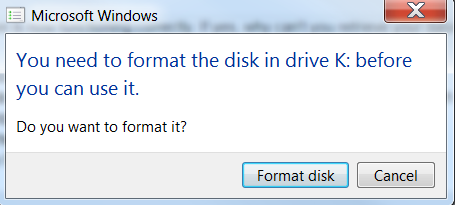
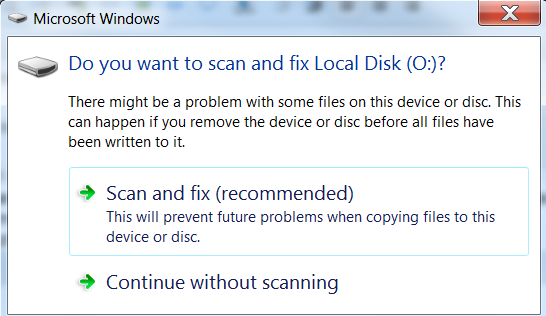
When I connect it to the USB 3 port on my laptop, only 1 out of 4 partitions is visible. The other three partitions only display the drive names, without showing any volume information. Subsequently, my computer begins to fill a green progress bar at the top and becomes unresponsive (hangs). After a while, a message appears stating, "Format before use." I click on "Cancel."
First time I connected it, I received a message (Yellow exclamation in device manager) indicating that "drivers for the USB devices were not installed completely." I updated the drivers, and they now appear to be functioning correctly. The LED on the drive is blinking, and I can hear a buzzing sound, along with some movement inside the hard drive when I place my hand on it(I believe sound does not mean defecting and it's a natural sound)
Could you please assist me in retrieving my data, if possible? How can I check for the underlying problem? To be honest, this hard drive was my first one, and it contains all my important data, including old photos. I cannot bear the thought of losing them. Additionally, I would like to mention that I do not have confidence in handing it over to a technician or expert.
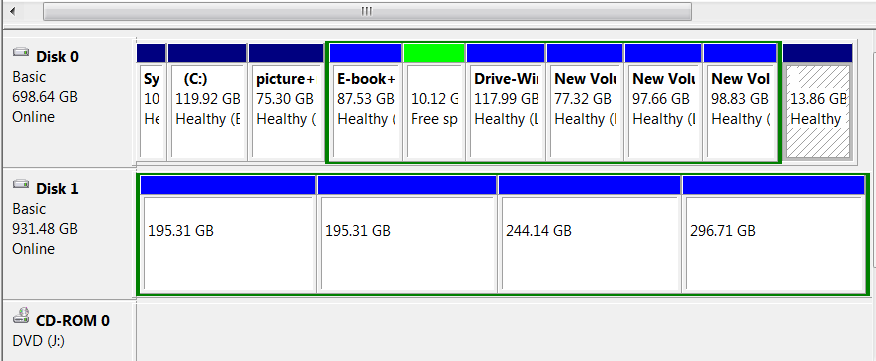
NOTE:defect drive of external HD is "O" , "P" , "Q" and "K"
Note: I have to eject HD by pulling it from the laptop's port and can't perform safety remove .
I attached 4 images
Disk 1 is my external Hard drive
thank you

HD Brand : WD , my passport
File System : NTFS
Windows : 7
I apologize for the general topic and posting this issue here (maybe related to others' sub-forum), but I would like to clarify the issue I am experiencing. I have several external hard drives, and the one I am referring to was purchased 13 years ago. It has not been damaged by water or impact.
When I connect it to the USB 3 port on my laptop, only 1 out of 4 partitions is visible. The other three partitions only display the drive names, without showing any volume information. Subsequently, my computer begins to fill a green progress bar at the top and becomes unresponsive (hangs). After a while, a message appears stating, "Format before use." I click on "Cancel."
First time I connected it, I received a message (Yellow exclamation in device manager) indicating that "drivers for the USB devices were not installed completely." I updated the drivers, and they now appear to be functioning correctly. The LED on the drive is blinking, and I can hear a buzzing sound, along with some movement inside the hard drive when I place my hand on it(I believe sound does not mean defecting and it's a natural sound)
Could you please assist me in retrieving my data, if possible? How can I check for the underlying problem? To be honest, this hard drive was my first one, and it contains all my important data, including old photos. I cannot bear the thought of losing them. Additionally, I would like to mention that I do not have confidence in handing it over to a technician or expert.
NOTE:defect drive of external HD is "O" , "P" , "Q" and "K"
Note: I have to eject HD by pulling it from the laptop's port and can't perform safety remove .
I attached 4 images
Disk 1 is my external Hard drive
thank you
- Attachments
-
Re: External hard disk issue [detect but not accessible]
October 24th, 2024, 20:45
Maybe try an app like crystal disk info as it can provide some more diagnostic information. Post a picture of the results here so the community can help you better.
Re: External hard disk issue [detect but not accessible]
October 25th, 2024, 4:10
Zero Alpha wrote:Maybe try an app like crystal disk info as it can provide some more diagnostic information. Post a picture of the results here so the community can help you better.
Thanks for your response
I'll do that .
Re: External hard disk issue [detect but not accessible]
October 26th, 2024, 11:16
Another WD Busy problem; find anyone in Colobia who has PC3000 or MRT.
Re: External hard disk issue [detect but not accessible]
November 3rd, 2024, 15:21
Hi
Hope someone could help me in this situation ,
I did live boot with Linuxmint , nothing shown but pop up messages, I attached some photos
HD sentinel couldn't run and respond (Not responding) , Gsmart also couldn't run,
One partition which was shown, now , is disappeared,
If you know any way please learn me , I really don’t feel good

How possible physical damage or format hard drive could recover , my external hD I'm sure that it hasn't been physically damaged.


Hope someone could help me in this situation ,
I did live boot with Linuxmint , nothing shown but pop up messages, I attached some photos
HD sentinel couldn't run and respond (Not responding) , Gsmart also couldn't run,
One partition which was shown, now , is disappeared,
If you know any way please learn me , I really don’t feel good
How possible physical damage or format hard drive could recover , my external hD I'm sure that it hasn't been physically damaged.
Re: External hard disk issue [detect but not accessible]
November 3rd, 2024, 21:33
Use linux to print the S.M.A.R.T status of the drive and paste results here.
Re: External hard disk issue [detect but not accessible]
November 4th, 2024, 10:03
Zero Alpha wrote:Use linux to print the S.M.A.R.T status of the drive and paste results here.
Hi and thanks for your response
Images has not been shown
I try to attach them again
How I could print SMART status ? via a software? If yes? Because system freezing I couldn't run any software ? is there any commands? Can you please inform me what are them ? I'm not familiar with Linux
thanks
Re: External hard disk issue [detect but not accessible]
November 4th, 2024, 10:24
vital_0x wrote:Zero Alpha wrote:Use linux to print the S.M.A.R.T status of the drive and paste results here.
Hi and thanks for your response
Images has not been shown
I try to attach them again
How could I print SMART status ? via software? If yes? Because system freezing I couldn't run any software ? is there any commands? Can you please inform me what are them ? I'm not familiar with Linux
thanks
Re: External hard disk issue [detect but not accessible]
November 4th, 2024, 10:36
I find that there is smartctl command I'm not familiar with that even I do not know should I run long or short and whether it damages my external hard disk or not , I tried it and post it back here. please if any further commands related to my situation is needed inform me
thanks
thanks
Re: External hard disk issue [detect but not accessible]
November 4th, 2024, 11:59
Show DMDE partitions TAB.
Stop showing pics no one asks for.
Stop showing pics no one asks for.
Re: External hard disk issue [detect but not accessible]
November 4th, 2024, 14:58
Arch Stanton wrote:Show DMDE partitions TAB.
Stop showing pics no one asks for.
Thanks for your response
As I'm not as professional as you're
Show DMDE partitions TAB
Do you mean should I Install and use DMDE software? (This website: https://dmde.com/manual/datarecovery.html ) ?
Stop showing pics no one asks for
I'm sorry, I do .
Re: External hard disk issue [detect but not accessible]
November 11th, 2024, 13:39
Zero Alpha wrote:Use linux to print the S.M.A.R.T status of the drive and paste results here.
-----Output from -H command (smartctl)
- Code:
smartctl 7.4 2023-08-01 r5530 [x86_64-linux-6.8.0-38-generic] (local build)
Copyright (C) 2002-23, Bruce Allen, Christian Franke, www.smartmontools.org

=== START OF READ SMART DATA SECTION ===
SMART Status not supported: Incomplete response, ATA output registers missing
SMART overall-health self-assessment test result: PASSED

Warning: This result is based on an Attribute check.
-----------------Output from -i command-----------------------------
- Code:
smartctl 7.4 2023-08-01 r5530 [x86_64-linux-6.8.0-38-generic] (local build)
Copyright (C) 2002-23, Bruce Allen, Christian Franke, www.smartmontools.org

=== START OF INFORMATION SECTION ===
Model Family:     Western Digital Elements / My Passport (USB, AF)
Device Model:     ****************
Serial Number:    ****************
LU WWN Device Id: ****************
Firmware Version: 01.01A01
User Capacity:    1,000,204,886,016 bytes [1.00 TB]
Sector Sizes:     512 bytes logical, 4096 bytes physical
Rotation Rate:    5200 rpm
Device is:        In smartctl database 7.3/5528
ATA Version is:   ATA8-ACS (minor revision not indicated)
SATA Version is:  SATA 2.6, 3.0 Gb/s
Local Time is:    Mon Nov 11 15:37:36 2024 UTC
SMART support is: Available - device has SMART capability.
SMART support is: Enabled
------------Output from -a command-----------------------
- Code:
smartctl 7.4 2023-08-01 r5530 [x86_64-linux-6.8.0-38-generic] (local build)
Copyright (C) 2002-23, Bruce Allen, Christian Franke, www.smartmontools.org

=== START OF INFORMATION SECTION ===
Model Family:     Western Digital Elements / My Passport (USB, AF)
Device Model:     ************
Serial Number:    ************
LU WWN Device Id: ************
Firmware Version: 01.01A01
User Capacity:    1,000,204,886,016 bytes [1.00 TB]
Sector Sizes:     512 bytes logical, 4096 bytes physical
Rotation Rate:    5200 rpm
Device is:        In smartctl database 7.3/5528
ATA Version is:   ATA8-ACS (minor revision not indicated)
SATA Version is:  SATA 2.6, 3.0 Gb/s
Local Time is:    Mon Nov 11 15:38:27 2024 UTC
SMART support is: Available - device has SMART capability.
SMART support is: Enabled

=== START OF READ SMART DATA SECTION ===
SMART Status not supported: Incomplete response, ATA output registers missing
SMART overall-health self-assessment test result: PASSED
Warning: This result is based on an Attribute check.

General SMART Values:
Offline data collection status:  (0x00)   Offline data collection activity
               was never started.
               Auto Offline Data Collection: Disabled.
Self-test execution status:      ( 241)   Self-test routine in progress...
               10% of test remaining.
Total time to complete Offline
data collection:       (25260) seconds.
Offline data collection
capabilities:           (0x7b) SMART execute Offline immediate.
               Auto Offline data collection on/off support.
               Suspend Offline collection upon new
               command.
               Offline surface scan supported.
               Self-test supported.
               Conveyance Self-test supported.
               Selective Self-test supported.
SMART capabilities:            (0x0003)   Saves SMART data before entering
               power-saving mode.
               Supports SMART auto save timer.
Error logging capability:        (0x01)   Error logging supported.
               General Purpose Logging supported.
Short self-test routine
recommended polling time:     (   2) minutes.
Extended self-test routine
recommended polling time:     ( 246) minutes.
Conveyance self-test routine
recommended polling time:     (   5) minutes.
SCT capabilities:           (0x7035)   SCT Status supported.
               SCT Feature Control supported.
               SCT Data Table supported.

SMART Attributes Data Structure revision number: 16
Vendor Specific SMART Attributes with Thresholds:
ID# ATTRIBUTE_NAME          FLAG     VALUE WORST THRESH TYPE      UPDATED  WHEN_FAILED RAW_VALUE
  1 Raw_Read_Error_Rate     0x002f   200   200   051    Pre-fail  Always       -       0
  3 Spin_Up_Time            0x0027   142   133   021    Pre-fail  Always       -       5883
  4 Start_Stop_Count        0x0032   100   100   000    Old_age   Always       -       744
  5 Reallocated_Sector_Ct   0x0033   200   200   140    Pre-fail  Always       -       0
  7 Seek_Error_Rate         0x002e   005   005   000    Old_age   Always       -       3195
  9 Power_On_Hours          0x0032   100   100   000    Old_age   Always       -       312
 10 Spin_Retry_Count        0x0032   100   100   000    Old_age   Always       -       0
 11 Calibration_Retry_Count 0x0032   100   100   000    Old_age   Always       -       0
 12 Power_Cycle_Count       0x0032   100   100   000    Old_age   Always       -       683
192 Power-Off_Retract_Count 0x0032   200   200   000    Old_age   Always       -       559
193 Load_Cycle_Count        0x0032   199   199   000    Old_age   Always       -       3113
194 Temperature_Celsius     0x0022   121   093   000    Old_age   Always       -       29
196 Reallocated_Event_Count 0x0032   200   200   000    Old_age   Always       -       0
197 Current_Pending_Sector  0x0032   200   200   000    Old_age   Always       -       52
198 Offline_Uncorrectable   0x0030   100   253   000    Old_age   Offline      -       0
199 UDMA_CRC_Error_Count    0x0032   200   200   000    Old_age   Always       -       0
200 Multi_Zone_Error_Rate   0x0008   100   253   000    Old_age   Offline      -       0

SMART Error Log Version: 1
No Errors Logged

SMART Self-test log structure revision number 1
No self-tests have been logged.  [To run self-tests, use: smartctl -t]

SMART Selective self-test log data structure revision number 1
 SPAN  MIN_LBA  MAX_LBA  CURRENT_TEST_STATUS
    1        0        0  Not_testing
    2        0        0  Not_testing
    3        0        0  Not_testing
    4        0        0  Not_testing
    5        0        0  Not_testing
Selective self-test flags (0x0):
  After scanning selected spans, do NOT read-scan remainder of disk.
If Selective self-test is pending on power-up, resume after 0 minute delay.

The above only provides legacy SMART information - try 'smartctl -x' for more
Re: External hard disk issue [detect but not accessible]
November 12th, 2024, 6:50
197 Current_Pending_Sector 0x0032 200 200 000 Old_age Always - 52
This is your issue probably. Clone / image the drive using something like OpenSuperClone, see https://old.reddit.com/r/datarecoveryso ... lone_guide
Re: External hard disk issue [detect but not accessible]
November 12th, 2024, 10:48
Also you can clone with ddrescue (linux) or dmde (windows/linux)
Re: External hard disk issue [detect but not accessible]
December 14th, 2024, 15:36
Arch Stanton wrote:197 Current_Pending_Sector 0x0032 200 200 000 Old_age Always - 52
This is your issue probably. Clone / image the drive using something like OpenSuperClone, see https://old.reddit.com/r/datarecoveryso ... lone_guide
Hi thank you for your response , Yes I believe it is my problem.
Re: External hard disk issue [detect but not accessible]
December 14th, 2024, 16:08
laptokowiec wrote:Also you can clone with ddrescue (linux) or dmde (windows/linux)
Hi I am grateful for your response.
Could you compare those two and distinguish between them? which one is better in my situation?
and If you add HDD Super Clone I am more than grateful if you have had any experience with these 3 tools.
one question please:
I am a Windows user, I do not have Installed Linux but I boot with Linux Mint .
I could install Linux If needed.
I found a link here :https://html5.litten.com/make-full-image-of-broken-raw-infected-or-encrypted-hard-drive-with-free-tools/
As I am Windows user can I use Clonezilla with ddrescue from booting Windows or I have to installed Linux in one of my partition?
and Can I run ddrescue with bootable live Linux Mint ?
Powered by phpBB © phpBB Group.