No spin WD 6400AAKS
April 7th, 2026, 13:25
Hello all,
Short story, drive is no longer spinning. Did some searching here, tried a few things, and still no joy. I'm a hack, not a pro, but would love to see if there is anything else I can do to revive this drive.
No apparent physical damage to the board, 2060-701537-003 rev A.
Got a donor on ebay. Swapped the boards, and she spins up with donor board but of course doesn't read. I do hear faint clicking.
Thermal view shows main chip getting warm (~90f) but so does donor so nothing seems badly shorted.
Did some checking with my fluke. No shorts for D1/2/3/4, L2,L1, Q1, and 12/5/3v inputs all seem OK. Since I have known good board, I compared voltages as well for these components.
I don't have skills or equipment to swap the BGA controller.
I might have enough skills to reprogram donor chip with right software?
Unless there's something else for me to check first?
Thanks for any and all advice
Short story, drive is no longer spinning. Did some searching here, tried a few things, and still no joy. I'm a hack, not a pro, but would love to see if there is anything else I can do to revive this drive.
No apparent physical damage to the board, 2060-701537-003 rev A.
Got a donor on ebay. Swapped the boards, and she spins up with donor board but of course doesn't read. I do hear faint clicking.
Thermal view shows main chip getting warm (~90f) but so does donor so nothing seems badly shorted.
Did some checking with my fluke. No shorts for D1/2/3/4, L2,L1, Q1, and 12/5/3v inputs all seem OK. Since I have known good board, I compared voltages as well for these components.
I don't have skills or equipment to swap the BGA controller.
I might have enough skills to reprogram donor chip with right software?
Unless there's something else for me to check first?
Thanks for any and all advice
Re: No spin WD 6400AAKS
April 7th, 2026, 14:34
curwiler wrote:I might have enough skills to reprogram donor chip with right software?
Most likely, yes. The correct software is called WDMarvel 2.3 beta. It's free; newer versions are no longer free, but this free version will be more than enough for you.
Assuming that the mechanics of your faulty hard drive are working properly, and only the board is faulty, you need to flash the correct firmware from a drive with the same firmware version to the donor board. The easiest way to find it is by serial number. Take a photo of the sticker on your faulty drive, and if possible, also on the donor board. I hope the original and donor boards are the same (2060-701537).
After flashing, the drive should be detected by the computer and display all the data stored on it, but it's best not to try to copy it immediately, as the firmware you flash to the board isn't entirely compatible; it stores parameters unique to each drive. If you try to copy the data immediately, it may copy slowly and encounter read errors.
To fully restore the hard drive, you'll need to copy several small files from its system area and fix the program that will be written to the board. After that, your hard drive will function as before, with its original board.
Re: No spin WD 6400AAKS
April 7th, 2026, 16:53
Measure the voltages at L1, L2 and D2 (anode) adjacent to the SMOOTH IC.
Also measure the voltages at Q1 near the SATA connector.
Also measure the voltages at Q1 near the SATA connector.
Re: No spin WD 6400AAKS
April 8th, 2026, 10:26
fzabkar wrote:Measure the voltages at L1, L2 and D2 (anode) adjacent to the SMOOTH IC.
Also measure the voltages at Q1 near the SATA connector.
Thanks for suggestions fzabkar... So I got the same measurements with both boards. To be clear, I removed them from the physical drive, and placed each one in the SATA connector in my external drive enclosure to power the board and take measurements.
Measurements:
D2 anode 0v
L1 1.2v
L2 2.6v
Q1 - not sure how to say what terminal is what but.... left side gave me 5v, right side top was 3.3, middle was 5 and bottom was 3.9
Guessing this might mean problem is elsewhere, perhaps the SMOOTH chip?
Re: No spin WD 6400AAKS
April 8th, 2026, 12:18
The anode voltage on D2 should be -5V when the drive is spinning. That's the negative supply for the preamp on the headstack. You should find that this voltage briefly comes up after power-on and then switches off when the MCU fails to detect the preamp. If this doesn't happen on the patient PCB, then this would suggest that the MCU and SMOOTH IC are not communicating. That's because the SMOOTH IC generates this supply on command from the MCU.
I think your PCB has an unpopulated location at U12. This means that the "ROM" is embedded within the MCU.
One way to rebuild the ROM is to use the donor PCB to attempt to recover firmware modules from the System Area (SA) on the platters. To this end you could use WD Marvel (demo version):
https://arch7rt.com/en/demo/
I think your PCB has an unpopulated location at U12. This means that the "ROM" is embedded within the MCU.
One way to rebuild the ROM is to use the donor PCB to attempt to recover firmware modules from the System Area (SA) on the platters. To this end you could use WD Marvel (demo version):
https://arch7rt.com/en/demo/
Re: No spin WD 6400AAKS
April 8th, 2026, 15:15
fzabkar wrote:I think your PCB has an unpopulated location at U12. This means that the "ROM" is embedded within the MCU.
One way to rebuild the ROM is to use the donor PCB to attempt to recover firmware modules from the System Area (SA) on the platters. To this end you could use WD Marvel (demo version):
Yes, there is no U12 on this board and my previous research pointed me towards the "ROM" was in the MCU, which was of course disappointing to me because that U12 looked like something I actually *could* tackle myself. But a BGA - no way.
I will look at this WD Marvel, sounds promising to me after some learning of course. And I'll verify that voltage jump on D2 like you mentioned.
I really, really appreciate the assist here! Will report back on any other progress that I can make, which might take a few days LOL
Re: No spin WD 6400AAKS
April 9th, 2026, 12:35
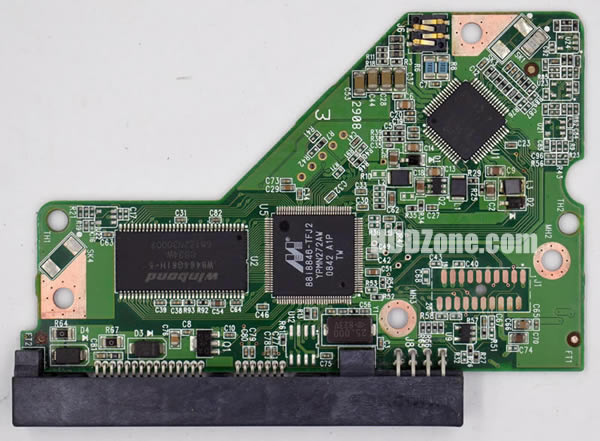
I have seen a few variations of the old WD6400AAKS, it's a SATA 300 class 3.5" hard disk.
Re: No spin WD 6400AAKS
April 9th, 2026, 16:46
Hardcore Games wrote:I have seen a few variations of the old WD6400AAKS, it's a SATA 300 class 3.5" hard disk.
my board looks similar - main diff being that I do NOT have that huge winbond chip there near the SATA connector
Re: No spin WD 6400AAKS
April 9th, 2026, 16:53
ora wrote:curwiler wrote:I might have enough skills to reprogram donor chip with right software?
Most likely, yes. The correct software is called WDMarvel 2.3 beta. It's free; newer versions are no longer free, but this free version will be more than enough for you.
<snip>
Thank you Ora, I did not see your post until now, will look for the software. After that I'll try to read more about what you've stated here with regards to reading the system area and updating the flash again. Sounds like I might be able to make it work with a little precautionary education.
Re: No spin WD 6400AAKS
April 10th, 2026, 21:30
The modern internet has become a place where it's impossible to find anything, so if you can't find this old version, I'll give you a link to where you can download it. I thought this program was in the files section on this site, but no.curwiler wrote:will look for the software
This program has some drawbacks: it's entirely in Russian and doesn't support AHCI mode or anything else, only IDE. It also doesn't work on modern operating systems, so you'll have to find an old computer with a Core 2 Duo processor and install 32-bit Windows 7 on it. Or, you can temporarily install a 32-bit version of Windows 10 on your computer and switch the motherboard's SATA controller to IDE compatibility mode.
You'll also need a more recent version of this program, for example, the demo version fzakbar linked to. If it doesn't work, I can also provide links to older demo versions. New versions have a one-click solution for restoring the original ROM of your faulty hard drive—you'll need this after flashing the ROM from a similar hard drive onto the board.
First, it's best to start with the demo version—it works in read-only mode. Check that it can detect the hard drive, read the ROM, and create a restore point. As far as I understand, you purchased another working hard drive as a donor, not just a board, which is good.
If everything works, you can move on to the old beta version. It launches the same way as the new one, with a big, scary warning that if you want to press buttons without understanding what they do, it's best not to waste your time. It's better to take your hard drive to an e-waste recycling center right away, because it'll end up there anyway. There's also another warning about disabling the ATA channel the hard drive is connected to in Device Manager to prevent the operating system from interfering with anything. If the computer asks you to reboot after this, reboot it and continue. If another drive, including a system drive, is connected to the same ATA channel, the drive will have to be connected to a different SATA port.
These warnings should be taken seriously, and the program itself should be treated as a minefield—some buttons initiate actions immediately when pressed, without warning or requiring confirmation. In the image below, I've illustrated what you need to press and where the magic button you're looking for is located. Another useful feature is stopping the hard drive motor. After flashing the ROM, you'll have to disconnect the hard drive from the computer and transfer the circuit board to the faulty drive, so it's best to stop the motor before flashing to avoid damaging the hard drive by shaking it while it's running.
Now for the most important thing: for some Western Digital hard drives, you can only flash the board using this program if the drive starts up and is fully functional. Or if the drive was able to at least partially initialize. If the drive can't initialize (for example, if it can't read anything from the magnetic platters due to faulty heads, or if only the control board was connected to the computer, without the HDA), if the ROM contains incorrect firmware, or if the ROM contains garbage instead of what it should contain, you can't do anything with the software. If the board has external ROM, this isn't a problem, since you can always transfer the chip from one board to another or flash it with a cheap Chinese programmer with a clip. But in our case, the ROM is stored inside the MCU. In this case, the board can still be flashed, but it's much more difficult, and this is definitely not the problem we need.
I have a drive with the same board as yours, but I haven't tested how it behaves in a similar situation. So take a photo of the labels on the faulty drive and the donor drive, and upload them to the forum; people here have a lot of experience in data recovery and will be able to find the correct file.
This means you have a completely different board. These boards all look identical, judging by their color and shape. But they're all different, with different MCUs, with or without external ROM, with different types of RAM, motor control chips, and so on. They're incompatible with each other, even though they can be physically installed on a HDA, and the hard drive will even be able to spin up with a completely incompatible control board. Of course, it will spin up extremely slowly—about a minute. This can be used to determine whether the preamp inside the HDA is working properly—if it's faulty, the hard drive won't spin up.curwiler wrote:my board looks similar - main diff being that I do NOT have that huge winbond chip
Re: No spin WD 6400AAKS
April 11th, 2026, 9:20
Always check the regenerated ROM. I encountered a case (at Tom's Hardware?) where WDMarvel incorrectly recreated a ROM from SA modules. Instead, I wrote my own tool for this purpose.
Re: No spin WD 6400AAKS
May 4th, 2026, 11:56
Wow has it already been a month since last post here...
You guys are great, thanks for the information.... I have not yet drilled into any of this, as this is not my top priority at the moment.... but...
I will try to get both the donor and patient drives to show up in the demo software on my old PC... sounds like that's a good first step towards using the software properly... if I have to install older windows well, that will be "fun"
Here are pictures of the donor and patient boards - I tried to do as much research as possible to find a compatible donor drive, hope I got it right LOL
You guys are great, thanks for the information.... I have not yet drilled into any of this, as this is not my top priority at the moment.... but...
I will try to get both the donor and patient drives to show up in the demo software on my old PC... sounds like that's a good first step towards using the software properly... if I have to install older windows well, that will be "fun"
Here are pictures of the donor and patient boards - I tried to do as much research as possible to find a compatible donor drive, hope I got it right LOL
- Attachments
-
-
Re: No spin WD 6400AAKS
May 12th, 2026, 13:13
Yes, that's right, the donor and original boards are completely the same. It was not necessary to look for completely identical boards, it is enough that their number (2060-701537) matches, the third number (002, 003, 005) may differ, as well as the revision of the board - in this case, the boards are also suitable and completely interchangeable.curwiler wrote:hope I got it right LOL
Powered by phpBB © phpBB Group.