Seagate ST360020A 60gb with bad sectors
June 26th, 2026, 21:06
Hi all,
I need some help with recovering the remaining data from my failed 60GB hard drive.
Back in 2006, the partition table became corrupted and the partition showed as RAW, so I couldn't access it through Windows. The drive had also developed bad sectors. I tried running CHKDSK to repair the partition table, but the drive became extremely slow to read, so I powered it off immediately to avoid causing further damage.
In 2006, I sent the drive to a UK data recovery company that I later discovered had a reputation for scamming customers. Last year, I found out they had never actually opened the drive. They claimed they had recovered only about 40% of the data.
When I later connected the drive, the BIOS still detected it correctly, so I immediately created a clone using HDDSuperClone and have not used the original drive since.
From the clone, I've rebuilt the directory structure and reconstructed most of my files because the file system was badly damaged. So far, I've recovered about 99% of my data. I only have around 35 files left that I'd like to recover. Some of the text files were fragmented, and parts of them were lost because of unreadable sectors, although I've managed to reconstruct much of their contents.
More recently, I sent the original drive to a reputable data recovery company. They opened the drive and found that the read/write heads were weak, so they replaced them with a compatible donor head assembly. They also said the platters were in excellent condition, with no scratches or physical damage.
They used a PC-3000 data extraction to image the drive, but they reported that there were around 50 unreadable sectors. After one imaging attempt, they said they couldn't recover any additional data and gave up.
My question is whether another data recovery company might have a better chance of recovering data from those remaining bad sectors. Could a company using a PC-3000 Portable Pro with head mapping and different imaging strategies adjust the head configuration to obtain better reads from those sectors?
Since I only need about 35 files (ZIP, EXE, TXT, and URL files), I'm wondering whether it's worth getting a second opinion.
Alternatively, I've been considering attempting to replace the heads myself. I could obtain a matching donor drive, replace the PCB (since the current PCB firmware was modified by the recovery company), and install a matching donor head assembly in a clean chamber. I assume I couldn't simply reuse the current PCB because of the firmware modifications made during the recovery process.
Would this approach have any realistic chance of improving the recovery, or is it more likely that it wouldn't work because the replacement heads would have difficulty staying on track or reading the remaining bad sectors?
I need some help with recovering the remaining data from my failed 60GB hard drive.
Back in 2006, the partition table became corrupted and the partition showed as RAW, so I couldn't access it through Windows. The drive had also developed bad sectors. I tried running CHKDSK to repair the partition table, but the drive became extremely slow to read, so I powered it off immediately to avoid causing further damage.
In 2006, I sent the drive to a UK data recovery company that I later discovered had a reputation for scamming customers. Last year, I found out they had never actually opened the drive. They claimed they had recovered only about 40% of the data.
When I later connected the drive, the BIOS still detected it correctly, so I immediately created a clone using HDDSuperClone and have not used the original drive since.
From the clone, I've rebuilt the directory structure and reconstructed most of my files because the file system was badly damaged. So far, I've recovered about 99% of my data. I only have around 35 files left that I'd like to recover. Some of the text files were fragmented, and parts of them were lost because of unreadable sectors, although I've managed to reconstruct much of their contents.
More recently, I sent the original drive to a reputable data recovery company. They opened the drive and found that the read/write heads were weak, so they replaced them with a compatible donor head assembly. They also said the platters were in excellent condition, with no scratches or physical damage.
They used a PC-3000 data extraction to image the drive, but they reported that there were around 50 unreadable sectors. After one imaging attempt, they said they couldn't recover any additional data and gave up.
My question is whether another data recovery company might have a better chance of recovering data from those remaining bad sectors. Could a company using a PC-3000 Portable Pro with head mapping and different imaging strategies adjust the head configuration to obtain better reads from those sectors?
Since I only need about 35 files (ZIP, EXE, TXT, and URL files), I'm wondering whether it's worth getting a second opinion.
Alternatively, I've been considering attempting to replace the heads myself. I could obtain a matching donor drive, replace the PCB (since the current PCB firmware was modified by the recovery company), and install a matching donor head assembly in a clean chamber. I assume I couldn't simply reuse the current PCB because of the firmware modifications made during the recovery process.
Would this approach have any realistic chance of improving the recovery, or is it more likely that it wouldn't work because the replacement heads would have difficulty staying on track or reading the remaining bad sectors?
Re: Seagate ST360020A 60gb with bad sectors
June 27th, 2026, 8:42
If the heads have been replaced and there are still bad sectors it may be actual damage with so few sectors damaged it's unlikely to be visible. Without knowing where the sectors are and if they're random or patterned it's impossible to say.
As you have found out a lot will depend on where you have sent it for recovery and more importantly how long they were able to spend on the recovery.
If you have the drive and the heads read anything DO NOT try to replace them yourself, don't even open the drive. If a reasonable company has already taken a swing at it you're not going to do any better yourself. What another pro might get is perhaps more blocks (or less) depending on the time they can allocate on rereads - we have to consider what is recoverable and what is economically viable to recover. Time on the kit uses a channel up that could be making money on another full recovery.
Most of us offer free evaluations , if the drive is working and reading (after the other company replaced the heads) it should be classed as a logical recovery only. If the other company have removed the working heads and restored the original set then it's unlikely to be viable to have another DR pro chase 50 sectors.
If the drive is reading you're welcome to sending it here with a file list and I'll take a shot at it.
As you have found out a lot will depend on where you have sent it for recovery and more importantly how long they were able to spend on the recovery.
If you have the drive and the heads read anything DO NOT try to replace them yourself, don't even open the drive. If a reasonable company has already taken a swing at it you're not going to do any better yourself. What another pro might get is perhaps more blocks (or less) depending on the time they can allocate on rereads - we have to consider what is recoverable and what is economically viable to recover. Time on the kit uses a channel up that could be making money on another full recovery.
Most of us offer free evaluations , if the drive is working and reading (after the other company replaced the heads) it should be classed as a logical recovery only. If the other company have removed the working heads and restored the original set then it's unlikely to be viable to have another DR pro chase 50 sectors.
If the drive is reading you're welcome to sending it here with a file list and I'll take a shot at it.
Re: Seagate ST360020A 60gb with bad sectors
June 27th, 2026, 18:02
I'm trying to understand how 50 unreadable sectors correlate to 35 damaged files.
Ddrescue and HDDSuperClone have a companion tool that can parse the log/map file and determine which files in an intact NTFS file system are affected by bad sectors:
https://sourceforge.net/p/ddrutility/wiki/Home/
Ddrescue and HDDSuperClone have a companion tool that can parse the log/map file and determine which files in an intact NTFS file system are affected by bad sectors:
https://sourceforge.net/p/ddrutility/wiki/Home/
Re: Seagate ST360020A 60gb with bad sectors
June 27th, 2026, 19:13
I don’t know. There are 50 errors in other sectors as well.
I have got the logs so do you want me to paste it on here?
I can’t clone these 35 data I want because the DR firm have modified on the firmware when they installed the new heads before they removed it.
If I replace the heads and swap the pcb that come with same firmware version as the patient drive, it will not work.
I have got the logs so do you want me to paste it on here?
I can’t clone these 35 data I want because the DR firm have modified on the firmware when they installed the new heads before they removed it.
If I replace the heads and swap the pcb that come with same firmware version as the patient drive, it will not work.
Re: Seagate ST360020A 60gb with bad sectors
June 27th, 2026, 20:25
I must be misunderstanding something. I thought you had a clone with only 50 bad sectors.
Re: Seagate ST360020A 60gb with bad sectors
June 27th, 2026, 20:38
Yes I did cloned the drive image used with hddsuperclone. What part you do not understand?
I’ve cloned the whole image of the drive. I still need 35 files, but I can’t get it back because the firmware have been modified by the DR so I can’t get access to the drive either no heads.
I’ve cloned the whole image of the drive. I still need 35 files, but I can’t get it back because the firmware have been modified by the DR so I can’t get access to the drive either no heads.
Re: Seagate ST360020A 60gb with bad sectors
June 27th, 2026, 20:41
chris01479 wrote:Yes I did cloned the drive image used with hddsuperclone. What part you do not understand?
"There are 50 errors in other sectors as well."
I find this statement confusing.
Re: Seagate ST360020A 60gb with bad sectors
June 28th, 2026, 8:15
fzabkar wrote:chris01479 wrote:Yes I did cloned the drive image used with hddsuperclone. What part you do not understand?
"There are 50 errors in other sectors as well."
I find this statement confusing.
Oh I get this. Well there are 50 errors in per sector. If I try to read two sectors there will be 100 errors. I hope you get this now.
Do you want me to send you the logs of the errors?
Can a data recovery be able to use PC-3000 Portable Pro with head mapping and different imaging strategies adjust the head configuration to obtain better reads for those sectors?
Alternatively, can I replace the donor heads and the donor pcb that come with the same model, serials and firmware version as the failed drive, will it works?
Re: Seagate ST360020A 60gb with bad sectors
June 28th, 2026, 12:42
Sorry, I don't think I can help you.
Re: Seagate ST360020A 60gb with bad sectors
June 28th, 2026, 14:57
Provide us a screenshot which illustrates the "50 errors per sector" and any other digital assets you have.
This thread is overcomplicated with either assumptions, incorrection interpretation of data, or a combination of both.
This thread is overcomplicated with either assumptions, incorrection interpretation of data, or a combination of both.
Re: Seagate ST360020A 60gb with bad sectors
June 28th, 2026, 16:23
Sounds like the disk is rather old and probably well past its useful service life.
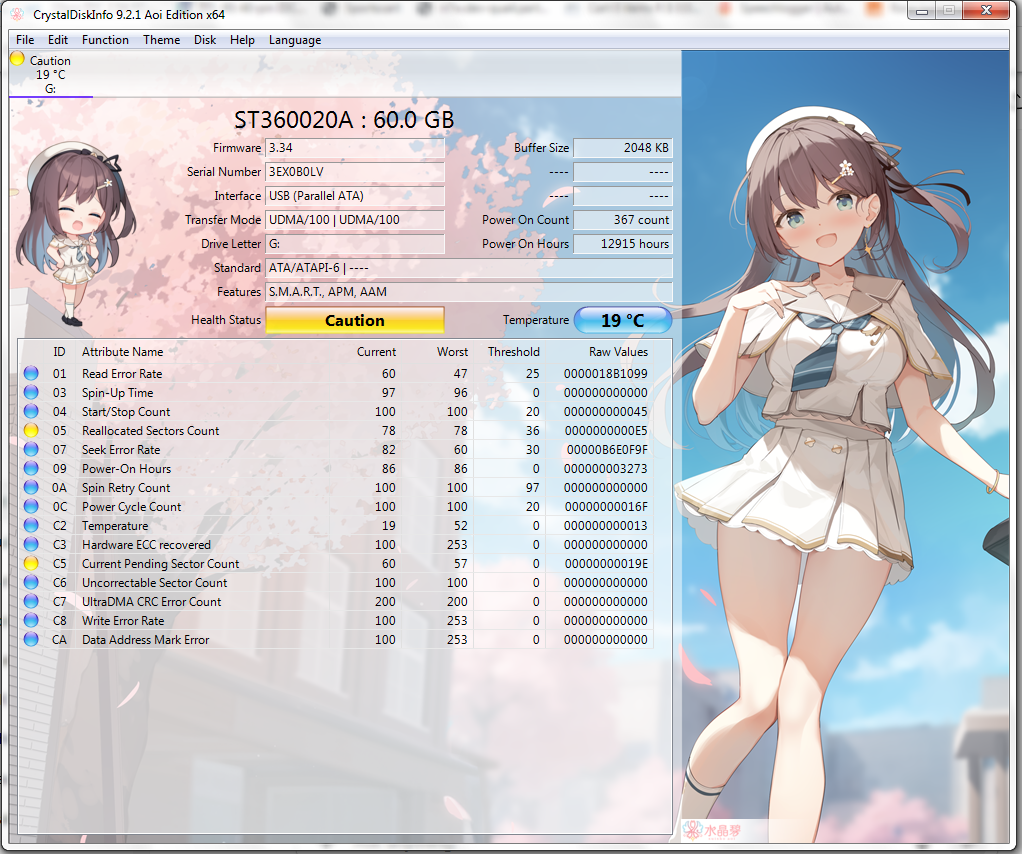
If you can post a screenshot of CrystalDiskInfo it might shed some light on the disk condition
If you can post a screenshot of CrystalDiskInfo it might shed some light on the disk condition
Re: Seagate ST360020A 60gb with bad sectors
June 29th, 2026, 6:56
In my opinion, the problem is not the disk health itself, but the repair attempts associated with CHKDSK.
Re: Seagate ST360020A 60gb with bad sectors
June 30th, 2026, 14:50
WebClaw wrote:Provide us a screenshot which illustrates the "50 errors per sector" and any other digital assets you have.
This thread is overcomplicated with either assumptions, incorrection interpretation of data, or a combination of both.
I cant provide you a screenshot of these 50 errors per sector because i was told by a DR.
But I do have logs for hddsuperclone. You want the errors logs?
Re: Seagate ST360020A 60gb with bad sectors
June 30th, 2026, 14:52
Hardcore Games wrote:Sounds like the disk is rather old and probably well past its useful service life.
If you can post a screenshot of CrystalDiskInfo it might shed some light on the disk condition
Sure, here it is:
Re: Seagate ST360020A 60gb with bad sectors
June 30th, 2026, 14:54
Lukas wrote:In my opinion, the problem is not the disk health itself, but the repair attempts associated with CHKDSK.
I agree with you, I did used CHKDSK when the hard drive was so slow so I decided to stop used CHKDSK and shut it down so I got the RAW partition.
Lucky, I have saved 99% of my data, but only 0.30% of the data I cannot get it back due to sectors errors.
As my failed drive has no heads, can I use the donor heads and the donor pcb that come with the same model, serials and firmware version as the failed drive, will it works?
Re: Seagate ST360020A 60gb with bad sectors
June 30th, 2026, 14:56
fzabkar wrote:Sorry, I don't think I can help you.
why not???????
Re: Seagate ST360020A 60gb with bad sectors
June 30th, 2026, 15:16
chris01479 wrote:fzabkar wrote:Sorry, I don't think I can help you.
why not???????
Because I don't understand the problem. Initially I thought you had cloned the entire drive except for 50 unreadable sectors. Now you are saying that some sectors have 50 errors. As I see it, you either read a sector without errors, or you don't read it all. Partial reads make no sense to me.
Re: Seagate ST360020A 60gb with bad sectors
June 30th, 2026, 17:19
Aside from the sector-count confusion, is your question simply this:
Can the remaining 35 damaged files be recovered by either:
A. Sending the drive to another professional who may use different PC-3000 imaging, head-mapping, or reread strategies?
Or:
B. Installing another donor head assembly and matching donor PCB yourself?
If that is accurate, I think you would have difficulty finding a reputable lab willing to take on the case given its history and the limited amount of data still missing.
That said, almost anything is possible if you are willing to spend enough money. A further head replacement, particularly a DIY attempt, is more likely to cause additional data loss than improve the recovery.
Can the remaining 35 damaged files be recovered by either:
A. Sending the drive to another professional who may use different PC-3000 imaging, head-mapping, or reread strategies?
Or:
B. Installing another donor head assembly and matching donor PCB yourself?
If that is accurate, I think you would have difficulty finding a reputable lab willing to take on the case given its history and the limited amount of data still missing.
That said, almost anything is possible if you are willing to spend enough money. A further head replacement, particularly a DIY attempt, is more likely to cause additional data loss than improve the recovery.
Re: Seagate ST360020A 60gb with bad sectors
July 2nd, 2026, 7:31
WebClaw wrote:Aside from the sector-count confusion, is your question simply this:
Can the remaining 35 damaged files be recovered by either:
A. Sending the drive to another professional who may use different PC-3000 imaging, head-mapping, or reread strategies?
Or:
B. Installing another donor head assembly and matching donor PCB yourself?
If that is accurate, I think you would have difficulty finding a reputable lab willing to take on the case given its history and the limited amount of data still missing.
That said, almost anything is possible if you are willing to spend enough money. A further head replacement, particularly a DIY attempt, is more likely to cause additional data loss than improve the recovery.
A. Sending the drive to another professional who may use different PC-3000 imaging, head-mapping, or reread strategies
Can the professional use different PC3000 imaging and change the heads mapping to read these sectors and get the data back??
Re: Seagate ST360020A 60gb with bad sectors
July 2nd, 2026, 8:35
I gave you the answer to this originally, we don't know why the sectors cant be read and that's really important. Hell, even a different set of matching heads could read differently, they may read your missing sectors they may not.(Changing the head mapping wont make a difference, but I suspect you're just reusing a term you've read wrongly).chris01479 wrote:A. Sending the drive to another professional who may use different PC-3000 imaging, head-mapping, or reread strategies
Can the professional use different PC3000 imaging and change the heads mapping to read these sectors and get the data back??
Did you decline the recovery service from the company based on the missing files ? I can't see a reason why they would return the drive to you with missing heads.
Powered by phpBB © phpBB Group.