Repairing modules in PC3000
February 17th, 2007, 5:29
hello, Im using dos pc3000 and I was abit confused on how to upload modules. I have them (bunch of rpm & smb files) but after loading the ldr and ram & running a test, in the "disc firmware zone" menu, do I choose "writing of modules"
"writing module groups"
or
"modules repairing"
And do the rpm files have to be in a special directory or just the same one as pcmx_pkr?
Thanks.
"writing module groups"
or
"modules repairing"
And do the rpm files have to be in a special directory or just the same one as pcmx_pkr?
Thanks.
February 17th, 2007, 10:57
Writing modules - to write separate modules.
Writing modules groups - to write modules by groups.
Modules repair - to repair some existing modules(fix header, recalculate checksum etc)
Writing modules groups - to write modules by groups.
Modules repair - to repair some existing modules(fix header, recalculate checksum etc)
February 17th, 2007, 11:39
yeh, thx.
I get this error when I try to write modules or module groups. Anyone know what it means?
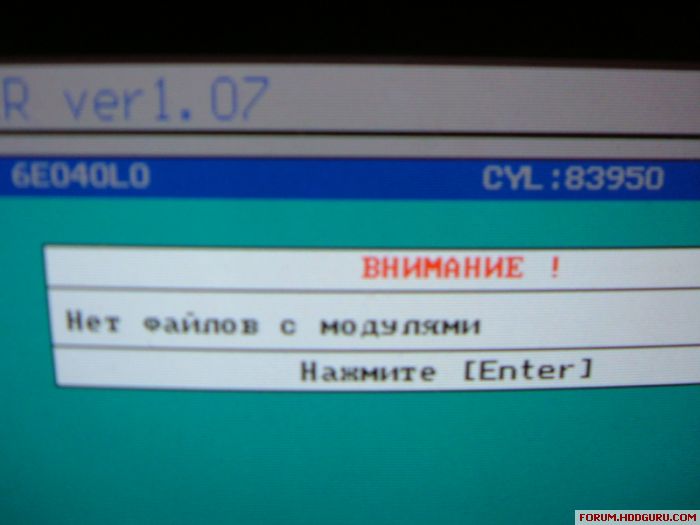
I get this error when I try to write modules or module groups. Anyone know what it means?
February 17th, 2007, 16:58
u have not modules that u want to write....
they must be in exact subfolder....
they must be in exact subfolder....
February 18th, 2007, 0:33
Why do you try to fix modules?
The drive seems to identify correctly, there shouldn't be problems with firmware.
The drive seems to identify correctly, there shouldn't be problems with firmware.
February 18th, 2007, 3:55
gsimon wrote:u have not modules that u want to write....
they must be in exact subfolder....
Ok, I just had them in the same folder as I run pcmx_pkr from.
Starling wrote:Why do you try to fix modules?
The drive seems to identify correctly, there shouldn't be problems with firmware.
Well...yeh it does, but I cant see the drive in windows or read any data off it. When I run a firmware structure scan I get a couple errors, so I thought that would be the problem and Id have to fix them. Im totally new to this though...
What should I be doing? Correcting the G/P/U-lists? I thoguht that would wipe the data...
February 18th, 2007, 6:39
If ur using poker drive then u should put all ur rpm and smb file in Mxpkrmod directory . i think the error u have posted means There are no modules in the directory . Dont write the structure modules if they are not bad they might destroy ur hdd .
Please read the manual of pc3k isa it would help u alot .
Please read the manual of pc3k isa it would help u alot .
February 19th, 2007, 3:07
Thanks alot for your help.
I feel im very close to fixing this but I got 1 more error. I put the modules in the right directory, when I choose to write them I get a list of which ones I want, I select the one I want to replace and press enter then get this message
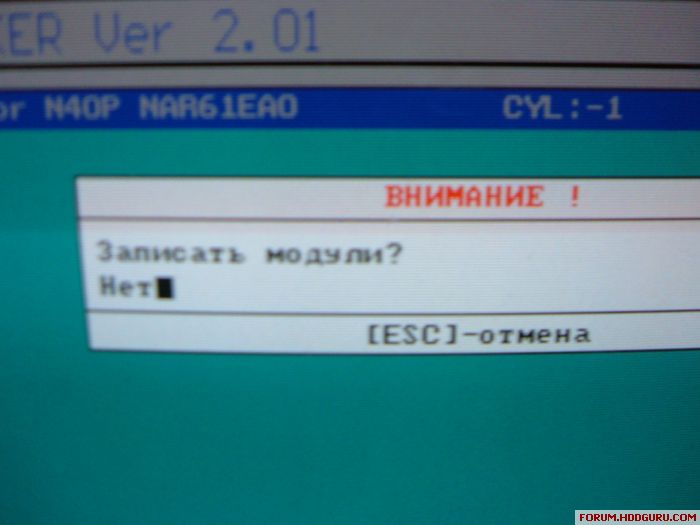
Anyone know what it means?
I feel im very close to fixing this but I got 1 more error. I put the modules in the right directory, when I choose to write them I get a list of which ones I want, I select the one I want to replace and press enter then get this message
Anyone know what it means?
February 19th, 2007, 3:34
Yes....the program ask you if u want to write the module....The HET means NO in russian and , if u want to continue, u must press SPACE to change to DA witch means YES in russian and then u can press ENTER to write the module to hdd.
Rgds
Rgds
February 19th, 2007, 7:15
Yes, thankyou, I figured it out by accident. Now im on to a new problem but im not gonna bother anyone with it. I think I give up ( -_-)
February 19th, 2007, 16:31
To Starling and anybody who owns a real PC3k:
This is an open forum, and I think it is not wise to make advises to users of non legal stuff as it is supporting piracy with all its side effects.
People owning legal stuff should discuss things at the manufacturer's private forum. BTW there will be more proper answers as those users have more experiences in the field.
IMHO this forum is not intended for such problems, but everything else that includes using of FREE software, and other technical questions.
Hit me
This is an open forum, and I think it is not wise to make advises to users of non legal stuff as it is supporting piracy with all its side effects.
People owning legal stuff should discuss things at the manufacturer's private forum. BTW there will be more proper answers as those users have more experiences in the field.
IMHO this forum is not intended for such problems, but everything else that includes using of FREE software, and other technical questions.
Hit me
February 20th, 2007, 2:10
I agree with pepe sir,
If you are earning from data recovery and using pirated software why don't you get licensed and original pc3k or other recovery software you are using.
Buy legal software's Make it a habit. avoid piracy
Thanks
DF

If you are earning from data recovery and using pirated software why don't you get licensed and original pc3k or other recovery software you are using.
Buy legal software's Make it a habit. avoid piracy
Thanks
DF
Powered by phpBB © phpBB Group.