Hdd converted to dynamic, gone wrong.
June 7th, 2007, 2:54
Hi,
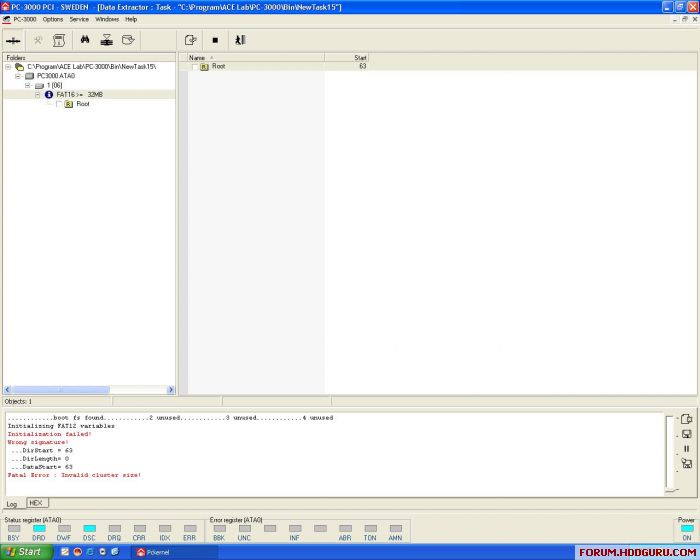
A friend of mine has convert a hdd to a dynamic drive, and it all has gone wrong.
Now it shows fat16, but should be ntfs.
I have pc3000 with DE, when I start it up in DE there is no folder structure, the only way I have pulled out data with success is with Raw data extraction, but it had been nice to have it all saved with structure and right names.
Anyone got a nice trick for this?
Regards
Bosse
A friend of mine has convert a hdd to a dynamic drive, and it all has gone wrong.
Now it shows fat16, but should be ntfs.
I have pc3000 with DE, when I start it up in DE there is no folder structure, the only way I have pulled out data with success is with Raw data extraction, but it had been nice to have it all saved with structure and right names.
Anyone got a nice trick for this?
Regards
Bosse
June 7th, 2007, 7:49
You need to make clear between DE and all other recovery data software. You see, software (GetDataback for examble) can not work with HDD've had bad sector 0 or real bad sector on user data. DE can clone HDD've bad sector but it can not help you now. You must use something like GetDataback for more right structure and name. Goodluck!
June 7th, 2007, 11:36
Hi, hddlab...and thanks.
That worked just fine..of course
Over 5 years ago I bought my first recovery software...GDB!
I must had a slightly blackout when I did this post
Regards
/Bosse
That worked just fine..of course
Over 5 years ago I bought my first recovery software...GDB!
I must had a slightly blackout when I did this post
Regards
/Bosse
June 7th, 2007, 14:12
hddlab wrote: DE can clone HDD've bad sector but it can not help you now. You must use something like GetDataback for more right structure and name.
DE can recover NTFS - right-click on the disk and do "Logical scanning".
It'd be slow though, because it works in PIO, so GetDataBack or R-Studio would a be better choice in this case.
June 8th, 2007, 4:38
Hi mr Spokk
DE is not as powerful as GDB or R-studio in finding and reconstructing
corrupted file system.
Just attach drive to IDE or USB port of your machine (or mount it from
inside DE) and try GDB or R-Sudio.
You may try Stellar Phoenix for windows too(choose NTFS scan)
Goodluck
DE is not as powerful as GDB or R-studio in finding and reconstructing
corrupted file system.
Just attach drive to IDE or USB port of your machine (or mount it from
inside DE) and try GDB or R-Sudio.
You may try Stellar Phoenix for windows too(choose NTFS scan)
Goodluck
Powered by phpBB © phpBB Group.