Data recovery and disk repair questions and discussions related to old-fashioned SATA, SAS, SCSI, IDE, MFM hard drives - any type of storage device that has moving parts
Post a reply

Samsung HD103SJ PCB problem

October 16th, 2013, 8:12

Hey guys,

a few months ago due to an electrical surge, i blew one of the TVS diodes on the PCB on my HDD. thanks to some advise from the guys here at hddguru, i was able to get my drive running again by desoldering the TVS diode from the HDD. they also advised me to replace the TVS diodes and the fuse, and while i was able to get the TVS diodes, i soldered it wrong resulting in the TVS diode i soldered to burn out along with the fuse i replaced as well.so, i desoldered the burnt TVS diode (left the other one as it is) and soldered across the fuse leads and kept on using the hard drive with some caution along with a good PSU.

recently i had to switch to a PSU that cannot be trusted as such so, before switching over to that, i reordered the fuse and removed a TVS diode from another HDD (same type SMAJ5.0A) and soldered both on to the PCB.the hard drive worked well afterwards too, and then one day, it wouldn't spin up.i immediately suspected the tvs diode so i desoldered both and also jumped across the fuse but still no avail

here's a picture of the PCB when it burnt out the first time
Image

the one circled in red was the bad one

here's a picture of the PCB now
Image

Can anyone advise on what i should do to get my hard disk working again?
(i noticed that some of the small resistors have got removed(cirlced in green) can that be the problem?)

Re: Samsung HD103SJ PCB problem

October 16th, 2013, 14:19

Thats a mess, might want to clean that up and take another picture.

From what can see, looks like a resister or capacitor is missing that feeds the memory module. I suspect it fell off or got damaged when all the work was done. Also you might want to clean all the flux of the memory pins too before using it again.

Shane

Re: Samsung HD103SJ PCB problem

October 16th, 2013, 18:46

and kept on using the hard drive with some caution along with a good PSU.


How do you use a drive "with caution" and how do you know it is a "good PSU"?

Re: Samsung HD103SJ PCB problem

October 17th, 2013, 3:57

I always believed that the fuse does a lot more than just protect the circite, I also believed it acts like a resister to lower the voltage going into the board by a little mainly on the the 5v rail. I have a feeling that a transistor might have overheated with the fuse removed and died, preventing the drive from working.

When the drive was working, did you notice any components get unusably hot during its operation.

Also, could you give us a picture of the whole board too.

Shane

Re: Samsung HD103SJ PCB problem

October 17th, 2013, 8:20

@ShaneWard
I'm away from home right now so i wont be able to send you a picture right now, but i'll clean up the PCB and send you one tonight.

I have a feeling that a transistor might have overheated with the fuse removed and died, preventing the drive from working.


however the drive worked fine without the fuse and TVS and it worked after i resoldered the TVS and fuse back on to the PCB as well
it was only after a few days that it wouldnt spin up :(

@HaQue
I know what i did was unwise, but i was not able to get the components at the time :( . and by caution, i mean not connecting or disconnecting the HDD while the PSU was already on (i know, its not of much help)and by good PSU i mean a PSU of a better brand (and not a cheap Chinese knock off) and a working overload shutdown

Re: Samsung HD103SJ PCB problem

October 18th, 2013, 7:23

Sorry for being so late at posting theses pics. i wasn't able to clean them up much as well
anyway here's a shot of the whole pcb
Image

and here's a shot of the TVS diode area
Image

So what do you think might be cause of my hard drive to not spin up?

Re: Samsung HD103SJ PCB problem

October 18th, 2013, 14:02

Not sure what to say about this, but first the flux needs to be cleaned from around the memory chip and all the components in that area. then the component marked in red needs to be replaced. Not sure what that rail does on the memory chip. It goes right into the HD's controller so it must be something important. If that does not work, then someone else will have to give you more detial information about voltage testing diffrent points around the board
Attachments
pcb.jpg
pcb.jpg (17.13 KiB) Viewed 10481 times

Re: Samsung HD103SJ PCB problem

October 18th, 2013, 16:09

The small component adjacent to the SDRAM appears to be a supply bypass capacitor. If it was shorted, then that's another problem. If it wasn't shorted, then there would have been no need to remove it. In any case it doesn't need to be replaced.

Re: Samsung HD103SJ PCB problem

October 19th, 2013, 3:58

thanks for all the input guys
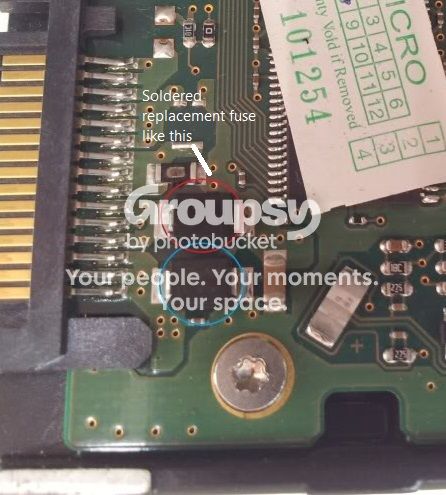
the component in red is the old fuse. what happened is that when it tried to get it off the first time, i accidentally melted the fuse case and now it is stuck to PCB and i was unable to get it off. so there was a pcb trace next to it that came from the same place and i re purposed it to put the fuse like below
Image

Image
(sorry for the pic quality, only ones i took at the time)
after i soldered the components back on (yes really messy i know :wink: ) the hard drive worked, it was a few days after that it didn't. it is then that i removed all the components off and tried to jump the fuse with no avail.

@ShaneWard
what must i do with the area circled in blue in your pic?

Re: Samsung HD103SJ PCB problem

October 20th, 2013, 16:40

The small component adjacent to the 12V TVS diode appears to be another supply bypass capacitor. It doesn't need to be replaced.

Re: Samsung HD103SJ PCB problem

December 2nd, 2013, 6:24

Hey guys
Finally got some time to work on this again and i sure appreciate your guys help on this
Anyway, as i said before i tried replacing the 2 TVS diodes and the fuse (The components circled in white) and still the drive would not spin up. it is then that i noticed the 2 components circled in green that were there before and had gone missing and i think it is that is the cause of this issue. i the only problem is that i have no idea what it is (fzabkar says that it is a supply bypass capacitor and doesnt need to be replaced however i have tried replacing all the other components and still no avail) and where to get it

So can someone tell me what this components is and where to get it or better yet tell me what i need to do (testing that must be carried out or components that must be replaced to get my hard drive working again?

Thanks :)
Attachments
DSC00061.jpg
The PCB after soldering and then desoldering the components
Replacedori.jpg
The original PCB (before soldering replacement components)

Re: Samsung HD103SJ PCB problem

December 2nd, 2013, 7:08

Perhaps your drive has a different problem?

I would first measure the onboard voltages (+2.5V, +1.8V, and -5V). If these are OK, then read the following threads:

viewtopic.php?f=1&t=27116
http://malthus.zapto.org/viewtopic.php?f=19&t=643

Re: Samsung HD103SJ PCB problem

December 2nd, 2013, 8:40

@fzabkar what are the test points on which i should measure these volatges? (although right now i have removed both TVS diodes and the fuse from the PCB and it is like the first picture in my previous post)

Re: Samsung HD103SJ PCB problem

December 2nd, 2013, 15:41

Hirendra wrote:@fzabkar what are the test points on which i should measure these volatges?
Attachments
HD103SJ_Vcore_Vio_Vneg.jpg
HD103SJ_Vcore_Vio_Vneg.jpg (125.86 KiB) Viewed 10134 times
Post a reply