MultiDrive – free backup, clone & wipe disk utility from Atola Technology

All times are UTC - 5 hours [ DST ]


Post new topic Reply to topic  [ 10 posts ] 
Author Message
 Post subject: Western Digital WD10EACS problems.
PostPosted: January 10th, 2014, 6:46 
Offline

Joined: January 10th, 2014, 2:22
Posts: 8
Location: Peoples Republic of Kalifornia
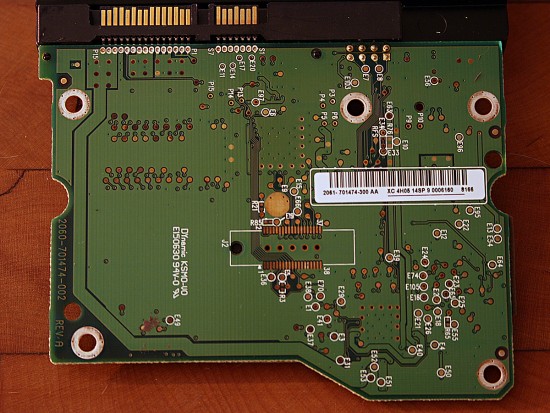
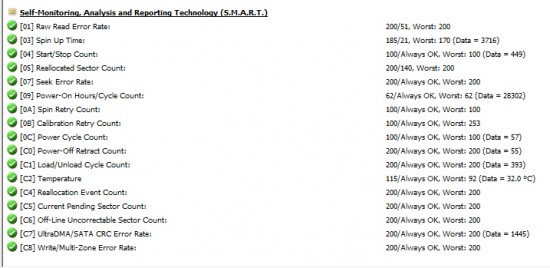
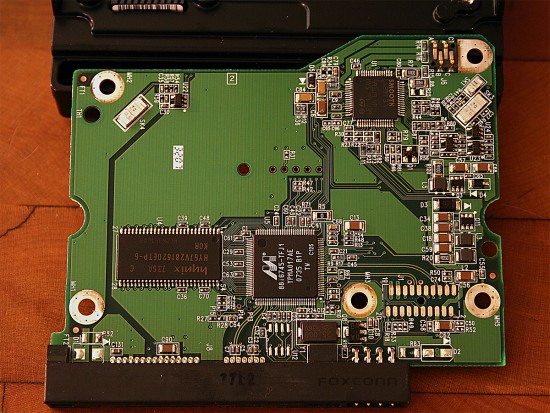
Hello everyone. A friend of mine handed me a headache today, namely a Western Digital WD10EACS-00C7B0 1tb Green HDD Revision 01.01B01 that would randomly drop offline and not be accessible. I hooked it up to my workstation via SATA 3Gb/s and when power is applied, the drive does spin up, followed by the standard sound of the arm working. A few seconds later the drive will appear in Windows explorer, then disappear. The same goes for storage management in admin tools, and when running Active@Partition Recovery. It's never up long enough for me to access it or run a test. Strangely though, the drive is shown in HWiNFO32 and Corsair LINK software, as well as it's SMART status which seems ok. The PCB itself doesn't have any visible damage which leads me to believe there is probably something wrong with the firmware. And to add insult to injury, i see this PCB is lacking a bios chip, so a board swap isn't on the menu.

Here are some photos of both sides of the PCB, and the SMART status from HWiNFO32.

Attachment:
PCB_Back.jpg
PCB_Back.jpg [ 1.65 MiB | Viewed 14940 times ]


Attachment:
PCB_Front.jpg
PCB_Front.jpg [ 1.5 MiB | Viewed 14940 times ]


Attachment:
HDD_Repair1.jpg
HDD_Repair1.jpg [ 224.6 KiB | Viewed 14940 times ]


Soo... what do you guys think? I have no problem swapping boards, soldering bios chips, or pretty much anything else that can reasonably be done by hand, but I have a feeling this is something that is beyond my ability. I hope there is something stupid that I carelessly forgot to check out, because this drive has the last 6 years of family photos/video, and if prices to have this professionally repaired are even remotely in the same ballpark as a drive I had Ontrack do the recovery on about 10 years ago, then she'll just have to deal with the fact that they're all gone. If only she had listened to me always telling her how she needs redundancy in order to ensure this doesn't happen.

Any help would be greatly appreciated.

Thanks in advance,
-Andrew


Top
 Profile  
 
 Post subject: Re: Western Digital WD10EACS problems.
PostPosted: January 11th, 2014, 5:10 
Offline

Joined: August 3rd, 2012, 7:47
Posts: 396
Location: slovenija
Helo Andrew LB ,

you can try with ddrescue.
viewtopic.php?f=1&t=27574&p=189539&hilit=ddrescue#p189539


Top
 Profile  
 
 Post subject: Re: Western Digital WD10EACS problems.
PostPosted: January 13th, 2014, 5:04 
Offline

Joined: January 10th, 2014, 2:22
Posts: 8
Location: Peoples Republic of Kalifornia
Thanks so far for the help everyone. I tried what spildit recommended and insulated the head connectors and no luck there, so today I decided to relocate the drive to my second computer, a "HackPro" Hackintosh which tri boots in Linux and Windows because my main desktop PC seems to not like it when all 8 SATA ports have a hard drive hooked up. (2x 150gb Raptors raid 0, 2x 640gb wd black 640gb raid 0, 2x WD black 1tb no-raid, an external SATA 1tb, and a 180gb Vertex4 SSD). I know it's not a power issue. My power supply is more than adequate. http://www.corsair.com/us/power-supply- ... r-psu.html

So into my i7-860 hackintosh it went, and to my amazement I was able to see the drive in windows storage management, and after a 18 hour long check-disk repair, I'm very slowly able to start pulling some files off the drive using Active@File Recovery Pro. It still wont show up in explorer as a drive, nor will the WDR-Demo program even see the thing. It's transferring the 800gb of data at slower than USB2 speeds, so I'm going to pray for the drive to hang on just enough to rescue the data. If it craps out tonight I'll probably try Linux to get access.


Top
 Profile  
 
 Post subject: Re: Western Digital WD10EACS problems.
PostPosted: January 13th, 2014, 11:57 
Offline
User avatar

Joined: June 8th, 2006, 19:44
Posts: 3144
Location: Atlanta, GA
Or not near you as the case may be . . .

:D

_________________
http://www.datasaversllc.com


Top
 Profile  
 
 Post subject: Re: Western Digital WD10EACS problems.
PostPosted: January 13th, 2014, 17:10 
Offline

Joined: January 10th, 2014, 2:22
Posts: 8
Location: Peoples Republic of Kalifornia
The problem is like I explained in the original post, its all going to come down to either I get her important data off the drive, or its gone forever. I already discussed the costs of having a professional data recovery company fix things and she said no way. Way too much money for her to afford.


Back to WDR Pro 3.0.... can anyone explain why neither western digital hard drive shows up when I click options, port, and custom... i get a warning saying "Privileged Instruction". If I turn off "auto load values", it will allow me to scan PCI but it gives me the same error when i click the scan button. Oddly enough, when I click SCAN USB, it lists both drives. But neither drive will show on the status lights.


Top
 Profile  
 
 Post subject: Re: Western Digital WD10EACS problems.
PostPosted: January 14th, 2014, 5:08 
Offline

Joined: January 10th, 2014, 2:22
Posts: 8
Location: Peoples Republic of Kalifornia
This program seriously doesn't work on 64bit operating systems? What year is this, 2000? ugh... i guess i can throw in a different hard drive and do a quick install of windows 7 32bit.


Top
 Profile  
 
 Post subject: Re: Western Digital WD10EACS problems.
PostPosted: January 14th, 2014, 9:04 
Offline

Joined: January 10th, 2014, 2:22
Posts: 8
Location: Peoples Republic of Kalifornia
Ok. Installed 32-bit Windows 7. Now WDR works!

When i select the port and WD-ROYL, the window pops up and i ran flash operations, then clicked read.

here is the rom:

Attachment:
File comment: WD10EACS Rom
rom.zip [8.01 KiB]
Downloaded 541 times


Just so you guys know, I used the full version of WDR Pro 3.0 to access the drive.


Top
 Profile  
 
 Post subject: Re: Western Digital WD10EACS problems.
PostPosted: January 14th, 2014, 18:09 
Offline

Joined: December 22nd, 2013, 15:52
Posts: 15
Location: England
Andrew LB wrote:
This program seriously doesn't work on 64bit operating systems? What year is this, 2000? ugh... i guess i can throw in a different hard drive and do a quick install of windows 7 32bit.


It does, running on windows 8 64bit here.

Make sure you run as administrator.


Top
 Profile  
 
 Post subject: Re: Western Digital WD10EACS problems.
PostPosted: January 14th, 2014, 20:15 
Offline

Joined: January 10th, 2014, 2:22
Posts: 8
Location: Peoples Republic of Kalifornia
Ok. When I select the drive and hit identify, it always comes up as jibberish. The latest description is this:

________ FW:_____ SN:y_y_y_y_y_y_y_ (royl selected)
Logical: Cyls 31100, Heads 31100, Sectors 31100, LBA 4185717116, 2143Gb
Controller Buffer Size: 31934Kb
Family: Hawk2

It's also come up as Hercules SAE.

Green lights: DRDY, DSC, DRQ, INX
Red Lights: WFT, CORR, ERR, and all repair lights except BBK.

I get error every time I attempt to read the rom. To confirm, when reading the ROM in the flash operations menu, i'm supposed to select "Flash directory" and then READ? My choices are heads map, flash directory, flash cfg, sa translator, sa adaptives, and file 4f. Then below that is the ARCO reserved area where i can chose Main, ALT1, ALT2, ALT3, RAM. Then there are two empty check boxes for 8 heads and Dword in 40.


Top
 Profile  
 
 Post subject: Re: Western Digital WD10EACS problems.
PostPosted: January 14th, 2014, 20:16 
Offline

Joined: January 10th, 2014, 2:22
Posts: 8
Location: Peoples Republic of Kalifornia
Spildit wrote:
Andrew LB wrote:
This program seriously doesn't work on 64bit operating systems? What year is this, 2000? ugh... i guess i can throw in a different hard drive and do a quick install of windows 7 32bit.


It's the best that you can get for FREE.
If you want something better go buy a PC-3000 or Salvation Data or ATOLA.
If you can only use free stuff the least that you can do is install a 32 bit xp and live with the fact that the tools doesnt work as they should on other os.
Ideal wdr needs 32 bit xp. Even on 32 bit 7 you will get issues like wdr not responding if the drive is in a bad condition.


Ok. Windows XP 32bit it is then. Install it with all the service packs right?


Top
 Profile  
 
Display posts from previous:  Sort by  
Post new topic Reply to topic  [ 10 posts ] 

All times are UTC - 5 hours [ DST ]


Who is online

Users browsing this forum: Google [Bot] and 109 guests


You cannot post new topics in this forum
You cannot reply to topics in this forum
You cannot edit your posts in this forum
You cannot delete your posts in this forum
You cannot post attachments in this forum

Search for:
Jump to:  
Powered by phpBB © 2000, 2002, 2005, 2007 phpBB Group