|
WD Elements 4TB USB 3 External HDD:
Long story short, had some weird problems with this drive a year or so ago. I think it was after trying to convert it to NTFS from exfat or something without wiping drive first. The drive showed as RAW and was completely unusable. I fixed it, the drive showed as NTFS, except in CMD, where it showed as RAW. Drive worked normally for the most part since then but chkdsk r/f/x would not finish stage 5.
Recently, I got a new drive, so have emptied and backed up Elements to it. During the backup, one folder was causing the cut and pasting to not work, so assuming bad sector that hadn't been reallocated. The process would just exit after "discovering" phase. Fortunately, the folder was unimportant so I just deleted it. I'm hoping to keep using this drive but wanted to make sure there was no existing problems before putting data back on it.
So, after backing up, I deleted the Elements partition, performed a quick format, and then chkdsk r/f/x, which successfully completed this time. The drive shows as NTFS, except when formatting it via CMD, where it shows as RAW (similar to before).
I've attached screenshots of chkdsk r/f/x, and crystaldiskinfo. I tried wiping the drive with CC cleaner doing 1 pass to hopefully make any as yet undiscovered bad sectors show up so they could be reallocated by running chkdsk again, but the wipe failed to complete with an unreadable error.
I realise using this drive for anything important is not advisable considering the issues and DiskInfo values. However, I'd like to still use it for games. But wanted to make sure all bad sectors were reallocated first. It seems although chkdsk completed this time, there are still bad sectors/problems with the drive since it shows as RAW in CMD and CCleaner couldn't complete a wipe.
The only option I can think of to try is a full reformat, which it seems will take days. Before hooking it up to a laptop and just leaving a full reformat to run. I was wondering if anyone had any advice on what else could be done?
Any help would be much appreciated.
| Attachments: |
File comment: DiskInfo
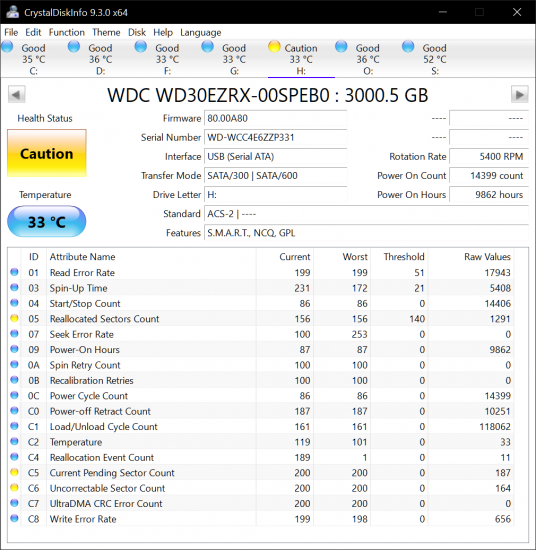
Elements Info (22 05 24).png [ 97.41 KiB | Viewed 2076 times ]
|
File comment: chkdsk r/f/x results
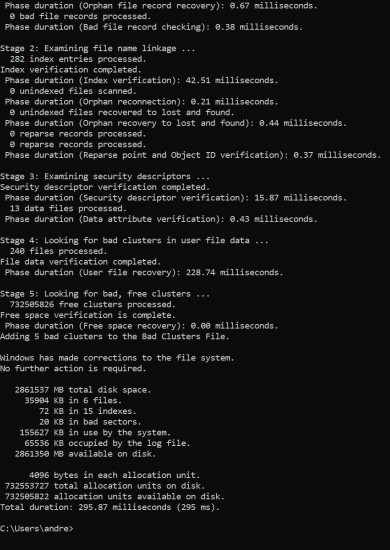
Elements chkdsk.JPG [ 180.04 KiB | Viewed 2076 times ]
|
|



 FAQ
FAQ Search
 Login
Login Register
 HDDGURU FILES
