Hi, I got a personal STAX1000600 drive I'd like advice on how to proceed. It doesn't seem to be in a bad shape, both data and the drive, but this is my first time recovering from a bad MFT (I've only ever dealt with bad sectors) so I'm trying to be cautious and learn something new.
This is a long post due smart data but I hope I made it easy to skim.
Drive History- It's a 1TB STAX1000600 USB drive with
a single NTFS data partition, connected directly to a MOBO USB port, never removed from enclosure. It must be 10 years old give or take. I included the SMART at the end of this post. It says it's a ST1000LM024 HN-M101MBB.
-
No clicking, head parking sounds or weird noises, no disconnection issues or sudden transfer speeds drops, it's rarely moved from its spot (when it is, it's always powered off). This year however was atypical, I had to move the entire PC three times already, so unplugged and re-plugged all cables.
- The computer is nearly as old as the drive but with a new, better quality PSU installed this year (CM V850). The old one wasn't defective, just an ageing lower quality bronze seal Corsair. Mentioning it because I'm about to go through the second RMA for a different drive. There's info about it at the end in case it's relevant.
-
The drive file system got corrupted when transferring files both to and from it in alternating steps, sometimes in chunks, others just by pausing to/from transfers windows.
> This drive is rarely written to. It was nearly full, I was taking 200GB out of it and writing another 200GB. The last time I did such a large transfer was ~2 months ago, and haven't written this much to it in years, just read from it. It's always connected to the computer though.
> When nearing the transfer completion it just froze. When it was clear it wasn't a hiccup, OS under load or disconnection, with it still frozen minutes later, I unplugged the drive after trying to spindown it with hdparm (the command timed out). I tried to remount it and got the warning the fs was corrupted. I promplty disconnected it to prevent further damage (I'm not a pro but know this much

) and started researching what to do next.
- When ready I imaged it with HDDSuperClone. Looks as good as one could hope:
Code:
# Total LBA: 1953525164 LBA to read: 1953525164
# Run time: 0:11:58:30 Remaining: 0:-11:-58:-30
# Rate: 0 B/s Recent: 0 B/s Total: 23 MB/s
# Skip size: 4096 Skips: 0 Slow: 0 Runs: 0 Resets: 0 Run size: 0
# Position: 0 Status: Analyzing
# Finished: 1953525164 (1 areas 100.000000%)
# Non-tried: 0 (0 areas 0.000000%)
# Non-trimmed: 0 (0 areas 0.000000%)
# Non-divided: 0 (0 areas 0.000000%)
# Non-scraped: 0 (0 areas 0.000000%)
# Bad: 0 (0 areas 0.000000%)
- Testdisk reports
MBR is good, MFT and mirror are bad. It suggests "None" as partition table.
-
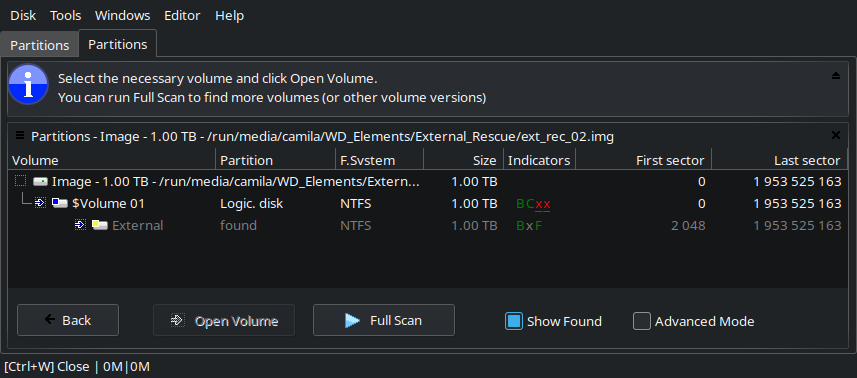
It mounts in DMDE without issues. Initially it finds only the data volume ($Volume 01 > External), after running a full scan (RAW+NFTS) it reports additional results. The the file structure seems correct for the External volume.
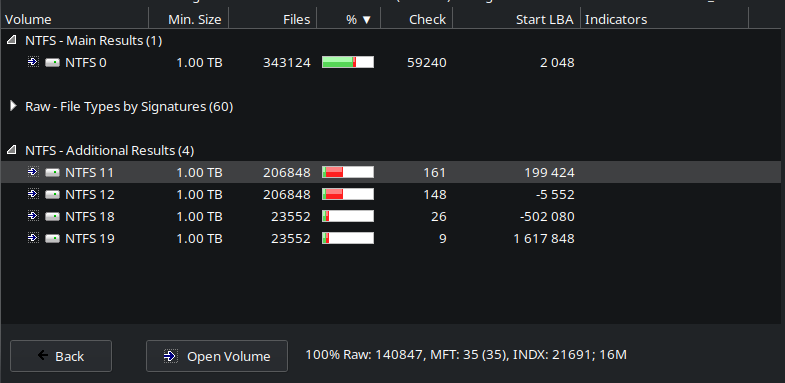
- Opening the extra volumes from the Full Scan tab shows files that were being copied from/to the drive sitting outside the $Root.
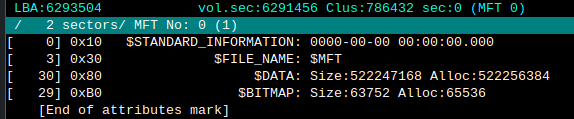
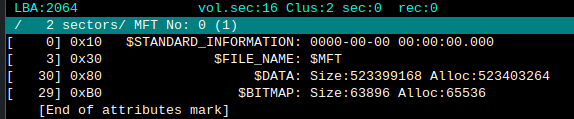
- There are two entries for the $MFT in
$FSFragments. The rest are files that were being transferred and can be ignored.
 Questions
- Anything else I can do about the MFT?
- DMDE transfer speed has been low when recovering files, and I don't mean file limits, it's the literal speed. Any tips? Is there something else I should do before recovering the files or is this just due hardware?
- When it froze could I have done anything differently to decrease the risk of corruption? Leave the drive alone for a longer time (over 5 min), remove immediately, something else?
- What could have possibly caused it? Looking at the dmesg the drive itself is still being recognized by the OS fine and afaik SMART doesn't suggest bad sectors.
- As far as a 10yo drive can be trusted, do you think it can be put back to work? Most data in it was already archival and redundant. The industry segment I work in has been bad enough lately I can't afford to just throw things out, and the economy isn't helping.
- If yes, any tips on how prepare it? Imaging already fully read it without issues, so format, fill it back, surface scan to see if anything changed, then keep an eye on it? I've also been thinking of using something as btrfs now Windows is no longer my daily driver to be able to test data integrity for extra peace of mind and take advantage of compression but I don't know if it could make recovering from issues like the MFT harder.
SMART -aCode:
smartctl 7.5 2025-04-30 r5714 [x86_64-linux-6.16.3-1-default] (SUSE RPM)
Copyright (C) 2002-25, Bruce Allen, Christian Franke, www.smartmontools.org
=== START OF INFORMATION SECTION ===
Model Family: Seagate Samsung SpinPoint M8 (AF)
Device Model: ST1000LM024 HN-M101MBB
LU WWN Device Id: 5 0004cf 4010e7e63
Firmware Version: 2AR10002
User Capacity: 1,000,204,886,016 bytes [1.00 TB]
Sector Sizes: 512 bytes logical, 4096 bytes physical
Rotation Rate: 5400 rpm
Form Factor: 2.5 inches
Device is: In smartctl database 7.5/5706
ATA Version is: ATA8-ACS T13/1699-D revision 6
SATA Version is: SATA 3.0, 3.0 Gb/s (current: 3.0 Gb/s)
Local Time is: Sun Oct 5 16:35:10 2025 -03
SMART support is: Available - device has SMART capability.
SMART support is: Enabled
=== START OF READ SMART DATA SECTION ===
SMART overall-health self-assessment test result: PASSED
General SMART Values:
Offline data collection status: (0x00) Offline data collection activity
was never started.
Auto Offline Data Collection: Disabled.
Self-test execution status: ( 0) The previous self-test routine completed
without error or no self-test has ever
been run.
Total time to complete Offline
data collection: (13500) seconds.
Offline data collection
capabilities: (0x5b) SMART execute Offline immediate.
Auto Offline data collection on/off support.
Suspend Offline collection upon new
command.
Offline surface scan supported.
Self-test supported.
No Conveyance Self-test supported.
Selective Self-test supported.
SMART capabilities: (0x0003) Saves SMART data before entering
power-saving mode.
Supports SMART auto save timer.
Error logging capability: (0x01) Error logging supported.
General Purpose Logging supported.
Short self-test routine
recommended polling time: ( 2) minutes.
Extended self-test routine
recommended polling time: ( 225) minutes.
SCT capabilities: (0x003f) SCT Status supported.
SCT Error Recovery Control supported.
SCT Feature Control supported.
SCT Data Table supported.
SMART Attributes Data Structure revision number: 16
Vendor Specific SMART Attributes with Thresholds:
ID# ATTRIBUTE_NAME FLAG VALUE WORST THRESH TYPE UPDATED WHEN_FAILED RAW_VALUE
1 Raw_Read_Error_Rate 0x002f 100 100 051 Pre-fail Always - 1
2 Throughput_Performance 0x0026 055 055 000 Old_age Always - 12292
3 Spin_Up_Time 0x0023 086 086 025 Pre-fail Always - 4458
4 Start_Stop_Count 0x0032 066 066 000 Old_age Always - 35221
5 Reallocated_Sector_Ct 0x0033 252 252 010 Pre-fail Always - 0
7 Seek_Error_Rate 0x002e 252 252 051 Old_age Always - 0
8 Seek_Time_Performance 0x0024 252 252 015 Old_age Offline - 0
9 Power_On_Hours 0x0032 100 100 000 Old_age Always - 47342
10 Spin_Retry_Count 0x0032 252 252 051 Old_age Always - 0
11 Calibration_Retry_Count 0x0032 100 100 000 Old_age Always - 195
12 Power_Cycle_Count 0x0032 098 098 000 Old_age Always - 2750
191 G-Sense_Error_Rate 0x0022 100 100 000 Old_age Always - 3
192 Power-Off_Retract_Count 0x0022 252 252 000 Old_age Always - 0
194 Temperature_Celsius 0x0002 052 039 000 Old_age Always - 40 (Min/Max 17/61)
195 Hardware_ECC_Recovered 0x003a 100 100 000 Old_age Always - 0
196 Reallocated_Event_Count 0x0032 252 252 000 Old_age Always - 0
197 Current_Pending_Sector 0x0032 252 252 000 Old_age Always - 0
198 Offline_Uncorrectable 0x0030 252 252 000 Old_age Offline - 0
199 UDMA_CRC_Error_Count 0x0036 200 200 000 Old_age Always - 0
200 Multi_Zone_Error_Rate 0x002a 100 100 000 Old_age Always - 15445
223 Load_Retry_Count 0x0032 100 100 000 Old_age Always - 195
225 Load_Cycle_Count 0x0032 026 026 000 Old_age Always - 751875
SMART Error Log Version: 1
No Errors Logged
SMART Self-test log structure revision number 1
Num Test_Description Status Remaining LifeTime(hours) LBA_of_first_error
# 1 Short offline Completed without error 00% 47312 -
# 2 Short offline Completed without error 00% 47296 -
# 3 Short offline Completed without error 00% 47280 -
# 4 Short offline Completed without error 00% 47266 -
# 5 Short offline Completed without error 00% 47251 -
# 6 Short offline Completed without error 00% 47236 -
# 7 Short offline Completed without error 00% 47222 -
# 8 Short offline Completed without error 00% 47205 -
# 9 Short offline Completed without error 00% 47189 -
#10 Short offline Completed without error 00% 47166 -
#11 Short offline Completed without error 00% 47152 -
#12 Short offline Completed without error 00% 47137 -
#13 Short offline Completed without error 00% 47122 -
#14 Short offline Completed without error 00% 47109 -
#15 Short offline Completed without error 00% 47093 -
#16 Short offline Completed without error 00% 47077 -
#17 Short offline Completed without error 00% 47064 -
#18 Short offline Completed without error 00% 47040 -
#19 Short offline Completed without error 00% 47027 -
#20 Short offline Completed without error 00% 47013 -
#21 Short offline Completed without error 00% 47001 -
SMART Selective self-test log data structure revision number 0
Note: revision number not 1 implies that no selective self-test has ever been run
SPAN MIN_LBA MAX_LBA CURRENT_TEST_STATUS
1 0 0 Completed [00% left] (0-65535)
2 0 0 Not_testing
3 0 0 Not_testing
4 0 0 Not_testing
5 0 0 Not_testing
Selective self-test flags (0x0):
After scanning selected spans, do NOT read-scan remainder of disk.
If Selective self-test is pending on power-up, resume after 0 minute delay.
The above only provides legacy SMART information - try 'smartctl -x' for more
That Raw_Read_Error_Rate has been 1 since forever, I'm under the impression the G-Sense_Error_Rate increased by 1, and that Multi_Zone_Error_Rate also increased by lot. The OS runs short self-tests by itself, and I manually ran a long one 2 months ago, which took the expected time but logged as from LBA 0 to 0.
End of SMART -xCode:
SCT Error Recovery Control:
Read: Disabled
Write: Disabled
Device Statistics (GP/SMART Log 0x04) not supported
Pending Defects log (GP Log 0x0c) not supported
SATA Phy Event Counters (GP Log 0x11)
ID Size Value Description
0x0001 4 0 Command failed due to ICRC error
0x0002 4 0 R_ERR response for data FIS
0x0003 4 0 R_ERR response for device-to-host data FIS
0x0004 4 0 R_ERR response for host-to-device data FIS
0x0005 4 0 R_ERR response for non-data FIS
0x0006 4 0 R_ERR response for device-to-host non-data FIS
0x0007 4 0 R_ERR response for host-to-device non-data FIS
0x0008 4 0 Device-to-host non-data FIS retries
0x0009 4 2 Transition from drive PhyRdy to drive PhyNRdy
0x000a 4 0 Device-to-host register FISes sent due to a COMRESET
0x000b 4 0 CRC errors within host-to-device FIS
0x000d 4 0 Non-CRC errors within host-to-device FIS
0x000f 4 0 R_ERR response for host-to-device data FIS, CRC
0x0010 4 0 R_ERR response for host-to-device data FIS, non-CRC
0x0012 4 0 R_ERR response for host-to-device non-data FIS, CRC
0x0013 4 0 R_ERR response for host-to-device non-data FIS, non-CRC
0x8e00 4 0 Vendor specific
0x8e01 4 0 Vendor specific
0x8e02 4 0 Vendor specific
0x8e03 4 0 Vendor specific
0x8e04 4 0 Vendor specific
0x8e05 4 0 Vendor specific
0x8e06 4 0 Vendor specific
0x8e07 4 0 Vendor specific
0x8e08 4 0 Vendor specific
0x8e09 4 0 Vendor specific
0x8e0a 4 0 Vendor specific
0x8e0b 4 0 Vendor specific
0x8e0c 4 0 Vendor specific
0x8e0d 4 0 Vendor specific
0x8e0e 4 0 Vendor specific
0x8e0f 4 0 Vendor specific
0x8e10 4 0 Vendor specific
0x8e11 4 0 Vendor specific
Extra info: The other problematic drives- The first one was a 5TB external Seagate. Sudden death in a month of usage. I didn't like the way it died out of the blue so got a refund and went with a different model. I didn't have the habit of testing drives before using them, just quick formatted and started using this one.
- Second one is a 4TB WD. Started getting pending sector count nearly one year in. I didn't know at the time but it's SMR. Replaced under warranty for another identical drive (got no say in it and all storage, which was already expensive, doubled in price since I first bought it). I replaced the PSU in the meantime, before this drive started to degrade.
- Before even thinking of using the replacement I ran badblocks with three patterns then started to fill it with large but not critical data at first just in case it decided to keel over. Once bitten twice shy! One month in the smart is okay, but the drive started to randomly not show up upon boot. Sometimes it also refuses to mount on the first try if you plug it on an already booted OS. Once it's mounted it's fine, even when putting the system to sleep and back presumably because it doesn't spin down in this state. I'll RMA it once I solve the 1TB drive issue.
The common factor is the computer. I'm not surprised the old 1TB drive choked on the transfer, but the new ones having issues one after another, it's spooky. I wonder if bad ports or something could be causing issues or if I just ran out of good luck, considering it's a sad SMR model and everything.
Thanks in advance!



 FAQ
FAQ Search
 Login
Login Register
 HDDGURU FILES


