Data recovery and disk repair questions and discussions related to old-fashioned SATA, SAS, SCSI, IDE, MFM hard drives - any type of storage device that has moving parts
February 25th, 2016, 14:51
Hello guys. First sorry for my bad english but I'm from Slovenia.
Let me describe my situation.I am in a pretty bad situation and I decided to ask you for some professional help.
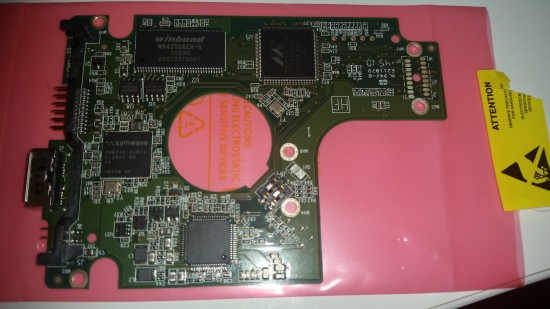
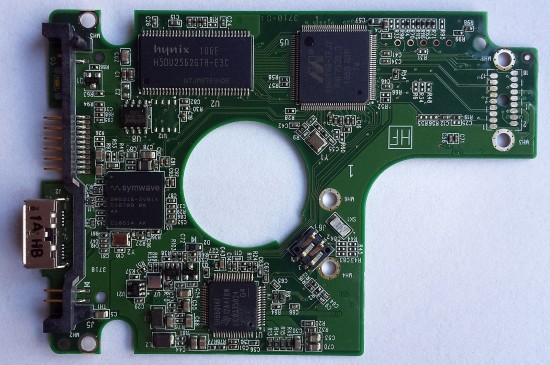
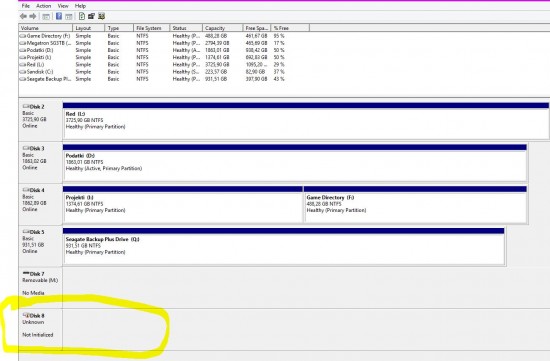
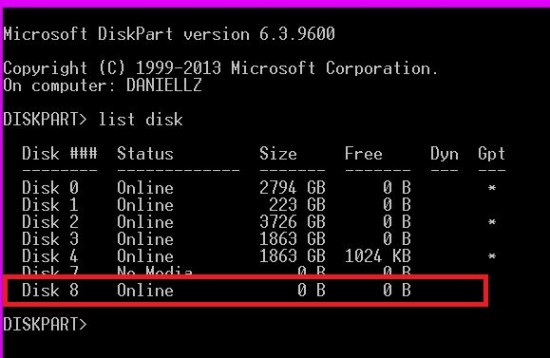
2 weeks ago my old Passport 500gb drive 'died' 'WD5000BMVW-11AMCS0' Model .. After further investigation, I came to the conclusion that the PCB is faulty (PIC PREVIOUS PCB) the light wasnt going on or anything so I ordered another one from ebay with the same fw version and everything.. however the pcbs/chips are not exactly the same as you see in the pictures the U12 CHIP near the u8 is not situated on the new board.. but after succesfully replacing them my windows actually detects the drive as MY PASSPORT 0732 and AS A NON INITIALIZED DISK IN DISK MANADGEMENT. Since I have some very valuable data and projects on the drive and with computer knowledge I know that now I mustn't initialize the disk. I tried to find/restore/recover the partition with a lot of recovery programs such as paragon, easus, wizard but none of which sees and finds anything..As you see below this is it.
I watched some videos on youtube and tutorials saying that some disks from WD need to replace the ROM from one disk to another but on some PCBs.
Can you tell me from the pictures I've send if this is my case 2 ? And what would be the best options for me? We dont have any bigger disc recovery companies here in our country so I'm on my own and rely on your help here guys. !

- OLD 'DEFECTIVE' PCB

- NEW PCB

- status2

- status1
February 25th, 2016, 15:10
First off, with any WD drive made this decade you always, absolutely always, need to transfer the U12 chip as this contains the adaptive ROM code which is unique to each individual drive. If you want to know if your PCB is even compatible after the swap though, all you need to do is flip it over and read the number printed in the board that's something like "2060-771692-001 REV P1" and be sure it's exactly the same as the original one.
February 25th, 2016, 15:22
WellI dont think I have the apropriate tools to replace the u12 chip.. maybe any tips about that? ..
The serial on the back is actually almost the same.. just the rev on the second one is P1 on the new one is A.. however the number and everything is the same...
February 25th, 2016, 15:53
what happened to the U12 on new PCB ?
daniellz wrote:WellI dont think I have the apropriate tools to replace the u12 chip.. maybe any tips about that? ..
you can try to ask the electronics repair shop in your area to do it for you
but you can ran into other problems, like firmware, preamp...
February 25th, 2016, 15:56
What was the drive's physical behavior prior to ordering this new replacement PCB? Was it spinning still regardless of lights activity?
February 25th, 2016, 16:02
The easiest solution (for you) would be to purchase a compatible PCB from a supplier who provides a free firmware transfer.
http://search.store.yahoo.net/yhst-1443 ... rts.com%2F
February 25th, 2016, 16:02
labtech wrote:What was the drive's physical behavior prior to ordering this new replacement PCB? Was it spinning still regardless of lights activity?
Yea. The drive did always work mechanically flawlessly.. and yes it also did spin with the old pcb with the light off.
February 25th, 2016, 16:05
Exactly what I was suspecting.
It is not a problem with the PCB.
Problem is with firmware and/or internal read-write component issue.
February 25th, 2016, 16:05
daniellz wrote:Yea. The drive did always work mechanically flawlessly..and yes it also did spin with the old pcb with the light off.
stays spinning ?
if so why have you decided the problem is the PCB ?
February 25th, 2016, 16:06
I can only assume that the donor PCB has had the U12 removed in preparation for you to solder your own chip on, from your drive.
This absolutely MUST be done.
BUT from what I've just read in between posting this message and editing it, it's almost certain that the PCB is NOT your issue. It could be that the connection to the USB is bad, in which case the new PCB would resolve that, but it's a long shot!
Good luck
Last edited by
pcimage on February 25th, 2016, 16:09, edited 1 time in total.
February 25th, 2016, 16:07
labtech wrote:Exactly what I was suspecting.
It is not a problem with the PCB.
Problem is with firmware and/or internal read-write component issue.
+1
you probably wasted money for nothing
February 25th, 2016, 16:24
Does the drive spin up with the new PCB (with the missing U12 chip)???
February 25th, 2016, 22:11
jermy wrote:daniellz wrote:Yea. The drive did always work mechanically flawlessly..and yes it also did spin with the old pcb with the light off.
stays spinning ?
if so why have you decided the problem is the PCB ?
Since the mini led light right by the usb on the older PCB is off while on the new one it is always on.. just when I safely remove "My Passport 0748" it starts blinking so I can remove the cable. Thats the first reason and the second one is also I forgot to mention that when I had the old pcb the drive was displayed in windows as 'wd passport bad pcb' which is the prof that the PCB is the problem. Now its displayed as non initialized 'My Passport 0748' The drive doesnt have any stange sound or clicking in it..
I assume that the new pcb has the u12 slot empty to solder the smd on it right by yes. But I have another question. I will need to solder the u8 chip to or it has to be the same?
A recovery specialist told me by mail that: "On PCBs with a USB interface, you must swap
both the u8 and the u12 chips."
Last edited by
daniellz on February 25th, 2016, 22:13, edited 1 time in total.
February 25th, 2016, 22:12
fzabkar wrote:Does the drive spin up with the new PCB (with the missing U12 chip)???
Yes it does. But not in a strange way.. its still pretty silent
February 25th, 2016, 23:36
daniellz wrote:A recovery specialist told me by mail that: "On PCBs with a USB interface, you must swap both the u8 and the u12 chips."
I wouldn't consider him as a specialist as a matter of fact I wouldn't consider him at all (sorry about that)
February 26th, 2016, 23:59
So I need just so solder the u12 chip from the old to the new board and that would be enough for data/partition to be seen again?
February 27th, 2016, 0:04
daniellz wrote:So I need just so solder the u12 chip from the old to the new board and that would be enough for data/partition to be seen again?
99% will not. But hey, you seem eager to try it, so, your call.
February 27th, 2016, 1:45
labtech wrote:daniellz wrote:So I need just so solder the u12 chip from the old to the new board and that would be enough for data/partition to be seen again?
99% will not. But hey, you seem eager to try it, so, your call.
Well you think that it is a internal component, firmware problem.. if that was so why was the old pcb displayed as 'BAD PCB' in the 'safely remove hardware, media'?
February 27th, 2016, 6:19
daniellz wrote:So I need just so solder the u12 chip from the old to the new board and that would be enough for data/partition to be seen again?
It won't hurt to try, unless you damage the chip/PCB in the process.
February 27th, 2016, 9:57
daniellz wrote:labtech wrote:daniellz wrote:So I need just so solder the u12 chip from the old to the new board and that would be enough for data/partition to be seen again?
99% will not. But hey, you seem eager to try it, so, your call.
Well you think that it is a internal component, firmware problem.. if that was so why was the old pcb displayed as 'BAD PCB' in the 'safely remove hardware, media'?
Well, few reasons:
1) "bad pcb" as a message does not exist and more than likely whatever message the operating system did provide it may be misinterpreted.
2) statistically, 90%+ of scenarios resembling your drive's description do not involve a PCB failure
3) based on countless of PCB related activity of various brands, families and models of drives, a PCB failure should cause a different behavior in this drive.
Could there be an exception? Sure, it is possible.
Powered by phpBB © phpBB Group.