Data recovery and disk repair questions and discussions related to old-fashioned SATA, SAS, SCSI, IDE, MFM hard drives - any type of storage device that has moving parts
Post a reply

Re: system/firmware area damaged?

January 19th, 2012, 17:48

freakzy wrote:pavelh,
Can you record the hissing sound and attach here ?

Great idea, Freakzy!
Though it pushed my current abilities to the limits a little bit :D
I used a USB device to connect the disk this time as it allows me to place the disk far from the noisy environment of my PC case.
You can hear the Win7 USB device plug in and out sounds at the start and end of the sound.
I have normalized it and denoised it a bit.
Recorded with my regular mic but in STEREO :D

Hope the sound makes any sense to you :)

Thanks in advance and best regards!!
PH
Attachments
hddsound1nrmlzddnsd.7z
mp3 extension is not allowed here, so kindly unpack the attached file first
(packed with 7-zip.org)
(508.94 KiB) Downloaded 269 times

Re: system/firmware area damaged?

January 19th, 2012, 19:20

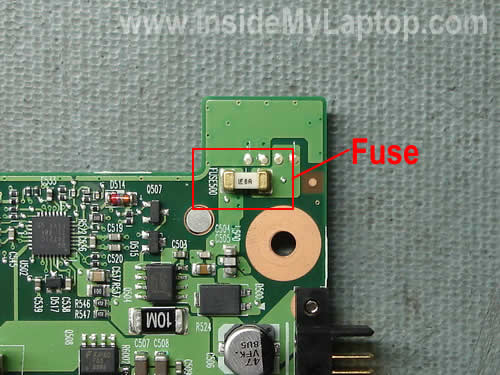
If there is in fact no sound coming from the drive, then you should check the fuse near pins 41-44 of the IDE header. If you need help with this, then show us a detailed photo of that corner of the PCB.

Re: system/firmware area damaged?

January 19th, 2012, 20:54

Thanks for writing, fzabkar!

fzabkar wrote:If there is in fact no sound coming from the drive, then you should check the fuse near pins 41-44 of the IDE header. If you need help with this, then show us a detailed photo of that corner of the PCB.

I had no idea there was a fuse on an HDD! (I have found out is also a part of a MB :shock: ). I had no luck finding a picture of 2.5" HDD fuse, but I assume it would look something like this, right?
http://www.insidemylaptop.com/images/ba ... p-fuse.jpg
http://www.rkawakami.net/ibm_t2x/main_fuses.jpg

I will certainly look into it! But first I'd like to wait to see if others gather anything from the sound that I have recorded and posted here. The fuse, if burnt, would probably be darker, as if, well, burnt, right?

Many thanks for you guidance!

Best regards,
PH

Re: system/firmware area damaged?

January 19th, 2012, 22:45

Your fuse would look something like this ...
http://www.users.on.net/~fzabkar/HDD/HT ... EEPROM.jpg

That said, after hearing your audio sample, your fuse is OK.

Re: system/firmware area damaged?

January 20th, 2012, 5:06

Well your drive spins up, so no PCB problem, also not a stiction.

Re: system/firmware area damaged?

January 20th, 2012, 7:56

Yes, PCB is OK. The problem is elsewhere......... :(

@northwind : what is your best bet ? pre-amp ? :mrgreen:

Re: system/firmware area damaged?

January 20th, 2012, 13:12

@freakzy :mrgreen:

@pavelh The recorded sound doesn't help much, but i can't hear the drive init. It only spins up.
But can't tell for sure.

Sorry but at this stage and without physical access to drive, one can only guess. I think it is time for a pro. You said the drive does not detect in BIOS, right? Are you 100000% sure about this? If it does, but does not show up in Disk Manager or My Computer, then it 's maybe worth a try to run R-Studio. It will catch the drive, even if it is not shown up in Windows Utilities. If it doesn't show up in BIOS or MHDD, then it is really time for a pro.

I don't know, i'm only guessing now.

Re: system/firmware area damaged?

January 21st, 2012, 11:10

First of all, northwind, freakzy, fzabkar - thank you all a lot for your time and sharing of your knowledge!

northwind wrote:@pavelh The recorded sound doesn't help much, but i can't hear the drive init. It only spins up. But can't tell for sure.


So perhaps there is still a chance it powers up, but does not spin - therefore it could be the stiction? I could listen to some 2.5" drives at my friends' and learn how the spinning 2.5" sounds.

northwind wrote:Sorry but at this stage and without physical access to drive, one can only guess. I think it is time for a pro.


Fortunately for me, not that many data might be lost on this HDD. I've had an unfortunate problem with its backups, but still a lot of the important data has been already recovered from them. The bummer is, I have all my writing on the drive as I had been doing some restructuring of the folder and data structure-cleaning it up a bit. So if I loose the drive, hopefully not that much happens, but if I give it to someone else, I will share decades of my writing with them. I am not worried about the published stuff, but the unpublished and unproduced writing should better not be shared :-) So as unfortunate as it is, it kind of rules using a data saving company out :-(

northwind wrote:You said the drive does not detect in BIOS, right? Are you 100000% sure about this? If it does, but does not show up in Disk Manager or My Computer, then it 's maybe worth a try to run R-Studio. It will catch the drive, even if it is not shown up in Windows Utilities. If it doesn't show up in BIOS or MHDD, then it is really time for a pro. I don't know, i'm only guessing now.


I am not even 50% sure about anything :-) What I do is I plug in the drive, start the PC and then enter BIOS and browse thru its options where the HDDs are detected - in "Standard CMOS Setup/IDE Channel 0-4" and also in "Hard Disk Boot Priority" just to be on the safe side. If nothing shows up I might reset the PC and do it again 2 or 3 times. I guess there's nothing more I can do in this regard, right? I have been thinking about toying with the address setting - master, slave etc. But since it does not show up in the BIOS at all it seems redundant. I have also plugged it like this before using the same USB device and it worked (JFYI I have also purchased a convertor so I can plug it directly into my PC).

Again thanks for all your kind help!

Best regards,
PH

P.S. First real snow in Prague today, wow. Winter is really weak this year. Looks nice though... Clean :D

Re: system/firmware area damaged?

January 21st, 2012, 18:57

pavelh wrote:First of all, northwind, freakzy, fzabkar - thank you all a lot for your time and sharing of your knowledge!


You're most welcome.
pavelh wrote:
northwind wrote:@pavelh The recorded sound doesn't help much, but i can't hear the drive init. It only spins up. But can't tell for sure.


So perhaps there is still a chance it powers up, but does not spin - therefore it could be the stiction? I could listen to some 2.5" drives at my friends' and learn how the spinning 2.5" sounds.


No. If problem is stiction, drive would not spin up to normal rpm. It would just try to spin up but fail. In this case, you would not hear drive spin up. As per the sound you uploaded, this is NOT the case.
pavelh wrote:
northwind wrote:Sorry but at this stage and without physical access to drive, one can only guess. I think it is time for a pro.


Fortunately for me, not that many data might be lost on this HDD. I've had an unfortunate problem with its backups, but still a lot of the important data has been already recovered from them. The bummer is, I have all my writing on the drive as I had been doing some restructuring of the folder and data structure-cleaning it up a bit. So if I loose the drive, hopefully not that much happens, but if I give it to someone else, I will share decades of my writing with them. I am not worried about the published stuff, but the unpublished and unproduced writing should better not be shared :-) So as unfortunate as it is, it kind of rules using a data saving company out :-(

So as I understand this, there is no much need to recover the data off this drive.
pavelh wrote:
northwind wrote:You said the drive does not detect in BIOS, right? Are you 100000% sure about this? If it does, but does not show up in Disk Manager or My Computer, then it 's maybe worth a try to run R-Studio. It will catch the drive, even if it is not shown up in Windows Utilities. If it doesn't show up in BIOS or MHDD, then it is really time for a pro. I don't know, i'm only guessing now.


I am not even 50% sure about anything :-) What I do is I plug in the drive, start the PC and then enter BIOS and browse thru its options where the HDDs are detected - in "Standard CMOS Setup/IDE Channel 0-4" and also in "Hard Disk Boot Priority" just to be on the safe side. If nothing shows up I might reset the PC and do it again 2 or 3 times. I guess there's nothing more I can do in this regard, right? I have been thinking about toying with the address setting - master, slave etc. But since it does not show up in the BIOS at all it seems redundant. I have also plugged it like this before using the same USB device and it worked (JFYI I have also purchased a convertor so I can plug it directly into my PC).

Again thanks for all your kind help!

Best regards,
PH

If drive is not detected in BIOS and based on the sound you uploaded, there could be a problem with the f/w of this drive or some other problem. It needs to be accurately diagnosed by a pro. But then you say data is not that important, so we just call it a day and stop attempting to give you good advice as to how to possibly recover the data. If confidentiality and privacy of your data is the issue then i guess you shouldn't worry if you trust your drive to a recommended company. We see private data every day and we even sign a form of trust with the client so they (and we) are certain everything is secure.
pavelh wrote:P.S. First real snow in Prague today, wow. Winter is really weak this year. Looks nice though... Clean :D


This has been a very rough winter for Greece. We have even experienced a -15 degrees which is too low for us!

Re: system/firmware area damaged?

January 21st, 2012, 23:28

Hi again, northwind!

northwind wrote:If problem is stiction, drive would not spin up to normal rpm. It would just try to spin up but fail. In this case, you would not hear drive spin up. As per the sound you uploaded, this is NOT the case.

That's sad. Very good to know, though. Sigh.

northwind wrote:So as I understand this, there is no much need to recover the data off this drive.

I would not put it THAT way :D
In the beginning, when I realized there was an unfortunate problem with the backups, it seemed quite horrible. I was able to locate about 70% of the most critical data and 0% of not critical but still useful data. So I would LOVE to recover the remaining data and I will pursue it, but if I don't manage to do that... oh well, life will go on.

northwind wrote:If drive is not detected in BIOS and based on the sound you uploaded, there could be a problem with the f/w of this drive or some other problem. It needs to be accurately diagnosed by a pro.

Seems like I am at my wits' end :(
But I have learned quite a lot about drives along the way, which is nice. I'd prefer to learn that stuff under different circumstances of course :D

northwind wrote:But then you say data is not that important, so we just call it a day and stop attempting to give you good advice as to how to possibly recover the data. If confidentiality and privacy of your data is the issue then i guess you shouldn't worry if you trust your drive to a recommended company. We see private data every day and we even sign a form of trust with the client so they (and we) are certain everything is secure.

I am sorry if I offended you :( That was FAR from my intention. Never wanted to question anyone's integrity especially when I am given a free advice. I have nothing but respect and thanks for you guys here.
I have zero experiences with data recovery services in Czech. It's a very hard choice for me to trust all my writing to them. Really hard.

northwind wrote:
pavelh wrote:P.S. First real snow in Prague today, wow. Winter is really weak this year. Looks nice though... Clean :D

This has been a very rough winter for Greece. We have even experienced a -15 degrees which is too low for us!

minus 15 degrees Celsius???? Wow! Greece is closer to meridian than we are! This is strange. We have an unusually warm winter this year. More or less -1 - +5 degrees Celsius. Almost no snow. But I guess it is better than dealing with minus 15 :shock:

Best regards,
PH

Re: system/firmware area damaged?

January 22nd, 2012, 9:07

Hey pavelh

I will not quote again what you wrote because it would create a large post and that would be maybe annoying for other people reading this thread.

I will reply to what you write, though :)

You did not offend me, all is cool :D Maybe you misunderstood what I meant by what I wrote. What I said, is that confidentiality is an understood issue when someone holds private data and gives drive away for recovery. On the other hand, I hardly know anyone who does not have private data stored in his drive, so if no-one trusted DR companies, we would be unemployed :)
Having said that, I mean that you should trust some reputable DR company and go ahead. If that is your concern. But it is your choice, of course.

If you're ready to send your drive to Greece, I could examine it and tell you what it is all about, with no charge (except shipping costs).
If you're interested, send me a PM. I will tell you what the story behind this drive is, and quote you for recovery. If you accept we will all be happy. If you don't accept, you just pay the shipping costs and I will return you your drive free of charge.
And, you know what! I wouldn't be able to understand your writings, since my Czech are very rusty, I don 't understand your language at all. Ha!

If you don't want to send to Greece, that's fine, find some good DR company in your area and have your drive evaluated.

Good Luck!
Post a reply