Re: Why is my HDD seen as RAW
August 14th, 2021, 18:54
Here is a blog which shows the partition structures for a 2TB Passport (WD20NMVW-11EDZS6):
https://m.blog.naver.com/sunw911/221596553819
This is the boot sector:
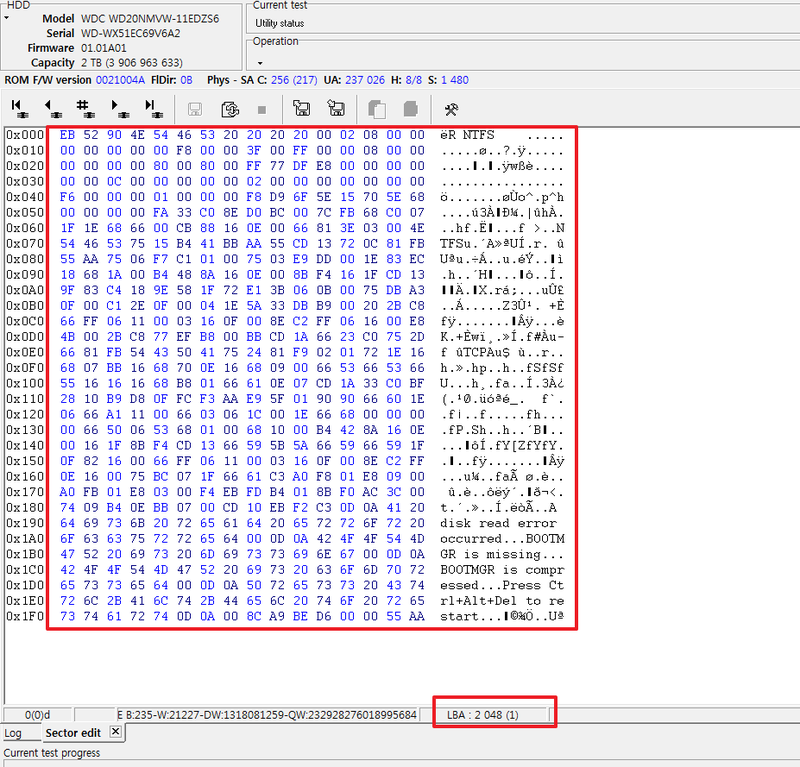
It is located at LBA 2048, and the size of the NTFS volume is 0xE8DF77FF.
So the last sector of the volume would be ...
The MFT is located at cluster 0xC0000 = 786432.
So there is nothing wrong here. Sorry for introducing a red herring.
https://m.blog.naver.com/sunw911/221596553819
This is the boot sector:
It is located at LBA 2048, and the size of the NTFS volume is 0xE8DF77FF.
So the last sector of the volume would be ...
- 2048 + 0xE8DF77FF = 3906961407
The MFT is located at cluster 0xC0000 = 786432.
So there is nothing wrong here. Sorry for introducing a red herring.
Re: Why is my HDD seen as RAW
August 14th, 2021, 21:16
I just ran TestDisk angain and executed a "Repair MFT". The response was "MFT and MFT mirror match exactly". Unless they are both bad, I assume that the MFT is valid.
Given that the start of sector 6293504 is all zeros, does that mean that the Boot Sector is still bad. i.e. TestDisk initially reported that the BS was bad but the backup was good and then apparently replaced the BS.
Given that the start of sector 6293504 is all zeros, does that mean that the Boot Sector is still bad. i.e. TestDisk initially reported that the BS was bad but the backup was good and then apparently replaced the BS.
Re: Why is my HDD seen as RAW
August 14th, 2021, 21:38
I just ran TestDisk angain and executed a "Repair MFT". The response was "MFT and MFT mirror match exactly". Unless they are both bad, I assume that the MFT is valid.
I assume they're both bad and I explained why before. Also I mentioned before that the mirror mirrors just a fraction of the MFT.
Re: Why is my HDD seen as RAW
August 14th, 2021, 22:07
It appears that TestDisk did restore the correct boot sector to its original location. I believe that some partitioning tool may have zeroed the MFT and MFTMirr.
Re: Why is my HDD seen as RAW
August 15th, 2021, 3:08
I think that's a technical explanation of the sort of thing that I was driving atfzabkar wrote:I'm also wondering whether a 2TB drive now normally ships with GPT partitions rather than MBR. If not, then the drive may have been reinitialised with some tool which deletes the boot sector and FS metadata.

What I'm having a problem with is the partialness of it all, the OP obvious has some MFT data from somewhere otherwise there'd be a need to carve. It's off in the long grass and firmly in the BER pile, especially without a full history or the drive to play with.
Re: Why is my HDD seen as RAW
August 15th, 2021, 4:55
dss_cottage wrote:I just ran TestDisk angain and executed a "Repair MFT". The response was "MFT and MFT mirror match exactly".
Run DMDE against a good NTFS volume. D-click the NTFS partition and expand the $Root. You will see the NTFS metafiles, ie $MFT, $MFTMirr, $Bitmap, $LogFile, etc.
You can recover these metafiles to another drive and explore them with a hex editor (eg HxD), or you can simply examine them in DMDE. The advantage of a hex editor is that you can compare two files side by side.
Re: Why is my HDD seen as RAW
August 15th, 2021, 6:04
fzabkar wrote:I believe that some partitioning tool may have zeroed the MFT and MFTMirr.
Right, or something did, does not matter really.. For any type of recovery having MFT (or what part remains) is the more important thing. What happened to the MBR, GPT etc. maybe nice to know but mostly waste trying pinpointing it if goal is data recovery.
OP still believes MFT and mirror are okay because Testdisk says so. When he insists in this belief even though it's explained to him why this is probably not the case, I feel as if I am just wasting time.
Re: Why is my HDD seen as RAW
August 15th, 2021, 10:12
Arch Stanton wrote:fzabkar wrote:I believe that some partitioning tool may have zeroed the MFT and MFTMirr.
Right, or something did, does not matter really.. For any type of recovery having MFT (or what part remains) is the more important thing. What happened to the MBR, GPT etc. maybe nice to know but mostly waste trying pinpointing it if goal is data recovery.
OP still believes MFT and mirror are okay because Testdisk says so. When he insists in this belief even though it's explained to him why this is probably not the case, I feel as if I am just wasting time.
OK. I understand what you are saying. I don't mean to waste your time.
From what I'm reading, it seems that there is little benefit in attempting to determine what went wrong. It also seems that there is little likelihood of restoring the HDD to health. I believe that I have recovered everything possible from the drive.
I'm now going to format the HDD and do a little more testing to see if it is usable or garbage.
Thank you everyone for your assistance. I'm definitely not well enough informed to be an HDDGURU moderator but I have learned a little from the exercise. Education is a good thing!
Thank you again.
Re: Why is my HDD seen as RAW
August 15th, 2021, 15:37
I'm wondering whether the OP's WDTV Live box was vulnerable to the same attack that was recently executed against My Book Live and My Book Live Duo devices. These attacks executed a factory reset.
https://www.tomshardware.com/news/wd-my-book-live-two-hacks
https://www.tomshardware.com/news/wd-my-book-live-two-hacks
Re: Why is my HDD seen as RAW
August 15th, 2021, 16:00
https://en.wikipedia.org/wiki/WD_TV#WD_TV_Live Doesn't look to have inbuilt storage by default - other than the "WD live TV Hub", so I doubt a reset would impact any external devices - but you never know, perhaps a different exploit, it hasn't got that sort of feel to it though.
Re: Why is my HDD seen as RAW
August 15th, 2021, 16:11
OK. I understand what you are saying. I don't mean to waste your time.
I didn't mean to sound so harsh. I apologize.
Re: Why is my HDD seen as RAW
August 15th, 2021, 17:12
dss_cottage wrote:From what I'm reading, it seems that there is little benefit in attempting to determine what went wrong.
If the damage to the MFT was caused by someone or something other than you or your tools, then that would be cause for concern. My understanding is that your WD TV Live is running the same My Cloud OS 3 that is used in the My Book Live and My Book Live Duo devices. Version 3 of the OS is vulnerable to a zero-day exploit which enables an attacker to upload his own firmware. I don't know whether this affects external storage, though.
Re: Why is my HDD seen as RAW
August 16th, 2021, 14:12
Arch Stanton wrote:OK. I understand what you are saying. I don't mean to waste your time.
I didn't mean to sound so harsh. I apologize.
No need for an apology. I apprectaite your help. Thank you again.
Re: Why is my HDD seen as RAW
August 16th, 2021, 14:17
fzabkar wrote:dss_cottage wrote:From what I'm reading, it seems that there is little benefit in attempting to determine what went wrong.
If the damage to the MFT was caused by someone or something other than you or your tools, then that would be cause for concern. My understanding is that your WD TV Live is running the same My Cloud OS 3 that is used in the My Book Live and My Book Live Duo devices. Version 3 of the OS is vulnerable to a zero-day exploit which enables an attacker to upload his own firmware. I don't know whether this affects external storage, though.
I read about this exploit in my research. I have no idea is this was the cause. However, I have 2 other WDTV LIVE units on the same network and they are fine.
I've just reformatted the problem HDD and it seems to be working fine. However, I'll do some more testing to see if there is any weakness in the drive. In any case, I'm not going to use it for anything critical.
Thanks again for ther help.
Powered by phpBB © phpBB Group.