Data recovery and disk repair questions and discussions related to old-fashioned SATA, SAS, SCSI, IDE, MFM hard drives - any type of storage device that has moving parts
Post a reply

Re: Tutorial: resolve 0 LBA,SEAGATE 7200.11 BIOS don't recognize

January 28th, 2009, 20:08

dick wrote:The warnings are clear enough so if anybody wants to try this at home then let them!
To keep on with the 'only for a pro' attitude kind of stinks in my opinion.
Look just because people have Salvation or Ace tools dosn't make them a pro as anybody can get there hands on them.
It seems to me there are a lot of recovery techs and companies who just don't like a trade secret to escape into the wild as breaks their little cartel.
And with the number of these failing drives in circulation it can only be a good thing that some financially poor owner has at least a chance to get their data back without having to cough up the big $$$$$$.


this is exactly what's this all about, i have no knowledge of doing this operation, but it is SO TRUE, very few people here wants to share their knowledge but i received at least 10 pm of people offering pro help with this drive and assuring me they can fix it!!!

Re: Tutorial: resolve 0 LBA,SEAGATE 7200.11 BIOS don't recognize

January 28th, 2009, 20:47

draeke wrote:this is exactly what's this all about, i have no knowledge of doing this operation, but it is SO TRUE, very few people here wants to share their knowledge but i received at least 10 pm of people offering pro help with this drive and assuring me they can fix it!!!


Some people have demonstrated that the information is available on the internet if you really want to find it. Do you really expect the pros to tell you how to do their job for free?

Re: Tutorial: resolve 0 LBA,SEAGATE 7200.11 BIOS don't recognize

February 3rd, 2009, 16:10

http://www.msfn.org/board/index.php?sho ... 807&st=520


Okzo is master.....!"!!

Re: Tutorial: resolve 0 LBA,SEAGATE 7200.11 BIOS don't recognize

February 3rd, 2009, 16:39

This is aimed at anyone who has this LBA 0 issue and are thinking of trying to restore the drive on their own and have little experience in using terminal and ata commands. We are a UK based data recovery company. We are currently offering FREE data recovery from Seagates with LBA 0 issue. Please visit www.datatrack-labs.co.uk for more info.

Re: Tutorial: resolve 0 LBA,SEAGATE 7200.11 BIOS don't recognize

February 3rd, 2009, 16:43

Do you offer FREE recovery for screwed drives caused by people trying to recover the 0 LBA DIY also?

Re: Tutorial: resolve 0 LBA,SEAGATE 7200.11 BIOS don't recognize

February 3rd, 2009, 16:49

BlackST wrote:Do you offer FREE recovery for screwed drives caused by people trying to recover the 0 LBA DIY also?


I'm afraid not. Any screwed drives will incur additional fees.

It's now up to the users, either spend the cost of a new drive plus shipping and get a full recovery or DIY to save $70/£60 and end up spending * 10 more to see the data again.

Re: Tutorial: resolve 0 LBA,SEAGATE 7200.11 BIOS don't recognize

February 3rd, 2009, 16:59

I have seen a lot of drives screwed / data damaged by people that tried this DIY. Very good. :mrgreen: ooops, should I have to be sorry ?

Re: Tutorial: resolve 0 LBA,SEAGATE 7200.11 BIOS don't recognize

February 3rd, 2009, 17:24

BlackST wrote:I have seen a lot of drives screwed / data damaged by people that tried this DIY. Very good. :mrgreen: ooops, should I have to be sorry ?


Oh, please.. BlackST, your childish behaviour is so pathetic. I recovered my 7200.11 drive in less than 10 minutes with those info, and so many people did the same. So, please stop to misinform about this, that's just a loser strategy.

and most of all, as maysoft said:

maysoft wrote:Then what is the real problem one would ask?

I really do not think that we should or even can prevent the information like this to spread out. We, the data recovery industry, cannot and should not police the internet and kill information by all means. If someone's business really depends on information like this that much, then it is definitely some very flawed kind of business.


period.

Re: Tutorial: resolve 0 LBA,SEAGATE 7200.11 BIOS don't recognize

February 4th, 2009, 5:35

Free recovery but

1: You get to keep the 500-750-1TB drive (Worth about £40 refurb 500GB)
2: You charge £20 shipping
3: You sell them a new 500GB drive for £65 they cost £51 on Dabs.com

so you make about £70 out of the free recovery ;o)

Not bad for free recovery... :lol:

Re: Tutorial: resolve 0 LBA,SEAGATE 7200.11 BIOS don't recognize

February 4th, 2009, 5:39

Hahahahahaha... It's like 50% discount on a 80% rised price. Great.

Re: Tutorial: resolve 0 LBA,SEAGATE 7200.11 BIOS don't recognize

February 4th, 2009, 5:52

guru wrote:Free recovery but

1: You get to keep the 500-750-1TB drive (Worth about £40 refurb 500GB)
2: You charge £20 shipping
3: You sell them a new 500GB drive for £65 they cost £51 on Dabs.com

so you make about £70 out of the free recovery ;o)

Not bad for free recovery... :lol:


Everyones a winner. :D
Customer saves hundreds of pounds, we build stock and a get very very small profit.

Re: Tutorial: resolve 0 LBA,SEAGATE 7200.11 BIOS don't recognize

February 4th, 2009, 7:26

Everyone's a winner but don't state FREE recovery. Even if you say "goto www.... . Everyone has its own strategy.

Unlocking terminal of ES.2 in BSY state

February 5th, 2009, 18:07

Here's what I discovered after many attempts in the last few nights.
Probably most of pros know this procedure but there are for sure many owners of ES.2 drives locked in BSY state, who can try to repair them at home.

Terminal of my 2 ES.2 drives was locked (drives were in BSY state) - every 3-4 seconds I received from their terminal message LED: 000000CC....

Standard solution which is widely known for 7200.11 series (ST******AS) doesn't work for locked ES.2 series (ST******NS) !!!

But i've found a way to unlock terminal of my ES.2 drives :) what allows then to repair hd in a standard way (solution from Yura/Okzo).

1. Disk has to be complete (PCB+rest together), NO isolation between the PCB and the rest
2. In the terminal you will see every few seconds message LED: 000000CC ...
3. between these messages you can unlock the terminal by pushing CTRL+Z. It will show a line: "F3 T>" and it will be Unlocked for about 1 second
4. During that 1 second when you see "F3 T>" message but before you receive next "LED:000000CC..." you must short two points shown in the following image (they are known as "read-channel").
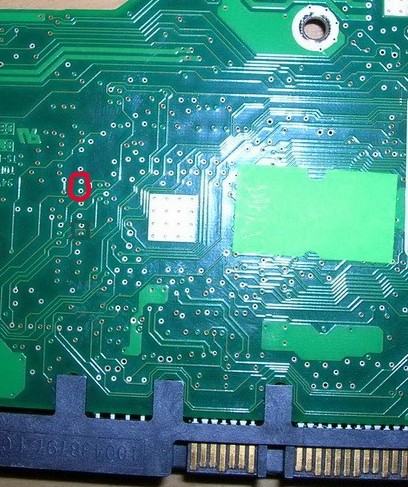
Image

You must hold them short about 20-30 or little more seconds.
If you won't see next "LED:000000CC..." and disk will issue few unpleasant sounds then after some time you'll see in the terminal message "Input Command Eror".
Now the disk's terminal is unlocked!
Still holding those 2 pins short issue command /2 and then Z (they're cAsE sEnSiTiVe!).
When disk's engine will stop you will see message "Spin Down Complete" and now you can release the short between 2 pins.

Next do repair with standard instruction (as for 7200.11) - all below is cAsE sEnSiTiVe!:
F3 2>U
Spin Up Complete
F3 T3>/1
F3 1>N1
F3 1>/
F3 T>m0,2,2,0,0,0,0,22
and wait until you'll get message
Max Wr Retries = 00, Max Rd Retries = 00, Max ECC T-Level = 00, Max Certify Rewrite Retries = 0000
.....
User Partition Format Successful - Elapsed Time 0 mins 05 secs

Good example (also extended) gave man called aviko on msfn.org forum (post number 529 in topic # 128807)
It is at: http://www.msfn.org/board/index.php?sho ... ntry832876

I am a complete amateur (not DR professional), and of course, give no warranty for the described procedure.
It worked for me and my two ES.2 drives are alive now.
Of course, this procedure or the incorrect use might as well burn your disks and data.
I don't assume responsibility for such cases - everything you do at your own risk.

This procedure of ES.2' terminal unlocking is my own discovery, and I'd like to share this knowledge with other poor owners of bricked (in BSY state) ES.2 disks.

Re: Tutorial: resolve 0 LBA,SEAGATE 7200.11 BIOS don't recognize

March 31st, 2009, 3:30

Thanks for the tutorial!. Got recovered my ST3750330AS from BSY state & succesfully moved all needed data. Question is how to make the "reverse" operation, to get device undetected by BIOS(LBA 0, BUSY etc.) with terminal cmds?

P.S: Our russian shops won't take it for warranty exchange/diag procedure if everything will look "working" :(

sorry for my bad english; working on this

Re: Tutorial: resolve 0 LBA,SEAGATE 7200.11 BIOS don't recognize

March 31st, 2009, 3:53

disqualified wrote:Thanks for the tutorial!. Got recovered my ST3750330AS from BSY state & succesfully moved all needed data. Question is how to make the "reverse" operation, to get device undetected by BIOS(LBA 0, BUSY etc.) with terminal cmds?

P.S: Our russian shops won't take it for warranty exchange/diag procedure if everything will look "working" :(

sorry for my bad english; working on this


Throw it out the Window :lol:

Re: Tutorial: resolve 0 LBA,SEAGATE 7200.11 BIOS don't recognize

March 31st, 2009, 7:08

HDD Spaz wrote:Throw it out the Window :lol:


threw it out few minutes ago. Still working.

are there any terminal commands to do this?

Re: Tutorial: resolve 0 LBA,SEAGATE 7200.11 BIOS don't recognize

March 31st, 2009, 7:33

put a non-native PCB on it, disk will not work and this is quick solution to provide a non-working drive for warranty.

Re: Tutorial: resolve 0 LBA,SEAGATE 7200.11 BIOS don't recognize

March 31st, 2009, 7:36

Put it in freezer set to -30 C :lol:

Re: Tutorial: resolve 0 LBA,SEAGATE 7200.11 BIOS don't recognize

March 31st, 2009, 7:47

Screw the ROM.

Re: Tutorial: resolve 0 LBA,SEAGATE 7200.11 BIOS don't recognize

March 31st, 2009, 7:55

BlackST wrote:Screw the ROM.


Always use protection!
Post a reply