MultiDrive – free backup, clone & wipe disk utility from Atola Technology

All times are UTC - 5 hours [ DST ]


Post new topic Reply to topic  [ 206 posts ]  Go to page Previous  1, 2, 3, 4, 5, 6 ... 11  Next
Author Message
 Post subject: Re: WD2000JD problem
PostPosted: March 14th, 2013, 6:08 
Offline

Joined: August 22nd, 2011, 15:43
Posts: 209
Location: Romania
new thread with some work on Bootstrap internals


Top
 Profile  
 
 Post subject: Re: WD2000JD problem
PostPosted: March 16th, 2013, 7:42 
Offline

Joined: August 22nd, 2011, 15:43
Posts: 209
Location: Romania
The donor has arrived. It is in a really bad shape outside. It has some marks from a fall down or something. First time I plugged in I was amazed by the sound...it was like from an old CD-Rom. Looking closer I realized that the air filter is half broken and missing. Patched with some scotch. It came in a plastic bag (which it's intact) with a sticker closing the opening..and since I haven't found the rest of the filter inside..I assume that it was sold like this..although the ebay seller stated "good condition" :lol:

Despite it's bad external shape, the donor works fine. It spins and I can access the SA..with my head/track/ vsc reading routine. I did the PCB swap...without any rom flashing. The result it's the same. 2 clicks repeated 5 times. So the problem it's inside. I tried reading the track -1 with the head 0..and no chances. I get the same error 0x4341 as before;

So..with a working PCB the same model, version etc I can't read any head on patient. This leads to a dead pre-amp, because the ROM information it's all that is needed by one head to go to the SA and read something on track -1. I assume that a module conflict (ROM<->SA) wouldn't influence the head reading. The drive won't work..but at least it would let me read the head, no?

YES. I HAD RIGHT. I did the swap in the opposite direction. The donor with the patient PCB. It runs..no clicking here...but it's identified also as WDC ROM BUCCANER (as I assumed before :) ).
Te "module conflict" SA-ROM modules...doesn't influence the head's reading (readability). I can read the heads in this situation! Basic stuff that no one wants to tell you. Yeah...I found it myself.

Code:
wd_read_pchs: reading track -1 with head 0, starting sector 1 number of sectors 10.
send_wd_cmd() (command=000C)(p1=0001)(p2=FFFF) (p3=FFFF) (p4=0000) (p5=0001) (p6=000A)
wd_rw_buffer_cmd() 0xA cylinders
wd_rw_buffer_cmd: OK
wd_read_pchs: operation successful!


Top
 Profile  
 
 Post subject: Re: WD2000JD problem
PostPosted: March 16th, 2013, 16:12 
Offline

Joined: August 22nd, 2011, 15:43
Posts: 209
Location: Romania
Spildit wrote:
So, are you able to read SA modules/tracks on your ebay drive with the damaged drive pcb without any ROM flashing ?

Yes. I did a short test, reading with a VSC the track -1 head 0...and returns fine the header of the Module 0x1...which holds the modules hosted on the SA. I've stopped here the researches, don't want to push the donor, because it has that hole patched and I'm afraid not getting dust inside.

Spildit wrote:
Can you read your donor drive in that condition (with patient pcb) on a different head (not head 0) ?

Tried only on head 0, but it should work fine on all the heads. The problem should appear as we take distance from the track -1 and the read head doesn't stay on the same track with the write head. The adaptives handle that.
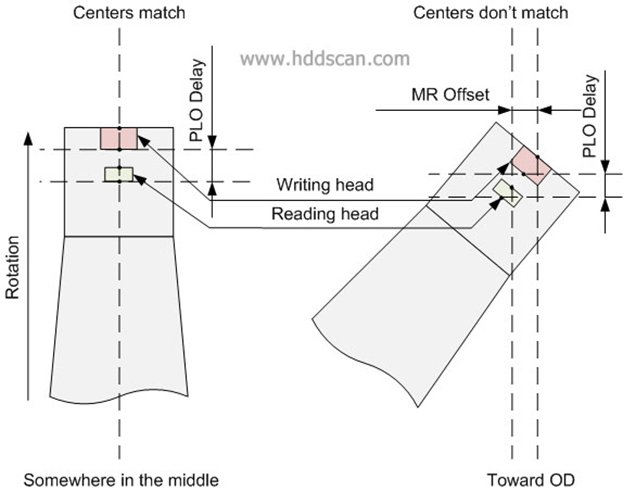
Image

Quote:
When heads flying above track in the middle of a platter, centers of reading and writing head will be above center of the same track and drive can read and write on the same track without moving heads. But if, for example, heads move toward OD, centers of reading and writing heads will not be above the same track, one of the heads will be far offtrack (sometimes several tracks aside). Such a difference between centers of reading and writing heads called MR Offset. MR Offset is not a constant it varies from track to track; it also can be negative (for ID) and positive (for OD). MR Offset depends of track location and track width. Another parameter called PLO Delay or Read-Write Delay. It shows difference between Read Gate and Write Gate appearances. On different tracks PLO Delay will be different for Write Gate. As we know each head has unique parameters and MR Offset and PLO Delay also will be unique for each head. Drive stores averaged MR Offset and PLO Delay for each head at least for each zone in special tables called Adaptive tables or just Adaptives (adaptives also include some other critical parameters). Adaptives may be stored of the platters in special area called System Area or SA.
So if my be stored on AS..you don't need them to read SA. You need the head map etc..which on the same model..should be the same.

Spildit wrote:
And on the damaged drive with ebay pcb, did you try to read using a different head ? And with modified head map on RAM ?

No...I know where you point...but I'm sure 100% that I'll get the same result as with the original PCB. It's clear...with the patient's PCB I can access the SA of the donor...not having any clicking, without any touch to the firmware. :D

My final diagnostic: dead-PREAMP. :P


Top
 Profile  
 
 Post subject: Re: WD2000JD problem
PostPosted: March 16th, 2013, 16:30 
Offline

Joined: August 22nd, 2011, 15:43
Posts: 209
Location: Romania
Quote:
When heads flying above track in the middle of a platter, centers of reading and writing head will be above center of the same track and drive can read and write on the same track without moving heads.

Better, I would say here...when the reading arm it's orthogonal on the platter's radius. So it depends on the HSA position..where on the disk would happen that. :)


Top
 Profile  
 
 Post subject: Re: WD2000JD problem
PostPosted: March 16th, 2013, 17:31 
Offline

Joined: August 22nd, 2011, 15:43
Posts: 209
Location: Romania
I think so.


Top
 Profile  
 
 Post subject: Re: WD2000JD problem
PostPosted: March 18th, 2013, 7:29 
Offline

Joined: August 22nd, 2011, 15:43
Posts: 209
Location: Romania
I had some plans developing the tool on the new received donor...(especially working on SA modules) but because it has that filter broken..I don't have a testing hardware :? of course, I have around about 2 sata hdds but don't want to play on them :mrgreen: an older one..on which I could play has ide con...not supported by working pc's mobo which has only sata connectors.

I'm waiting for a rom programmer ...because I plan to implement a "write flash" option..and I want a way to fix the rom chip...if I accidentally brick it during software tests.


Top
 Profile  
 
 Post subject: Re: WD2000JD problem
PostPosted: March 19th, 2013, 12:23 
Offline

Joined: August 22nd, 2011, 15:43
Posts: 209
Location: Romania
Code:
*************************************************************************************
*       WDT ver 0.2 alpha - a tool for western digital HDD firmware
*************************************************************************************

        usage: wdt.exe [-scan] [-dumprom <dev>] [...] [-v]

  -scan                 : scan for IDE/ATA compliant devices on default ports 0x1F0, 0x170
  -dumprom <dev> [t]    : dump device firmware; dev = 00 first number = channel, second  0=master, 1=slave; t=2 128k 3=196k
  -dumpctp <dev> <nr>   : dump config table page; dev = 00 etc; nr= config page number (dec)
  -dumpmem <dev> <s><l> : dump MCU's RAM memory, dev =00 etc, <s>=start ex. 0xffff000 <l>=lenght (hex)
  -dumpmod <dev> <nr>   : dump a resident module; dev = 00 etc; <nr>= mod number (hex)
  -bkall <dev>  [t]     : backup the rom firmware and Service Area modules; rom type t=2 128k 3=196k etc
  -vstat <dev>          : vendor specific status for a wd hard disk drive
  -v                    : verbose output
  -h                    : print this help


some basic functions in my application :)


Top
 Profile  
 
 Post subject: Re: WD2000JD problem
PostPosted: March 20th, 2013, 4:11 
Offline

Joined: August 22nd, 2011, 15:43
Posts: 209
Location: Romania
some words about WD mod_01.

mod_01 it's the first module accessed by the rom firmware. it's in fact a table holding information about all mods that are present on SA.

the mod_01 starts with a header. if the ROYL mark it's found at the beginning, this means that the firmware it's somehow newer..and the first 48 bytes forms a header. if not..the first 24 bytes...are the header of the old format.

the ROYL format it's somehow an enhancement to the old one. the mod's IDs are stored on 2 bytes..instead 1 byte....so more than 256 mods can be stored on SA on ROYL firmwares.

after the directory header...follows a series of headers describing each module.it is normal because the firmware must know where on the platters in SA is stored each mod. the number of headers (mods) is indicated in the main header...in case of old format..and for the new format in some bytes after the header;

the table entry describing each mod.. has a size of 8bytes...and holds the mod ID, the cylinder and start sector..+ size in sectors..so the mod can be read. on ROYL firmware there is another way of accessing mods..called LBA...so if this is stated in the main header (Bytes 16:19 "0002")...then the tables looks a little different having 18bytes size, in fact the first byte (usually = 0x12) tell the length; what it's interesting is that there is a member on this header showing the number of module copies on SA and a file attribute member, which doesn't exist on CHS way.

so to handle the mod1 parsing...one must read the header. if it's the old format...get the number of mods form this header (Bytes 10:11)..and then scroll down for each mode's table entry and get the mod. if the ROYL mark it's found...the version int field (starting at 16 byte) in header must be checked..to see if we have a LBA or CHS table for mods. then read the "number of mods" which it's found after the main header...size 2 bytes. the mods table it's located immediately after the "number of mods" for LBA..and 4 bytes after that..for CHS mode.

to examine this use a hex-editor and open a 0x0001.mod downloaded from here


Top
 Profile  
 
 Post subject: Re: WD2000JD problem
PostPosted: March 21st, 2013, 7:58 
Offline

Joined: August 22nd, 2011, 15:43
Posts: 209
Location: Romania
^^ useless...for non-russian speakers :)

today some words about PUIS (Power Up In Standby) nice to have for hot-swapping pcb

while playing with my evolving app I came across a strange situation while implementing wd PUIS. there's a wd-vsc which controls this option, which means that the HDD will start without spinning the platters.

a flag with 4 options controls the PUIS type.
Code:
PUIS Jumper Controlled (see PM2 jumper on drive) ->you plug the jumper..it will start in PUIS. unplug and reset...it will run fine.
Enable PUIS, PM2 jumper ignored ->here you get stacked if you enable this because OS won't know how to strat the hdd
Disable PUIS, PM2 jumper ignored -> usually default factory setting. doesn't allow users to control the PUIS state.
Enable PATA PUIS, PM2 jumper ignored


PM2 it's the PCB' jumper..

in my case, I wasn't able to set the drive in PUIS state with the PM2 jumper because the flag was set in firmware for "Disable PUIS, PM2 jumper ignored", which doesn't care of the PM2 jumper and spins always. I had the problem while setting the flag to "Enable PUIS, PM2 jumper ignored". on reboot the drive was silent...but it doesn't wanted to respond to my VSC commands (returning HOST_UNSUPPORTED_ATA_OPCODE), in order to set it back. more...for the ATA identify command (which it's the standard method to detect present hdds)...returned an empty structure. so what to do? (flash firmware? I don't have the tools.) :D

Quote:
PUIS requires corresponding BIOS support. If PM2 is enabled on the drive but not supported by the BIOS, the drive will not be detected by the system or detected as zero in size. PUIS is typically only supported on RAID Controllers


If you enter in this state..you won't be able to sent VSC commands to restore back the flag; on the other hand, windows seems not to know how to start the device. perhaps the bios should handle this. I didn't made researches on how to start the hdd with external methods so I coded another ATA command to sent to device in order to exit from PUIS state.after that, the firmware accepts again VSCs so I was able to reset the PUIS flag to jumper controlled.

Here I've implemented a check to see if the device it's somehow stacked in PUIS mode. This is the respons for ATA_IDENTIFY (0xEC)
Quote:
app\Debug>wdt.exe -scan
Scanning Controller 0 at Port: 0x1F0: Type : 0 (Master)
Warning: Device is identifying as Powered Up in Stand By!
==>Hard Disk [0:0]: (0/0/0 - 0 sectors) LBA:NO - DMA:NO -> here should be my HDD..but it responds with empty struct...only 2 bytes of data
Scanning Controller 0 at Port: 0x1F0: Type : 1 (Slave)
Nothing found
Scanning Controller 1 at Port: 0x170: Type : 0 (Master)
Nothing found
Scanning Controller 1 at Port: 0x170: Type : 1 (Slave)
Nothing found


Top
 Profile  
 
 Post subject: Re: WD2000JD problem
PostPosted: March 21st, 2013, 9:05 
Offline

Joined: August 22nd, 2011, 15:43
Posts: 209
Location: Romania
yeah, I tried to find some useful software tests for the inside components ...servo..preamp.

I'm doing some tests on the good drive. I get fine results..no error if I call functions in a logic order.
Code:
app\Debug>wdt.exe -test
wd_servo_spin_DOWN
wd_servo_spin_UP
wd_servo_init
wd_servo_park


but if I stop the spinning the platters and call actuator init I get an error. the drive doesn't start spinning:
Code:
wd_servo_init
send_wd_cmd: error register is on. aborting...
VSC error code not decoded for : 0x4340
wd_servo_init: send_wd_cmd failed, aborting

I assume that servo_actuator_init needs to access the SA to read its data, but since the drive it's not spinning it throws an error.

so the error code it's around my bad hdd error 0x4341; usually the numbers starting from 0xXXyy belongs to a specific part ie servo all wix 0x40xx etc


Top
 Profile  
 
 Post subject: Re: WD2000JD problem
PostPosted: March 21st, 2013, 11:10 
Offline

Joined: August 22nd, 2011, 15:43
Posts: 209
Location: Romania
ok..more...

again about PUIS. now I have the donor PCB which Powers Up in Stand By based on the jumper I set on PM2 or not! (so a jumper which does the specs) :) since it doesn't start the motor, it means that that flag it's written somehow inside the rom firmware. I have translated the PCB to the patient and it it proved true. the patient with the PM2 set doesn't start (until I send it the right ata command). so, I've done a rom dump and compared to the factory default. the dirty flag it's written inside 0xD mod at the end of the rom. the factory byte it's set to 0x02...and after I did the VSC modification...to 1...the flash reflected it as 0x00 (so if I set a flag with the VSC command to 3...it will be set in firmware as 3-1 = 2)

attached the roms. use HxD to compare the diff. the "Orig" in file's name, marks the default factory firmware. the crc byte it's changes..the flag byte..and 4 letters :lol:

what's funny is that on the patient hdd on witch the rom firmware can't access the SA..the VSC doesn't let me change the PUIS...it throws VSCE_PERM_OVL_NOT_LOADED. basically it needs to edit itself, but complains about SA :lol:


Attachments:
ROM_rev08.3AJ.zip [251.19 KiB]
Downloaded 511 times
Top
 Profile  
 
 Post subject: Re: WD2000JD problem
PostPosted: March 21st, 2013, 14:08 
Offline

Joined: August 22nd, 2011, 15:43
Posts: 209
Location: Romania
bad news.

my donor seems to be badly damaged. it came unformatted so what I did till today..I did with it how it was. only tests with rom and SA. today booted under xp to test some stuff and did a format. played with wdr and did a sort of surface scan..and at a moment it started to make some really ugly noise. it was with the old pcb on it. now look how it looks. however the external shape...about I've told proved that didn't left untouched the internals. :cry:

I'm not interested in that...but I'm afraid the HSA not to be affected. the heads reads fine the SA.

not. now that I'm looking better I get some DISK ECU UNSAFE ERROR on head 1 in SA. and in the rest of the. m...damn. that pattern it's for a dead head. and since i didn't tested the donor from the beginning I don't know if the old PCB did that..when playing around with it mounted on donor.

this is what the owner left behind on head 0..cyl n sector z
Code:
>C.:.\.W.i.n.d.o.w
0x002F4E51  00 73 00 5c 00 53 00 59 00 53 00 54 00 45 00 4d 00 33 00 32 00 5c 00 77 00  .s.\.S.Y.S.T.E.M.3.2.\.w.
0x002F4E6A  6f 00 77 00 36 00 34 00 77 00 69 00 6e 00 2e 00 64 00 6c 00 6c 00 00 00 ab  o.w.6.4.w.i.n...d.l.l...«


tsted again backup all function and it downloads well the rom and SA modules. all modules are located on head 0...and therefore I could play fine with it till today, not knowing what lies inside :D


Attachments:
donor.png
donor.png [ 68.23 KiB | Viewed 14736 times ]
Top
 Profile  
 
 Post subject: Re: WD2000JD problem
PostPosted: March 21st, 2013, 17:17 
Offline

Joined: August 22nd, 2011, 15:43
Posts: 209
Location: Romania
it sucks.

well, since I have formatted the hdd, now it's seen by wingoz. this is a big deal because it tries to access it and f. it. the device must be disabled from device manager, otherwise it will screw your operations!

as I said, the wdr demo or not reports ok on heads tests read...write etc. look in the image at the dos window...my app reporting head 1 down + the error. I'm 100% that the head is dead. I see it during debugging... the error and nothing came up in the read buffer.

more..wdr back-ups the files to a drive and unfortunately it was exactly the one I was working on, the donor. suddenly windows started throwing errors that cannot access that dir created by wdr. to play around..I did a head depop for head 1 and did a reset. then the entire modules list (except mod1) went red..with the error FM...bla bla...like on the other thread. while windows continuing popping messages with "cannot access ...blabla". I did a pc reboot this time, popped back the head and now the SA modules are fine. only that the hdd identifies as something else :lol: while it was WDC WD2000JD now it became WDC WD1200LB . at inspection the rom firmware is heavy changed in mod 47 (SA adaptives), so really I don't understand from where such large modifications and what was touched inside that mod.


Attachments:
Screenshot 20130321-220256.jpg
Screenshot 20130321-220256.jpg [ 365.72 KiB | Viewed 14723 times ]
Top
 Profile  
 
 Post subject: Re: WD2000JD problem
PostPosted: March 22nd, 2013, 0:39 
Offline

Joined: August 22nd, 2011, 15:43
Posts: 209
Location: Romania
wdr3 demo and full too. look at the window's title.

I'll wait for another donor to appear at a decent price on ebay. this one It was sold only to us..that's why I purchased it through a guy which can buy in us ans ship to me. so no doubts that I can do anything at this moment. one with only a letter in DCM slipped through after already placed the order for this one..


Top
 Profile  
 
 Post subject: Re: WD2000JD problem
PostPosted: March 22nd, 2013, 13:08 
Offline

Joined: August 22nd, 2011, 15:43
Posts: 209
Location: Romania
there's a tool around to check the royl module's checksum.

fzabkar someday said:

Quote:
chksum2 -32 *.MOD > MOD_chk.log

Don't be surprised if a few of them don't sum correctly. I don't know why, but this seems to happen even on good drives.

You may find that some MODs contain a "NOT INIT" text string. I believe that this means that these have not been initialised at the factory, and are therefore not used.


What he didn't knew, it was that the module sum correctly...but the tool is the problem, it misses something :)

I've worked today on a function which does a rom firmware file check. I mean...for an existing file...if someone want's to check the integrity. I've implemented a reverse scan at the end of the firmware file..searching for the ROYL mark..then for FLASH_MODULE_DIRECTORY..and from there...scan all internal mods for crc. for the ROYL frm it's possible, but for the old model firmware...I don't see an easy way. However, I need this function, if I plan to develop firmware write. some checks must be made on the firmware we want to flash.


Code:
app\Debug>wdt.exe -test rom.bin
Checking block ID 0x5A
Header CRC OK
Block CRC OK
Checking block ID 0x01
Header CRC OK
Block CRC OK
Checking block ID 0x02
Header CRC OK
Block CRC OK
Checking block ID 0x03
Header CRC OK
Block CRC OK
Checking block ID 0x04
Header CRC OK
Block CRC OK
Checking block ID 0x05
Header CRC OK
Block CRC OK
Checking block ID 0x06
Header CRC OK
Block CRC OK
Checking block ID 0x07
Header CRC OK
Block CRC OK
Checking block ID 0x08
Header CRC OK
Block CRC OK
Reached the table end.
ROYL mod traced mode name: 0x000D
ROYL mod traced mode name: 0x0047
ROYL mod traced mode name: 0x004F
ROYL mod traced mode name: 0x0030
ROYL mod traced mode name: 0x000B
ROM dir module traced...
ROYL mod traced mode name: 0x000A
Performing CRC on Flash Module 0x000A
CRC OK.
Performing CRC on Flash Module 0x000B
CRC OK.
Performing CRC on Flash Module 0x0030
CRC OK.
Performing CRC on Flash Module 0x0047
CRC OK.
Performing CRC on Flash Module 0x000D
CRC OK.
Performing CRC on Flash Module 0x004F
CRC OK.firmware, I don't see a method for checking the internal mods.


Top
 Profile  
 
 Post subject: Re: WD2000JD problem
PostPosted: March 23rd, 2013, 11:47 
Offline

Joined: March 7th, 2011, 10:45
Posts: 60
Location: France
louis wrote:
it sucks.

well, since I have formatted the hdd, now it's seen by wingoz. this is a big deal because it tries to access it and f. it. the device must be disabled from device manager, otherwise it will screw your operations!

as I said, the wdr demo or not reports ok on heads tests read...write etc. look in the image at the dos window...my app reporting head 1 down + the error. I'm 100% that the head is dead. I see it during debugging... the error and nothing came up in the read buffer.

more..wdr back-ups the files to a drive and unfortunately it was exactly the one I was working on, the donor. suddenly windows started throwing errors that cannot access that dir created by wdr. to play around..I did a head depop for head 1 and did a reset. then the entire modules list (except mod1) went red..with the error FM...bla bla...like on the other thread. while windows continuing popping messages with "cannot access ...blabla". I did a pc reboot this time, popped back the head and now the SA modules are fine. only that the hdd identifies as something else :lol: while it was WDC WD2000JD now it became WDC WD1200LB . at inspection the rom firmware is heavy changed in mod 47 (SA adaptives), so really I don't understand from where such large modifications and what was touched inside that mod.

Hello louis, i noticed that you have WDR3.0 inside HBCD? you customized your HBCD i guess?
Also about your tool, just for information, do you plan to release it or not?


Top
 Profile  
 
 Post subject: Re: WD2000JD problem
PostPosted: March 23rd, 2013, 14:56 
Offline

Joined: August 22nd, 2011, 15:43
Posts: 209
Location: Romania
^^ at this moment I don't know if the CRC update isn't handled by the firmware if you we use the standard module update VSC function. the second way it's to write the SA directly by pcs_write function at the start point of the module on the platter.

what I mean is that if I have a mod file on my hdd...and change something to it, I can then, write it to the SA in 2 ways: 1.a special vsc command...or 2. a simple data write using also a vsc command. as you can see at a previous post of mine, changing PUIS byte in flash, is handled by the firmware which does the modifications and fix the crc of the flash module. they have a special command for changing some flags, but I could have done it by downloading the mod..changing it by myself and uploading it again.

by the way, do you now if wd roms larger than 192kb exist?


Top
 Profile  
 
 Post subject: Re: WD2000JD problem
PostPosted: March 24th, 2013, 12:32 
Offline

Joined: August 22nd, 2011, 15:43
Posts: 209
Location: Romania
I believe that there's now way to know what's the bios size. that vsc command simply reads the flash image mapped on dram memory. I could do some tests, starting downloading first 128..then 192...then 256, and perform a checkrom() for the downloaded rom file to see if it's complete, but this will take some time. It's a little bit confusing for a user to select what's the rom size. that's why I search a way to simply avoid that drop/list. it would be nice.


Top
 Profile  
 
 Post subject: Re: WD2000JD problem
PostPosted: March 25th, 2013, 2:22 
Offline

Joined: March 2nd, 2013, 10:22
Posts: 1
Location: Beijing
louis, the rom size is (mod109 size -1) *512 bytes.


Top
 Profile  
 
 Post subject: Re: WD2000JD problem
PostPosted: March 25th, 2013, 7:17 
Offline

Joined: August 22nd, 2011, 15:43
Posts: 209
Location: Romania
qintl, on a lower perspective, perhaps. but what we do with the non-royl firmware, the 128k ones? there isn't any mod 109. we treat this situation as 128k? I mean..what returns false when asking mod109...it's a 128k rom? What if we can't access the SA? you know that he rom can be dumped even without access to SA :)

btw, I found a rom which seems to be old enough not to have any trace of mod's at the end of it. more, it doesn't fit to my description form here. the sizes seems to be on 3 bytes instead 4.


Attachments:
WDC WD1200BB-55GUC0.zip [123.5 KiB]
Downloaded 409 times
Top
 Profile  
 
Display posts from previous:  Sort by  
Post new topic Reply to topic  [ 206 posts ]  Go to page Previous  1, 2, 3, 4, 5, 6 ... 11  Next

All times are UTC - 5 hours [ DST ]


Who is online

Users browsing this forum: Google [Bot] and 42 guests


You cannot post new topics in this forum
You cannot reply to topics in this forum
You cannot edit your posts in this forum
You cannot delete your posts in this forum
You cannot post attachments in this forum

Search for:
Jump to:  
Powered by phpBB © 2000, 2002, 2005, 2007 phpBB Group