Data recovery and disk repair questions and discussions related to old-fashioned SATA, SAS, SCSI, IDE, MFM hard drives - any type of storage device that has moving parts
Post a reply

Re: WD5000AAKS-00V1A0 Crash

March 9th, 2013, 6:09

Spildit wrote:
But in his case he didn't damage the ROM. He just placed a ROM for other drive (firmware version) on his drive. This would be the same as moving the ROM chip. Rom was not damaged as drive was still spinning. If ROM was damaged drive would not spin at all, but in his case he had wrong adaptive data / wrong firmware, yet ROM was still loaded to RAM and booting. It should have been possible to Re-Flash again, as the code on ROM was still working, the same way that you can use WDR even without the heads of your drive reading firmware from the platters.


I'm confused :mrgreen:

I understand that in the end he used the bad hdd with the donor's PCB and the firmware extracted from old hdd and flashed with WDR. So..what adaptive data you say there...the firmware has all what it needs on SA, because it's the old firmware. There it's no conflict between ROM->SA mdules, they match. I assume that WDR write bogus data, perhaps not the entire 192kb block...and the firmware get stacked somewhere during boot.

So the VSC commands which in my opinion are processed by the firmware (the status VSC command...has some version numbers..which make me believe that it's part of the ROM frm)...won't work..so no more flashing via WDR.

Re: WD5000AAKS-00V1A0 Crash

March 9th, 2013, 13:05

Spildit wrote:Re-Flashing with WDR should have worked if drive were to be prevented from reading content on platters, as it was for old drive (user was able to read rom from old/damaged drive by connecting power to PCB without HSA connected. Hope this clarify the issue.


Then why he used the chip programmer? I assume he didn't had any pleasure in un-soldering..instead using 2 clicks WDR on the new PCB with HSA disconnected. What would you try first :)
The old bios was incompatible with the new board...who knows..other ports mapped in other ways which the old bios couldn't access...other addresses on new PCB.
If it spins..it's not a sign that works..maybe the firmware worked fine until spinning the plates but crashed few functions after. Some functions inside the firmware were ok executed while others no...because the hardware differs from the what software "knows".

In other way..I assume that the kernel loader (the first code executed from the bios...first table entry in bios.bin) try to check the ROM modules against the SA backed up ones..and if it cant read or read bogus data..then it display WDC ROM. The ROM flash..has only the basic data to access the SA. How many heads are..etc. From what I've read the SA is written especially in the middle of the platters (or around there) where the heads don't need adaptive data to read the info.

The hdd identifies with WDC DISK or WDC ROM in model field .DISK indicates it was already loaded from disk. More, lets assume that the SA modules are bad...in this case we should have access reading each head. If we get errors on each head..it means that the Preamp is dead.

Re: WD5000AAKS-00V1A0 Crash

March 9th, 2013, 13:52

that soic8 stuff is awesome. It prevents me destroying the PCB

the MCU must match 100%. I believe that.."almost" doesn't work here. I have little experience with some PIC programming, but I know that on a cip..a pin must mean something, while on other..it will do something else. It doesn't involve opcodes..which is the language..but the hardware locations where the software try to communicate with the MCU.

Re: WD5000AAKS-00V1A0 Crash

March 9th, 2013, 16:44

Hi again,
I tested new PCB with old drive and old ROM with connected and without connected head stack.
Unfortunately, I don't have got that SO8-clip, I had to unsolder the ROM, solder some wire on it and put it in the programmer.
Old drive with new PCB and old ROM wasn't able to connect via WDR, too.

Re: WD5000AAKS-00V1A0 Crash

March 9th, 2013, 18:48

Old drive with new PCB and old ROM wasn't able to connect to WDR and doesn't either spin up. With insulated HSA it spins up but stops shortly after that and WDR wasn't able to connect.
I think it was a kind of luck, WDR was able to read ROM from old drive with old PCB.
Is WDR able to connect to HDD instead PC-BIOS isn't able to recognize HDD? My PC wasn't able to boot with connected HDD, so I connected it during running Windows.
I tried any possible combination of drive and PCB, with and without insulated HSA. But WDR couldn't connect to PCB.
Should WDR be able to connect to PCB without any drive? In my case, it wasn't. Either with old PCB and old ROM or new PCB with its own ROM or new PCB and old ROM.
As I understand, MCU loads firmware and adaptive information from ROM? So MCU loads firmware through a bootloader via SPI from ROM?
If it works that way, I don't understand why drive won't spin up with connected heads. Maybe because of different assembly and therefore different voltage etc. for HSA (already mentioned by Nebojsa_28) or damaged driver in HSA (mentioned by Spildit). But nevertheless, old drive spins up and does some clicking with old PCB and old ROM.
Should I try another PC with WDR to connect to HDD (as I mentioned, I've got an old Dell Pentium4 with installed Windows and SATA)?

Re: WD5000AAKS-00V1A0 Crash

March 9th, 2013, 19:16

I wasn't able to read out ROM on first time. I tried several times and suddenly I got it. But I don't know what step I did before (maybe new reboot of PC with insulated HSA and deactivated HDD in BIOS). But I tried all possibilities (reboot PC many times with old and new PCB, with and without insulated HSA, with old and new drive connected to old and new PCB, only PCB without drive etc.)
Next step, i would have changed different assembly. Maybe PCB has got different component values, too. I can't verify them because of little package and no label.
Schematics would be fine.

Re: WD5000AAKS-00V1A0 Crash

March 9th, 2013, 19:23

to read.

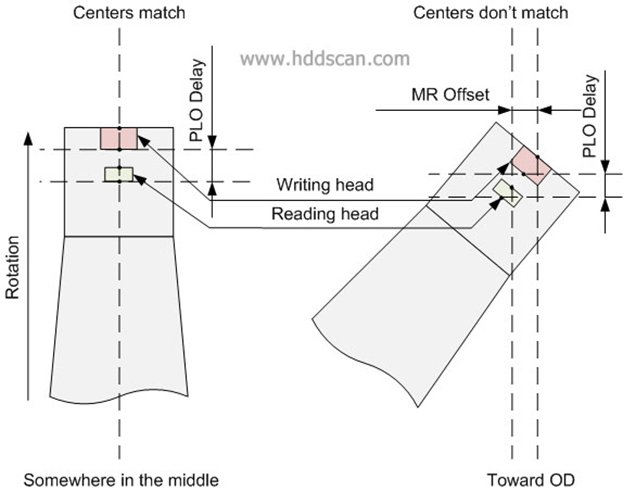
Image

Writing head is magnetically shielded from reading head and this causes a gap between heads.

When heads flying above track in the middle of a platter, centers of reading and writing head will be above center of the same track and drive can read and write on the same track without moving heads. But if, for example, heads move toward OD, centers of reading and writing heads will not be above the same track, one of the heads will be far offtrack (sometimes several tracks aside). Such a difference between centers of reading and writing heads called MR Offset. MR Offset is not a constant it varies from track to track; it also can be negative (for ID) and positive (for OD). MR Offset depends of track location and track width. Another parameter called PLO Delay or Read-Write Delay. It shows difference between Read Gate and Write Gate appearances. On different tracks PLO Delay will be different for Write Gate. As we know each head has unique parameters and MR Offset and PLO Delay also will be unique for each head. Drive stores averaged MR Offset and PLO Delay for each head at least for each zone in special tables called Adaptive tables or just Adaptives (adaptives also include some other critical parameters). Adaptives may be stored of the platters in special area called System Area or SA. System Area contains part of drive’s firmware. And here is a dilemma: drive basically cannot read and write w/o adaptives but to get adaptives drive supposed to read SA first, what to do? Here is the solution: SA formatted with predetermined TPI and BPI in known place of platters and that allows drive to read SA w/o adaptives. Most of modern drives write SA in the middle of platters, so the drive would have ability to write SA w/o adaptives. But for data area drive has to calc DACs for reading and writing procedures separately, with MR Offset included. If adaptives got lost drive may become totally helpless and data may be lost forever. Some drives put part of adaptives into flash and that makes PCB unique for each drive.

Re: WD5000AAKS-00V1A0 Crash

March 9th, 2013, 19:32

I gave it back to my brother, but I could get it back tomorrow.
Data recovery is much too expensive. He told some laboratories and they said something about 900 €.
It's still in warranty. Maybe WD would change the drive and data will be lost. I have to talk to my brother about that situation.
My problem is time. I have to prepare for some important exams.
I will read that article, talk to my brother and answer tomorrow about next steps.
I appreciate your help.

Re: WD5000AAKS-00V1A0 Crash

March 9th, 2013, 19:47

That's I'm thinking of :wink:
Nevertheless, he's sad about data from last 3 years. He did a backup on exernal HDD, but deleted it for a huge project for which he needed much disk space.
This mishap happend few hours before next backup :twisted:
I learned a lot how HDD is working.

@Spildit:
Are you able to read out ROM soldered on PCB with SOIC8-Clip? I'm thinking of power-supply for circuit. Does MCU work during connection through external programmer?

Re: WD5000AAKS-00V1A0 Crash

March 9th, 2013, 20:07

drd wrote:Is WDR able to connect to HDD instead PC-BIOS isn't able to recognize HDD? My PC wasn't able to boot with connected HDD, so I connected it during running Windows.
I tried any possible combination of drive and PCB, with and without insulated HSA. But WDR couldn't connect to PCB.

No. You should go to wingoz device manager..and look for the HDD. Doesn't matter when you plug it in (I plug it in after windows start because else it will remain stucked at BIOS checks. More, I plug the SATA in it after it finishes those clicks in which is not ready and f.u windows). Also it is recommended to disable the device in dev manager to stop windows accessing it. If the windows can't see at least the ROM version...WDR won't see nothing. I'm talking from experience. I was doing some coding on the principle that WDR works. ATA commands directly to the MOBO's ide controller. But if the PCB firmware (intern or external U12) is f. up..MCU can't handle any ATA command or Vendor Specific Commands. So if the hdd can't even reply to ATA IDent command...even with the ROM name..it means that the rom it's invalid...bad..not supported by the MCU in other words..the MCU is stacked with some errors at some flash execution point.


drd wrote:As I understand, MCU loads firmware and adaptive information from ROM? So MCU loads firmware through a bootloader via SPI from ROM?

Adaptives could be or not inside ROM firmware. MCU loads the firmware via a bootstrap...a code which can be dumped from within MCU with a JTAG device.

drd wrote:Should I try another PC with WDR to connect to HDD (as I mentioned, I've got an old Dell Pentium4 with installed Windows and SATA)?

In the PC's bios..the sata controller must be set as ide for the ports where you connect the hdd. ATA commands work with the controller set to IDE. But if you already dumped the frmw ..the MOBO's bios is correct.

Now I plan to write a function which checks the ROM.bin...but since te PCB identifies as WDC ROM..I assume that the file it's checked (by the kernel loader- the first code pointed by the first 32 bytes header in rom.bin file) for that stupid additive CRC :D

Re: WD5000AAKS-00V1A0 Crash

March 9th, 2013, 20:35

I'm to lazy at this hour to get the screw and unmount the pcb which by the way..lies on the floor with the cables hanging over the PC's opened case. :lol:

Tried a little time ago the ida on a random ROM..."kernel loader". the one about _dex_ states that it unpacks the other module. I'm a little overrun by the image I saw :mrgreen: It requires deep knowledge of micro-controllers architecture and low level arm understanding. What ar I/O, IRQ etc, and how it looks the arm code when working with those entities. I'm just staring like a cow at it. Although the code is really small, couldn't find any unpacking routine ore where the code checks for the other code segments in the header.

Re: WD5000AAKS-00V1A0 Crash

March 10th, 2013, 3:47

Of course, power doesn't have to be connected to pcb. But ROM needs VCC to run. If MCU needs same voltage, let's say 3,3V, it would probably on the same power path and run, too. So it would interrupt communication between external programmer and ROM.

@louis:
Maybe WDR works with old PCB because I connected SATA to PCB after it ended up clicking. I will try again.
Post a reply