MultiDrive – free backup, clone & wipe disk utility from Atola Technology

All times are UTC - 5 hours [ DST ]


Post new topic Reply to topic  [ 7 posts ] 
Author Message
 Post subject: Seagate Barracuda 7200.9 300GB need help
PostPosted: October 23rd, 2008, 20:06 
Offline

Joined: October 23rd, 2008, 19:22
Posts: 9
Hi All,

I have been trying to fix my HDD for about a week now. It worked well for a long while and then suddenly one night I noticed the LED was blinking and the drives (all partitions) were not listed in explorer. It was a Maxtor One Touch III with a 1 year warranty that ran out in January. I figured my warranty was expired and Seagate wanted $700-2400 to recover the data from it, so what could I lose by opening up the screw that voids my warranty. I opened the case and found a SATA drive

Seagate Barracude 7200.9 300GB
ST3300622AS
P/N:9BD144-376
Firmware:3.AAK
Date code: 07062
Site code: TK
Board Sticker: 100355570 Y 77882U02B

I tried to buy a SATA card to directly connect the drive but it wasn't recognized by the BIOS. It was a cheap card with the old SATA data rate 150GB/s so I jumpered the two pins as described in the seagate website, still wasn't recognized by the BIOS. I tried a USB to SATA cable my friend loaned me and an outboard power supply for the HDD, still no drives popping up on explorer.

I started reading up on these forums and found most people who had similar problems, had bad TVS diodes, so I tried to test them with my Fluke DMM and couldnt get a good diode reading (had resistance in either direction since it was actually IN a circuit). I unsoldered one side of each of the three TVS's I found, I retested them with a DMM, and they all passed with forward voltage drops of .621V for D1, .625V for D2 & .176V for D3 (which didnt sound right, but it was doing its diode job). All three open circuit in the opposite polarity. Nonetheless I tried hooking it up via the USB cable, to no avail. I re-soldered (allbeit a bit sloppier than the original wave solder job) the three diodes, and tried testing the voltages while it was powered.

It read 12V on two of the diodes and 5V on one (or was it 2 x 5V and 1 x 12V? I cant remember right now). In any case it seemed to be OK in the power supply section. I kept probing points and taking mental notes. I found that the little coil thingies had some tiny voltage drop accross them and they were powered at about 3.3V or so. All except one of the coils which sits closest to the spindle of the drive. That seemed strange so I probed the area further. the little chip that sat adjacent to the coil had 0V on the four pins close to the edge and -5V on the four pins towards the inside of the board. YES negative 5V??? Where did that come form? It looks like the coil is part of some LC circuit.

As far as other diagnostics, the drive powers up and spins, there is no clicking from the heads, although occasionally when I was probing it, it made a funny high frequency noise that I dont want to call whirring because it wasnt the drive spinning (I dont think).

Below is a picture of my board with some crude labels. Any help would be greatly appreciated.

Attachment:
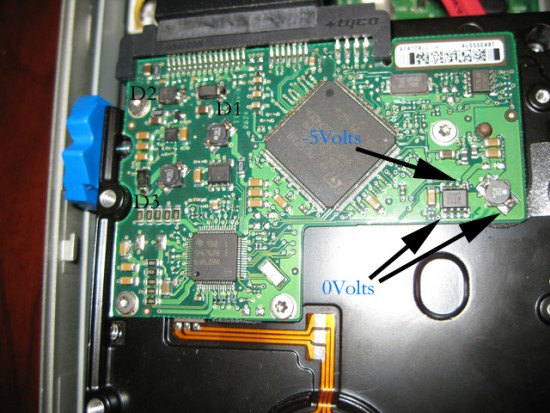
Seagate PCB.jpg
Seagate PCB.jpg [ 375.8 KiB | Viewed 10094 times ]


Top
 Profile  
 
 Post subject: Re: Seagate Barracuda 7200.9 300GB need help
PostPosted: October 23rd, 2008, 20:38 
Offline
User avatar

Joined: June 8th, 2006, 19:44
Posts: 3144
Location: Atlanta, GA
If you had a bad TVS, the drive wouldn't spin at all.

You still could have a bad logic board or maybe bad firmware (which isn't all that common with Seagate). You could make an RS232 terminal which would report what is going on with the drive. Instructions for making on are on this forum.

If you have a bad logic board, find the same drive with the same firmware version and site code and swap 'em. Or else find a board with the same barcode series and swap the ROM.

_________________
http://www.datasaversllc.com


Top
 Profile  
 
 Post subject: Re: Seagate Barracuda 7200.9 300GB need help
PostPosted: October 23rd, 2008, 22:59 
Offline
User avatar

Joined: December 16th, 2007, 10:26
Posts: 1151
yes,above is right. before swap PCB you had to check the PCB is bad or no.

_________________
data recovery service[/b]


Top
 Profile  
 
 Post subject: Re: Seagate Barracuda 7200.9 300GB need help
PostPosted: October 23rd, 2008, 23:10 
Offline

Joined: October 23rd, 2008, 19:22
Posts: 9
so how does one go about checking if the board is good or not?


Top
 Profile  
 
 Post subject: Re: Seagate Barracuda 7200.9 300GB need help
PostPosted: October 24th, 2008, 1:22 
Offline

Joined: October 23rd, 2008, 19:22
Posts: 9
Does anyone have a working PCboard with the proper specs/series/firmware etc. I can buy? All I want is to get my data off the drive. Will trying the RS232 route mentioned by the first reply get me an error code that would tell us what is wrong? I tried searching on RS-232 and found a couple of articles, namely the one that refers to the schematic. However, it doesnt give any more information that how to make the interface. How do you go about diagnosing/communicating with the drive? Anyone have a link to a good primer on the subject?


Top
 Profile  
 
 Post subject: Re: Seagate Barracuda 7200.9 300GB need help
PostPosted: October 24th, 2008, 1:33 
Offline

Joined: July 18th, 2006, 3:05
Posts: 7476
Location: ITALY
Seems a firmware problem (SA) or one of the heads becoming weak. Need terminal log but frankly this is beyond your possibilities right now.


Top
 Profile  
 
 Post subject: Re: Seagate Barracuda 7200.9 300GB need help
PostPosted: October 25th, 2008, 8:56 
Offline

Joined: June 28th, 2008, 0:37
Posts: 225
Location: San Francisco Bay Area www.harddiskcrashed.com
This is likely still firmware and hopefully it would complete the imaging before the whole thing dies. I posted a thread recently on how to quickly connect to the on-board diagnostic interface using easily obtainable parts (soldering-required-232-seagate-terminal-parts-list-t10218.html).

If you are curious, that would be one way to start. In order to actually fix the drive, you'll likely need special equipment. Believe me, I thought differently and wound up making some large wire transfers. ;)


Top
 Profile  
 
Display posts from previous:  Sort by  
Post new topic Reply to topic  [ 7 posts ] 

All times are UTC - 5 hours [ DST ]


Who is online

Users browsing this forum: Google [Bot] and 52 guests


You cannot post new topics in this forum
You cannot reply to topics in this forum
You cannot edit your posts in this forum
You cannot delete your posts in this forum
You cannot post attachments in this forum

Search for:
Jump to:  
Powered by phpBB © 2000, 2002, 2005, 2007 phpBB Group

