MultiDrive – free backup, clone & wipe disk utility from Atola Technology

All times are UTC - 5 hours [ DST ]


Post new topic Reply to topic  [ 3 posts ] 
Author Message
 Post subject: PointSec:save the data in D drive once recovery C drive
PostPosted: July 15th, 2009, 1:25 
Offline

Joined: July 15th, 2009, 0:56
Posts: 2
Location: malaysia
I am facing a problem here. I had used a cd recovery to recovery 1 notebook C drive before i uninstall the PointSec.

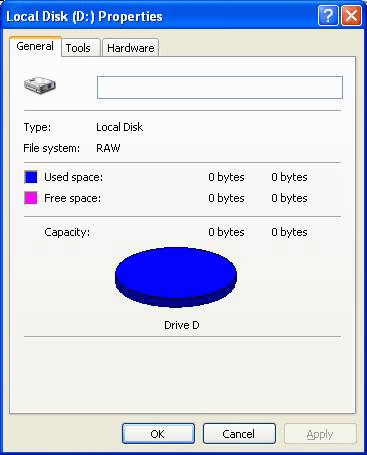
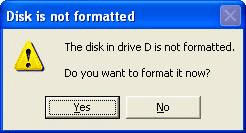
Unfortunetly, the user backup all her data in D drive. Therefore, after I complete recovery the C drive, but D drive cannot access and ask to format the drives. it show 0 bytes for the D drive.


May I know how to rescue all the data in D drive? The user saved and backup all her important data in D drive. The D drive still encrypted now and may I know there has any way or solutions to save the data? Besides, we cannot find any PointSec recovery file for this notebook in the IT server there. It seems like when install the PointSec, the recovery profile cannot auto created in the server.

Now the notebook cannot continue to install the PointSec since the D drive haven’t format. I scare once I format the D drive, all the data will be lost.

MY OS version is Window XP.
Kindly please provide or share a solution how to save the data in drive.

Thanks.
Attachment:
untitled1.gif
untitled1.gif [ 16.7 KiB | Viewed 3745 times ]
Attachment:
untitled2.gif
untitled2.gif [ 37.72 KiB | Viewed 3745 times ]


Top
 Profile  
 
 Post subject: Re: PointSec:save the data in D drive once recovery C drive
PostPosted: July 20th, 2009, 1:49 
Offline

Joined: July 15th, 2009, 0:56
Posts: 2
Location: malaysia
Does anyone can help me?


Top
 Profile  
 
 Post subject: Re: PointSec:save the data in D drive once recovery C drive
PostPosted: July 20th, 2009, 6:49 
Offline

Joined: May 16th, 2009, 9:32
Posts: 325
Location: UNited Kingdom
How much of the C: drive did you recover/backup
If a full image you should have whatever encryption key related stuff Pointsec uses
(although will still need any user entered key or password file to decypt data, unless it gas an auto or TPM mode)

If you only copied files of of C: (inc hiiden/system one) you might not have everyting required (eg modified system boot sectors/code)

NB I'm not a PointSec expert, but am a BitLocker expert

Sugest installing pointsec on another system with a similar drive or partition layout and investigate where pointsec saves any encryption related code and data

Without the right decryption key (or some saved off emergency recovery key) there is no way you will be able to decrypt D:


Top
 Profile  
 
Display posts from previous:  Sort by  
Post new topic Reply to topic  [ 3 posts ] 

All times are UTC - 5 hours [ DST ]


Who is online

Users browsing this forum: Google [Bot] and 54 guests


You cannot post new topics in this forum
You cannot reply to topics in this forum
You cannot edit your posts in this forum
You cannot delete your posts in this forum
You cannot post attachments in this forum

Search for:
Jump to:  
Powered by phpBB © 2000, 2002, 2005, 2007 phpBB Group