Hi, I'd first like to thank anyone that tries to help.
My problem is as such. My girlfriend spilled some water and it got under her laptop.
She said she turned it off, and turned it back on and it worked fine, then the screen froze, and
she heard some sizzle and she shut it down immediately. So far from my searches and "tinkering"
I have some information that may help.
The hard drive is a Toshiba MK3252GSX HDD2H01 S ZK01 T.
I've since taken the drive out of the laptop and have been looking for a replacement PCB.
The PCB number is G002217A, at least that's what an EBAY vendor lists. This PCB number matches on both the damaged drive and the donor drive.
I have bought a similar drive that has been known for clicking. I attached this drive to my laptop via a SATA cable
and it just clicks, and is recognized by the computer, but it keeps requesting that I reformat it before use. The parts drive is a Toshiba MK3252GSX HDD2H01 S UK01 T.
I've compared the two PCBs and have noticed a few things.
1) The boards have the same layout, and most parts have the same manufacturer and part number.
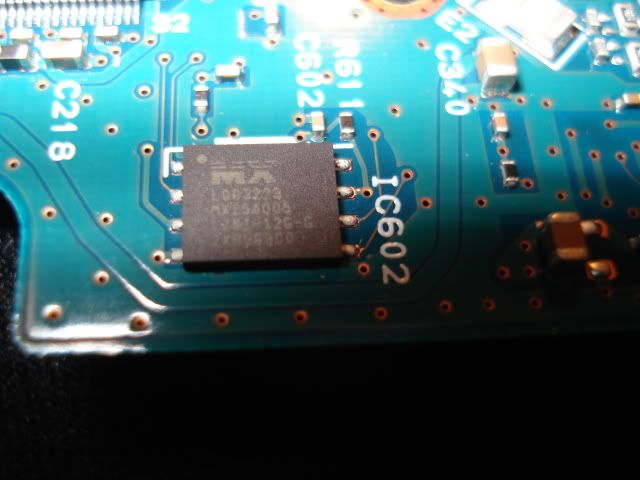
2) There is an 8 pin chip that looks to be different between the two boards, different manufacturers.
I have swapped the PCB from the other drive, but I know now this will not be the magic fix I'm looking for as the drive is "adaptive." As are all newer Toshiba drives, right?
My observations from here are that the UK01 PCB on the ZK01 will spin, but it will not be recognized by the computer.
I have no plans to open the hard drive as I know this is detrimental to drives without a proper clean room environment.
My question are:
1) How can I check if the fuse on the ZK01 PCB is faulty? Is this likely the culprit? Is it just a dream that it's as simple as a burnt fuse?
2) I've read that it is possible to swap over the IC602 (8 PIN) chip that I mentioned before, and this can solve the problem.
3) Most all of the chips on the board have two sets of numbers, and at least 1 set matches on each board, will this make it easier to swap just the 8-PIN chip? For example both have a Hynix chip with number "HYS7V641620FTP-6" but different, smaller numbers. Also they both have the same Controller Chip number 88i6717-TFJ1, but the numbers following are different.
4) I don't plan on swapping the chip out myself, I read that it requires an infrared soldering iron?
5) Should I take it to a data recovery specialist? I would really like to avoid this for cost purposes...the data is not too precious. The HD is still under warranty and I would just like to find ways to get the data off before sending the computer in for repairs.
Thank you for reading and please help me if you can!




 FAQ
FAQ Search
 Login
Login Register
 HDDGURU FILES

