MultiDrive – free backup, clone & wipe disk utility from Atola Technology

All times are UTC - 5 hours [ DST ]


Post new topic Reply to topic  [ 6 posts ] 
Author Message
 Post subject: Maxtor DiamonMax Plus 6Y160P0 Firmware
PostPosted: March 31st, 2010, 17:17 
Offline

Joined: March 28th, 2010, 23:39
Posts: 15
Location: United States of America
Hi,
I just received some old Maxtor DiamonMax Plus 6Y160P0 drives, & a few have a little bit of bad sectors, but everything works great. One is some how ATA locked EVERYTIME & must be unlocked by typing "idrive" within MHDD on each re-boot. Tried unlock & dispwd, and still not working. Another drive formatted to only 9MB (not a misspelling) the drive had a program "qunlock" used accidentally, it's some type of xbox Maxtor unlocker and it screwed it up. Another drive showed Maxtor Calypso?? or something like that after a power outage...

Anyhow, these look like perfectly good 40-pin ATA/IDE drives that is still good for installing on old 32-bit motherboard running Win XP or Linux for kids to play/learn on & abuse. I'm wondering if there is a "DLOAD.EXE, *.BFB, *.CFB, *.BBR, *.CBR" for this drive to update. I remember a few years ago, before Maxtor was taken over, a nice tech e-mailed me a disk image for one of my 40GB drives and it solved all issues, but now, they would not even look at out of warranty drives.

It's no problem if I screw up, as there are no data, or nothing important on them. And after a firmware update, I realize it should be immediately reformatted & surface scanned. I'm hoping to save my new system and sata drives for my important redundant nas backups. These old drives will be used only to connect to the Internet thru a web browser & wiped every month or so & imaged with fresh copy of updated operating system & updated Internet browser.

Anyhow, is there any other way to fix these drives w/ possibly corrupt/screwed up firmware? I just d/l a firmware package (Maxtor 6Y160P0) (YAR41BW0) that has BOOT.RAM, BOOT_AC1D.COD, BOOTB_AC1D.COD, Maxtor 6Y160P0_YAR41BW0_Y436QBYE_.RES, sra.bin, srb.bin, & a MOD directory. How would I flash such a firmware onto these recycled HDD? What "program.exe" would I use?

Any help would greatly be appreciated.

-Simon


Top
 Profile  
 
 Post subject: Re: Maxtor DiamonMax Plus 6Y160P0 Firmware
PostPosted: March 31st, 2010, 18:58 
Offline

Joined: March 28th, 2010, 23:39
Posts: 15
Location: United States of America
For the Maxtor DiamonMax Plus 6Y160P0 I mentioned above, is there a firmware ripper I can use to copy the firmware from one of the good drive & flashing it onto the corrupted drive. If all else fails or is not feasible for effort, I'll just toss them, no biggy...... thanx


Top
 Profile  
 
 Post subject: Re: Maxtor DiamonMax Plus 6Y160P0 Firmware
PostPosted: March 31st, 2010, 19:02 
Offline

Joined: January 15th, 2008, 11:06
Posts: 1419
Location: Providence, RI. Boston, MA USA
You will need special Software/hardware package to fix those drives.

_________________
www.datarecoveryne.com


Top
 Profile  
 
 Post subject: Re: Maxtor DiamonMax Plus 6Y160P0 Firmware
PostPosted: April 1st, 2010, 3:46 
Offline

Joined: July 18th, 2006, 3:05
Posts: 7476
Location: ITALY
There is no "firmware update" that can solve these issues and these drives are no longer supported. Need special HW tools to work with (and know what to do). OR know what to do and build something else to do what you want.


Top
 Profile  
 
 Post subject: Re: Maxtor DiamonMax Plus 6Y160P0 Firmware
PostPosted: April 1st, 2010, 4:36 
Offline
User avatar

Joined: September 8th, 2009, 18:21
Posts: 16971
Location: Australia
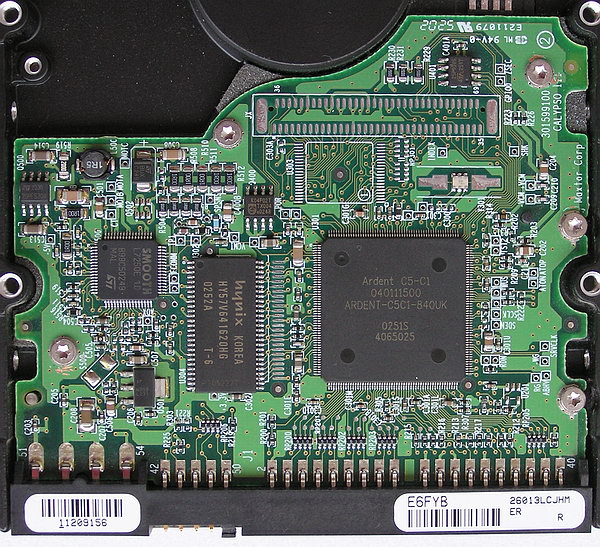
I'm not a DR guy, but I suspect that the drive that identifies itself as a "Maxtor Calypso" is unable to read the firmware on the platters. It is therefore reporting a generic identity stored in the serial EEPROM on the PCB.

See the "Calypso" marking at the right rear corner of this PCB:
http://www.ixbt.com/storage/maxline3/ma ... -plate.jpg


Top
 Profile  
 
 Post subject: Re: Maxtor DiamonMax Plus 6Y160P0 Firmware
PostPosted: April 1st, 2010, 4:44 
Offline

Joined: July 18th, 2006, 3:05
Posts: 7476
Location: ITALY
fzabkar wrote:
It is therefore reporting a generic identity stored in the serial EEPROM on the PCB.
http://www.ixbt.com/storage/maxline3/ma ... -plate.jpg


There's no serial EEPROM on Calypso . Only on some where patch needed. Also a FW corruption or generic malfunction can lead to ID as "CALYPSO"


Top
 Profile  
 
Display posts from previous:  Sort by  
Post new topic Reply to topic  [ 6 posts ] 

All times are UTC - 5 hours [ DST ]


Who is online

Users browsing this forum: No registered users and 31 guests


You cannot post new topics in this forum
You cannot reply to topics in this forum
You cannot edit your posts in this forum
You cannot delete your posts in this forum
You cannot post attachments in this forum

Search for:
Jump to:  
cron
Powered by phpBB © 2000, 2002, 2005, 2007 phpBB Group