MultiDrive – free backup, clone & wipe disk utility from Atola Technology

All times are UTC - 5 hours [ DST ]


Post new topic Reply to topic  [ 11 posts ] 
Author Message
 Post subject: GPT MBR and EFI Records
PostPosted: April 21st, 2014, 19:20 
Offline
User avatar

Joined: June 11th, 2013, 17:01
Posts: 1772
Location: Phoenix, AZ USA
I have a RAID 0 (2 x 3TB). It looks like the Protected MBR was overwritten with a standard MBR. I have not worked much with GPT and have a few questions. The client says there was a single 3TB Partition. When I build the array I only see a 2TB partition. I can see from hex that there is indeed a lot more data beyond the 2TB partition end. I have done some work changing the MBR and GPT, but the protective MBR only seems to allow for a maximum partition sector size of 2TB with hex reference FFFFFFFF at 1CAh. I have set the GPT to the last available sector, but I still only get a 2TB partition showing. Any ideas?

_________________
HDD, SSD, Flash and RAID Data Recovery
Founder of The Data Recovery Professionals Group


Top
 Profile  
 
 Post subject: Re: GPT MBR and EFI Records
PostPosted: April 21st, 2014, 19:35 
Offline
User avatar

Joined: September 8th, 2009, 18:21
Posts: 16955
Location: Australia
ddrecovery wrote:
I have a RAID 0 (2 x 3TB). ... The client says there was a single 3TB Partition.

Do you mean RAID 1, or do you mean a single 6TB partition?

ddrecovery wrote:
When I build the array I only see a 2TB partition. I can see from hex that there is indeed a lot more data beyond the 2TB partition end. I have done some work changing the MBR and GPT, but the protective MBR only seems to allow for a maximum partition sector size of 2TB with hex reference FFFFFFFF at 1CAh. I have set the GPT to the last available sector, but I still only get a 2TB partition showing. Any ideas?

GPT partitions are defined in sectors 1 and 2. These two sectors are also backed up at the very end of the drive.

Could we see these four sectors (in hex)?

_________________
A backup a day keeps DR away.


Top
 Profile  
 
 Post subject: Re: GPT MBR and EFI Records
PostPosted: April 21st, 2014, 19:48 
Offline
User avatar

Joined: June 11th, 2013, 17:01
Posts: 1772
Location: Phoenix, AZ USA
Thanks for the quick response:
It is Raid 0. The initial MBR and EFI are on one drive and the Copy EFI is on the other. Attached are the original hex before I made some changes. I have checked locations of both EFI's and they do match. CRC is also good.


Attachments:
Disk1 EFI Copy.txt [1000 Bytes]
Downloaded 718 times
Disk0 Sectors 0-2.txt [11.6 KiB]
Downloaded 728 times

_________________
HDD, SSD, Flash and RAID Data Recovery
Founder of The Data Recovery Professionals Group
Top
 Profile  
 
 Post subject: Re: GPT MBR and EFI Records
PostPosted: April 21st, 2014, 20:14 
Offline
User avatar

Joined: September 8th, 2009, 18:21
Posts: 16955
Location: Australia
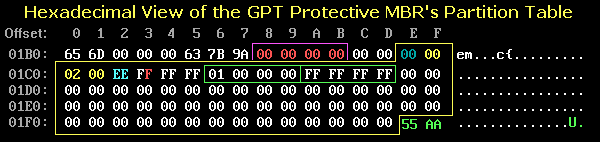
Sector 0 contains a 2TB MBR partition of type 06. A protective MBR should have a type EE and should look like this:

http://thestarman.pcministry.com/asm/mbr/GPThpt.gif

The structure of the "EFI PART" GPT header is explained here:

http://thestarman.pcministry.com/asm/mbr/GPT.htm

The "last usable LBA" is 0x0x2BAA1473E. This corresponds to a capacity of 6TB.

http://www.google.com/search?q=0x2BAA14 ... in+decimal

Sector 2 is showing a single Microsoft reserved partition. The entry for the data partition has been zeroed.

You need to search the drives for boot sectors. These will be near the beginning and shouldn't take long to find ... if they still exist.

_________________
A backup a day keeps DR away.


Top
 Profile  
 
 Post subject: Re: GPT MBR and EFI Records
PostPosted: April 21st, 2014, 23:01 
Offline
User avatar

Joined: June 11th, 2013, 17:01
Posts: 1772
Location: Phoenix, AZ USA
Once again, thanks for the response. The Hex I uploaded was from the original drive, I have since changed to a protective MBR and GPT Partition structure. I will change the last usable LBA after your advice and see if we get a better scan.

When searching for boot sectors in GPT you mean 55 AA? I think the main partition we are looking for could be is Ext4. I had previously search for 55 AA but could not find any.

_________________
HDD, SSD, Flash and RAID Data Recovery
Founder of The Data Recovery Professionals Group


Top
 Profile  
 
 Post subject: Re: GPT MBR and EFI Records
PostPosted: April 21st, 2014, 23:33 
Offline
User avatar

Joined: September 8th, 2009, 18:21
Posts: 16955
Location: Australia
I assumed that the OS was Windows (because of the "Microsoft reserved partition") in which case you would be looking for an NTFS boot sector. These are easily recognisable by their "NTFS" signature. In the case of Windows systems, you could search for boot sectors with DMDE (freeware disc editor), but I have no real experience with Linux file systems.

Here are two professional tools for Linux:

http://www.r-tt.com/data_recovery_linux/Download.shtml
http://www.ufsexplorer.com/download.php

If assembling a software RAID in a Linux environment, you could use mdadm (freeware):

http://www.linuxmanpages.com/man8/mdadm.8.php

_________________
A backup a day keeps DR away.


Top
 Profile  
 
 Post subject: Re: GPT MBR and EFI Records
PostPosted: April 22nd, 2014, 0:36 
Offline
User avatar

Joined: June 11th, 2013, 17:01
Posts: 1772
Location: Phoenix, AZ USA
And if I do find NTFS boot sectors can I add them to the partition table? Sorry if my questions are dumb now and again.

_________________
HDD, SSD, Flash and RAID Data Recovery
Founder of The Data Recovery Professionals Group


Top
 Profile  
 
 Post subject: Re: GPT MBR and EFI Records
PostPosted: April 22nd, 2014, 0:54 
Offline
User avatar

Joined: September 8th, 2009, 18:21
Posts: 16955
Location: Australia
Yes, tools such as DMDE can use the information in the boot sector(s) to rebuild the partition structure.

_________________
A backup a day keeps DR away.


Top
 Profile  
 
 Post subject: Re: GPT MBR and EFI Records
PostPosted: April 22nd, 2014, 11:25 
Offline
User avatar

Joined: June 11th, 2013, 17:01
Posts: 1772
Location: Phoenix, AZ USA
There seems to be a conflict between the protective MBR and the GPT Header. The MBR has a maximum partition size of FF FF FF FF which is 2TB. Yet in the GPT Header you can specify a LastUsableLBA which can be almost anything you want. Does the OS ignore the MBR when its GPT?

Also how does the OS system find partitions? A GPT formatted disk can have up to 128 partitions, so how are they notated?

_________________
HDD, SSD, Flash and RAID Data Recovery
Founder of The Data Recovery Professionals Group


Top
 Profile  
 
 Post subject: Re: GPT MBR and EFI Records
PostPosted: April 22nd, 2014, 16:55 
Offline
User avatar

Joined: September 8th, 2009, 18:21
Posts: 16955
Location: Australia
Sectors 2 through 33 are reserved for 128 partition entries, each entry occupying 128 bytes.

See http://en.wikipedia.org/wiki/GUID_Parti ... on_entries

That said, ISTM that you need to decide whether you have a RAID 0 or a RAID 1, whether the capacity is 6TB or 3TB, and whether the file system is Linux or Microsoft.

BTW, in DMDE you would search for boot sectors by selecting Tools -> Search for Special Sector.

_________________
A backup a day keeps DR away.


Top
 Profile  
 
 Post subject: Re: GPT MBR and EFI Records
PostPosted: April 22nd, 2014, 17:12 
Offline
User avatar

Joined: June 11th, 2013, 17:01
Posts: 1772
Location: Phoenix, AZ USA
Thanks Fzabkar. I will keep studying and keep learning.

_________________
HDD, SSD, Flash and RAID Data Recovery
Founder of The Data Recovery Professionals Group


Top
 Profile  
 
Display posts from previous:  Sort by  
Post new topic Reply to topic  [ 11 posts ] 

All times are UTC - 5 hours [ DST ]


Who is online

Users browsing this forum: Google [Bot] and 32 guests


You cannot post new topics in this forum
You cannot reply to topics in this forum
You cannot edit your posts in this forum
You cannot delete your posts in this forum
You cannot post attachments in this forum

Search for:
Jump to:  
Powered by phpBB © 2000, 2002, 2005, 2007 phpBB Group