|
Hello everyone,
I found this forum, looking for help.
I have a Samsung HDD HD154UI/Y, on external MEMUP case, since 2009, always working good (1.5TB).
Some months ago, the power adapter died, the HD dind't turned on, so i searched for one adapter that was similar to the original, and found one.
The HD kept working well, but 3 months ago it started having truble to initiate. When turned on i could hear the same noise as always when a disc is starting, but one second passed and it gives a BIP, and the starting noise of the disks goes back to the beginning untill the same bip again, and kept going untill i turn the power off.
I think the disk was trying to initiate but it was unable to do it. (but some times did started)
I took the disk from it's case, and plugged in to a kind of doc station (whit SATA and IDE 2.5" and 3.5"conections and memory cards reading) and smoke came from the disk PCB.
Now we can see that the PCB has a loose component (4R7) and i think that the 5V is also burnt.
I allready have one PCB with the same number (that i bought on an online shop) and already tried the disk on the same HDD Dock Station.
The HDD stars, and it apears on the explorer, but its not recognized.
As i saw in many pages on the internet, a simple PCB swap isn't enough,
Hopping that anyone can give me some tips.
Thanks
PS: i will try to upload an image of my old PCB
| Attachments: |
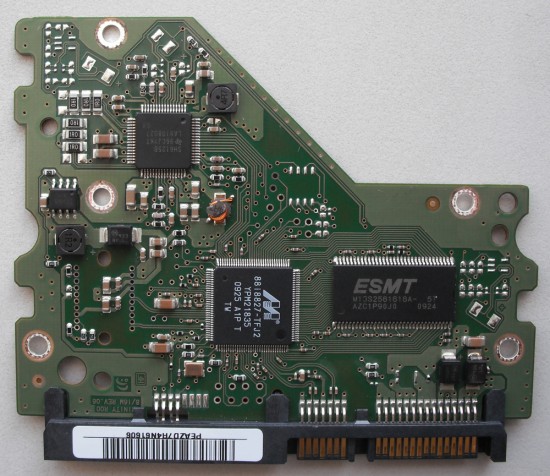
webDSCF0002.jpg [ 720.18 KiB | Viewed 5073 times ]
|
|



 FAQ
FAQ Search
 Login
Login Register
 HDDGURU FILES