MultiDrive – free backup, clone & wipe disk utility from Atola Technology

All times are UTC - 5 hours [ DST ]


Post new topic Reply to topic  [ 11 posts ] 
Author Message
 Post subject: Western Digital WD10EADS not detected and spin down
PostPosted: January 9th, 2012, 11:27 
Offline

Joined: January 9th, 2012, 6:57
Posts: 4
Location: United Kingdom
I have split this post into a few sections as it is quite long, but I wanted to give anyone willing to help as much information as I can. Scroll down if you simply want to know the current state of the drive and/or images of the drive, board and serial numbers.

Full background

About a week ago a friend tripped over the power cable for my external USB hard drive - WD10EADS -11M2B2 in a "My Book Essential" external package - which pulled it off a low table (45cm) onto the ground. The hard drive seemed to still respond okay in Windows 7, allowing me to browse through the folder structure, but as a precaution I unhooked the drive no more than a minute after the fall in order to connect it to a PC which had enough spare disk space to copy all files off before complete failure. Upon connecting the drive, it was not recognized by Windows, prompting me to remove the drive from it's casing and connect it direct to the SATA controller on the motherboard. The drive was not seen by the BIOS at all. To avoid potentially doing further damage to the drive I set it aside and proceeded to research data recovery options.

I would like to state at this point that it's unlikely I could afford a professional data recovery service, and while the data on that drive isn't critical, it would be nice to get it back so I'll try whatever I can myself. I am aware that any action taken by myself can damage the drive further and reduce the chance of a successful recovery of the data.

Having said that I proceeded to learn as much as I could about hard drive architecture, possible faults and the options of recovery. I've installed the latest release of Ubuntu on a separate machine with the sole purpose of using it for the recovery of that drive. I've practiced using ddrescue to image several old drives including an old 60GB one that was making excessive spindle whine which I intentionally opened in a dusty environment to induce bad sectors and other faults and managed to successfully image this drive. I also prepared a boot CDROM of MHDD to deal with the drive in case it continued to fail to show in the BIOS.

I feel I gave myself the best chance of recovering the drive if it responded at all at this point and proceeded to connect the drive directly to the SATA controller on the motherboard (having been untouched for about a week) with an empty 3TB seagate drive to image the faulty drive to and with Ubuntu running on a 200GB Western Digital drive. Upon startup the faulty drive wasn't seen by the BIOS as before, the PC continued to boot to Linux where the drive didn't show in the /dev/ list (no big surprise really). I noticed at this point that the drive had spun down. Not being sure if it had failed to spin up at all, but remembering it spun up normally when connected to USB the last time, I shut the PC down and restarted it with the drive disconnected completely.

I then connected the drive to USB through it's USB interface card while in Ubuntu. The drive spun up normally, but did not show up in the /dev/ list. After several lsusb commands (2 minutes or so after connection), it finally showed up as /dev/sdc with a /dev/sdc1 partition in the terminal as well as sowing up as a mountable device in the graphical file browser. I proceeded to mount the drive in terminal to /mnt/WDdrive/ with the intention of copying off the most important files before complete failure. The full folder structure was showing and using the graphical file browser I managed to brows to the folder I most wanted to save with video files from a holiday last summer. These files not only showed up in the browser but even generated preview icons.

I attempted to copy two of the files to the 3TB Seagate drive but it only copied a few bytes before giving an error. The drive had spun down and trying to issue commands with ddrescue to image the first 50M of the drive was entirely unsuccessful. I have retried to connect the drive in the same manner several times, but have had no response. Each time the drive spins up, and seems to do a normal startup sequence, but after two minutes or so spins down again. This happens both using the USB interface and SATA, with both the drive in normal 3GB/s operation and with a jumper set so the drive operates in 1.5GB/s data rate.

I have again put the drive aside and am reassessing what I can do further. Any help would be greatly appreciated.

Current state of the hard drive

SATA connection
  • Drive spins up normally on booting
  • Drive not recognized by the BIOS
  • Drive spins down and does not respond after about 2 to 3 minutes
  • Drive is not shown in Windows 7 or in the device list of Ubuntu
  • Drive is not seen by MHDD on a bootable CDROM

USB connection
  • Drive spins up normally when connected
  • Not seen by USB controller or device list in both Windows 7 and Ubuntu, except for single instance in Ubuntu when repeated lsusb commands were issued
  • In all cases drive spins down and does not respond after about 2 to 3 minutes

Questions

- Am I right in thinking that, as I was able to see the folder structure, files, and even preview icons briefly before the hard drive spun down, the platters, heads, motor and servo mechanism are in good condition?
- Is there any way to image the entire drive or mount it and retrieve specific files beyond what I have tried, without resorting to expensive hardware imagers?
- Is board replacement an option worth considering at all? I know certain chips with alignment data for the heads need to be re-soldered onto any replacement if done.
Any other suggestions are more than welcome.

Images of drive
Click for full size

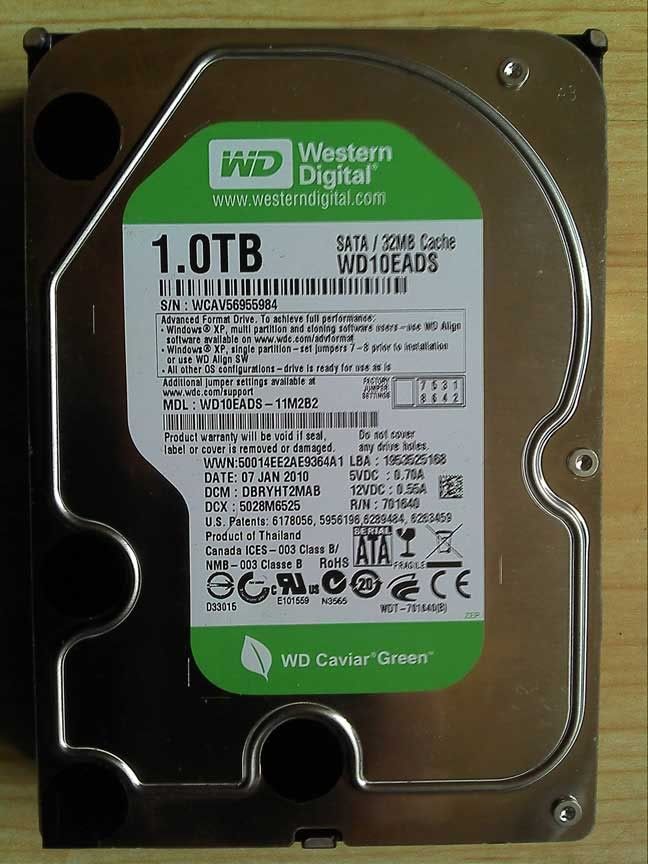
Western Digital Caviar Green WD10EADS - 11M2B2
Image

Circuit board
Image

Board underside
Image

USB interface card
Image

USB card underside
Image


Top
 Profile  
 
 Post subject: Re: Western Digital WD10EADS not detected and spin down
PostPosted: January 9th, 2012, 12:52 
Offline

Joined: November 9th, 2006, 15:15
Posts: 2984
Ravell wrote:
In all cases drive spins down and does not respond after about 2 to 3 minutes


You will need professional assistance. Very likely the recording heads are damaged and unable to read the media.


Top
 Profile  
 
 Post subject: Re: Western Digital WD10EADS not detected and spin down
PostPosted: January 9th, 2012, 13:01 
Offline

Joined: January 9th, 2012, 6:57
Posts: 4
Location: United Kingdom
I can certainly imagine a drop would cause head damage. Although I'm confused how it managed to read for a few minutes while it was hooked up to Ubuntu with USB?

I imagine if head damage is the case, repeatedly spinning up the disk for attempted recoveries could do significant damage to the platters so it'd be best not to run the drive again without professional help.

I know that this generation of WD drives requires head realignment with a very expensive tool if the cover is removed, so even if I had access to a clean room head replacement on these drives isn't something that can be done by an individual, regardless of skill/training/equipment without that tool. :(


Top
 Profile  
 
 Post subject: Re: Western Digital WD10EADS not detected and spin down
PostPosted: January 9th, 2012, 13:09 
Offline
User avatar

Joined: September 5th, 2010, 12:29
Posts: 1038
Location: South Africa
This generation does not fall victim to the 'Western Digital alignment problem' that I think you are referring to, that was prevalent on older models. Either way, even if you had access to a cleanroom it would not help as there is more to it than that. The correct parts, tools, software/hardware, knowledge, experience etc.

Best to contact a professional as mentioned above.

_________________
Death is nothing, but to live defeated and inglorious is to die daily.
Data Recovery Cape Town


Top
 Profile  
 
 Post subject: Re: Western Digital WD10EADS not detected and spin down
PostPosted: January 9th, 2012, 13:18 
Offline

Joined: January 15th, 2008, 11:06
Posts: 1419
Location: Providence, RI. Boston, MA USA
Ravell wrote:
isn't something that can be done by an individual, regardless of skill/training/equipment without that tool. :(


Dentist is also an individual, but I don't think you would want to ask your friend, who has no experience, to perform oral surgery on you.

_________________
www.datarecoveryne.com


Top
 Profile  
 
 Post subject: Re: Western Digital WD10EADS not detected and spin down
PostPosted: January 9th, 2012, 13:26 
Offline

Joined: January 9th, 2012, 6:57
Posts: 4
Location: United Kingdom
harddrivespecialist wrote:
Dentist is also an individual, but I don't think you would want to ask your friend, who has no experience, to perform oral surgery on you.


I meant it more in the sense that some tasks can be attempted by a non-professional. I've heard head replacement isn't impossible for some drives if you can get sufficient practice (although extremely risky), but most modern drives are too hard for anyone but an expert. As such my point was that anything internally wrong with the drive would force me to seek professional help or give up on the data.


Top
 Profile  
 
 Post subject: Re: Western Digital WD10EADS not detected and spin down
PostPosted: May 17th, 2012, 3:49 
Offline

Joined: May 17th, 2012, 1:39
Posts: 2
Location: United Arab Emirates
to Ravell
am facing the same thing... that hard used to work and i copied a few videos but then stopped
can you please tell me what did you do ???
cause 98% of my art work and family photos is on the drive


Top
 Profile  
 
 Post subject: Re: Western Digital WD10EADS not detected and spin down
PostPosted: May 17th, 2012, 6:35 
Offline

Joined: January 9th, 2012, 6:57
Posts: 4
Location: United Kingdom
Gave up on the drive. I might try and get one with a near identical serial number to swap PCB's and failing that the heads. But as yet I haven't taken action and have basically conceded to the data being lost.

I got the most important things from it backed up so it could have been worse.


Top
 Profile  
 
 Post subject: Re: Western Digital WD10EADS not detected and spin down
PostPosted: May 17th, 2012, 7:40 
Offline

Joined: April 26th, 2012, 1:52
Posts: 388
Location: Chicago, USA
Ravell wrote:
Questions

- Am I right in thinking that, as I was able to see the folder structure, files, and even preview icons briefly before the hard drive spun down, the platters, heads, motor and servo mechanism are in good condition?

No, that was likely information in the cache.

- Is there any way to image the entire drive or mount it and retrieve specific files beyond what I have tried, without resorting to expensive hardware imagers?

No. And likely there is media damage by now.

- Is board replacement an option worth considering at all? I know certain chips with alignment data for the heads need to be re-soldered onto any replacement if done.
Any other suggestions are more than welcome.

Doubtful this will work.


Either suck it up and trash the drive, or get it to a pro.

_________________
On a clear disk you can seek forever.


Top
 Profile  
 
 Post subject: Re: Western Digital WD10EADS not detected and spin down
PostPosted: May 17th, 2012, 14:56 
Offline

Joined: May 21st, 2007, 16:10
Posts: 1592
Location: Gothenburg/ Sweden
Hi, as the drive was dropped on the floor the heads were damaged and the more you try to read it the more damage will you do.
I recommend you to contact Pcimage http://forum.hddguru.com/member5866.html, he's member here in the forum and is located in UK.
He can help you out with your drive.

Rgds
Bosse

_________________
Rescue IT Datarecovery service Sweden
Rescue IT Dataräddning Göteborg AB
http://www.rescue-it.se


Top
 Profile  
 
 Post subject: Re: Western Digital WD10EADS not detected and spin down
PostPosted: May 18th, 2012, 5:15 
Offline
User avatar

Joined: September 8th, 2009, 18:21
Posts: 16960
Location: Australia
hesham85 wrote:
that hard used to work and i copied a few videos but then stopped

Can you give us a bit more information?

Does the drive still spin up?

Did you drop it or bump it?

Does it still show up in Device Manager?

Can you see the SmartWare VCD?

_________________
A backup a day keeps DR away.


Top
 Profile  
 
Display posts from previous:  Sort by  
Post new topic Reply to topic  [ 11 posts ] 

All times are UTC - 5 hours [ DST ]


Who is online

Users browsing this forum: No registered users and 137 guests


You cannot post new topics in this forum
You cannot reply to topics in this forum
You cannot edit your posts in this forum
You cannot delete your posts in this forum
You cannot post attachments in this forum

Search for:
Jump to:  
Powered by phpBB © 2000, 2002, 2005, 2007 phpBB Group


