MultiDrive – free backup, clone & wipe disk utility from Atola Technology

All times are UTC - 5 hours [ DST ]


Post new topic Reply to topic  [ 2 posts ] 
Author Message
 Post subject: Failing Seagate
PostPosted: March 13th, 2013, 2:07 
Offline

Joined: March 13th, 2013, 1:26
Posts: 1
Location: United States
Working on a friends computer. System stopped booting. Bios Recognizes drive, boot will go black and the restart with no boot device available. It will boot to the Windows error recovery. Trying to repair boot up it will just hang. I hooked it up to my Windows 8 box. I saw all of the partitions. I was going to copy off what I could but it started getting slow and then some folders didn't show any data and then the drive disappeared from disk management. On other reboots I can see all the partitions but the now show as raw.
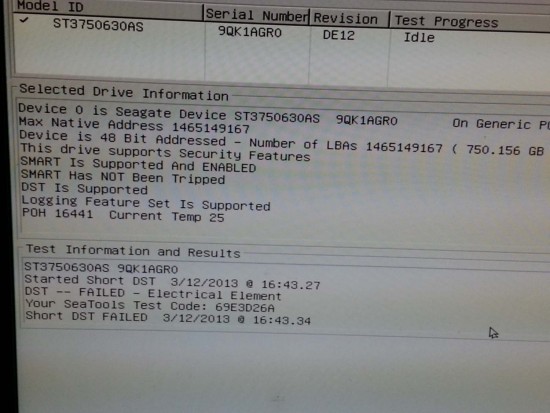
Booted with DOS seatools and got DST failed - electrical element on the short test.
The long test will go to 1.5% and then error as well and complains about bad sectors and that it can't talk to the drive and to check cables. I examined the PCB, don't see anything that looks burnt and there is no burnt smell.
Spins fine, no abnormal noises.
Partition sizes look normal (small OEM, recovery, and main boot) from second computer, except disk manager show the disk as read only and the partitions are RAW.


What to do now?

Attached seatools screen.


Attachments:
File comment: Seatools screen
seatools.jpg
seatools.jpg [ 122.64 KiB | Viewed 3262 times ]
Top
 Profile  
 
 Post subject: Re: Failing Seagate
PostPosted: March 13th, 2013, 3:07 
Offline
User avatar

Joined: February 27th, 2009, 3:26
Posts: 1721
Location: French Polynesia Tahiti
I would suggest that you should image this drive as soon as possible and stop trying to recover the files now. Your drive is failing and while possible image this to another drive. Then from the imaged or cloned drive you should be able to recover the files you want. Then replace the drive and load your system again. Check on Linux there is a program you can use to do this imaging to another drive. Once you have a clone of your HDD then you can use any DR program to get back your data. You say the partitions are showing as RAW. This should be NTFS and I would use Get Data Back NTFS. You can try it before buying it.

_________________
Iorana Haraharaini


Top
 Profile  
 
Display posts from previous:  Sort by  
Post new topic Reply to topic  [ 2 posts ] 

All times are UTC - 5 hours [ DST ]


Who is online

Users browsing this forum: No registered users and 52 guests


You cannot post new topics in this forum
You cannot reply to topics in this forum
You cannot edit your posts in this forum
You cannot delete your posts in this forum
You cannot post attachments in this forum

Search for:
Jump to:  
Powered by phpBB © 2000, 2002, 2005, 2007 phpBB Group