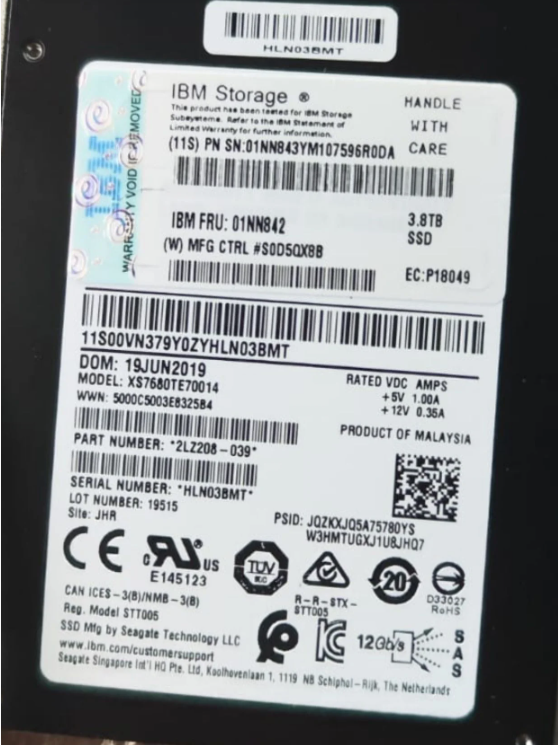
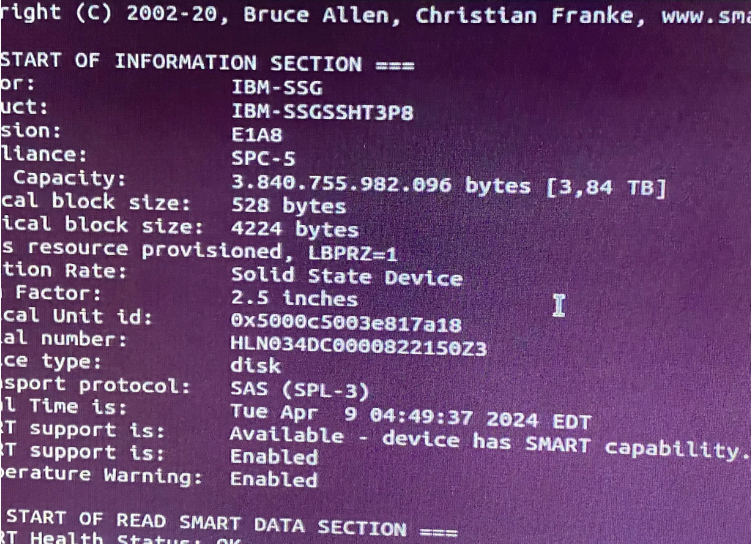
I purchased the 2 discs you see in the images. I hope image is clear.
GitHub - Drive-Trust-Alliance/sedutil: DTA sedutil Self encrypting drive software (I tried, it didn't work)
illegal request, type sense key apart from invalid opcode.
Oh hey, I have this exact same drive, and exact same issue! I haven't been able to solve this yet, but maybe putting what I've tried to do on the internet might help someone actually solve it? If they do, I really hope they post it in a public place.
This SSD really is a piece of work. It's a Seagate Nytro 3131 Read Intensive 7.68TB SED SSD that's been rebranded to an IBM 3.84TB SED SSD. Not only is the firmware modified to show all the fancy IBM stuff, but the drive size has been cleaved in half for whatever reason (my current guess is so they could sell 3.84TB drives when the real ones ran out of stock?) and it being an SED absolutely doesn't help.
What I tried on Ubuntu 22.04 running on an IBM Slicestor 2448 chassis (intel x86, probably just rebranded SuperMicro?): While sg_format with --size=528 works, or at least doesn't error, other sizes (like 512, 4096, and even 4224) will fail with the Invalid field in parameter list error I've grown to despise. I even ended up going through the SCSI command spec (the SeaGate one) to figure out if sg_format was sending incorrect commands, but even my manual attempts via sg_raw ran into that error. I'm going to guess that IBM's custom firmware doesn't follow the spec when you try to change the block size, and they have custom data fields that must be provided. Or perhaps it's actually the right format, but IBM is having the drive throw a bogus error because proprietary reasons. ¯\_(ツ)_/¯, This was the command I have in my notes, I think this is the correct one? It's been a bit since I've worked on this. I do recall that using \x02\x10 (528) instead of \x02\x00 (512) worked, which aligns with sg_format with --size=528 working but --size=512 not.
I should probably mention that I'm not new to reformatting block sizes. The previous IBM drives I've gotten in with non-512 block sizes have all formatted fine to 512 via sg_format, but IBM-branded SSD's, especially the SED ones, reject being converted. All of the IBM HDD's I've gotten have converted fine, and even some SSD's (though not SED SSD's).
sedutil-cli can handle the SED portion of the drive fine. The standard PSID reset works fine, I can take ownership of the drive and the mess with the locking ranges, all that works as standard. Trying to do any of the sg_format stuff while the drive is locked will correctly throw errors that point to the drive being locked. Trying to do the sg_format stuff with the drive freshly PSID-reset or unlocked will result in the Invalid field in parameter list crap, so it doesn't look like the SED stuff is actually getting in the way. SeaChest, Seagates own utility for this stuff, doesn't seem to be able to handle the drive either. While SeaChest Format seems to recognize the drive, displaying some information and showing that it should be able to do 512, 520, and 528 sector sizes, all of my attempts to use SeaChest Format to reformat the drive to 512 have failed, seemingly running into the same Invalid field in parameter list error from the sg_* commands.
One of the things I found referenced in the IBM docs that is supposed to be able to change an "Advanced Function" disk into a JBOD disk is iprconfig, the IBM Power RAID Configuration utility. There's even a github repo for it that I was able to grab, compile, and install. Unfortunately, likely due to the Slicestor not actually having a RAID card (seems to just be an HBA) let alone an IBM one, while iprconfig will launch fine it wont actually detect any RAID cards or the drive.
Most of this you can find online on existing discussions if you look hard enough though, so not much of this is new info, but it is compiled here. Now to what else I've done that I haven't been able to find online at all: Using actual non-rebranded IBM hardware.
I managed to get my hands on an IBM Power8 8247-21L/S812L server and got it to boot AIX Diag 7.2 to try to have the AIX Diagnostics reformat it to JBOD/512. Unfortunately, the drive never showed up in AIX. I took the 2 HDD's that were in it, put them in a RAID 0, and installed the PowerPC version of SUSE Linux Enterprise 15 via the power of the free trial and got iprconfig running on there. This time, on the actual IBM hardware, iprconfig DID recognize the RAID card and was able to see the 2 drives I put in the RAID 0 for SUSE, but still wasn't able to see the SED SSD. After some more testing, it seems like it can't see any SSD's? Not sure if it's my setup or if the RAID card is just wack.
I proceeded to get my hands on an IBM Power9 9008-22L/L922 server, which actually came with 2 U.2 SAS 4224 block sized SSD's (not SED though), and popped the 2 RAID 0 SUSE HDD's and the SED SSD in there. Got SUSE up and running, ran iprconfig, and though the SSD was labeled "R/W Protected", it was able to see it! Unfortunately, I wasn't able to reformat it to 512. Based on the logs, it seems iprconfig was also running into the same issues as sg_format. iprconfig also wasn't able to make a single-drive RAID 0 from the drive, and just errored (TODO: Try again from SUSE and put error in here). Putting the drive back into my Ubuntu box and using sedutil-cli to take ownership, make a locking range that spans the entire drive, and having the locking range unlocked by default, and putting the drive back into the Power9 box made it stop showing up as "R/W Protected" and allowed me to create the RAID 0.
Putting the drive into my Ubuntu box, PSID-resetting the drive, putting it back into the Power9 box, and booting into AIX 7.2 it showed the drive but errored when trying to format it for JBOD/512. The drive was listed as "R/W Protected", but doing a general reformat (keeps the block size) that AIX offers not only worked, but changed the state of it to "zeroed". Booting into SUSE, I was able to use iprconfig to make it into a RAID 0, so that was neat.
In SUSE, the various /dev/sg*'s will point to the actual drives even if they are in a RAID. For me right now, /dev/sg1 and sg2 are pointing to the two 283 GB drives that are in the RAID 0 housing SUSE, and sg3 is the SSD SED. Very interestingly, smartctl in SUSE will show the SSD as having a logical block size of 512, though it wont mention the physical block size. Running sudo smartctl --test=short /dev/sg3 wont error, but doesn't seem to actually work. I ran a single short test a while ago, and I can see that in the SMART Self-test log on SUSE, but no new tests I try to run are added to that log. Starting a long test then cancelling it via sudo smartctl --test=long /dev/sg3 and sudo smartctl -X /dev/sg3 still wont error, but no cancelled test shows up in the log. Running sudo sg_readcap /dev/sg3 will show a logical block size of 512, Logical blocks per physical block exponent=0, and both lbpme=0 and lbprz=0, despite Ubuntu saying otherwise (both are set to 1). Running sudo sg_format --format --size=512 /dev/sg3 yields a different error, "MODE SELECT command: Transport Error". I'm going to guess that the IBM RAID card is not providing direct communication to the drive, and shows a false version of the drive.
Weirdly, after running the `smartctl` stuff just now, it allowed me to do the sg_format with --size=512. Unfortunately, removing it and checking in Ubuntu shows that it's still 528/4224 block size. It also doesn't show any of the (cancelled) SMART tests I ran on SUSE but I can run a test from Ubuntu and it does show up in the SMART log. The IBM RAID card doesn't seem to actually relay any of the test requests to the drive.
I'm sorry to say that I don't have a solution, OP




 FAQ
FAQ Search
 Login
Login Register
 HDDGURU FILES