|
Hello Everyone,
I would just like to ask your opinion on the nature of my hard drive failure. Yesterday the computer this hard drive was in blue screened. After a little work, I removed two sticks of RAM, and the computer was able to boot back into Windows (system has two HDs, this one, the ST31000340AS, was just a storage drive). I wanted to run MemTest on the RAM to try and see if that was the culprit of the bluescreen. After shutting Windows down normally, I disconnected power (just saying in case someone asks) and added back the two sticks of RAM I removed. Upon turning the computer back on again, the Seagate ST31000340AS was not recognized in the BIOS.
I turned it back off and on again, still no longer seen by the BIOS. I tried swapping the cables (power and data) with the other hard drive in the system just to see if it was the cables, but it still was no longer recognized by the BIOS. I then took the HD out of that machine and connected it to another computer - nothing in the BIOS of that machine. Finally, I have a USB external caddy that I connected to the hard drive and plugged into two machines (including the original computer it came out of), but it never showed up in Device Manager or Disk Management MMC. I tried another SATA HD as a test of this USB chipset and it appeared as another drive just fine.
I looked at the PCB and there looked like a dirtiness to a silver portion that I thought possibly could be an indication that something burnt out, and the back of the PCB seems to have a similar discolouration where the PCB makes contact with the points on the hard drive itself. There was never any discerable smell though of anything. I've attached a picture of the front and back of the PCB, but you can't really see the dirtiness but I've circled it where I saw it that led me to remove the PCB in the first place.
The codes on the front label are:
ST31000340AS
P/N: 9BX158-335
Firmware: SD15
Date Code: 08453
Site Code KRATSG
Product of Thailand
The codes on the PCB are:
Printed on the board:
UJAJ-6
PCB 100466824
REV C
Printed on a sticker on the board:
100468979 H C8423U7L
I also want to add that although this hard drive was manufactured in 2008, it was still shrink wrapped in a box and not put into use until the end of 2012, so it has only been in use for a little over a year and not nearly 6 as you may initially assume. I understand that you can no longer just do a simple PCB swap, that data must be copied from the EEPROM on the PCB to another one if the board is bad, but if this is the BSY error, then maybe I could fix it myself? I can feel the hard drive spin up when power is applied, but again, it is no longer recognized by the BIOS. Thank you for your thoughts on this.
| Attachments: |
File comment: FrontOfST31000340AS_ControllerBoard
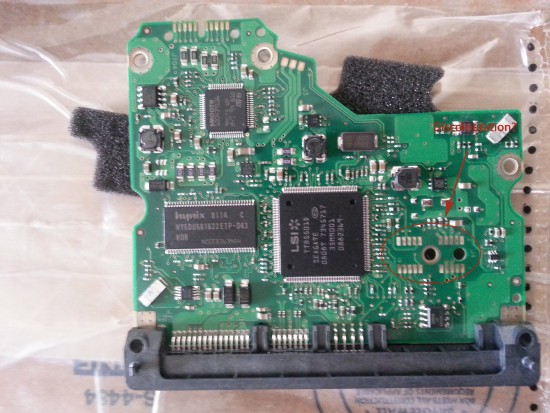
FrontOfST31000340AS_ControllerBoard.jpg [ 1.19 MiB | Viewed 5324 times ]
|
File comment: BackOfST31000340AS_ControllerBoard
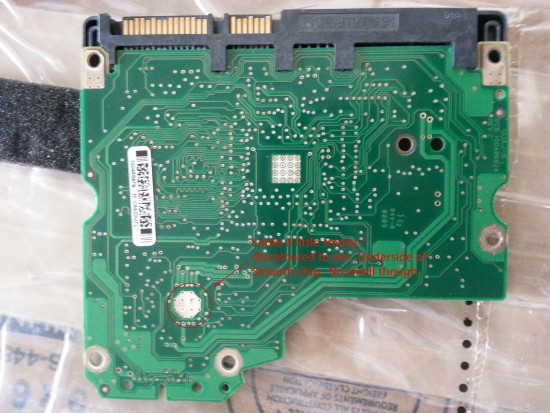
BackOfST31000340AS_ControllerBoard.jpg [ 1.22 MiB | Viewed 5324 times ]
|
|



 FAQ
FAQ Search
 Login
Login Register
 HDDGURU FILES

