MultiDrive – free backup, clone & wipe disk utility from Atola Technology

All times are UTC - 5 hours [ DST ]


Post new topic Reply to topic  [ 40 posts ]  Go to page 1, 2  Next
Author Message
 Post subject: copy very slow from WD Green to WD RAID 0
PostPosted: December 15th, 2014, 11:18 
Offline

Joined: December 15th, 2014, 10:47
Posts: 21
Location: Arizona
I have two 750 GB WD7500AYYS in a RAID 0 controlled by the onboard Intel P55 RAID controller on my Asus P7P55D-E PRO motherboard. This is where "My Documents" resides. CHKDSK was successfully run on both drives before pairing up in the RAID.

I have a third drive, a 3TB WD30EZRX, as my back up drive.

All 3 drives are using the same bank of Intel P55 SATA 3.0 GB/s connectors on the MB. I've tried moving the WD30EZRX to a single JMicron SATA connector, but the results didn't change.

Intel Matrix Storage Manager 8.9 is installed.

Individual HD Tune reports are as follows:

HD Tune: Intel Raid 0 Volume Benchmark
Transfer Rate Minimum : 92.0 MB/sec
Transfer Rate Maximum : 162.1 MB/sec
Transfer Rate Average : 138.0 MB/sec
Access Time : 12.2 ms
Burst Rate : 128.3 MB/sec
CPU Usage : -1.0%

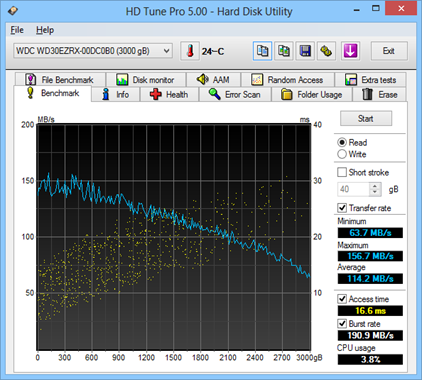
HD Tune: WDC WD30EZRX-00DC0B0 Benchmark
Transfer Rate Minimum : 122.3 MB/sec
Transfer Rate Maximum : 147.1 MB/sec
Transfer Rate Average : 135.2 MB/sec
Access Time : 11.1 ms
Burst Rate : 181.7 MB/sec
CPU Usage : -1.0%

A fresh install of Win7 64 SP1 (with all updates) is running on a 256 GB Samsung 850 Pro.

Since this is a fresh install, I'm copying over the backed up "My Documents" type files from the WD30EZRX to the RAID 0 drive. Once complete, I'll resume backing up from the RAID to the WD30EZRX.

However, when I'm copying large amounts of data from the WD30EZRX (iTunes library, ripped DVD VOB files, 113 GB of pictures, etc) to the RAID drive, the transfer rate never breaks 5 MB/s. It took over 24 hours to copy the 356 GB iTunes library.

Is there something I'm missing? Some setting somewhere? Do I have something configured incorrectly? Thanks in advance for any advice.

-Scott


Top
 Profile  
 
 Post subject: Re: copy very slow from WD Green to WD RAID 0
PostPosted: December 15th, 2014, 12:06 
Offline
User avatar

Joined: April 3rd, 2011, 0:19
Posts: 2003
Location: Providence, RI
If you're copying lots of small files, such as an OS, that's about the speed you can expect. However larger files as you describe should copy faster.

Try a program like Fast Copy: http://ipmsg.org/tools/fastcopy.html.en

If it's still slow then it's got to be a hardware/driver issue.

_________________
Data Medics - Hard Drive, SSD, and RAID Data Recovery Service Company


Top
 Profile  
 
 Post subject: Re: copy very slow from WD Green to WD RAID 0
PostPosted: December 15th, 2014, 12:37 
Offline

Joined: December 15th, 2014, 10:47
Posts: 21
Location: Arizona
Thanks for the reply. I should have mentioned in my original post that I did try FastCopy, and it reported the same transfer rates.

Any ideas how/where I should start looking from a hardware / driver perspective?

All related drivers are from Asus's website for the MB, so while they might be outdated themselves, they are "current" for the motherboard.

I know that Intel Matrix Storage Manager has been replaced with Intel Rapid Storage Technology, but the latest version wasn't supported when I tried installing it. Not sure if an older version of RST would work, or if it would even be a contributor.

I haven't run CHKDSK on the WD30EZRX, I could try that, otherwise I'm not sure where else to look / investigate.


Top
 Profile  
 
 Post subject: Re: copy very slow from WD Green to WD RAID 0
PostPosted: December 16th, 2014, 6:04 
Offline
User avatar

Joined: January 28th, 2009, 10:54
Posts: 3547
Location: Greece
Maybe a SMART report from all drives could help.
Perhaps one of the drives is developing bad sectors..

_________________
http://www.northwind.gr
SandForce SSD Recovery
Ransomware Reverse Engineering - NoMoreRansom! partners


Top
 Profile  
 
 Post subject: Re: copy very slow from WD Green to WD RAID 0
PostPosted: December 16th, 2014, 9:14 
Offline

Joined: December 15th, 2014, 10:47
Posts: 21
Location: Arizona
The SMART parameters look good for the WD30EZRX. Is there a way I can check the individual RAID disks without converting them back to non-RAID? The SMART data doesn't show up for them otherwise.


Top
 Profile  
 
 Post subject: Re: copy very slow from WD Green to WD RAID 0
PostPosted: December 16th, 2014, 10:06 
Offline

Joined: February 13th, 2010, 9:44
Posts: 208
Location: san diego, ca.
When you copy a massive file you should see good speeds. The problem is that there is a delay hit on a per file basis- thousand of small files equal in totaled megabytes to that massive file will take a many many times longer to copy.


Top
 Profile  
 
 Post subject: Re: copy very slow from WD Green to WD RAID 0
PostPosted: December 16th, 2014, 12:55 
Offline

Joined: December 15th, 2014, 10:47
Posts: 21
Location: Arizona
I took several 1-2 GB mkv files and zipped them up into a single 8GB 7zip file and did a test copy. Transfer rates started out briefly around 40 MB/s, then slowly declined down to around 7 MB/s before I canceled the operation. It still had about 15 min to go, and the transfer rate was still dropping.

I then copied over the folder contents of a ripped DVD, so several 1-2 GB VOB files, small BUP files, etc for a total of 31 files at 7.5 GB. It started out floating around 100 MB/s, as the dialog was calculating the "Time remaining:". As soon as the "Time remaining" field was populated (it stated 60 seconds), the transfer rate immediately began to drop. Several seconds later the "Time remaining" updated to 22 min and the transfer rate had plummeted to 17 MB/s. This trend continues with slower and slower transfer rates.

Both of these tests were with simple Windows Explorer Copy-->Paste commands (since I didn't see any change in behavior with FastCopy previously).

It almost seems like I'm missing a checkbox in some configuration utility somewhere. Is there a cache setting that I'm missing perhaps? I'm very puzzled...


Top
 Profile  
 
 Post subject: Re: copy very slow from WD Green to WD RAID 0
PostPosted: December 16th, 2014, 14:16 
Offline

Joined: December 6th, 2012, 8:49
Posts: 291
Location: españa
Firmware (mod 02)


Top
 Profile  
 
 Post subject: Re: copy very slow from WD Green to WD RAID 0
PostPosted: December 16th, 2014, 16:57 
Offline

Joined: August 3rd, 2012, 7:47
Posts: 396
Location: slovenija
Hello,

could you try to select another SATA port or if you have additional SATA drive to try copying from 3TB drive to additional drive.


Top
 Profile  
 
 Post subject: Re: copy very slow from WD Green to WD RAID 0
PostPosted: December 17th, 2014, 2:03 
Offline

Joined: December 15th, 2014, 10:47
Posts: 21
Location: Arizona
Good suggestion. RAID is definitely the culprit...I copied the same DVD folder from the previous test to the 850 Pro SSD, and the rate never dropped below 100 MB/s.

So now...do I rebuild the RAID and try again, or is there some setting that I'm missing on the RAID?

Thanks for all the help so far...


Top
 Profile  
 
 Post subject: Re: copy very slow from WD Green to WD RAID 0
PostPosted: December 17th, 2014, 3:00 
Offline

Joined: August 3rd, 2012, 7:47
Posts: 396
Location: slovenija
Hello,

check for the last bios update.
check also this link
http://www.win-raid.com/t385f13-Request-for-Asus-P-P-D-E-Bios-Mod-Upgrade-for-Intel-RST.html


Top
 Profile  
 
 Post subject: Re: copy very slow from WD Green to WD RAID 0
PostPosted: December 17th, 2014, 23:37 
Offline

Joined: December 15th, 2014, 10:47
Posts: 21
Location: Arizona
BIOS is the latest available from Asus.

I thought I struck gold when I read this line, buried in the link you sent:
"The connection of more than 1 optical drive with Intel SATA ports may cause massive problems with Intel SATA port connected RAID devices."

I did have two DVD drives connected to the same bank of SATA ports as the RAID, so I unplugged one and re-ran the test, but that didn't improve anything.

It will take me a bit to digest the information in the link you sent. I'll also try the RAID drives on a different pair of SATA ports, just for giggles.


Top
 Profile  
 
 Post subject: Re: copy very slow from WD Green to WD RAID 0
PostPosted: December 18th, 2014, 2:34 
Offline

Joined: August 3rd, 2012, 7:47
Posts: 396
Location: slovenija
Hello,

since you mentioned, that you have more more devices connected to SATA ports, try first with boot drive(SSD) with RAID drives and disconnect all other drives.
Then connect SATA 3TB drive.
You can try also with SSD and only 3TB, just to see if this will improve performance.

In link is following sentence "If you want to update the Intel RAID ROM of your BIOS, you should do it yourself. That is why I have written the guides."

But befor you start playing with this, BACKUP all your data, and also playing with BIOS could sometimes damaged your motherboard.

I hope that you will find solution, that will improve your performance


Top
 Profile  
 
 Post subject: Re: copy very slow from WD Green to WD RAID 0
PostPosted: December 19th, 2014, 0:50 
Offline

Joined: December 15th, 2014, 10:47
Posts: 21
Location: Arizona
I again thought I struck gold. I was double-checking the BIOS (it is the latest), but there was a note with it that said to update to Intel RST 10.5.0.1026. I was previously on Matrix Storage Manager 8.9. Unfortunately, the performance (or lack of) was the same after uninstalling 8.9 and installing 10.5.0.1026.

Other things I've tried:
changing SATA ports
removing all DVD drives from SATA ports
3TB WD30EZRX is on a separate SATA port
copying from SSD to RAID
enabled write back cache

According to HD Tune, performance actually went up after upgrading to 10.5.0.1026:

Intel Storage Manager 8.9

Rapid Storage Technology 10.5.0.1026
HD Tune: Intel Raid 0 Volume Benchmark

Transfer Rate Minimum : 89.6 MB/sec
Transfer Rate Maximum : 182.1 MB/sec
Transfer Rate Average : 145.1 MB/sec
Access Time : 12.2 ms
Burst Rate : 3143.5 MB/sec
CPU Usage : -1.0%
I agree, I'm trying everything I can think of before I even think about messing around with the RAID ROM on the BIOS.


Top
 Profile  
 
 Post subject: Re: copy very slow from WD Green to WD RAID 0
PostPosted: December 19th, 2014, 4:00 
Offline
User avatar

Joined: September 8th, 2009, 18:21
Posts: 16960
Location: Australia
sgivens wrote:
Is there a way I can check the individual RAID disks without converting them back to non-RAID?

Smartmontools (smartctl) can see individual drives behind some RAID controllers.

There are several other options here:

http://superuser.com/questions/331139/h ... ix-storage

_________________
A backup a day keeps DR away.


Top
 Profile  
 
 Post subject: Re: copy very slow from WD Green to WD RAID 0
PostPosted: December 19th, 2014, 4:09 
Offline
User avatar

Joined: September 8th, 2009, 18:21
Posts: 16960
Location: Australia
sgivens wrote:
Individual HD Tune reports are as follows:

HD Tune: Intel Raid 0 Volume Benchmark
Transfer Rate Minimum : 92.0 MB/sec
Transfer Rate Maximum : 162.1 MB/sec

HD Tune: WDC WD30EZRX-00DC0B0 Benchmark
Transfer Rate Minimum : 122.3 MB/sec
Transfer Rate Maximum : 147.1 MB/sec

These numbers don't look right. The maximum transfer rate should be about twice the minimum rate.

Are these figures the read transfer rate or the write transfer rate?

Can you upload the actual benchmark graphs?

Edit:

Here is a shortstroked (2.2TB) WD30EZRX-00DC0B0 graph:
http://blog-imgs-55-origin.fc2.com/p/c/ ... ne_002.jpg

This is a fully stroked WD30EZRX-00DC0B0:
http://lh6.ggpht.com/-JWOUo73V2zM/UMsxA ... 25255D.png

Your results appear to be consistent with a drive that has been shortstroked to 800GB. If so, then you have a 32-bit LBA limitation in your driver or BIOS.

_________________
A backup a day keeps DR away.


Top
 Profile  
 
 Post subject: Re: copy very slow from WD Green to WD RAID 0
PostPosted: December 20th, 2014, 1:06 
Offline

Joined: December 15th, 2014, 10:47
Posts: 21
Location: Arizona
My last post got a little goofed up. I was trying to report the before and after results from HD Tune between Matrix Storage Manager and RST:

Matrix Storage Manager 8.9
Transfer Rate Minimum : 92.0 MB/sec
Transfer Rate Maximum : 162.1 MB/sec
Transfer Rate Average : 138.0 MB/sec
Access Time : 12.2 ms
Burst Rate : 128.3 MB/sec
CPU Usage : -1.0%

RST 10.5.0.1026
Transfer Rate Minimum : 89.6 MB/sec
Transfer Rate Maximum : 182.1 MB/sec
Transfer Rate Average : 145.1 MB/sec
Access Time : 12.2 ms
Burst Rate : 3143.5 MB/sec
CPU Usage : -1.0%

I've not specifically shortstroked the drive (actually had to Google the term).

However, I installed HDD Guardian and smartctl, and discovered one of the RAID drives had 9024 ATA errors, and errors on "Current Pending Sector" from the SMART report. According to HDD Guardian, the drive should be replaced. I'll try that and see if things improve.


Top
 Profile  
 
 Post subject: Re: copy very slow from WD Green to WD RAID 0
PostPosted: December 20th, 2014, 2:11 
Offline

Joined: December 15th, 2014, 10:47
Posts: 21
Location: Arizona
Rats. I dropped in a replacement 750 GB WD7500AYYS and rebuilt the RAID 0 array, but it's still doing the same thing.

Here's a screenshot of the report from HD Tune for the RAID:
https://www.dropbox.com/s/eg6p7xsck27edu7/Screenshot%202014-12-19%2022.48.07.png?dl=0

Screenshot for the WD30EZRX:
https://www.dropbox.com/s/d6xz2jeaj9wsqc6/Screenshot%202014-12-19%2022.58.51.png?dl=0

HD Tune info for the WD30EZRX (HD Tune info for the RAID is empty):
https://www.dropbox.com/s/kifo37vnspuix2p/Screenshot%202014-12-19%2023.03.31.png?dl=0

It's curious that HD Tune is reporting it as only a 2.2 TB drive in that screenshot. Just an anomaly with HD Tune?
Windows properties on the WD30EZRX:
https://www.dropbox.com/s/5gbuunposohjrwi/Screenshot%202014-12-19%2023.06.37.png?dl=0

Anybody see anything in here that I'm missing?


Top
 Profile  
 
 Post subject: Re: copy very slow from WD Green to WD RAID 0
PostPosted: December 20th, 2014, 10:23 
Offline

Joined: December 15th, 2014, 10:47
Posts: 21
Location: Arizona
Duh...I just realized the results from the free version of HD Tune are read only, not write. Here's a screenshot from ATTO, showing the miserable write performance:

https://www.dropbox.com/s/1zv2wl6ld3w2efg/Screenshot%202014-12-20%2007.19.41.png?dl=0


Top
 Profile  
 
 Post subject: Re: copy very slow from WD Green to WD RAID 0
PostPosted: December 20th, 2014, 19:00 
Offline
User avatar

Joined: September 8th, 2009, 18:21
Posts: 16960
Location: Australia
ISTM that you have several problems, not necessarily related.

The 2199GB (= 2TiB) capacity problem is probably unrelated to the low transfer rate issue, but it's potentially a more serious one. It suggests that there is a 32-bit LBA limitation somewhere in your system, possibly in the driver.

http://www.google.com/search?q=2+TiB+in+GB

You say that you switched to the JMicron JMB363 SATA ports. How does the 3TB drive benchmark in HD Tune on the Intel ports? Does it show up as a 3TB, 2199GB, or 800GB drive? I suspect the latter, if your original results are valid.

The Windows Properties screenshot for drive G: is that of a logical volume, not the physical drive. As such, the capacity information would be retrieved from the file system, not from the device driver. Therefore it's possible that Windows is unaware that the 3TB volume is occupying a 2TiB drive, in which case you would have a data loss time bomb. At the moment the used space is 1.87TiB which is within the 2TiB limit. However, as soon as you attempt to write beyond the 2TiB mark, the data will wrap around to sector 0 and trash your file system.

How does the SATA controller appear in BIOS? Is it configured for RAID, AHCI, or IDE mode? Note that even single drives can be configured in RAID mode. AFAIK, some BIOS RAID versions will not support individual drives in excess of 2TiB. RAID and AHCI use different drivers, so if you built the file system in AHCI mode and subsequently switched to RAID, then that could explain the 32-bit LBA problem.

The flat HD Tune read benchmark graph for the WD30EZRX suggests that the JMB363 SATA controller, or its driver, is throttling the drive's performance. Comparing the graph against the ATTO benchmark would suggest that HD Tune may be using a sub-optimal transfer size, eg 64KB or 128KB, but I'm only guessing.

_________________
A backup a day keeps DR away.


Top
 Profile  
 
Display posts from previous:  Sort by  
Post new topic Reply to topic  [ 40 posts ]  Go to page 1, 2  Next

All times are UTC - 5 hours [ DST ]


Who is online

Users browsing this forum: Google [Bot], pepe and 44 guests


You cannot post new topics in this forum
You cannot reply to topics in this forum
You cannot edit your posts in this forum
You cannot delete your posts in this forum
You cannot post attachments in this forum

Search for:
Jump to:  
Powered by phpBB © 2000, 2002, 2005, 2007 phpBB Group