Fried Hard Drive PCB - Samsung HD103SJ
April 7th, 2015, 16:06
Stupidly after installing a new SSD I was pushing some cables around to make room in my case (while the machine was on). When i heard a faint sound, saw a flashing light and smell a horrid smell. Instinctively i removed the power to the HDD. Everything else appears to be fine despite this at the time. The computer is still on and working as usual.
I power down, completely remove the HDD, and take a closer look. The smell of burned electronics is definitely coming from the HDD. I take a look at the PCB and this is what i see.
http://i.imgur.com/J5Wrs7e.jpg
Something has definitely blown on one of the small black chips on the right (has a white bump).
Reading online, it looks like the MOSFET chopper, but i'm not 100% sure. Since this happened yesterday, my computer seems fine in its self, booting just off the new SSD.
My question now is what could have caused this? And is there any possibility it has affected the PSU or anything else?
Any advice would be really appreciated.
I power down, completely remove the HDD, and take a closer look. The smell of burned electronics is definitely coming from the HDD. I take a look at the PCB and this is what i see.
http://i.imgur.com/J5Wrs7e.jpg

Something has definitely blown on one of the small black chips on the right (has a white bump).
Reading online, it looks like the MOSFET chopper, but i'm not 100% sure. Since this happened yesterday, my computer seems fine in its self, booting just off the new SSD.
My question now is what could have caused this? And is there any possibility it has affected the PSU or anything else?
Any advice would be really appreciated.
Re: Fried Hard Drive PCB - Samsung HD103SJ
April 8th, 2015, 12:51
aiden2211 wrote:
My question now is what could have caused this? And is there any possibility it has affected the PSU or anything else?
Short circuit has caused it.
Just hope this has not gone any further.
Re: Fried Hard Drive PCB - Samsung HD103SJ
April 9th, 2015, 16:35
Yeah, short circuit, probably 12V cable touched something on the hard drive. From what it looks like the hard drive is completely dead. I don't see a ROM chip on the board so swapping the PCB would be pointless and the Pre-amp might be dead too. Do you need the data on the drive?
Shane
Shane
Re: Fried Hard Drive PCB - Samsung HD103SJ
April 9th, 2015, 16:42
ShaneWard wrote: I don't see a ROM chip on the board so swapping the PCB would be pointless
This is a Samsung so you don't even need ROM transfer. Just match the full model number, FW if it's on the lable, and the PCB code that looks like this:
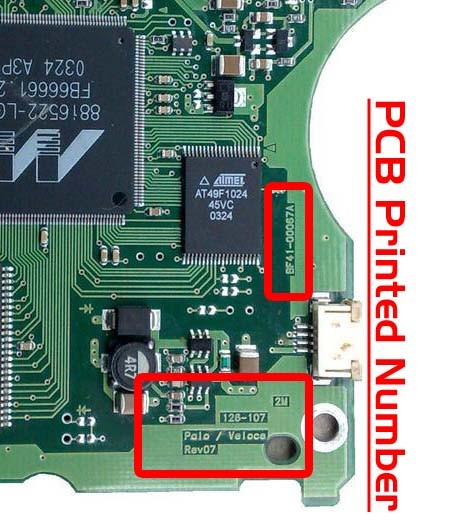
Last edited by data-medics on April 9th, 2015, 16:44, edited 1 time in total.
Re: Fried Hard Drive PCB - Samsung HD103SJ
April 9th, 2015, 16:43
Looks like you beat me to the answer.  Guess I was still typing and you had posted already.
Guess I was still typing and you had posted already.
Powered by phpBB © phpBB Group.