WD My Passport (WD10TMVV-11A1CS0) write protected Help!
April 21st, 2015, 6:36
Hello there!
Please help to solve my problem!
1. The drive came to my lab with clicking issue. WD10TMVV-11A1CS0
2. Heads are okay, and i ported the ROM chip to a donor PCB.
3. Fixed the firmware, and then the drive was identifiable.
4. Created a drive image with Atola Insight, only 21036 sectors are not imaged between LBA 191.645.000 and LBA 191.812.000 sectors.
5. I copied the image file content to a WD5000AAKX drive, now i have a healthy drive with the patient drive sectors.
6. The drive is self-encrypted, and i used the drive's own usb chip (initio chip) for decrypt the contents. (later i used 2 more initio based PCB with no luck)
7. Now the drive is appear in disk management, i see the WD UDF partition with contents (all files are okay, no corrupt files), with Victoria i see the drive parameters, serial number, but it's state is "Not initialized" and "write protected"
8. The drive sector 976 769 032 is looks right that contents the decryption key (i think it is)
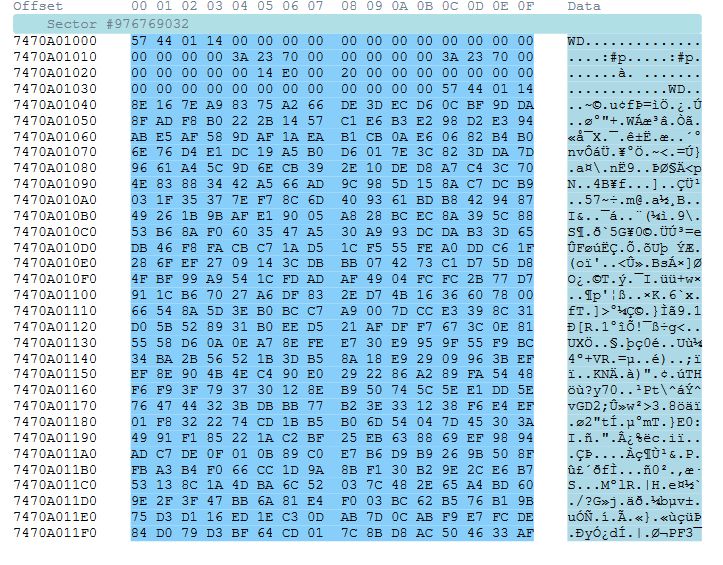
Please help to solve this issue, i would like to decrypt the contents of drive.
Thanks for all help!
Please help to solve my problem!
1. The drive came to my lab with clicking issue. WD10TMVV-11A1CS0
2. Heads are okay, and i ported the ROM chip to a donor PCB.
3. Fixed the firmware, and then the drive was identifiable.
4. Created a drive image with Atola Insight, only 21036 sectors are not imaged between LBA 191.645.000 and LBA 191.812.000 sectors.
5. I copied the image file content to a WD5000AAKX drive, now i have a healthy drive with the patient drive sectors.
6. The drive is self-encrypted, and i used the drive's own usb chip (initio chip) for decrypt the contents. (later i used 2 more initio based PCB with no luck)
7. Now the drive is appear in disk management, i see the WD UDF partition with contents (all files are okay, no corrupt files), with Victoria i see the drive parameters, serial number, but it's state is "Not initialized" and "write protected"
8. The drive sector 976 769 032 is looks right that contents the decryption key (i think it is)
Please help to solve this issue, i would like to decrypt the contents of drive.
Thanks for all help!
- Attachments
-
Re: WD My Passport (WD10TMVV-11A1CS0) write protected Help!
April 21st, 2015, 7:23
You've copied a 1tb to a 500Gb, that's your issue.
The key sector is in the wrong place.
Clone to a 1Tb drive.
The key sector is in the wrong place.
Clone to a 1Tb drive.
Re: WD My Passport (WD10TMVV-11A1CS0) write protected Help!
April 21st, 2015, 7:56
Sorry pcimage, i wrote wrong, the patient drive is a WD5000BMVV-11A1CS0
Sorry again!
Sorry again!
Re: WD My Passport (WD10TMVV-11A1CS0) write protected Help!
April 21st, 2015, 8:09
Can you access any sectors of the user partition with WinHex?
If not, maybe it's passworded.
Run "unlock" form the UDF partition if it's present, or download Smartware and run that to see if it recognises the drive.
If not, maybe it's passworded.
Run "unlock" form the UDF partition if it's present, or download Smartware and run that to see if it recognises the drive.
Re: WD My Passport (WD10TMVV-11A1CS0) write protected Help!
April 21st, 2015, 8:10
Also post mod 25 from FW backup.
Re: WD My Passport (WD10TMVV-11A1CS0) write protected Help!
April 21st, 2015, 8:38
- error.jpg (10.2 KiB) Viewed 6946 times
The user said me now the password, but i can't run unlock.exe or smartware.exe, because it sends me an error message...
I will try to download another unlock.exe.
The mod25 is attached to this post.
Thank you!
- Attachments
-
- 0025.rar
- (804 Bytes) Downloaded 356 times
Re: WD My Passport (WD10TMVV-11A1CS0) write protected Help!
April 21st, 2015, 9:39
Key looks OK.
Try and download full version of smartware from WD site.
Try this..
http://www.wdc.com/wdproducts/wdsmartwa ... ial&os=win
Try and download full version of smartware from WD site.
Try this..
http://www.wdc.com/wdproducts/wdsmartwa ... ial&os=win
Re: WD My Passport (WD10TMVV-11A1CS0) write protected Help!
April 21st, 2015, 9:47
Problem solved.
The drive was encrypted with WD Smartware password
The user forgot to say.
Thanks pcimage, you are the greatest!
The drive was encrypted with WD Smartware password
The user forgot to say.
Thanks pcimage, you are the greatest!
Re: WD My Passport (WD10TMVV-11A1CS0) write protected Help!
April 21st, 2015, 15:16
saltwater wrote:Problem solved.
The drive was encrypted with WD Smartware password
The user forgot to say.
Thanks pcimage, you are the greatest!
No problem

Powered by phpBB © phpBB Group.