MultiDrive – free backup, clone & wipe disk utility from Atola Technology

All times are UTC - 5 hours [ DST ]


Post new topic Reply to topic  [ 19 posts ] 
Author Message
 Post subject: Can a drive case ruin a SATA hard drive?
PostPosted: July 24th, 2015, 18:28 
Offline

Joined: July 24th, 2015, 18:17
Posts: 8
Location: Willmar
Of course ANYTHING is POSSIBLE, but normally can a external drive case ruin a SATA hard drive? Here's the story.

I have two 3.5 external drive cases. One is just USB and the other (supposedly better one) is Firewire and USB. In the past, which I can not recall well, I got them to check SATA hard drives or use them to some extent. AFAICR, no drive ever worked on them. I do remember once, where I THINK I got a 500GB SATA drive, and I put it in the FW/USB case, and I hooked it up to a Mac G4 but nothing worked. I forgot why or how or what.

But this I do know. I have the 2 drive cases and 2 SATA drives. One is a drive I'm fairly sure doesn't work, it was a friend's. The other is the 500GB drive referenced above.

Anyway, another friend came over and asked me to try out his SATA drive. He was a little vague about what it was capable of. So I pulled the FW/USB case, put in the SATA drive, and tried every computer in my arsenal none saw the drive at all. (I'm not talking about seeing the file system, I'm talking about seeing the drive itself, like in Disk Utility Mac or Disk Management Windows.) Tried my other USB case too, NADA. So he went away and had it tested at Best Buy and they told him "no good" either.

But then I started checking things out out of curiosity, plus I could use another backup drive. So I ordered a SATA 2TB drive off Amazon, it came in, I put it in the FW/USB case and again NOTHING. Tried the USB case, nothing. And the drive doesn't even seem like it's spinning, REAL quiet. Really strange that a new drive comign in wouldn't work either.

So I got ANOTHER drive case, USB only, and STILL nothing.

Now I know it's POSSIBLE this new SATA drive doesn't work either, but really - it's brand new. But what I'm concerning about is whether hooking ANYTHING up to this FW/USB ruins a drive from then/on/out. I am unwilling to hooking anything up to it anymore.

Any thoughts on this?


Top
 Profile  
 
 Post subject: Re: Can a drive case ruin a SATA hard drive?
PostPosted: July 24th, 2015, 19:09 
Offline
User avatar

Joined: September 8th, 2009, 18:21
Posts: 16955
Location: Australia
It could be that the power supply is killing your drives. What kind of adapter are you using?

Measure the TVS diodes. If they are shorted, then that would confirm a power supply problem.

See http://www.users.on.net/~fzabkar/HDD/TVS_diode_FAQ.html

... and http://www.users.on.net/~fzabkar/HDD/ (photo clips)

_________________
A backup a day keeps DR away.


Top
 Profile  
 
 Post subject: Re: Can a drive case ruin a SATA hard drive?
PostPosted: July 24th, 2015, 22:50 
Offline

Joined: July 24th, 2015, 18:17
Posts: 8
Location: Willmar
Thanks for answering. (See my question) I'm using external drive cases, as far as the power supply it's simply the adapter that came with the cases. So I'm not sure how to answer that question.

I'm not hugely electronically apt, but I'll try to understand this. Are you saying that it's possible that the drive case may be sending too much power into the SATA drive and that "ruins" the TVS diodes on the HDD? If so, and if I understand right, the drives can be fixed by eliminating or replacing the diodes (of course checking the diodes first)?

So, going backwards (remembering that I'm still not 100% what is even happening here), if my new drive has bad TVS diodes, we can assume it's the FW/USB drive case that is the culprit here? That leads to the question, aren't drive cases designed so such things don't happen?

And logically further on, can SATA connectors such as exist on my drive cases be tested in and of themselves? That would be the most immediate way of seeing if the FW/USB drive case caused the problem in the first place.

OK, and finally, remembering that I'm not no electronic engineer, does repair like this (at a shop) typically exceed the price of drives and cases right off the bat? The new drive only cost $60 and the new drive case $20. A repair shop in town (don't ask) said it would cost me $90 to check 3 drives ($30 each) just to tell me if they worked or not (diagnosis fee only).


Top
 Profile  
 
 Post subject: Re: Can a drive case ruin a SATA hard drive?
PostPosted: July 25th, 2015, 2:10 
Offline
User avatar

Joined: September 8th, 2009, 18:21
Posts: 16955
Location: Australia
A power supply and adapter are the same thing. They both convert AC mains power to DC. Some external enclosures use a barrel type connector whereas others use a 4-pin mini DIN. You stated that you have two enclosures. I'm wondering whether you switched adapters between the two.

The DIN connectors typically come with two different 5V/12V pinouts. The wrong pinout can damage your drive.

The barrel type can have two polarities, either centre positive or centre negative. The wrong polarity can damage your drive. Using a 19V laptop adapter in place of the original 12V adapter will damage your drive.

What you need to do is to invest in a digital multimeter. That should cost less than US$10. You may even find one for $3. Then test the TVS diodes as I have explained in my FAQ. You don't need to be an engineer to do this.

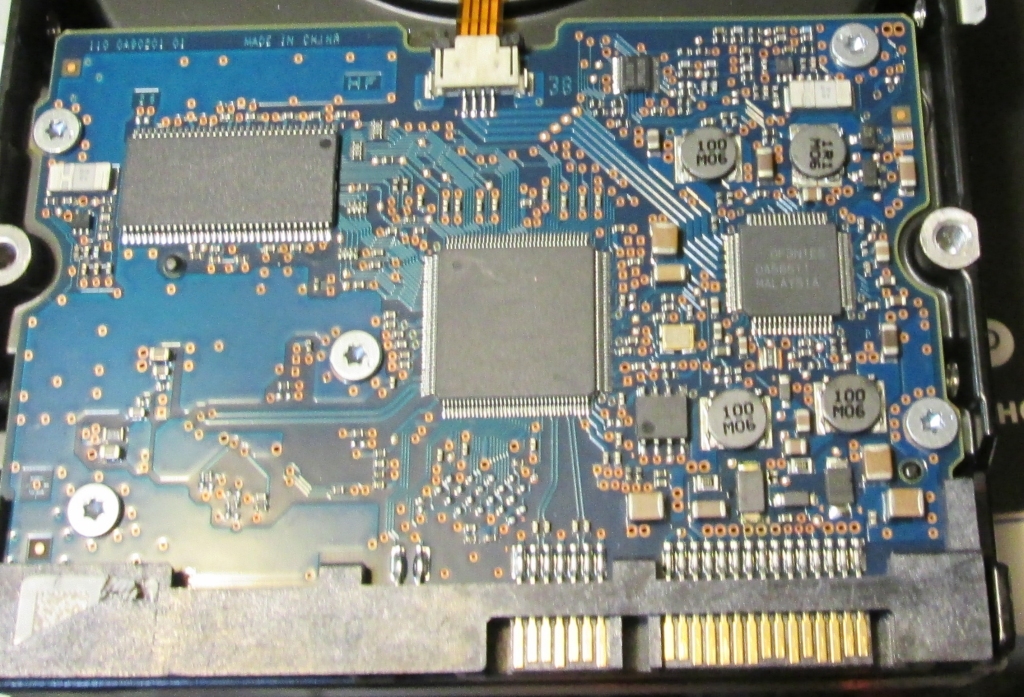
Finally, it would help to know the model numbers of your drives. It would also help to see the component side of the PCB. Some drives, especially WD's, will have visible evidence of damage.

_________________
A backup a day keeps DR away.


Top
 Profile  
 
 Post subject: Re: Can a drive case ruin a SATA hard drive?
PostPosted: July 25th, 2015, 17:11 
Offline

Joined: July 24th, 2015, 18:17
Posts: 8
Location: Willmar
fzabkar wrote:
A power supply and adapter are the same thing. They both convert AC mains power to DC. Some external enclosures use a barrel type connector whereas others use a 4-pin mini DIN. You stated that you have two enclosures. I'm wondering whether you switched adapters between the two.


No, 100% positive they are the correct adapters; in fact the FW/USB one is 4-pin and the USB one is barrel. So they can't be confused.

fzabkar wrote:
The DIN connectors typically come with two different 5V/12V pinouts. The wrong pinout can damage your drive.


Thanks... though in my case (pardon the pun) the adapter is correct. I mark them the moment I open the package. The 4-pin is made so you can't insert it wrongly.

fzabkar wrote:
The barrel type can have two polarities, either centre positive or centre negative. The wrong polarity can damage your drive. Using a 19V laptop adapter in place of the original 12V adapter will damage your drive.


Thanks, but again no worries. It's the correct adapter both ways.

fzabkar wrote:
What you need to do is to invest in a digital multimeter. That should cost less than US$10. You may even find one for $3. Then test the TVS diodes as I have explained in my FAQ. You don't need to be an engineer to do this.


I got a good John Fluke one (my dad was a TV repair man but died over 20 years ago - I really missed out on fun stuff with him). I just have big hands and aren't good with small things or equipment. Plus lousy eyesight. But I sure can try.

fzabkar wrote:
Finally, it would help to know the model numbers of your drives. It would also help to see the component side of the PCB. Some drives, especially WD's, will have visible evidence of damage.


Thanks for your help. I've been educating myself on the Web and the examples I've seen, just like you said, the TVS's are really obviously burned, with black marks and everything. On my examples, I don't see anything burned. The new drive I'm looking at is a Hitachi 0F10629. The others are WD's (WD3200JS and WD5000AAKX), but the PCB's are flipped around (components underneath) so I'd have to take off the PCB's to see (right?).

Which leads to another inquiry: I'm willing to try something new like this, but is replacing the PCB board another way to do this? In the articles I've read, it seems that solutions like this are just for getting data off the drives and then not using the drive again. They allude to the firmware BIOS's being drive-specific, and that you'd have to transfer the BIOS info from the old PCB to the new PCB, like they assume it's possible but they don't give the specifics. BTW I'm going to use these drives for backup, so they will spin up like once every 2 months for like 4 hours.

And the other question is: what is a good way to test the drive case itself? Should I find out the pin outs and use the multimeter to test the voltages of the individual pins?

What is the meaning behind all this?
Image


Top
 Profile  
 
 Post subject: Re: Can a drive case ruin a SATA hard drive?
PostPosted: July 26th, 2015, 17:00 
Offline
User avatar

Joined: September 8th, 2009, 18:21
Posts: 16955
Location: Australia
Measure the resistance of these two diodes:
Attachment:
Hitachi_TVS.jpg
Hitachi_TVS.jpg [ 46.19 KiB | Viewed 21228 times ]

_________________
A backup a day keeps DR away.


Top
 Profile  
 
 Post subject: Re: Can a drive case ruin a SATA hard drive?
PostPosted: July 26th, 2015, 17:17 
Offline
User avatar

Joined: September 8th, 2009, 18:21
Posts: 16955
Location: Australia
To answer your other questions ...

WD drives have unique drive specific information in serial flash memory on the PCB, either in a chip at location U12, or embedded within the Marvell MCU. And yes, you need to remove the PCB.

You could test the external enclosure by ensuring that the correct supply voltages appear at the SATA power pins.

http://pinouts.ru/Power/sata-power_pinout.shtml

_________________
A backup a day keeps DR away.


Top
 Profile  
 
 Post subject: Re: Can a drive case ruin a SATA hard drive?
PostPosted: July 28th, 2015, 14:01 
Offline

Joined: July 24th, 2015, 18:17
Posts: 8
Location: Willmar
Let me change my specific needs: for the new drive, I thought it a lot easier to simply return the drive. I sent it back before my post was let through (I guess posts with pics need to be moderated) so I didn't get a chance to test it. (The vendor was understanding and refunded me PLUS paid my shipping. Wow!)

But I did order another same drive from the same manufacturer, and I'll use a new drive case to use it on. I'm not going to use it as a guinea pig. I get it in today.

OK, going forward: the most important question you didn't answer (just restating), is it a better idea to get a replacement PCB board than to fix one (bearing in mind that even if I can test it, fixing it would be quite hard for me)? And also, sine HDD's are so cheap nowadays, are the only people that just don't replace HDD's are the individuals skilled enough to fix their own drives? And are there HDD's fixers (no data recovery) that charge less per drive than it costs to buy a replacement?

So right now, I have two WD drives and one Seagate drive that likely have been "touched" by my probably defective drive case. All 3 have the boards flipped upside down (components are not visible). Tomorrow I will flip all three and test them, and I'll also test my drive case.

Thanks for your time and help thus far.


Top
 Profile  
 
 Post subject: Re: Can a drive case ruin a SATA hard drive?
PostPosted: July 28th, 2015, 15:34 
Offline
User avatar

Joined: September 8th, 2009, 18:21
Posts: 16955
Location: Australia
See http://www.onepcbsolution.com/phone-orders.html

To answer your other question, since you thought it easier to return the Hitachi drive than to test the two TVS diodes, I would say that your potential for a DIY repair is nil. Sorry.

_________________
A backup a day keeps DR away.


Top
 Profile  
 
 Post subject: Re: Can a drive case ruin a SATA hard drive?
PostPosted: July 28th, 2015, 16:02 
Offline
User avatar

Joined: April 3rd, 2011, 0:19
Posts: 2003
Location: Providence, RI
chickeneps wrote:
And are there HDD's fixers (no data recovery) that charge less per drive than it costs to buy a replacement?.


Yes, but not in most developed nations. In third world countries there are people who do this, but it's really not profitable most places. And, if you know how to do this, you can make far more money in data recovery.

_________________
Data Medics - Hard Drive, SSD, and RAID Data Recovery Service Company


Top
 Profile  
 
 Post subject: Re: Can a drive case ruin a SATA hard drive?
PostPosted: July 29th, 2015, 13:47 
Offline

Joined: July 24th, 2015, 18:17
Posts: 8
Location: Willmar
OK, thanks guys.

So my understanding is that concerning HDD repair related to (at least) TVS diodes and assuming data recovery is not needed, the only way this make economically feasible is to DIY. That can mean repairing the TVS or ordering a PCB board and transferring the firmware yourself. Correct?

OK, I'm fine with that I suppose. Now, I'd like to close the book on this by checking my drive case that likely attacked this round of drives. I have a nice FLUKE 77 multimeter that I know basically how to use. I am not checking a drive but the drive case. The problems (don't laugh) are that:

1) I don't understand the pinouts.ru thing, it talks about a 15-pin thing, but SATA is two plugs. I ASSUME they are talking about the wider connector. Is that right?
2) I can't fit my multimeter lead into the thin connector, and even if I could, I'm not sure if the multimeter could fit on one "pin", it seems it would always overlap on two.

3) Perhaps I'm answering my own question, but the SATA cable in the drive case goes into the drive case circuit board via 4 wires. Middle two are black and the outsides are red and yellow. Testing the left RED-BLACK is 11.43V DC. The right BLACK-YELLOW is 5.43V DC. That seems right. But of course, I'm not testing the connector itself.

I can't test the other connector because even at the circuit board it's a indweel thin-pin thing, just like the connector.

Remember, this drive case is highly suspected to be a drive-killer.

Any thoughts? Sorry for being a newbie on this.


Top
 Profile  
 
 Post subject: Re: Can a drive case ruin a SATA hard drive?
PostPosted: July 29th, 2015, 14:17 
Offline
User avatar

Joined: September 8th, 2009, 18:21
Posts: 16955
Location: Australia
I'm not laughing. I'll help you as best as I can.

The 15-pin connector is for power while the 7-pin is for data. When measuring the voltage, assuming you can get near enough with your probes, aim for the middle pin of each set of 3 pins. This will eliminate the risk of shorting adjacent, dissimilar pins.

Testing the resistance of the TVS diodes (in the absence of power) will confirm whether the drives were killed by an overvoltage.

The colour coding of the 4 wires is a worry. Yellow is normally associated with 12V while red is 5V. ISTM that the case may be applying 12V to the HDD's 5V input. That's potentially deadly for WD drives insofar as a DIY repair is concerned. But you may be lucky. It's too bad that you didn't test your Hitachi's 5V diode, as that would have confirmed any wiring error.

Could you upload some photos of the innards?

As for your question regarding DIY, yes, can sometimes remove a TVS diode and recover your drive. Otherwise you can transfer the firmware to a replacement PCB and hope that there is no other damage (such as a dead preamp).

Best of luck.

_________________
A backup a day keeps DR away.


Top
 Profile  
 
 Post subject: Re: Can a drive case ruin a SATA hard drive?
PostPosted: July 29th, 2015, 14:27 
Offline

Joined: July 24th, 2015, 18:17
Posts: 8
Location: Willmar
fzabkar wrote:
Testing the resistance of the TVS diodes (in the absence of power) will confirm whether the drives were killed by an overvoltage.


That's true, and it's unfortunate I don't have the drive. But what about this drive case, where it seems every drive it touches goes bad (my original worry)? Although I wanted to repair the drives, a parallel issue is finding out how evil this drive case is. I mean, I got a friends drive in, that he said worked, and now the drive is a brick. I get a brand-new drive in, that goes brick.

So right now I'm trying to check this drive. I'll check the things you said.


Top
 Profile  
 
 Post subject: Re: Can a drive case ruin a SATA hard drive?
PostPosted: July 29th, 2015, 14:30 
Offline
User avatar

Joined: September 8th, 2009, 18:21
Posts: 16955
Location: Australia
You said that you have two cases. Which is the bad one? If it's the 4-pin DIN case, then I would suspect that the wrong power adapter may have been supplied with it. Compare the pinout diagram on the case (if it has one) with the pinout diagram on the adapter.

Edit: I have a 6-pin DIN adapter for my USB case.

_________________
A backup a day keeps DR away.


Top
 Profile  
 
 Post subject: Re: Can a drive case ruin a SATA hard drive?
PostPosted: July 29th, 2015, 16:07 
Offline

Joined: July 24th, 2015, 18:17
Posts: 8
Location: Willmar
I had a long reply written out, but scrubbed it since I shouldn't be telling long stories as I am wont to do. (ugg) and because I found out I was wrong.

I'm usually VERY precise when it comes to adapters that come with items. I mark them. So I was 100% positive this was the right adapter. Apparently it wasn't.

Since the yellow-red were swapped, I started looking into it. I found two other adapters in my stash with the large 4-pin, both unmarked. I noted that one of them had the bottom 2 pins switched. (So, REALLY, even a standardized plug like this is NOT standardized for pin-outs? Someone please explain this to me.)

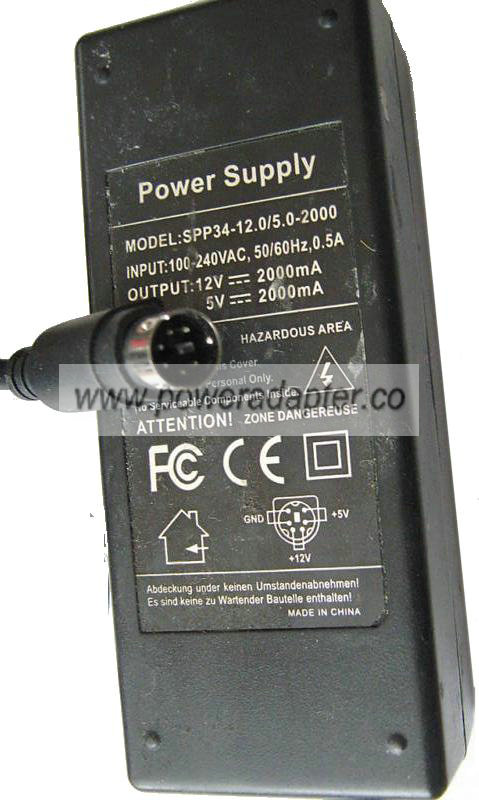
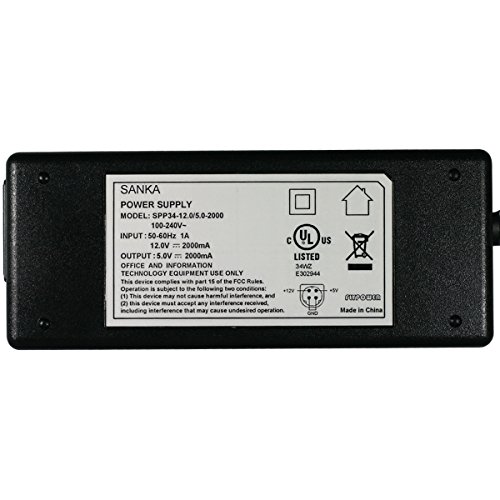
Well, what convicted me was the drive case has this lettering on it: MODE NAME: 820B IS-U2IE. Dunno what that meant. The marked adapter said KY-05036S-12, but one of the unmarked ones (yes, the swapped one) said SPP-34. When I google the drive case lettering and the SPP-34, they both reference the same adapter line: UpBright Corp. The "KY" thing goes nowhere related.

So all this evidence pretty much says I mismarked the adapter. And I thought I was the perfect Man, created by God to save the world. So much for that. =)

OK, so... doesn't this mean that I was simply feeding the drive 5V and not 12V? Don't drives want 12V, not 5V? Undervolting (that's a word?) something doesn't do anything, does it?


Top
 Profile  
 
 Post subject: Re: Can a drive case ruin a SATA hard drive?
PostPosted: July 29th, 2015, 16:29 
Offline
User avatar

Joined: April 3rd, 2011, 0:19
Posts: 2003
Location: Providence, RI
Where electronics are concerned, too low of voltage is just as bad as over voltage. In some cases worse. However in your case you were also supplying 12V where it should have been just 5.

Probably is just a burnt diode. Just test to see if either is shorted.

_________________
Data Medics - Hard Drive, SSD, and RAID Data Recovery Service Company


Top
 Profile  
 
 Post subject: Re: Can a drive case ruin a SATA hard drive?
PostPosted: July 29th, 2015, 16:55 
Offline

Joined: July 24th, 2015, 18:17
Posts: 8
Location: Willmar
So a typical SATA HDD takes both 5V and 12V?

Also, I think this will be it (though I'm happy to hear corroborative answers), you tech guys: with your multimeter, do you have multiple sets of leads - some smaller, some larger? Those things on the drive PCB are so small, my multimeter leads have a hard time getting exactly on it.

And, the HDD needs to be getting power when I do this? Or am I checking continuity? (I know what the instructions say, I'm just getting another response.)

And, lastly, if a HDD fails this diode test, that means I need to replace the diodes (per those instructions posted earlier) to repair the drive with any economic sense, right?


Top
 Profile  
 
 Post subject: Re: Can a drive case ruin a SATA hard drive?
PostPosted: July 29th, 2015, 17:25 
Offline
User avatar

Joined: September 8th, 2009, 18:21
Posts: 16955
Location: Australia
chickeneps wrote:
So a typical SATA HDD takes both 5V and 12V?

3.5" drives require both 5V and 12V whereas 2.5" drives typically require only 5V, although there are a few 2.5" models that need both.

The power specs are printed on the drive's cover.

chickeneps wrote:
Also, I think this will be it (though I'm happy to hear corroborative answers), you tech guys: with your multimeter, do you have multiple sets of leads - some smaller, some larger? Those things on the drive PCB are so small, my multimeter leads have a hard time getting exactly on it.

And, the HDD needs to be getting power when I do this? Or am I checking continuity? (I know what the instructions say, I'm just getting another response.)

And, lastly, if a HDD fails this diode test, that means I need to replace the diodes (per those instructions posted earlier) to repair the drive with any economic sense, right?

Diode tests must be done without power. Some drives can be fixed by snipping the shorted diode while others need just a little bit of extra work, all within your capabilities, depending on the extent of the damage. We need to see photos to be certain.

In the case of your WD drives, measure resistors R63 and R67, and diodes D4 and D3. See the photo in the following article:

Catastrophic failures in Western Digital PCBs:
http://www.hddoracle.com/viewtopic.php?f=59&t=1119

_________________
A backup a day keeps DR away.


Top
 Profile  
 
 Post subject: Re: Can a drive case ruin a SATA hard drive?
PostPosted: July 30th, 2015, 3:55 
Offline
User avatar

Joined: September 8th, 2009, 18:21
Posts: 16955
Location: Australia
This will really confuse you:

http://poweradapter.co/images/1/flypowe ... 0-2000.JPG
http://poweradapter.co/images/1/SPP34-12.0-5.0-2000.jpg
http://ecx.images-amazon.com/images/I/41QWk5wySfL.jpg
http://www.kelte.fr/assets/images/KY-05036S-12.jpg

I'm betting that there will be many more variations. You need to match the pinout on the adapter with the pinout on the enclosure.

_________________
A backup a day keeps DR away.


Top
 Profile  
 
Display posts from previous:  Sort by  
Post new topic Reply to topic  [ 19 posts ] 

All times are UTC - 5 hours [ DST ]


Who is online

Users browsing this forum: Google [Bot] and 27 guests


You cannot post new topics in this forum
You cannot reply to topics in this forum
You cannot edit your posts in this forum
You cannot delete your posts in this forum
You cannot post attachments in this forum

Search for:
Jump to:  
Powered by phpBB © 2000, 2002, 2005, 2007 phpBB Group