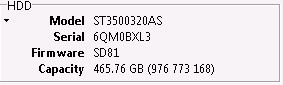
HDD is old faithful 7200.11 MOOSE
.
Its FW seems to be almost 100% OK Customer was unaware how disks work and they are going to die one day. He has backed up all family photos videos in this external usb disk which is crashed.
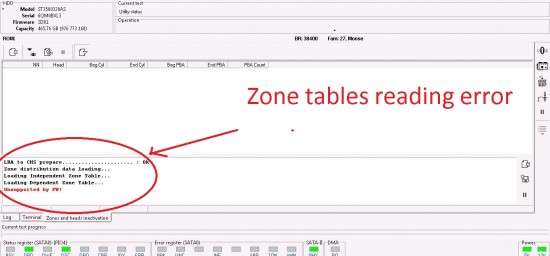
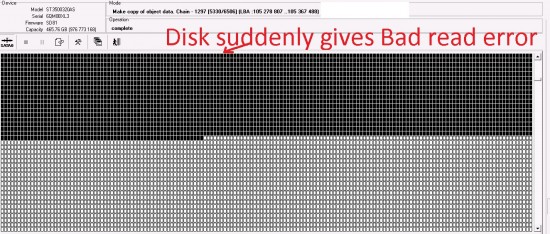
It has 4 heads out of which I have imaged 3 heads without any errors. However while copying from Head 3 I am getting errors.
I could copy data using head 3 but it is very slow and with bad sectors. If I skipped file then it runs smoothly for some time. Then suddenly it starts giving bad sectors ( all sectors bad then & I am forced to power off/on)
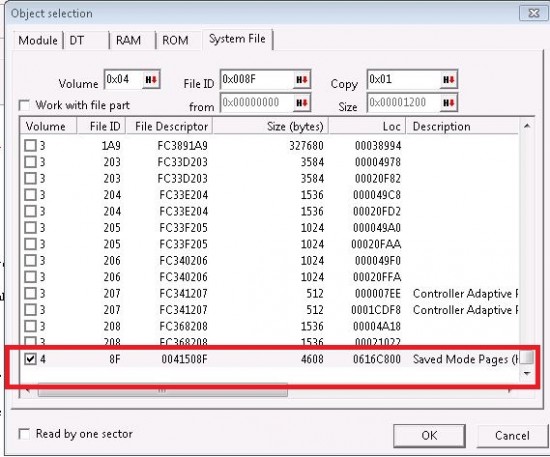
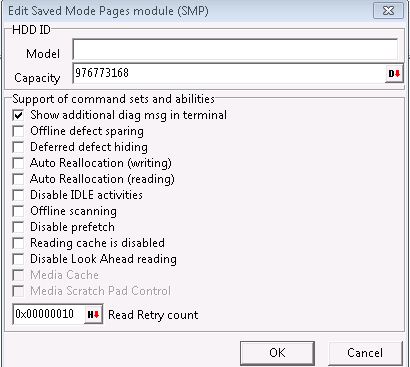
I have cleared SMP flags assuming this is system file issue but that has not given any respite.
Head does not seems to be dead but either weak or some Head 3 related firmware file is having issue.
Can someone pls. guide me ? I am using PC3000 UDMA express Red card
Here is terminal --
RequestResumeSaveSmartFrame
RequestResumeSaveSmartFrame
RequestResumeSaveSmartFrame
RequestResumeSaveSmartFrame
FW backup & module checking ---
amily ID: 27
Selected family......................... : 27, Moose
Model by ID............................. : ST3500320AS
Loading default settings!
Use the options dialog to review and save utility settings.
Then press OK!
Family default settings loading!
Tech Key...
Requesting FW Pkg ver ........ MS010C.SDD8.AD090D.SD81
Detecting Phys Sct Size...
Result.................................. : 512
Detecting Max Head number...
Phys. heads............................. : 4
Obtaining Saved Mode Pages File information...
Reading Saved Mode Pages...
Parsing Saved Mode Pages...
SMP Dbl: 0x3C000316 - 0x01BFF7FF (0x0000000F)
LBA alignment........................... : 0
Obtaining Registry File information...
Reading Registry File...
Parsing Registry File...
Media Cache
===========
MC is not supported / NVC caching
Collecting Sys Files information...
ID Len
===============
0 2 Reserved Defect Table (SA defect table)
1 2 Drive Information File (DIF)
2 16 Performance Parameter File (PPF)
3 1880 Primary Defect File (P-List))
4 9 Servo Adaptive Parameter File (SAP)
5 4 Manufacturing Information File (MIF)
6 66 Read Adaptive Parameters File (RAP)
7 1 Controller Adaptive Parameters File (CAP)
8 2400
9 1 SMART Configuration File
A 2251 SMART Data File
B 1000
C 64000 Serial Port Test Results File (Self Scan Log)
D 160
E 432 Data Integrity Check (DIC), HEAD 0
F 223 DIC Dummy File
13 8 Disc Registry File (settings, security, etc)
15 100 BGMS File (Directed Offline Scan)
16 2
17 40
19 24 Log File
1A 33 Log File
1B 1 Log File
1C 9
1D 128 Physical Overlay File 0
1E 128 Physical Overlay File 1
1F 640 Physical Overlay File 2
22 80 Drive Self Test (DST), Head 0
23 80 Drive Self Test (DST), Head 1
24 80 Drive Self Test (DST), Head 2
25 80 Drive Self Test (DST), Head 3
2A 9 Saved Mode Pages (HDD settings)
2B 579 R/W Operating Parameters (translator, etc)
2C 432 Data Integrity Check (DIC), HEAD 1
2D 432 Data Integrity Check (DIC), HEAD 2
2E 432 Data Integrity Check (DIC), HEAD 3
33 4576
34 640 Packed CONGEN XML definition
35 26 SMART Data
Collecting Sys File Infos completed
Collecting DT Infos...
ROM:
ID MemOffs Len
===========================
0 6020100 33792 Read Adaptive Parameters File (RAP)
1 6020000 256 Controller Adaptive Parameters File (CAP)
4 4001000 4096 Servo Adaptive Parameter File (SAP)
602BE00 4096
total 8192
5 6C000 81920 Servo Firmware Table
A 60A54B0 1024 Seek Profile
13 60B0764 544 Dependent Zone Table for User Area
14 60B0984 64 Dependent Zone Table for System Area
15 0 524288 Flash ROM
1B 60AFA8C 3288 Dependent Zone Group Tables for User Area
1C 60AF94C 320 Dependent Zone Group Tables for System Area
1D 60201A0 208 VBAR Configuration File
1E 6020390 2320 Zone Format Parameters File
RAM:
ID MemOffs Len
===========================
0 6020100 33792 Read Adaptive Parameters File (RAP)
1 6020000 256 Controller Adaptive Parameters File (CAP)
2 6020270 288 Zone Table
4 4001000 4096 Servo Adaptive Parameter File (SAP)
602BE00 4096
total 8192
5 6C000 81920 Servo Firmware Table
6 1FDC40 40996 Servo Flaw Table
A 60A54B0 1024 Seek Profile
13 60B0764 544 Dependent Zone Table for User Area
14 60B0984 64 Dependent Zone Table for System Area
15 0 524288 Flash ROM
16 6020100 32 Drive Configuration Table
17 6021690 1744 Temperature Control Configuration
1B 60AFA8C 3288 Dependent Zone Group Tables for User Area
1C 60AF94C 320 Dependent Zone Group Tables for System Area
1D 60201A0 208 VBAR Configuration File
1E 6020390 2320 Zone Format Parameters File
1F 614463C 1224 RW working user preamp table
20 6144B04 72 RW working system preamp table
Collecting DT Infos completed
Reading autotuning buffer............... Ok
Searching module table in RAM... ....... Ok
Searching volume 3 file table in RAM.... Ok
Searching volume 0 file table in RAM.... Ok
Searching SMP RAM FID in RAM............ Ok
Searching Non Resident G-List FID in RAM Ok
Searching CFW OVL FID in RAM............ Error
Searching DT table(RAM, WR) in RAM...... Ok
Searching DT table(RAM, RD) in RAM...... Ok
System Files I/O method detection... ATA(indirect)
Test : HDD resources backup
Folder: C:\Program Files\ACE Lab\PC-3000\Bin\!Profiles\SgF3\Moose\ST3500320AS-SD81-6QM0BXL3 NEW\Data\SABackup\
Reading ROM to profile folder
Folder: C:\Program Files\ACE Lab\PC-3000\Bin\!Profiles\SgF3\Moose\ST3500320AS-SD81-6QM0BXL3 NEW\Data\SABackup\ROM\
Result.................................. : Ok
Reading DT to profile folder
Folder: C:\Program Files\ACE Lab\PC-3000\Bin\!Profiles\SgF3\Moose\ST3500320AS-SD81-6QM0BXL3 NEW\Data\SABackup\CPDir\
DT 0000 (Flash ROM), Read Adaptive Parameters File (RAP).............. : Ok
DT 0001 (Flash ROM), Controller Adaptive Parameters File (CAP)........ : Ok
DT 0004 (Flash ROM), Servo Adaptive Parameter File (SAP).............. : Ok
DT 0005 (Flash ROM), Servo Firmware Table............................. : Ok
DT 000A (Flash ROM), Seek Profile..................................... : Ok
DT 0013 (Flash ROM), Dependent Zone Table for User Area............... : Ok
DT 0014 (Flash ROM), Dependent Zone Table for System Area............. : Ok
DT 0015 (Flash ROM), Flash ROM........................................ : Ok
DT 001B (Flash ROM), Dependent Zone Group Tables for User Area........ : Ok
DT 001C (Flash ROM), Dependent Zone Group Tables for System Area...... : Ok
DT 001D (Flash ROM), VBAR Configuration File.......................... : Ok
DT 001E (Flash ROM), Zone Format Parameters File...................... : Ok
DT 0000 (RAM), Read Adaptive Parameters File (RAP).................... : Ok
DT 0001 (RAM), Controller Adaptive Parameters File (CAP).............. : Ok
DT 0002 (RAM), Zone Table............................................. : Ok
DT 0004 (RAM), Servo Adaptive Parameter File (SAP).................... : Ok
DT 0005 (RAM), Servo Firmware Table................................... : Ok
DT 0006 (RAM), Servo Flaw Table....................................... : Ok
DT 000A (RAM), Seek Profile........................................... : Ok
DT 0013 (RAM), Dependent Zone Table for User Area..................... : Ok
DT 0014 (RAM), Dependent Zone Table for System Area................... : Ok
DT 0015 (RAM), Flash ROM.............................................. : Ok
DT 0016 (RAM), Drive Configuration Table.............................. : Ok
DT 0017 (RAM), Temperature Control Configuration...................... : Ok
DT 001B (RAM), Dependent Zone Group Tables for User Area.............. : Ok
DT 001C (RAM), Dependent Zone Group Tables for System Area............ : Ok
DT 001D (RAM), VBAR Configuration File................................ : Ok
DT 001E (RAM), Zone Format Parameters File............................ : Ok
DT 001F (RAM), RW working user preamp table........................... : Ok
DT 0020 (RAM), RW working system preamp table......................... : Ok
DT reading process completed
Result.................................. : Ok
Reading modules to profile folder
Folder: C:\Program Files\ACE Lab\PC-3000\Bin\!Profiles\SgF3\Moose\ST3500320AS-SD81-6QM0BXL3 NEW\Data\SABackup\ModDir\
Will be skipped : 000C, 000E, 000F, 0022, 0023, 0024, 0025, 002C, 002D, 002E
Module 0000, Reserved Defect Table (SA defect table).................. : Ok
Module 0001, Drive Information File (DIF)............................. : Ok
Module 0002, Performance Parameter File (PPF)......................... : Ok
Module 0003, Primary Defect File (P-List))............................ : Ok
Module 0004, Servo Adaptive Parameter File (SAP)...................... : Ok
Module 0005, Manufacturing Information File (MIF)..................... : Ok
Module 0006, Read Adaptive Parameters File (RAP)...................... : Ok
Module 0007, Controller Adaptive Parameters File (CAP)................ : Ok
Module 0008........................................................... : Ok
Module 0009, SMART Configuration File................................. : Ok
Module 000A, SMART Data File.......................................... : Ok
Module 000B........................................................... : Ok
Module 000D........................................................... : Ok
Module 0013, Disc Registry File (settings, security, etc)............. : Ok
Module 0015, BGMS File (Directed Offline Scan)........................ : Ok
Module 0016........................................................... : Ok
Module 0017........................................................... : Ok
Module 0019, Log File................................................. : Ok
Module 001A, Log File................................................. : Ok
Module 001B, Log File................................................. : Ok
Module 001C........................................................... : Ok
Module 001D, Physical Overlay File 0.................................. : Ok
Module 001E, Physical Overlay File 1.................................. : Ok
Module 001F, Physical Overlay File 2.................................. : Ok
Module 002A, Saved Mode Pages (HDD settings).......................... : Ok
Module 002B, R/W Operating Parameters (translator, etc)............... : Ok
Module 0033........................................................... : Ok
Module 0034, Packed CONGEN XML definition............................. : Ok
Module 0035, SMART Data............................................... : Ok
Modules reading process completed
Reading HDD ID pages list...
Reading HDD ID pages...
ID Page 00............................................................ : Ok
ID Page 01............................................................ : Ok
ID Page 02............................................................ : Ok
ID Page 03............................................................ : Ok
ID Page 04............................................................ : Ok
ID Page 08............................................................ : Ok
ID Page 09............................................................ : Ok
ID Page 0A............................................................ : Ok
ID Page 0B............................................................ : Ok
Reading System Files to profile folder
Folder: C:\Program Files\ACE Lab\PC-3000\Bin\!Profiles\SgF3\Moose\ST3500320AS-SD81-6QM0BXL3 NEW\Data\SABackup\SysFiles\
Copies : 0 1
Sys File FC000000(0), Reserved Defect Table (SA defect table)......... : Ok
Sys File FC000000(1), Reserved Defect Table (SA defect table)......... : Ok
Sys File FC001203(0).................................................. : Ok
Sys File FC001203(1).................................................. : Ok
Sys File FC002204(0).................................................. : Ok
Sys File FC002204(1).................................................. : Ok
Sys File FC003205(0).................................................. : Ok
Sys File FC003205(1).................................................. : Ok
Sys File FC004206(0).................................................. : Ok
Sys File FC004206(1).................................................. : Ok
Sys File FC345010(0), Primary Defect File (P-List))................... : Ok
Sys File FC345010(1), Primary Defect File (P-List))................... : Ok
Sys File FC34D01D(0), R/W Operating Parameters (translator, etc)...... : Ok
Sys File FC34D01D(1), R/W Operating Parameters (translator, etc)...... : Ok
Sys File FC34F027(0).................................................. : Ok
Sys File FC34F027(1).................................................. : Ok
Sys File FC354100(0), Physical Overlay File 0......................... : Ok
Sys File FC354100(1), Physical Overlay File 0......................... : Ok
Sys File FC355101(0), Physical Overlay File 1......................... : Ok
Sys File FC355101(1), Physical Overlay File 1......................... : Ok
Sys File FC356102(0), Physical Overlay File 2......................... : Ok
Sys File FC356102(1), Physical Overlay File 2......................... : Ok
Sys File FC357103(0).................................................. : Ok
Sys File FC357103(1).................................................. : Ok
Sys File FC358104(0).................................................. : Ok
Sys File FC358104(1).................................................. : Ok
Sys File FC359105(0).................................................. : Ok
Sys File FC359105(1).................................................. : Ok
Sys File FC35A106(0).................................................. : Ok
Sys File FC35A106(1).................................................. : Ok
Sys File FC35B107(0).................................................. : Ok
Sys File FC35B107(1).................................................. : Ok
Sys File FC35C108(0).................................................. : Ok
Sys File FC35C108(1).................................................. : Ok
Sys File FC35D109(0).................................................. : Ok
Sys File FC35D109(1).................................................. : Ok
Sys File FC35E10A(0).................................................. : Ok
Sys File FC35E10A(1).................................................. : Ok
Sys File FC35F10B(0).................................................. : Ok
Sys File FC35F10B(1).................................................. : Ok
Sys File FC36010C(0).................................................. : Ok
Sys File FC36010C(1).................................................. : Ok
Sys File FC36110D(0).................................................. : Ok
Sys File FC36110D(1).................................................. : Ok
Sys File FC362110(0).................................................. : Ok
Sys File FC362110(1).................................................. : Ok
System Files reading process completed
Reading loader data to folder (LDR)
Scanning LOD files...
reading file FC354100...
Appending: Overlay ID = 00
reading file FC355101...
Appending: Overlay ID = 01
reading file FC356102...
reading file FC357103...
Appending: Overlay ID = 04
reading file FC358104...
Appending: Overlay ID = 05
reading file FC359105...
reading file FC35A106...
reading file FC35B107...
reading file FC35C108...
reading file FC35D109...
reading file FC35E10A...
reading file FC35F10B...
reading file FC36010C...
reading file FC36110D...
Backup of service information completed
Requesting FW Pkg ver ........ MS010C.SDD8.AD090D.SD81
Detecting Phys Sct Size...
Result.................................. : 512
Detecting Max Head number...
Phys. heads............................. : 4
Obtaining Saved Mode Pages File information...
Reading Saved Mode Pages...
Parsing Saved Mode Pages...
SMP Dbl: 0x3C000316 - 0x01BFF7FF (0x0000000F)
LBA alignment........................... : 0
Obtaining Registry File information...
Reading Registry File...
Parsing Registry File...
Media Cache
===========
MC is not supported / NVC caching
Tech Key...
Collecting DT Infos...
ROM:
ID MemOffs Len
===========================
0 6020100 33792 Read Adaptive Parameters File (RAP)
1 6020000 256 Controller Adaptive Parameters File (CAP)
4 4001000 4096 Servo Adaptive Parameter File (SAP)
602BE00 4096
total 8192
5 6C000 81920 Servo Firmware Table
A 60A54B0 1024 Seek Profile
13 60B0764 544 Dependent Zone Table for User Area
14 60B0984 64 Dependent Zone Table for System Area
15 0 524288 Flash ROM
1B 60AFA8C 3288 Dependent Zone Group Tables for User Area
1C 60AF94C 320 Dependent Zone Group Tables for System Area
1D 60201A0 208 VBAR Configuration File
1E 6020390 2320 Zone Format Parameters File
RAM:
ID MemOffs Len
===========================
0 6020100 33792 Read Adaptive Parameters File (RAP)
1 6020000 256 Controller Adaptive Parameters File (CAP)
2 6020270 288 Zone Table
4 4001000 4096 Servo Adaptive Parameter File (SAP)
602BE00 4096
total 8192
5 6C000 81920 Servo Firmware Table
6 1FDC40 40996 Servo Flaw Table
A 60A54B0 1024 Seek Profile
13 60B0764 544 Dependent Zone Table for User Area
14 60B0984 64 Dependent Zone Table for System Area
15 0 524288 Flash ROM
16 6020100 32 Drive Configuration Table
17 6021690 1744 Temperature Control Configuration
1B 60AFA8C 3288 Dependent Zone Group Tables for User Area
1C 60AF94C 320 Dependent Zone Group Tables for System Area
1D 60201A0 208 VBAR Configuration File
1E 6020390 2320 Zone Format Parameters File
1F 614463C 1224 RW working user preamp table
20 6144B04 72 RW working system preamp table
Collecting DT Infos completed
Collecting Sys Files information...
ID Len
===============
0 2 Reserved Defect Table (SA defect table)
1 2 Drive Information File (DIF)
2 16 Performance Parameter File (PPF)
3 1880 Primary Defect File (P-List))
4 9 Servo Adaptive Parameter File (SAP)
5 4 Manufacturing Information File (MIF)
6 66 Read Adaptive Parameters File (RAP)
7 1 Controller Adaptive Parameters File (CAP)
8 2400
9 1 SMART Configuration File
A 2251 SMART Data File
B 1000
C 64000 Serial Port Test Results File (Self Scan Log)
D 160
E 432 Data Integrity Check (DIC), HEAD 0
F 223 DIC Dummy File
13 8 Disc Registry File (settings, security, etc)
15 100 BGMS File (Directed Offline Scan)
16 2
17 40
19 24 Log File
1A 33 Log File
1B 1 Log File
1C 9
1D 128 Physical Overlay File 0
1E 128 Physical Overlay File 1
1F 640 Physical Overlay File 2
22 80 Drive Self Test (DST), Head 0
23 80 Drive Self Test (DST), Head 1
24 80 Drive Self Test (DST), Head 2
25 80 Drive Self Test (DST), Head 3
2A 9 Saved Mode Pages (HDD settings)
2B 579 R/W Operating Parameters (translator, etc)
2C 432 Data Integrity Check (DIC), HEAD 1
2D 432 Data Integrity Check (DIC), HEAD 2
2E 432 Data Integrity Check (DIC), HEAD 3
33 4576
34 640 Packed CONGEN XML definition
35 26 SMART Data
Collecting Sys File Infos completed
Reading autotuning buffer............... Ok
Searching module table in RAM... ....... Ok
Searching volume 3 file table in RAM.... Ok
Searching volume 0 file table in RAM.... Ok
Searching SMP RAM FID in RAM............ Ok
Searching Non Resident G-List FID in RAM Ok
Searching CFW OVL FID in RAM............ Error
Searching DT table(RAM, WR) in RAM...... Ok
Searching DT table(RAM, RD) in RAM...... Ok
Test : Reading modules
Reading modules to profile folder
Folder: C:\Program Files\ACE Lab\PC-3000\Bin\!Profiles\SgF3\Moose\ST3500320AS-SD81-6QM0BXL3 NEW\Data\ModDir\
Module 0000, Reserved Defect Table (SA defect table).................. : Ok
Module 0001, Drive Information File (DIF)............................. : Ok
Module 0002, Performance Parameter File (PPF)......................... : Ok
Module 0003, Primary Defect File (P-List))............................ : Ok
Module 0004, Servo Adaptive Parameter File (SAP)...................... : Ok
Module 0005, Manufacturing Information File (MIF)..................... : Ok
Module 0006, Read Adaptive Parameters File (RAP)...................... : Ok
Module 0007, Controller Adaptive Parameters File (CAP)................ : Ok
Module 0008........................................................... : Ok
Module 0009, SMART Configuration File................................. : Ok
Module 000A, SMART Data File.......................................... : Ok
Module 000B........................................................... : Ok
Module 000C, Serial Port Test Results File (Self Scan Log)............ : Ok
Module 000D........................................................... : Ok
Module 000E, Data Integrity Check (DIC), HEAD 0....................... : Ok
Module 000F, DIC Dummy File........................................... : Ok
Module 0013, Disc Registry File (settings, security, etc)............. : Ok
Module 0015, BGMS File (Directed Offline Scan)........................ : Ok
Module 0016........................................................... : Ok
Module 0017........................................................... : Ok
Module 0019, Log File................................................. : Ok
Module 001A, Log File................................................. : Ok
Module 001B, Log File................................................. : Ok
Module 001C........................................................... : Ok
Module 001D, Physical Overlay File 0.................................. : Ok
Module 001E, Physical Overlay File 1.................................. : Ok
Module 001F, Physical Overlay File 2.................................. : Ok
Module 0022, Drive Self Test (DST), Head 0............................ : Ok
Module 0023, Drive Self Test (DST), Head 1............................ : Ok
Module 0024, Drive Self Test (DST), Head 2............................ : Ok
Module 0025, Drive Self Test (DST), Head 3............................ : Ok
Module 002A, Saved Mode Pages (HDD settings).......................... : Ok
Module 002B, R/W Operating Parameters (translator, etc)............... : Ok
Module 002C, Data Integrity Check (DIC), HEAD 1....................... : Ok
Module 002D, Data Integrity Check (DIC), HEAD 2....................... : Ok
Module 002E, Data Integrity Check (DIC), HEAD 3....................... : Ok
Module 0033........................................................... : Ok
Module 0034, Packed CONGEN XML definition............................. : Ok
Module 0035, SMART Data............................................... : Ok
Modules reading process completed
Attachment:
 1.JPG [ 13.75 KiB | Viewed 15018 times ]
Attachment:
 smp.JPG [ 106.33 KiB | Viewed 15018 times ]
Attachment:
 smp11.JPG [ 36.3 KiB | Viewed 15018 times ]
Attachment:
 zone.JPG [ 168.82 KiB | Viewed 15018 times ]
Attachment:
 errtr.JPG [ 567.83 KiB | Viewed 15018 times ]



 FAQ
FAQ Search
 Login
Login Register
 HDDGURU FILES





 Module 002B -- read write operating parameters -like translator is OK