Data recovery and disk repair questions and discussions related to old-fashioned SATA, SAS, SCSI, IDE, MFM hard drives - any type of storage device that has moving parts
June 6th, 2014, 9:07
Using an external USB to IDE adapter together with a small external power supply unit I by misstake shortly connected the power connecor the wrong way (+12V was connected to +5V as the power connector had the connectors all the way out and therefore could make contact with the HD connector despite the connector is keyed to not allow wrong insertion) and I could smell something got burned and the hard drive did NOT work after that. Replacing the controller card with a similar did not work either so I suppose something inside the drive got damaged as well. With a replacement card all I hear is a kind of wining and clicking sound. Anyone who have managed to get a similar hard drive exposed to the same +12V to +5V situation to work again?
The data on the HD is important but not motivating spending a a lot of money to get it back.
June 6th, 2014, 10:08
Heads are not reading and are retrying- Preamp is very likely burned- calls for a heads replacement job. Not do it yourself. Without professional help it is highly improbable data is recoverable.
June 6th, 2014, 11:13
upload pictures of the both pcb, how you determine that pcb is similar, do you have similar drive ?
June 6th, 2014, 12:10
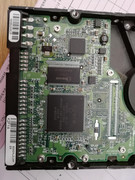
Here are the two HD that I use. The one to the left is working and the one to the right is the one that was "fried". From what I understand they shpould be similar as they have the same chip on the pcb and same number on the front.
- Attachments
-

June 6th, 2014, 13:42
upload the pictures of both pcb, i suspect pcb compatibility..
June 6th, 2014, 13:51
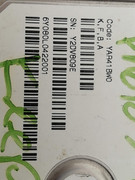
6Y080P0422811
You need to find a driver with matching number 28, your donor drive has number 22 so probably it's not compatible.
Get one with number 28 to be sure.
6Y080P0xx28xx (xx = not important)
or find a pcb with matching sticker number and same MCU number, pcb number looks like "D6FYA"
June 6th, 2014, 15:08
I don't believe the PCB has any protection on the +5V input. Therefore I suspect that the preamp may be damaged.
http://malthus.zapto.org/viewtopic.php?f=112&t=117
June 6th, 2014, 15:15
Yes, that's true. More common than you would think on Calypso drives, compared with others.
June 6th, 2014, 17:17
Here is a picture of the two pcb's, the one to the right is the "fried" one that I replaced with the left one.
- Attachments
-

June 6th, 2014, 17:37
Yes, it could be.
However donor pcb is not compatible, the original pcb has code "M8FYB", the donor has code "K4FYA".
Also MCU chip on original pcb has code 040111800, donor MCU seem to be 040111500 (difficult to see).
June 6th, 2014, 17:44
The large agere chip is marked with 040111300 on both pcb's so that chip is the same on both pcb's.
June 6th, 2014, 18:07
mcu number is the same but different pcb code, so maybe this is the problem (assuming that the preamp is not damaged).
You have to find the proper donor pcb, the best way is to find a donor drive with:
identical firmware (YAR41BW0)
s/n: Y2xxxxxx (xx = not important)
6Y080P0xx28xx (xx = not important)
PCB: M8FYB with mcu 040111300
then swap pcb, if still doesn't work then it would mean that head pre-amp is fried.
June 7th, 2014, 7:10
OK, THANKS for the information. I will keep an eye open for a matching hard drive according to your specification. The different data recovery web sites I checked before was not that specific on all details what was needed for the donor pcb for data recovery so hopefully a better match will work and if not then it is probably not worth going any further as I suspect a head replacement is quite an expensive procedure even if done in China or India.
June 7th, 2014, 7:22
Yep, a head replacement is quite expensive because it needs to be done in clean room and is not simple.
You have to hope that the problem is on the pcb, if there is also a head problem you would not be able to recover data without the help of pro DR.
March 17th, 2019, 6:42
I have one of these drives and have been meaning to get the data off it for a while now.
When it stopped working, it just melted the molex cables and smelled like a component had blown.
Is there a test I can do to check if this is PCB or motor/what ever circuitry inside is the problem?
I have access to multi-meter.


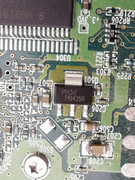
As you can see, this SOT-223 chip looks to have shorted.

Thanks
Jack
March 17th, 2019, 21:00
Maxtor DiamondMax Plus 9 160GB HDD (hi-res photos, test points, IC datasheets):
http://www.hddoracle.com/viewtopic.php?f=112&t=117
May 14th, 2019, 10:32
Hi again
Back working on this project again.
I have removed the PCB fro the HDD and can see that the "motor and VCM control" chip is showing heat marks on the bottom of the PCB like the SOT-223 +3.3V regulator.
I believe that this chip is bad and probably shorted the +3.3V reg to ground.
There is stock of K, F, B, A boards in the UK but only SATA interface.
If I was to find a matching one of those, would that be an okay substitute to test with?
Or as noted a few posts up, do I need to match everything?
michael chiklis wrote:mcu number is the same but different pcb code, so maybe this is the problem (assuming that the preamp is not damaged).
You have to find the proper donor pcb, the best way is to find a donor drive with:
identical firmware (YAR41BW0)
s/n: Y2xxxxxx (xx = not important)
6Y080P0xx28xx (xx = not important)
PCB: M8FYB with mcu 040111300
then swap pcb, if still doesn't work then it would mean that head pre-amp is fried.
The fact that it is the motor/VCM controller that looks to have been the issue, does this mean it is probably no the pre-amp?
May 15th, 2019, 3:31
Which Molex conductor was burnt? +5V? +12V?
What resistance do you measure between ground and each of the +5V and +12V inputs? Compare these resistances with the PCB on and off the drive. This will give us some idea as to the state of the internal preamp. Also do the same for the -5V and +3.3V test points.
The chip you have identified as the +3.3V regulator is in fact the NPN pass transistor for this regulator. Test the transistor's B-E and B-C junctions on the diode range of your meter.
Powered by phpBB © phpBB Group.